

What is the ETL framework in Atoti?
The ETL framework in Atoti is available in the Java SDK and provides a built-in mechanism for extracting, transforming, and loading data from external sources into its in-memory datastore. It uses components such as Sources, Channels, and Tuple Publishers to manage data ingestion and transformation efficiently. In contrast, the Atoti Python SDK does not include an ETL framework. Data extraction and transformation are performed using Python tools like pandas before loading the data into an Atoti session.How does the ETL pipeline work in Atoti?
The ETL pipeline for Atoti Java SDK follows a structured process:- Extract: Data is retrieved from various sources such as files, databases, or external APIs.
- Transform: Business logic, enrichment, and data cleaning are applied.
- Load: Transformed data is inserted into Atoti’s datastore for fast analytical queries.
What is the extraction step?
Extraction involves retrieving data from external sources and converting it into an in-memory format suitable for loading into the datastore.Supported source types
Atoti supports the following data sources:- CSV files: Parsed using Atoti’s built-in CSV parser.
- Parquet files: Parsed using Atoti’s columnar data parser.
- JDBC databases: Data is extracted using a JDBC driver and query.
- Cloud storage: CSV and Parquet files can be extracted from:
- Amazon S3
- Microsoft Azure Blob Storage
- Google Cloud Storage
In-memory sources
Some sources can bypass the extraction step and interact directly with the transaction manager:- Message brokers (e.g. Kafka)
- In-memory objects (e.g. Arrow table)
Extraction components
Atoti models extraction using:- Topics: Represent a path to a specific collection of data (e.g., file, directory, or database query).
- Sources: Manage how data is loaded; either as a one-time operation or as a continuous stream.
- Channels: Route data from sources to specific stores in the datastore.
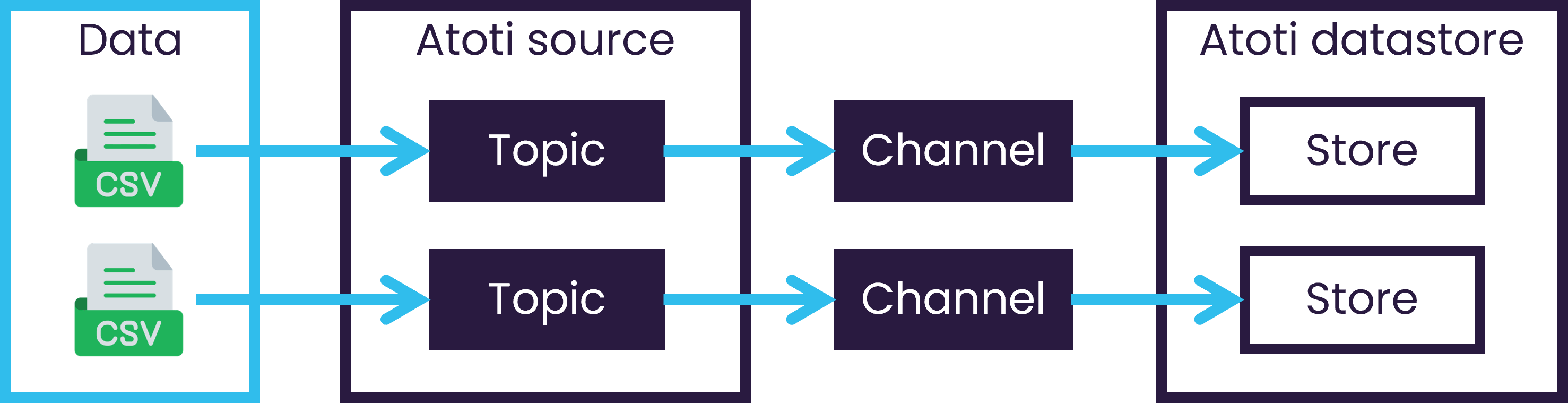
The components of Atoti's extraction process.
What is the transformation step?
Transformation modifies or enriches data before it is loaded into the datastore. This ensures the data is clean, consistent, and ready for analysis.Transformation mechanisms
Atoti provides two main mechanisms:-
Tuple publishers: Manage how data is processed before loading. They can:
- Filter records
- Stream data in batches or row-by-row
- Control transaction behavior
-
Column calculators: Modify or enrich data during ingestion.
Built-in calculators include:- Constant value insertion
- Line index tracking
- File metadata (e.g., file name, path)
- Empty value insertion
12/12/29 becomes December.
These tools help annotate data with useful metadata or generate unique identifiers.