

Introduction to DirectQuery Local Cache
Data from an external database is queried by Atoti using DirectQuery. Many Atoti projects have side stores on which they perform Get-by-key queries or List queries to retrieve data in a post-processor (for instance Market Data tables in Market Risk Solution). Several queries can be done on different coordinates in the same MDX query. This triggers multiple queries on the external database. Saturation can occur if thousands or millions of queries are sent to the external database. When this happens, the global MDX query becomes slow.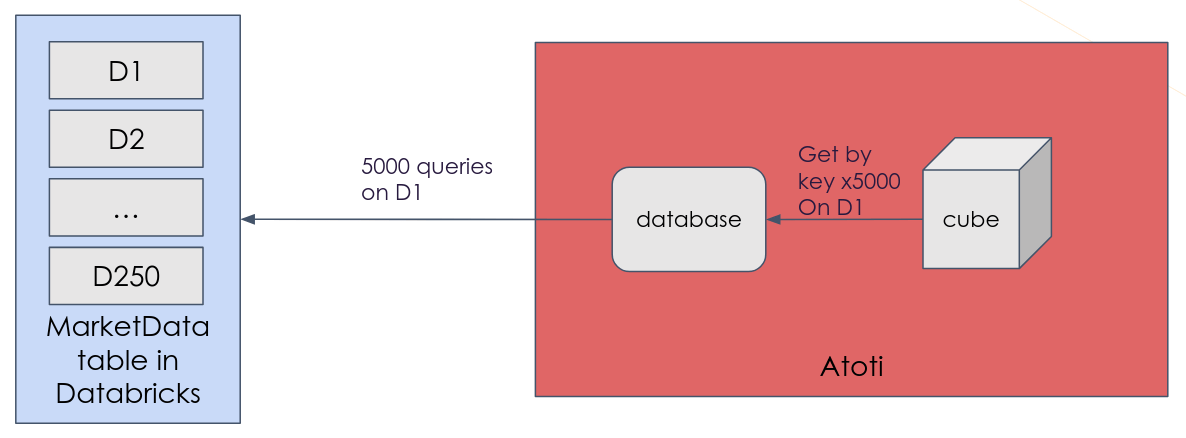
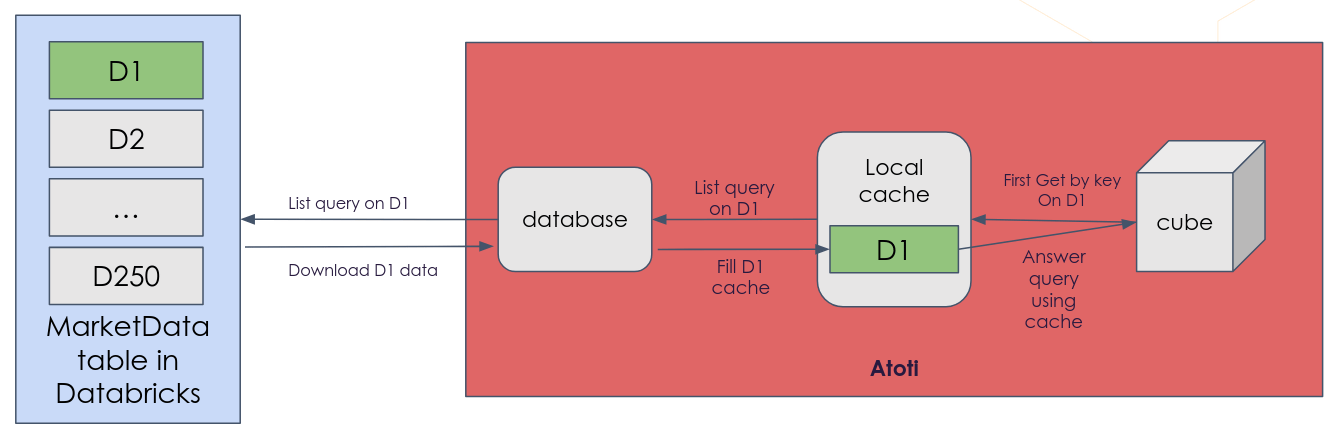
How the local cache works
- A query is used to query the external database.
- Atoti checks if the data is available in the local cache before retrieving data from the external database.
- If the data is already in the local cache, it is used for the query.
- If the data is not already in the local cache, a “part” of the external table containing the needed data is downloaded into the local cache.
- Any data in the local cache is available to use for subsequent queries of the external database.
- The cache is emptied when it reaches a specified size.
Cache partition
A “part” of the data which can be downloaded as a single block is called a “cache partition”. For instance, a simple way to partition the cache can be per date, each date being one partition of the cache.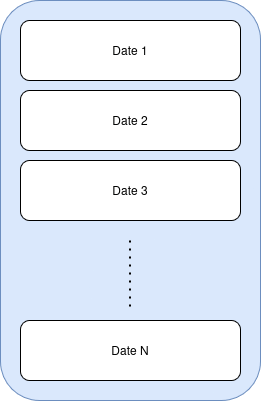
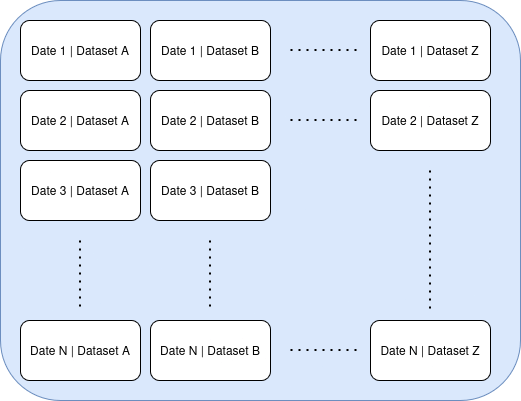
Partitioning fields considerations
It is important to choose the correct way to partition the cache. The partitions must be- small enough to download quickly and light enough to fit in-memory
- but large enough to match all the queries that will be sent to the external database in a single MDX query. This sweet spot is different for each project and depends mostly on the nature of the “normal” queries, but also on the size of the table, the number of queries sent, the number of users, etc. The partitions are based on the queries sent to the external database.
Retrieving data from the local cache
The data in the local cache is used by:- All get-by-key queries
- List queries if the cache partition can be inferred from the query’s condition
- Distinct queries if the cache partition can be inferred from the query’s condition
- The whole cache partition is downloaded in a single query, which is much faster than sending multiple queries to the external database.
- The local cache is stored even after the query, so the next queries on the same partition will be answered from the local cache directly without going to the external database.
Cache and database versions
The local cache only exists for the most recent version of the database. When a new version is created (for example after a data refresh or a structural update), the previous cache is discarded and a new empty cache is created. Previously cached partitions are not carried over, so queries will need to re-fetch data from the external database until the new cache is populated. Queries on older versions of the database do not use the cache and fall back to the underlying external database.Cache capacity and eviction
The cache is emptied when it reaches a certain capacity. The oldest partitions in the local cache are removed when a threshold is exceeded. There are two available policies to determine when to empty the cache:- Number of partitions
- Number of rows of data