

Database API
An Atoti cube can work on top of a Datastore or an external data warehouse. Therefore, a common interface is used to represent any component capable of providing versioned data for the cube. This interface iscom.activeviam.database.api.IDatabase.
This interface has two kind of implementations:
IDatastorewhich is the Atoti implementation of an in-memory database.IDirectQueryDatabasewhich is an implementation that supports querying an external data warehouse.
IDatabase as a data provider.
Database Schema
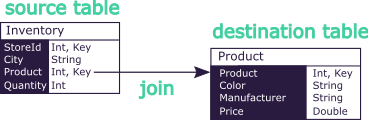
The database schema consists of a set of tables, each containing fields, and that are interlinked with joins.For those used to the vocabulary historically used in the Datastore, the tables used to be called stores, and the joins used to be called references.
Naming joins is not something that exists in common databases. In the context of Atoti where it is mandatory to pre-define a flattened schema, it is convenient to assign names to those paths. This makes it easier to reason about those fields as integrated to the schema.
Versions
Atoti Databases have the same concept of versions and branches that were previously exposed by the Datastore and Atoti cubes. As before, they represent single points in time of the Database and alternative scenarios on the dataset.Query Runner
This component is accessed from a Version through the method
IDatabaseVersion#getQueryRunner.- List: These queries are made to retrieve a list of records that match some specified conditions.
- Get-By-Key: These queries are made to retrieve one or several records (lines of data in a table) given their unique identifier (i.e. the key).
- Distinct: These queries are made to retrieve distinct values of a field or a field combination from a list of records. The list of records can be optionally filtered with specified conditions.
- Statistics: These queries are made to retrieve information about the Database. Details like the size of a table, or the cardinality of a given field.
Query Manager
This component is accessed from a Version through the method
IDatabaseVersion#getQueryManager or from the database
itself.IPreparedQueryThe benefits of Prepared Queries include compiling-once, managing, parametrizing and reusing them. Once created, those queries must be passed to a given Query Runner to be executed in a given version. See Database Queries for detailed examples of building and running queries.
Data Streamer
This component is accessed from the database through the method
IDatabase#getDataStreamer.Registering a stream view
Registering a stream view requires three things:- An
IPreparedListQuerydefining what data to watch (see Database Queries for how to build list queries) - An
IStreamListViewListenerthat receives change notifications RegistrationOptionsto configure the streaming behavior
The stream view listener
TheIStreamListViewListener interface defines callbacks for each type of data change.
Some callbacks may be invoked concurrently (e.g. for different partitions), so listener implementations must be
thread-safe.
Within a transaction, callbacks are called in this order:
transactionStartedsignals the beginning of a commit- Record change callbacks:
recordsAdded,recordsDeleted,recordsUpdated,partitionDropped, ortruncate transactionCommittedortransactionRolledBacksignals the outcome
onSelfFailure.
Registration options
RegistrationOptions is configured with a builder:
Managing the registration
registerListStreamView returns an IStreamedViewListenerRegistration to manage the lifecycle of the stream:
getAttachmentProcess()returns aCompletionStage<Void>that completes once the listener is fully registered. IfsendInitialViewis enabled, it completes after the initial data snapshot has been delivered.unregister()removes the listener and frees internal resources. If no more listeners remain for the underlying view, the view itself is deleted.