

Analysis Hierarchies
The concept of this page is an advanced concept of Atoti and should only be tackled once the reader is familiar with basic OLAP concepts and the associated terminology. The reader of this document is notably expected to be familiar with the notions of Hierarchies and Locations.Analysis Hierarchies are a concept that allows for an Atoti cube to define analytic attributes/levels with a larger degree of freedom: This allows for the definition of attributes (later used in the hierarchical structure of the cube) in a functional way, and does not require these attributes to be based on one of the database fields.
Concept definition and specificities
We call Analysis Hierarchy any hierarchy of an Atoti cube containing at least one level whose members are not created using the cube’s schema fact selection fields. This naming convention is to be opposed to “standard Hierarchies” that are used for binding the database’s records to the cube’s aggregates. The members of a level in a standard hierarchy are by definition the values of the field that was associated to it. A Hierarchy is often be assumed to be a standard Hierarchy unless stated otherwise. However, both Analysis Hierarchies and standard Hierarchies are hierarchies of the cube in a structural fashion. The values of the members of an Analysis Hierarchy are programmatically defined, and can be either static of dynamic. The lack of constraints on the definition allows for a functional definition for its levels, which for example can be based on business requirements rather than the existing data within the database. Analysis Hierarchies are therefore a powerful tool that allows for the integration of programmatically-defined members to the hierarchical structure of the cube, thus reinforcing the cube’s analytic capabilities through the addition of functionally-defined attributes as the hierarchies’ levels.Usage Examples
Here are two use-cases for Analysis Hierarchies:Introduction of a parameter for a subset of measures
If one’s measure definition is parameterized by a static parameter, and said measure is to be visualized for multiple parameter values at the same time, then the attribute corresponding the parameter can be added as a level of an analysis hierarchy, with the parameter values as the level members. Ex: PnL exploration for VaR breach scenario When estimating market risk through the computation of the VaR metrics, one of the methods is to use scenario-backed Monte-Carlo simulations. In that case, risk simulations will be stored in the database inside scenario-indexed vectors for improving the computation efficiency of the VaR metrics, so the scenario attribute is not explicitly available through the data, and thus cannot be used as the level of a standard Hierarchy. However, there are various business cases where some metrics are to be analyzed on a per-scenario basis, for example when analyzing why such scenario leads to a VaR increase, or when back testing the VaR model, since this allows to inspect which scenario was the closest to an actual VaR breach. Therefore, adding an Analysis Hierarchy with the “Scenario” attribute inside a VaR cube will allow to retain the computational optimization of the VaR metrics through vectorization while keeping the database model intact, while allowing for the analysis of some specific metrics per scenario.Introduction of an additional analysis level
A recurrent need when analyzing complex data is to create, use, and manipulate attributes corresponding to several groupings of the facts following a functional logic that is not available in the database records. Introducing an Analysis Hierarchy along with a Procedure defining the functional relationships between the facts and the groupings (called Aggregation Procedure) allows for the definition of a fully customizable hierarchy whose members correspond to the desired functional logic, without affecting the database at all. Ex: Sliding temporal buckets in Liquidity In liquidity, trade consolidation dates are often grouped in buckets, on which some computations may depend. The addition of the matching bucket as a pre-computed field of the base through the ETL is not always a satisfying solution as the buckets will be statically stored in that case, when the user can expect the buckets to be computed relative to the time of the analysis, rather than at the time data was inserted. In some cases, individual trades may move to other buckets between those two times, so the analysis would be incorrect. Adding the “Time Bucket” attribute to the cube through an Analysis Hierarchy allows for a computation of the bucket matching trades at the time of the query, making the query output aligned with the expectations of the user.Note: Defining a field through the ETL or the sources’ calculated column creation methods and using that field as part of a standard hierarchy is the preferred method for defining bucketing attributes. Analysis Hierarchies should be considered for bucketing when the functional definition of the buckets requires information that cannot be inferred when the data is inserted in the database (Here we need the query time in order to compute the temporal bucket).
Using Analysis hierarchies
Regarding the user of the Cube, an Analysis Hierarchy will have the same behavior as a standard Hierarchy with the notable exception that:When the cube is queried:These limitations are the direct consequence of the fact that it is no longer possible to infer the relationship between the records and the aggregates at the queried location if the expressed member on the analysis hierarchy is not a top level member:
- Expressing the Location on an Analysis Hierarchy on its first level will lead to the replication of the values obtained through the aggregation of the cube facts and the execution of the required post-processors for each of the non-filtered members of the first level of the analysis hierarchy.
- Expressing the Location on an Analysis Hierarchy beyond its first level will always return an empty result for aggregated measures.
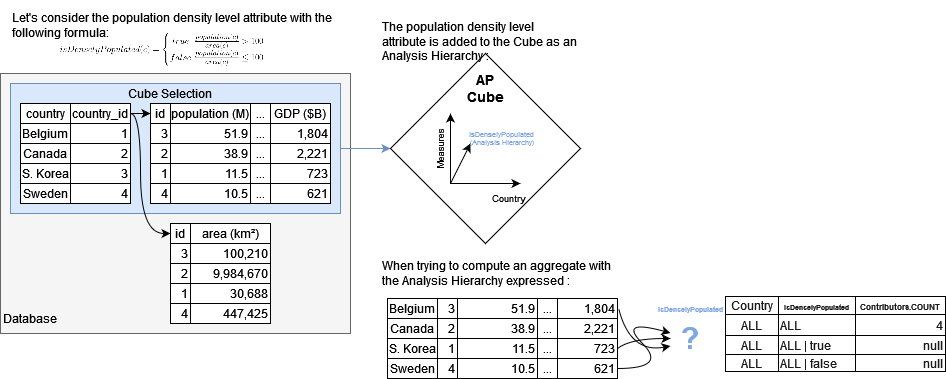
- Define post-processed measures explicitly handling the expressed Analysis Hierarchy member: by prefetching the location without any expressed analysis hierarchy and by defining the behavior regarding the expressed Analysis Hierarchy members, it is possible to specify values returned by the post-processor.
- Define a global behavior regarding facts: If, for any record of the database, there is one and only one member of the Analysis Hierarchy for which we want to match the facts to, then it is possible to redefine the logical relationship between facts and aggregates at any aggregation level of the cube. This can be done by implementing an “Aggregation Procedure” and associating it with the analysis hierarchy when defining the cube structure.
Analysis Hierarchies and Copper API
The Copper API allows for the functional declaration of join-based hierarchies or bucketing hierarchies. Both are analysis hierarchies, and come out of the box with their matching aggregation procedures.Introspecting analysis hierarchies
Analysis hierarchies can have its top levels corresponding to selection fields (like in a standard hierarchy) and its deepest levels defined programmatically (like in an analysis hierarchy). Such an analysis hierarchy is called “introspecting” analysis hierarchy. Although the members of the hierarchies are partially matching records, this type of hierarchy is still an Analysis Hierarchy and the above-mentioned specificities still apply here.Defining an analysis hierarchy in a cube
The addition of an analysis hierarchy inside the structure of a cube is done during its definition like standard hierarchies. The Atoti Java API provides cube definition fluent builders; adding an Analysis Hierarchy through that API is done via thewithAnalysisHierarchy(String hierarchyName, String pluginKey) method.
All implementations of analysis hierarchies must extend the AAnalysisHierarchy class. To register it in the registry, the interface should be IAnalysisHierarchy
Note: In order to properly add an analysis hierarchy, one must ensure that the plugin value’sExample:IAnalysisHierarchy(and optionallyIAnalysisHierarchyDescriptionProvider) with a matching pluginKey were added to Atoti ServerRegistry
- The “id” dimension containing a single standard hierarchy named “id” whose only level, also named “id”, contains members matching the values of the “id” field in the cube’s selection of the database.
- The “dimension” dimension containing an analysis hierarchy named “analysisHierarchy_example” for which:
- The member data and logic is defined by
IAnalysisHierarchyimplementation with theStringAnalysisHierarchy.PLUGIN_KEYplugin key. - The structure description is defined by
IAnalysisHierarchyDescriptionProviderimplementation with theStringAnalysisHierarchy.PLUGIN_KEYplugin key.
- The member data and logic is defined by
Customizing an analysis hierarchy during its definition
By default, the properties and the structure of an Analysis Hierarchy are defined by the matchingIAnalysisHierarchyDescriptionProvider
implementation. It is however possible to greatly customize an analysis hierarchy description by using the withCustomizations(Consumer<IHierarchyDescription>) method
when adding it to the cube description.
Reusing the previous example, we now have:
- The “id” dimension containing a single standard hierarchy named “id” whose only level, also named “id”, contains members matching the values of the “id” field in the cube’s selection of the database.
- The “dimension” dimension containing an analysis hierarchy effectively named “Customized Hierarchy” for which:
- The member data and logic is defined by
IAnalysisHierarchyimplementation with theStringAnalysisHierarchy.PLUGIN_KEYplugin key. - The structure description is defined by
IAnalysisHierarchyDescriptionProviderimplementation with theStringAnalysisHierarchy.PLUGIN_KEYplugin key, then altered by the customization method call.
- The member data and logic is defined by
Note: When altering the structure of the hierarchy, make sure that the resulting description is supported by the IAnalysisHierarchy implementation.
Implementing Analysis Hierarchies
Before considering implementing and using a custom Analysis Hierarchy, make sure that your use case effectively requires this solution:When defining an analysis hierarchy, one must implement the following
- In some cases, data modification or replication in order to introduce an attribute in the database is perfectly acceptable.
- the Copper API already provides a functional API for defining Analysis Hierarchies for joins and bucketing use-cases, the generated hierarchies are backed by aggregation procedures, so there is no need for customizing measures and post-processors in order to use these hierarchies for data exploration.
IPluginValues:
IAnalysisHierarchyresponsible for the definition of the hierarchy’s members and the related logic.IAnalysisHierarchyDescriptionProviderresponsible for providing a default description of the Analysis Hierarchy.
Example I - Scenario-based PnL extraction for parametric VaR
As presented before, in that use case, the user wishes to be able to view scenario-based metrics for one or several scenario. Here we consider the example of an extreme case where each scenario bring a constant bias in the output of the simulated data, with each scenario being “compensated” by an opposite scenario. However, since the VaR is not a linear metric, the worst-case scenario may impact the value of the aggregated VaR as well as the metric value on a granular level. This showcases the need for the ability to drill down between the output of the different scenario simulated by the risk engine.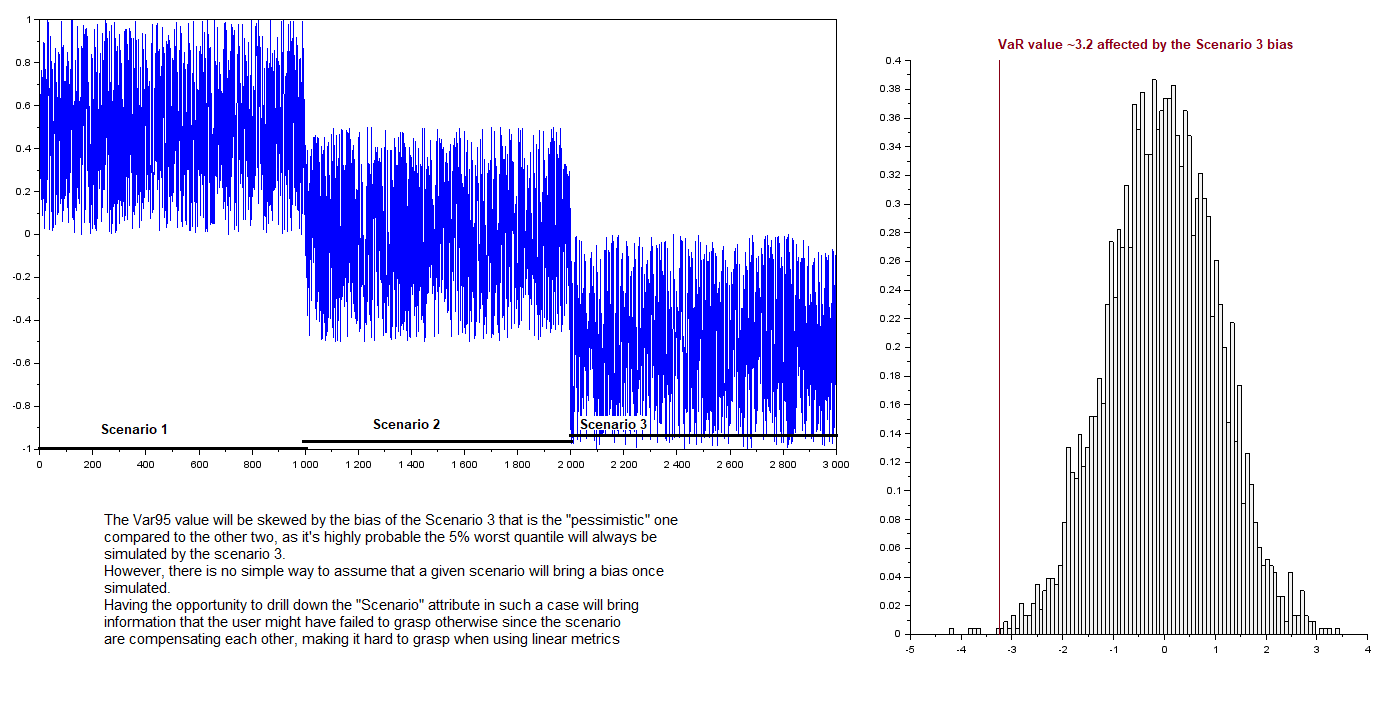
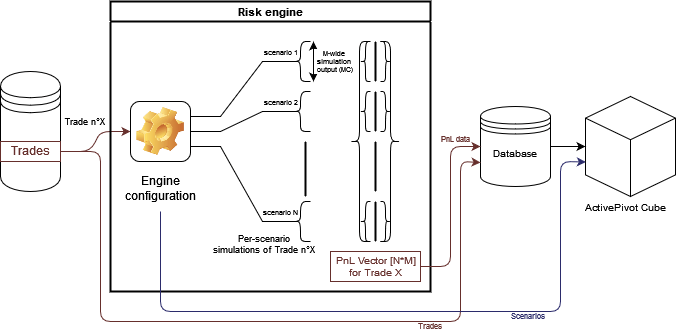
Note that the listing extendsAAnalysisHierarchyrather than the base interfaceIAnalysisHierarchyas this abstract class is the recommended entry point for writing custom analysis hierarchies.
IAnalysisHierarchyDescriptionProvider implementation:
"Averaged simulated pnL" measure on the Grand Total of the cube and
as well as the Total drilled-down per scenario:
Although the correct scenario members are shown in the output cellSet, the measure in not computed
as the proper way to drill down the scenario had not yet been defined.
Add post-processed measures handling the Analysis Hierarchy drill-down
In order to properly use the analysis hierarchy as a tool for the data exploration, Scenario-based metrics must be defined and implemented: The user wishes to simply obtain the aggregated PnL figures for a given expressed scenario, and the consolidated sum for all scenarios if none is specified. Since the sum is a linear operator, the extraction can be done at any level of aggregation, we can therefore compute the extracted aggregates simply from the values of the complete PnL vector at the queried location:- If the scenario is expressed in the query extract the subVector of PnL simulations matching the scenario
- Otherwise, keep the complete PnL simulation vector:
Note: Once a post-processed measure handling the Analysis Hierarchy is created and defined in the cube, it can be reused via the Copper API when defining new measures. The hierarchy description must however contain theWe can now add measures to the cube with the following snippet:IAnalysisHierarchy.LEVEL_TYPES_PROPERTYproperty with the appropriate value following the"levelName1:type1,levelName2:type2"convention.
"averaged simulated pnL with Scenario drillDown" measure
on the Grand Total and the Total drilled down per scenario locations:
In this example, the expansion on the Scenario level showcases a strong bias related to the scenarios that would be
very hard to analyze otherwise.
Example II - Sliding temporal bucketing
This specific use-case can be done with the usage of the Copper API’s bucketing possibilities. This example is however here to showcase an implementation of an analysis hierarchy coupled with an aggregation procedure. We greatly encourage the developers to use the Copper API whenever possible.We consider here the following use-case: When performing the analysis of the ongoing cash flow (liquidity) of our assets, we wish to define metrics that have a rule set which depends on the time interval between the analysis time and the maturity term of our assets. Here we need to be able to split trades between those whose term maturity is in less than a year, and the other. This classification is called “Maturity Term Category”. We also wish to further split our trades in the four following categories:
- Trades whose maturity term is in less than a week
- Trades whose maturity term is in more than a week and less than a month
- Trades whose maturity term is in more than a month and less than a year
- Trades whose maturity term is in more than a year
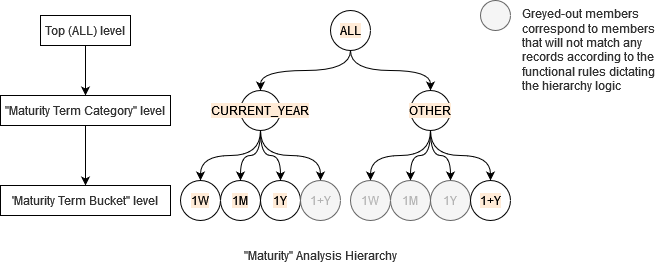
IBucketer component with the clear functional purpose to classify
timestamps into a matching entry of a list of buckets.
Definition of Aggregation Procedures
Aggregation Procedures are a completely different concept from Aggregation Functions
Aggregation Procedure is a complex topic and requires prior knowledge about some already
advanced topics of the querying workflow components and concepts such as Prefetchers.
Aggregation procedures are classes meant to centralize the logic for aggregating measures on analysis
hierarchies following a user-defined logic.
When an Analysis Hierarchy is defined as using an aggregation procedure, there is no need to write one post-processor per measure to use with the hierarchy.
Aggregation procedures work by adding optional steps to a query:
-
Transform the underlying query locations if needed: In order to be able to compute the aggregates, the procedure can alter
the queried location for measures, notably by forcing wildcard coordinates on the “underlying levels” defined in the builders by
withUnderlyingLevels(LevelIdentifier... levels)if an analysis hierarchy handle by the procedure is expressed. This behavior is implemented by thebuildRequestScope([...])method of the procedure Here, in order to compute a bucket value, thetradeDateattribute must not be aggregated until we’ve associated a time bucket to the records. In order to do so, the scope of the prefetches on the aggregate provider was alter to include a range location on thetradeDatelevel. The aggregates will then be re-aggregated by the last step of the procedure. -
Retrieve additional data from the database: Aggregation procedures can asynchronously perform explicit
database queries and use the output of said queries in the last step of computation. This is particularly useful when some
member-related information is not available in the cube Selection.
This behavior is implemented by the
getDatabasePrefetch([...])method of the procedure Here, there is no need for additional information, so no database query is required. -
Map the aggregated values to Analysis hierarchies members: The heart of the procedure, that will compute the
matching member of the analysis hierarchies handle by the procedure, for a given input location and a given context.
This behavior is implemented by the
mapToFullLocation([...])method of the procedure Here, the output location will be computed by comparing thetradeDatevalues in the locations to the state of the buckets in the procedure’s context.
As aggregation procedures alter the query scope and steps, adding an aggregation procedure to an analysis hierarchy can impact query performance. As a rule of thumb try to minimize the amount of required levels.For more information on the subject, please refer to the
com.quartetfs.biz.pivot.cube.hierarchy.axis.IAnalysisAggregationProcedure’s
API reference
Implementing an Aggregation Procedure
Here is a commented implementation of the aggregation procedure that will generalize the computation of the matching “Maturity Term Buckets” and “Maturity Term Category” for a given “TradeDate”. Aggregation Procedures must implement theIAnalysisAggregationProcedure interface.
They rely on ActiveViam Registry, but through a plugin value referring to the factory instantiating the Procedure. Factories
implement the interface IAnalysisAggregationProcedure.IFactory, a specialization of the Plugin Value contract.
IAnalysisAggregationProcedure implementation:
IAnalysisAggregationProcedure.IFactory implementation:
Misc implementation topics
Migrating to 6.0.X
The 6.0.0 version of Atoti Server introduced a new interfaceIAnalysisHierarchyDescriptionProvider whose purpose
is explicit: Providing a description of the analysis hierarchy.
That responsibility is removed from the AAnalysisHierarchy class contract,
which used to be the default provided base for IAnalysisHierarchy implementations.
The following methods describing the hierarchy and its structure are now deprecated:
AAnalysisHierarchy.getLevelsCount()AAnalysisHierarchy.getLevelComparator(int ordinal)AAnalysisHierarchy.getLevelField(int ordinal)AAnalysisHierarchy.getLevelType(int ordinal)AAnalysisHierarchy.getLevelName(int ordinal)AAnalysisHierarchy.getLevelFormatter(int ordinal)
IAnalysisHierarchyDescription returned by the IAnalysisHierarchyDescriptionProvider#getDescription()
implementation with the same plugin key as the Analysis Hierarchy.
Migration Example
Let’s consider a multi-level analysis hierarchy with a static set of members and a custom comparator on the second level:- for the hierarchy implementation
- for the description provider implementation