

What does the six-eyes approval process look like?
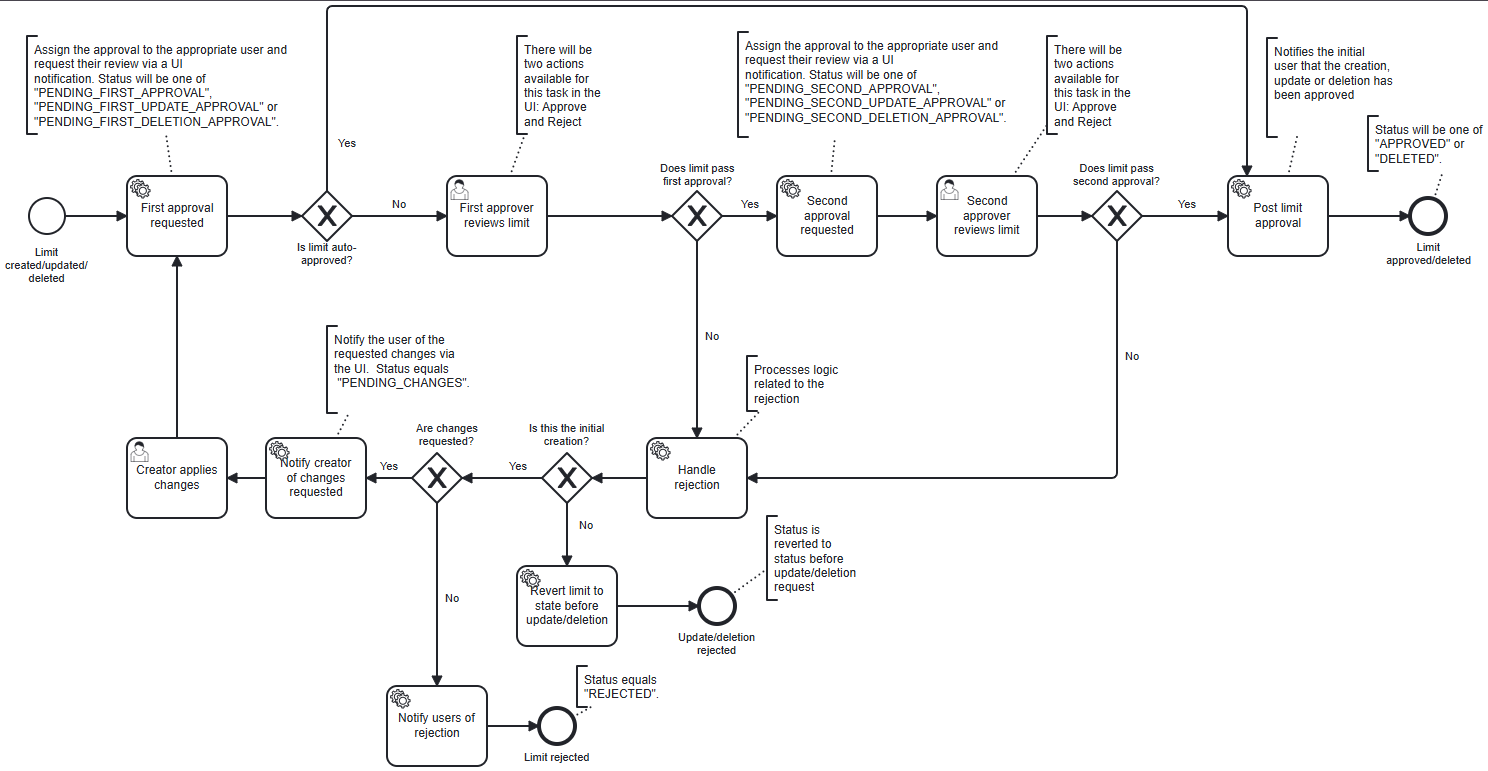
- Manages the lifecycle of limit changes that require approval from two separate users.
- Notifies the relevant users at each level of approval and update those notifications as the limit progresses through the workflow.
- Handles the case where a limit is rejected at either approval stage to either allow the user to resubmit the limit change or to terminate the workflow.
What initializing variables are included in the limit-process-six-eyes.bpmn workflow?
The following initializing variables are included in the workflow:Commentâ A text field for adding comments related to the limit.Attachmentsâ A file upload field for adding attachments related to the limit.First Approversâ A text field for specifying the user role that will be assigned to the first approver task. Only users with this role will be able to complete the first approver task.Second Approversâ A text field for specifying the user role that will be assigned to the second approver task. Only users with this role will be able to complete the second approver task.
What user tasks are included in the limit-process-six-eyes.bpmn workflow?
User task configuration for limit-process-six-eyes.bpmn
User task configuration for limit-process-six-eyes.bpmn
First approver reviews limitSecond approver reviews limit
Approve and Reject.
What input fields are included in the actions for the approval tasks?
TheApprove action for both approval tasks includes the following input fields:
- Does limit pass first/second approval? â A hidden checkbox field that is automatically set to
truewhen the user selects theApproveaction. This field is used to move the workflow to the next approval step. - Comment â A text field for adding a comment related to the approval.
- Attachments â A file upload field for adding attachments related to the approval.
Reject action for both approval tasks includes the following input fields:
- Does limit pass first/second approval? â A hidden checkbox field that is automatically set to
falsewhen the user selects theRejectaction. This field is used to move the workflow to the next step which is dependent upon the value of theShould the creator make changes?field. - Should the creator make changes? â A checkbox field that allows the approver to indicate
if the limit creator should be allowed to make changes and resubmit the limit. If this field is
checked, the limit creator will be notified to make changes and resubmit the limit. If it is not
checked, the workflow will terminate with status:
REJECTED. - Comment â A text field for adding a comment related to the rejection.
- Attachments â A file upload field for adding attachments related to the rejection.
What service tasks are included in the limit-process-six-eyes.bpmn workflow?
The workflow includes several service tasks that are executed at various points in the workflow to handle notifying relevant users, updating notification statuses, and managing workflow state.First approval requested service task
“First approval requested” service task implementation
“First approval requested” service task implementation
This example serves as a skeleton implementation not the default implementation. You may customize
this service task to meet your specific requirements. For more information see the section
on customizing service tasks.
Second approval requested service task
“Second approval requested” service task implementation
“Second approval requested” service task implementation
This example serves as a skeleton implementation not the default implementation. You may customize
this service task to meet your specific requirements. For more information see the section
on customizing service tasks.
Post limit approval service task
“Post limit approval” service task implementation
“Post limit approval” service task implementation
This example serves as a skeleton implementation not the default implementation. You may customize
this service task to meet your specific requirements. For more information see the section
on customizing service tasks.
Handle rejection service task
“Handle rejection” service task implementation
“Handle rejection” service task implementation
This example serves as a skeleton implementation not the default implementation. You may customize
this service task to meet your specific requirements. For more information see the section
on customizing service tasks.
Revert limit to state before update/deletion service task
“Revert limit to state before update/deletion” service task implementation
“Revert limit to state before update/deletion” service task implementation
This example serves as a skeleton implementation not the default implementation. You may customize
this service task to meet your specific requirements. For more information see the section
on customizing service tasks.
Notify creator of changes requested service task
“Notify creator of changes requested” service task implementation
“Notify creator of changes requested” service task implementation
This example serves as a skeleton implementation not the default implementation. You may customize
this service task to meet your specific requirements. For more information see the section
on customizing service tasks.
Notify users of rejection service task
“Notify users of rejection” service task implementation
“Notify users of rejection” service task implementation
This example serves as a skeleton implementation not the default implementation. You may customize
this service task to meet your specific requirements. For more information see the section
on customizing service tasks.