

What does the incident review process look like?
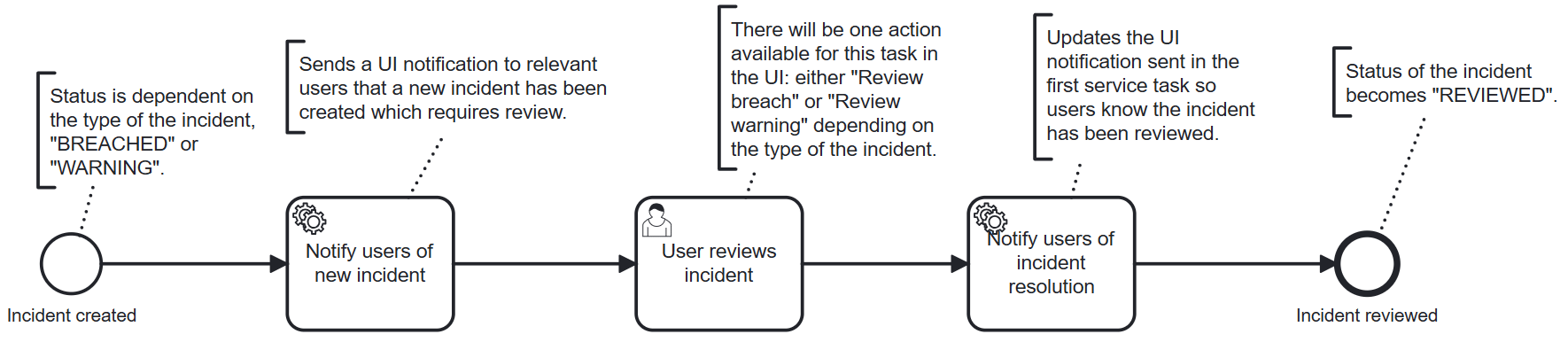
- Manages the lifecycle of incident breaches and warnings.
- Allows incidents to be reviewed by users to classify them and determine the appropriate resolution.
- Notifies relevant users when a new incident is created and update those notifications when the incident has been reviewed.
What user tasks are included in the incident-review-process.bpmn workflow?
User task configuration for incident-review-process.bpmn
User task configuration for incident-review-process.bpmn
User reviews incident, which includes two possible
actions: Review breach and Review warning. Only one of these actions will be enabled and visible
to the user per incident depending on whether the incident is a breach or a warning.
What input fields are included in the actions for the User reviews incident task?
The Review breach action includes the following input fields:
- Classification â A dropdown selection field for classifying the incident. Options:
Unclassified,Technical Issue,True Breach,New Trade,Late Trade,Market Moved. - Resolution â A dropdown selection field for selecting the resolution action. Options:
No action,Hedge exposure,Reduce position,Keep position,Keep, request increase. - Comment â A text input field for adding additional information about the incident.
- Attachments â A file upload field for adding attachments related to the incident.
- Attachment link â A field for adding a link to an external attachment or resource.
Review warning action includes the following input fields:
- Comment â A text input field for adding information about the warning.
- Attachments â A file upload field for adding attachments related to the warning.
- Attachment link â A field for adding a link to an external attachment or resource.
What service tasks are included in the incident-review-process.bpmn workflow?
The workflow includes two service tasks, one that is executed when a new incident is created prior to the user review, and another that is executed after the user has reviewed the incident.Pre-review service task
“Notify users of new incident” service task implementation
“Notify users of new incident” service task implementation
Post-review service task
“Update incident review notification” service task implementation
“Update incident review notification” service task implementation
Reviewed, which will be reflected in the incident status.