

Any customizations made in the sign-off logic will be reflected in the UI without requiring UI modifications.
Objects to customize
In Atoti Sign-Off there are two types of objects being managed:- Sign-Off Process Definition (for the sign-off task definition)
- Sign-Off Process Instance (for the sign-off task)
Sign-Off Process Definition
There is one default workflow for managing the sign-off process definitions which is sufficient for simple use cases. This can be found insign-off-process-definition.bpmn, and can be used as an example and
adapted as needed.
The file is stored in the delivered source code, in /src/main/resources/processes
This sample workflow is used when creating a new sign-off task definition in the UI.
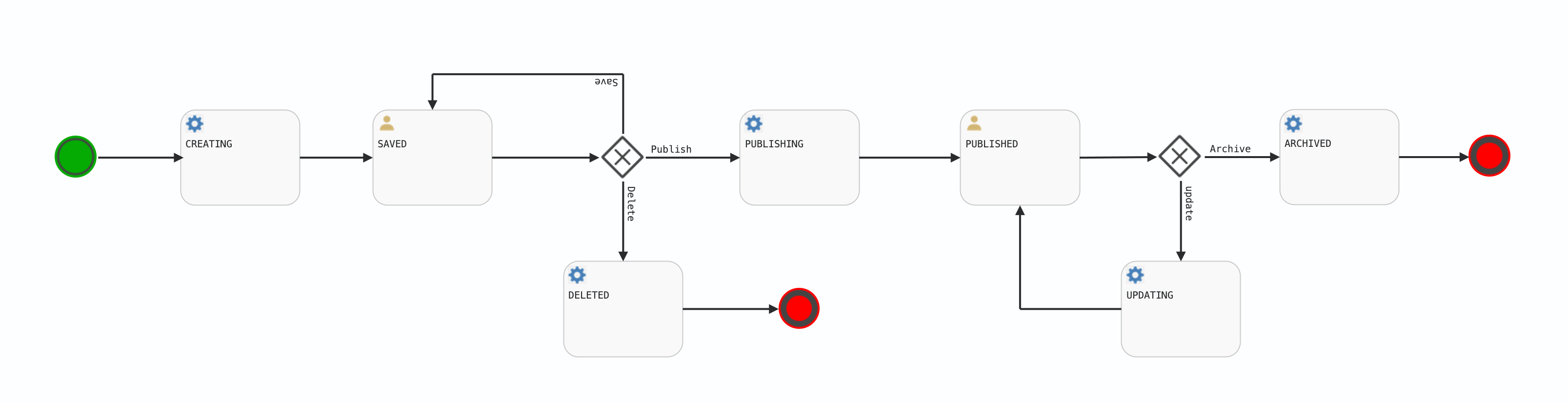
- signOffProcessDefinitionCreate bean to perform the object creation in persistent storage.
- signOffProcessDefinitionUpdate bean to perform the update task in persistence storage.
- signOffProcessDefinitionDelete bean to perform the delete task in persistence storage.
- signOffProcessDefinitionImport bean to perform the import task in persistence storage.
Example: set which roles can create tasks
In the default implementation, only those with the MANAGERS role can create and publish tasks. To change this configuration, set the role(s) as the value of thecandidateGroups attribute in the following lines:
candidateGroups attribute, see the Activiti documentation.
Sign-Off Process Instance
There are three sample workflows for performing the sign-off tasks:- simple in
sign-off-process-simple.bpmn - 4-eyes in
sign-off-process-four-eyes.bpmn - 4-eyes-kpi in
sign-off-process-four-eyes.bpmn
.bpmn file using the workflow.configuration
map in application.yml, new workflows can be added here. For more
information, see the configuration file application.yml
The two workflows are both started using the initiate() method in
SignOffProcesInstanceWorkflowService. This determines the workflow
type, from the sign-off process definition object, and starts the appropriate workflow.
Additionally, the initiate() method will add workflow parameters –
for example, lists of users – from the sign-off process definition
object to the workflow as variables. These variables are then available
for use in the workflow process instance.
The 4-eyes-kpi workflow is a sample
workflow illustrating how automated approval can be done using KPIs
provided.
The workflow is identical to the 4-eyes
workflow, except for the fact that at the initiation of the sign-off
task, the statuses of the KPIs defined in the sign-off task definition are
retrieved from the application server. If the status of all those KPIs
is 1 (i.e. green), the sign-off task is automatically approved without
the intervention of the manager user.
In order to retrieve the KPIs from the application server, a REST call
is used: IApplicationSignOff.fetchKPIs. That REST call needs to be
added to the application server as part of the project-specific
implementation tasks.
The data retrieved via the call to IApplicationSignOff.fetchKPIs are
processed to determine whether the sign-off tasks should be
automatically approved or not. In the sample implementation, the
sign-off task is automatically approved if the statuses of all the KPIs
present in the definition of the sign-off tasks are equal to 1 (i.e. the
statuses are all green).
Tasks that can be automatically performed must have the correct permissioning definition in Activiti.
Event listeners
Activiti event listeners are registered using Spring beans. The classSignOffProcessEventHandlers contains a couple of examples.
Notification email
The Spring bean taskCreatedListener inSignOffProcessEventHandlers can be used to send notification emails.
The method onTaskCreatedEvent() will need to be updated to send the
emails, currently this method is called whenever the workflow process
instance enters a user task. It then extracts relevant information about
the task, including:
- Which users and groups can execute the task
- Information about the task
- The object being managed by the workflow
- The status of the workflow process instance
- Convert the Spring users and groups into email addresses.
- Use a template to construct the email (subject and body) from the information collected.
- Connect to an email server to send the email.
Signals
Signals are a way of notifying all running processes of an event. Atoti Sign-Off sends two types of signals:SERVER_DOWN: this is sent when Atoti Sign-Off detects that an application server, such as MR or FRTB, has stopped responding. This signal is only sent to processes which relate to the particular application server that has stopped responding.SERVER_UP: this is sent when Atoti Sign-Off detects that an application server, such as MR or FRTB, has recommenced responding. This signal is only sent to processes which relate to the particular application server that has recommenced responding.
SERVER_DOWN signal, if the task is in an INITIATED or PENDING state, it will be transitioned to an AWAIT_SERVER_RESTART state. This prevents changes being made until the server restarts. When the SERVER_UP signal is received, the task moves to the RE_APPLY_ADJUSTMENTS state and all previous adjustments are applied to the application server. Once this has been done the task transitions back to the INITIATED state.
Custom workflows can also listen for and respond to these signals. Please see the Activiti documentation for details on catching a signal.