Overview
Atoti Sign-Off provides several objects out-of-the-box that are managed by the defaultEntityManager.
Each of these objects is defined as a JPA entity using the @Entity and @Table annotations. The default entity classes are:
However, many of the default entity classes inherit fields from a parent class that is annotated with
@MappedSuperclass. If you wish to modify a field
inherited by one of the default entity classes, you need to override the parent class where that field is defined instead of the entity class.
Be cautious when doing this, as any other entity classes inheriting from the same parent class will also be affected.
The default @MappedSuperclass classes are:
In some scenarios, you may want to override the default managed objects, for example:
- to change the length of a database column
- to add new fields
- to change a field’s attribute converter
- to mark a field as nullable/not nullable
- to add an attribute override
- to add dynamic filters to entities at runtime
1. Copy the existing entity class to your project with the same class and package names
It is critical that the class and package names remain the same so that theEntityManager recognizes your custom
entity class as an override of the default entity class and doesn’t treat it as a new entity. For example, to customize
the description field of SignOffProcessDefinitionEntity class, you need to create a AWorkflowProcessDefinitionEntity.java file at the following path in your project:
<java-folder> is the path from the root of your project to the directory containing your .java files, typically src/main/java.
2. Modify the entity class as needed
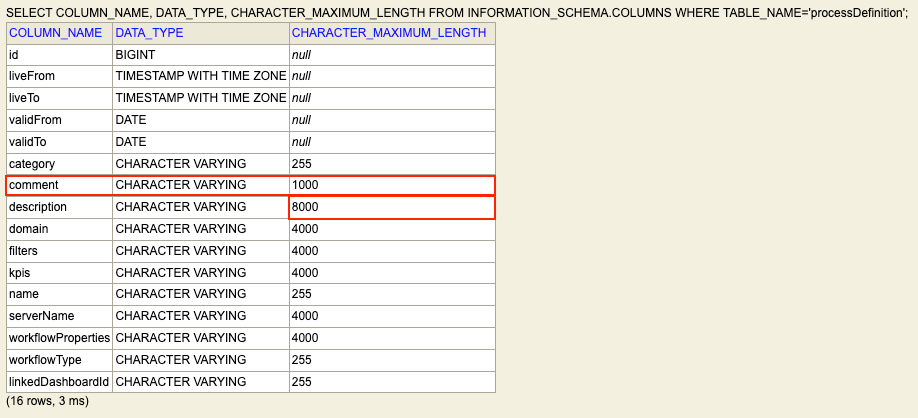
You can now modify the entity class as needed. The following example doubles the length of thedescription field from
the default of 4000 characters to 8000 and adds a new comment field with a length of 1000 characters, all other
fields and methods remain unchanged:
Custom AWorkflowProcessDefinition.java
Custom AWorkflowProcessDefinition.java
SignOff Process Definition managed object. You
can verify the change is applied by checking the schema for the processDefinition table in your database to verify that the
description column has a length of 8000 and that the new comment column exists: