

Euler
Euler capital allocation
Naming pattern: Measures with “Euler” behavior follow the name pattern: Main Measure Name Euler. Euler is one of the approaches implemented in to decompose a non-linear measure down to additive components. For instance, the Euler variation of the IMCC measure is called IMCC (Euler). The IMCC (Euler) measure enables allocating a result (for instance, at firm level) down to individual components (typically, desks).Overview of Euler calculations
The theory behind Euler Calculations is based on these facts:- Use of Euler’s theorem of homogeneous functions
- Capital Charges are homogeneous functions of degree 1
- Euler Capital Allocation is the evaluation of the derivative on a sub-portfolio
Analytical vs numerical Euler
The difference between Analytical and Numerical Euler is in how the calculations are performed:- For Analytical Euler, the functions are differentiated and the derivative is evaluated (this gives the exact value).
- For Numerical Euler, the Existing Capital Charge calculations are used to numerically approximate the derivative.
High-Low
The “high” and “low” measure variations represent the high correlation scenario and low correlation scenario (resp.) for the SBM calculations.Imported
Deprecated: Imported measures are deprecated and only provided for backwards compatibility with older EBA reporting templates. In a future version these measures will be hidden. Naming pattern: Measures with “Imported” behavior follow the name pattern:Main Measure Name Imported. Imported is one of the optional approaches implemented in to allow you to import values to be included in the cube for reporting purposes via an optional file and its corresponding store. Each imported value is identified by legal entity and measure name. Each value will be added to the capital charge calculations whenever the corresponding legal entity is included. The imported values only impact a specific set of measures. These comprise measures with the “Imported” suffix and those with the “(reported)” suffix. They also include the following measures, which are the ones requested in the CRR2 reporting template:- “risk-class risk-measure Risk Charge scenario”
- “risk-class Delta Sensitivities direction”
- “drc-risk-class Default Risk Charge”
- “drc-risk-class Gross JTD direction”
- “RRAO Exotic”
- “RRAO Other”
Additionally, the SA measures that follow on from the list of CRR2 reporting template measures above are also impacted, up to the “Portfolio Risk Charge”.
The Reported measure variation includes the impact of the netting sets and imported values. For example, “Portfolio Risk Charge (reported)”. The netting sets and imported values do not currently impact the unmodified measures; for example, “Portfolio Risk Charge” is not changed.
Overview of imported calculations
The imported values are identified by legal entity, parameter set, and measure name (and as-of date). The measure name must be one from the list above. The parameter set and measure name are sourced from theLegalEntityImports input store via the technical Legal Entity Import Parameter Set and Legal Entity Import Measure Name hierarchies, used internally to look up imported values and not intended for direct end-user navigation.
- The imported measures are not included when drilling down. For example, if a query filters on a desk or node from the booking hierarchy, then the imported measures will not be included.
- A configuration option allows you to specify for which hierarchies to ignore filters. For example, if you have added a “sensitivity-type” hierarchy and add that to the list to ignore, then the imported values will still be included even if a query filters by “sensitivity-type”.
Incremental
Naming pattern: Measures with “Incremental” behavior follow the name pattern:Main Measure Name Incremental. The Incremental measures evaluate the impact of a trade or a group of trades (‘current scope’) on the result at a selected ReferenceLevel, by comparing it with a computation as if the considered trade or aggregate of trades were hypothetically removed.The impact of query filters on the results can be controlled using ReferenceLevelVisualTotalsMode.
Example
In the following example, the IMCC measure is showing the impact of individual desks on the firm-level IMCC number.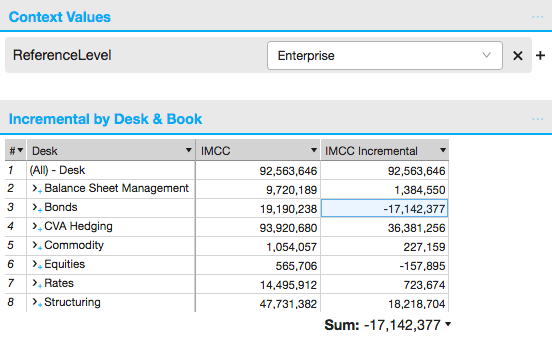
- In this example, the ReferenceLevel is set to Enterprise.
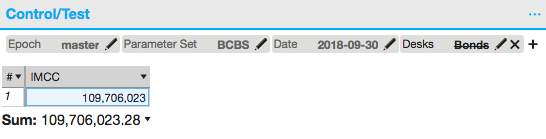
- IMCC for desk “Bonds” is -17 mio, which means, that this portfolio is reducing firm-level IMCC by 17 mio.
Long-Short
The “long” and “short” measure variations are used with the SBM Delta sensitivities. They were introduced for the EBA reporting template. In evaluating these measures, Delta sensitivities are aggregated to the risk-factor level, then sorted into “long” or “short” depending on if the aggregate sensitivities are positive or negative.Netted
Netted is an optional approach for calculating capital charges independently for each netting set and IRT Desk. Naming pattern: Measures with “Netted” behavior follow the name pattern: Main Measure Name Netted. Netted is an optional approach implemented in to map Legal Entities (and hence all sensitivities) to “netting sets” via an optional file and its corresponding store. Additionally, each book can be flagged as belonging to the “IRT Desk” or not. The capital charges can be calculated independently for each netting set and IRT Desk, then summed. The netting sets only impact a specific set of measures. These comprise measures with this suffix and those with the “(reported)” suffix. They also include the following measures, which are the ones requested in the CRR2 reporting template:- “risk-class risk-measure Risk Position scenario”
- “risk-class risk-measure Risk Charge scenario”
- “risk-class Curvature Sb scenario”
- “risk-class Delta Sensitivities direction”
- “drc-risk-class Default Risk Charge”
- “drc-risk-class Gross JTD direction”
- “drc-risk-class Net JTD direction”
- “drc-risk-class WtS Ratio”
- “RRAO Exotic”
- “RRAO Other”
Additionally, the SA measures that follow on from the above list are also impacted, up to the “Portfolio Risk Charge”.
The reported measure variation includes the impact of the netting sets and imported values. For example, “Portfolio Risk Charge (reported)”. The netting sets and imported values do not currently impact the unmodified measures; for example, “Portfolio Risk Charge” is not changed.
Overview of Netted Calculations
A Netting Set hierarchy allows for filtering by netting set. The capital charge calculations are performed with the netting sets as the leaf level, so that:- The capital charges are calculated without offsetting sensitivities across netting sets and IRT desks.
- After the capital charges are calculated (independently) for each netting set and IRT desk, they are summed.
- As with the “(reported)” suffix, the same set of measures are directly and indirectly impacted.
Pro-Rata
Pro-rata capital allocation
Naming pattern: Measures with “Pro-rata” behavior follow the name pattern: Main Measure Name Pro-Rata. Pro-Rata is one of the approaches implemented in to decompose a non-linear measure down to additive components. Depending on the specified context values, a Pro-Rata measure behaves as:-
bottom-up calculation: charges computed at leaf level (usually,
trades) are scaled proportionally. They then sum to a charge
computed at
ReferenceLevel.
Scaled leaf-level charges are additive and can be rolled up to any
level;
Pro-Rata Capital Allocation := Leaf * Scale -
“Russian Doll” calculation: charges are computed recursively
along the levels in a specified hierarchy (for instance,
organizational hierarchy), so that the sum at each level is equal to
the pro-rata charge for a parent.
Scale := Parent / {sum of Siblings}Several hierarchies can be combined, as described under ProRataHierarchy.
Rank
Naming pattern: Measures with “Rank” behavior follow the name pattern: Main Measure Name Rank. Rank measures are derived from vectors of P&L values. The P&L values are sorted lowest to highest and assigned an integer value from 1 to the size of the vector. The sort order of the ranks matches the sort order of the P&L values. The Rank measure can be used to manually check tail measures such as VaR and ES. For example, the 97.5% ES on a vector of 250 P&L values will be the average of the bottom 6-7 values. These will be the values whose rank is between 1 and 7. Follow this link to see the measures with the described behavior: Rank MeasuresReported
Naming pattern: Measures with “Reported” behavior follow the name pattern: Main Measure Name (reported). Reported is one of the optional approaches implemented in to include the impact of the netting sets and imported values. For example, “Portfolio Risk Charge (reported)”. The following measures have a Reported variation:- “risk-class risk-measure Risk Position scenario”
- “risk-class risk-measure Risk Charge scenario”
- “risk-class Curvature Sb scenario”
- “risk-class Delta Sensitivities direction”
- “drc-risk-class Default Risk Charge”
- “drc-risk-class Gross JTD direction”
- “drc-risk-class Net JTD direction”
- “drc-risk-class WtS Ratio”
- “RRAO Exotic”
- “RRAO Other”
Additionally, the SA measures that follow on from the above list are also impacted, up to the “Portfolio Risk Charge”.
Follow this link to see the measures with the described behavior: Reported Measures.