

For a conceptual overview of partitioning and NUMA awareness, see How partitioning and NUMA awareness can improve data loading and query time on Atoti Hub.
How should partitioning fields be chosen?
Choose the partitioning field first, then the partitioning function. Whatever the strategy, aim for an even distribution of records across partitions, so that loading and query work is spread across all cores. For the trade-offs between strategies, see What are the benefits of defining a partitioning strategy? on Atoti Hub.- For frequent housekeeping, such as dropping all of last week’s records, partition on a date-related key field. When a partition holds exactly the records matched by a
removeWherecondition, the whole partition is dropped instantly. - For query-heavy applications on large datasets, use a partitioning that spreads records evenly, such as modulo partitioning, so that queries use all processing units.
- For applications shared by teams that each own a domain, partition on that domain to minimize cross-domain data movement and resource sharing.
What are the partitioning constraints?
If a store has key fields, its partitioning fields must be key fields. Partitioning fields must respect the key field and store reference constraints described in Which constraints affect partitioning? on Atoti Hub. For examples of valid and invalid partitionings across a reference, see How does partitioning work across references?.How is NUMA awareness set up?
NUMA awareness is only available on Linux servers.
How is NUMA installed?
On a Linux system, install thenumactl package first. The command numactl -H prints the list of nodes configured on the machine, the CPU and memory characteristics for each node, as well as a distance matrix (provided by the firmware manufacturer) that indicates the latency between nodes.
The following represents the output of the command numactl -H on a machine with 2 NUMA nodes, each regrouping 8 CPUs. The nodes are numbered 0 and 1. The command shows, for each NUMA node, the associated CPU IDs and associated RAM. In the distance matrix, 10 is the default value given to a processor accessing its own memory bank. Higher values indicate higher latency (the values are somewhat proportional to the worst-case induced latencies). Absolute latency numbers between NUMA nodes can be obtained using Intel’s Memory Latency Checker.
How is NUMA configured in Atoti?
Two NUMA policies are available on the Datastore. To pick one, use the-Dactiveviam.pool.policy=<String> option. For how each policy affects data locality, see What is NUMA awareness? on Atoti Hub.
The total number of threads can be tuned using the
-Dactiveviam.pool.size=<Integer> option. On a machine with 4 nodes, 64 corresponds to 16 threads per node with the placed policy, and to 64 threads spanning the entire system with the free policy. The default total number of threads is equal to the number of processors as returned by Runtime.getRuntime().availableProcessors().
What is the optimal number of partitions?
Configure a store with at least one partition per logical core. With hyper-threading, this is typically twice the number of physical cores. NUMA-aware applications require at least one partition per physical processor. For why these numbers matter, see What is the optimal number of partitions? on Atoti Hub.Which partitioning functions does Atoti offer?
To partition a store is to choose a set of fields and a set of functions to apply to the data within these fields to select a partition for each record. Partitioning functions always apply on dictionarized values, thus integers. Partitioning fields are ensured to be dictionarized.Value partitioning
Value partitioning is a function that assigns one partition per distinct value of the field. In the following example, the store is partitioned on the Date field, each date’s trades filling a single partition:Modulo partitioning
Modulo partitioning on a single field is a function that takes the dictionarized value of the record for that field and applies a modulo-N operation to this value to assign a partition to the record. A given number of partitionsN is decided upon in advance.
A good practice is to select a number of partitions that is a power of 2.
N is decided in advance. The partition of a record is determined as follows: an integer value is computed by a hashing algorithm using the record’s dictionarized values on the partitioning fields, and the modulo function is applied to that result.
Combining fields
The datastore allows developers to select a number of store fields and assign a different partitioning function to each field. This is technically called a Cartesian partitioning. The partition is determined by combining the results of these functions. As a result of these functions, the set of partitions is the Cartesian product of the possible results for each partitioning function. In the following example, assuming the system keeps a week’s worth of trades, there are7 days * 8 possible partitions, which are the Cartesian product of the possible results for each partitioning function.
Hierarchical partitioning
Hierarchical partitioning is another configuration over multiple partitioning fields. It gives more flexibility than the Cartesian partitioning by giving each partitioning field a separate rule. An example use case for a hierarchical partitioning: a trading desk is calculating some measures to compare its clients (Buyers). The most trivial partitioning field for this case is the Buyer field, as most queries can be parallelized using this field. However, a small quantity of buyers account for the vast majority of the trades, which makes value partitioning a poor configuration. To keep partitions balanced, other partitioning fields must be added, such as the date or a modulo over the tradeId. However, a Cartesian partitioning will over-partition the store, while probably keeping some distribution imbalance (the subsets of partitions corresponding to the large buyers will still hold larger partitions than the others).How does partitioning work across references?
This section presents examples of partitioning across a store reference. The partitioning of the target store of a reference must be implied by the partitioning of the owner store, meaning that all records of a partition in the owner store must reference records of the same partition in the target store. Therefore, the partitioning of the target store is a sub-partitioning of the owner store, so the target store has the same number of partitions as the owner store, or fewer. In the following examples, these notations are used to represent the different partitioning functions:modulo<N>(<field 1>[, <field 2>, ...])for modulo partitioningvalue(<field>)for value partitioningvalue(A) | value(B) | ...for a partitioning combining multiple functions
-
Example 1:
Owner store partitioning:
value(A) | modulo8(B) | modulo16(C)
Target store partitioning:value(A) | modulo2(B)This partitioning is valid, as all fields of the target store partitioning are present in the owner store, andmodulo2(B)is a sub-partitioning ofmodulo8(B)because 8 is a multiple of 2. Thus, the partitioning of the target store is implied by the partitioning of the owner store. All other valid target store partitionings are:constant,value(A),modulo2(B),modulo4(B),modulo8(B),value(A) | modulo4(B)andvalue(A) | modulo8(B). -
Example 2:
Owner store partitioning:
modulo8(A) | modulo4(B)
Target store partitioning:value(A) | modulo4(C)This partitioning is invalid for two reasons: field C is a partitioning field in the target store but not in the owner store, and the partitioning function for field A in the target store is not implied by the one for field A in the owner store.
modulo<M>(A) is implied by modulo<N>(A) if and only if N is a multiple of M. So modulo<N>(A) is always implied by value(A), as value(A) can be seen as a modulo-infinity partitioning.
-
Example 3:
Owner store partitioning:
modulo8(A)
Target store partitioning:modulo3(A)This partitioning is invalid because, even if both stores have a modulo partitioning on the same field, 3 does not divide 8. Consider why this would not be compatible: values 0 and 8 belong to the same partition in the owner store (partition 0, since 0 % 8 = 0 and 8 % 8 = 0). But these values belong to different partitions in the target store, respectively partitions 0 and 2 (0 % 3 = 0 and 8 % 3 = 2).
- Be careful when a partitioning can propagate to another store multiple times. For instance, if an ‘Order’ store references a ‘Customer’ store twice (once for the buyer, once for the seller), the customer store cannot be partitioned without the risk of partitions induced by the two references conflicting.
- Partitioning a store referenced by other stores can only be done using fields that belong to the relationship.
- Partitioning the base store, which is usually the largest store, is always beneficial.
How is aggregate provider partitioning configured?
Both the Bitmap provider and the Leaf provider can be partitioned, using the same partitioning functions as stores (see Which partitioning functions does Atoti offer?). By default, Atoti partitions aggregate providers to closely follow the datastore partitioning. For when to override this default, see When is custom aggregate provider partitioning needed? on Atoti Hub. Aggregate provider partitioning considerations: A custom aggregate provider partitioning can slow down the commit phase, when Atoti contributes datastore records to the providers and hierarchies. For the commit time and memory cost, see When is custom aggregate provider partitioning needed? on Atoti Hub. Atoti fills each partition with a single thread. If several datastore partitions feed one aggregate provider partition, their changes are queued rather than applied in parallel. Re-partitioning an aggregate provider can also skew its partitions. Consider a well-defined store with a field Date and a field Value, partitioned by Date, and containing:- (Date: 01/12/20, Value: 1) -> 25M entries
- (Date: 01/12/20, Value: 2) -> 15M entries
- (Date: 02/12/20, Value: 1) -> 27M entries
- (Date: 02/12/20, Value: 2) -> 13M entries
Value EQUALS 1 contains 52M entries while the one for Value EQUALS 2 contains 28M entries. This means there will be single-threaded work once partition 2 is filled, while partition 1 is still being fed records.
What are NUMA node selectors?
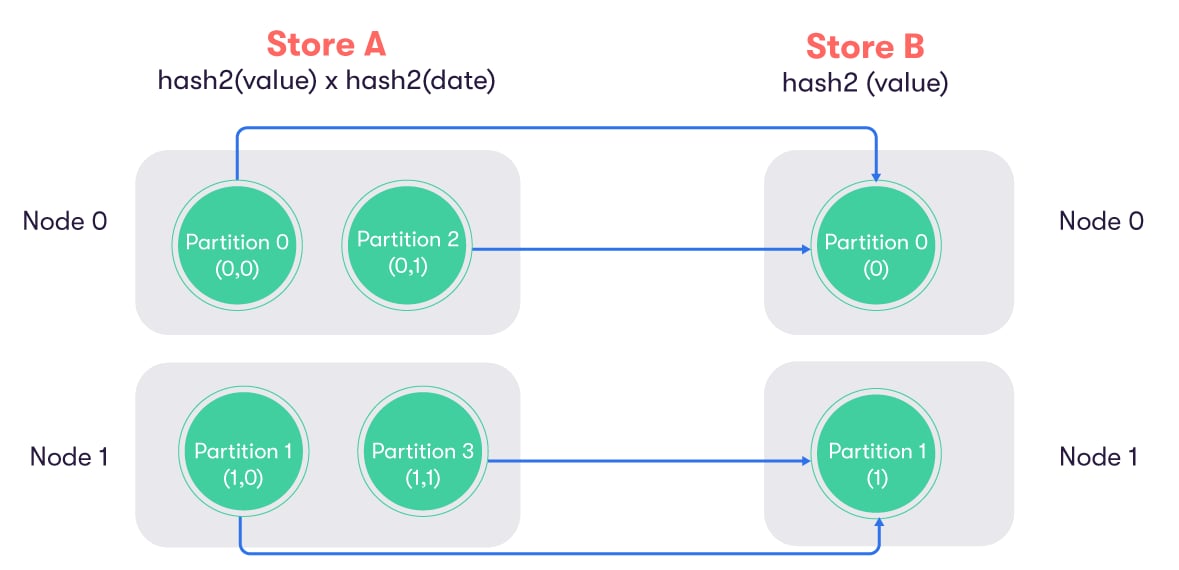
Atoti offers the possibility to define the NUMA node of each partition, whether it is a store partition or an aggregate provider partition. In an ideal scenario, each connected component should entirely reside within the same NUMA node. For instance, a store partition contributing to an aggregate provider partition should be on the same node as the provider partition, to avoid transferring data from one node to another. The following example illustrates the differences between a good and a bad re-partitioning. Store A and Store B have compatible partitioning:- Store A:
modulo2(value) | modulo2(date) - Store B:
modulo2(value)
(0, 0); (0, 1); (1, 0); (1, 1) as (value, date), while store B can have (0); (1) as (value).
From these combinations, Atoti assigns a unique integer that will become the partition ID. These partition IDs do not have a fixed definition; they are attributed as data is inserted in the stores.
For both of the following examples, the first inserted entry for store B has a combination of (0), and will create the partition 0. Then another entry corresponding to (1) will create partition 1.
In an ideal scenario, entries will be inserted into store A in the following order: (0, 0); (1, 0); (0, 1); (1, 1), thus creating the four partitions.
This will result in the following schema, in which all partitions matching the condition value EQUALS 1 reside on NUMA node 1:
(0, 0); (0, 1); (1, 1); (1, 0). This results in the following schema, in which data must be transferred across NUMA nodes:
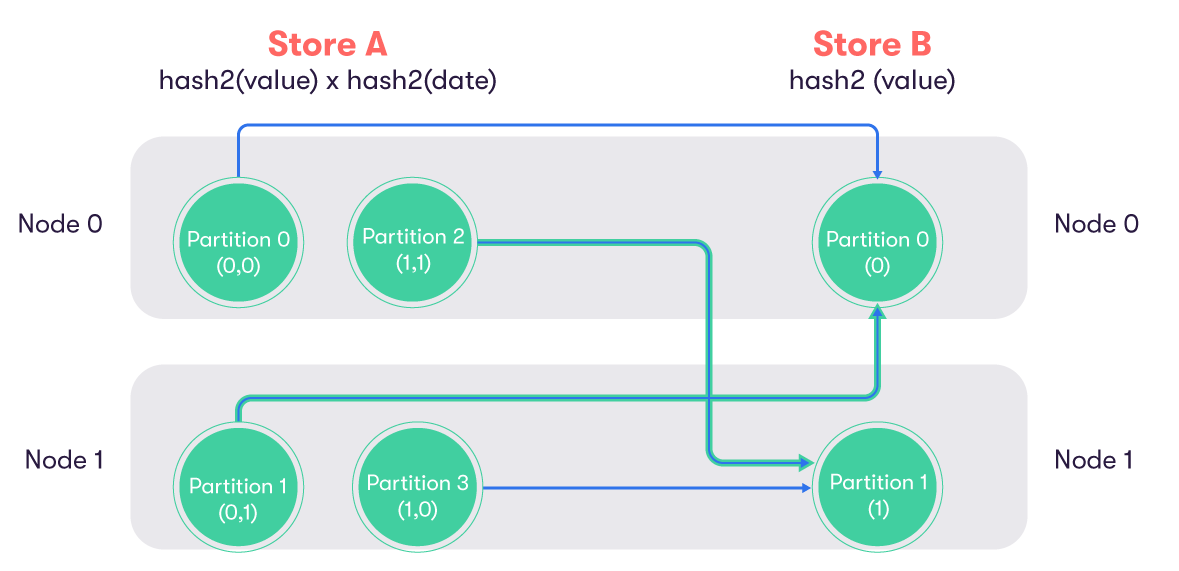
The goal is to ensure that all aggregate provider partitions are located on the same NUMA node as the corresponding store partitions. If the partitions of two stores are linked by a reference, they should be located on the same NUMA node.
printNumaConfiguration operation of the aggregate provider MBean.
Atoti provides multiple built-in NUMA selectors.
Using the store partitioning
This selector considers all fields of the store partitioning to select the NUMA node.Selecting specific fields
This selector only considers the mentioned fields to select the NUMA node.Using a reference
This selector considers the partitioning of the referenced store to select the NUMA node.Using an advanced custom selector
For full control, the NUMA node selector builder has twowithSelector methods. One takes a partitioning description, such as withSelector("modulo64(FIELD)"). The other takes an array of fields and an array of partitioning functions. Both can define any inner partitioning of the NUMA selector, as long as it is implied by the store partitioning.
When no selector is defined, Atoti favors the references first. If there are none, it defaults to using the partitioning of the store.
What are the considerations for NUMA selectors?
The standard issue when using a NUMA architecture is latency across nodes, when data must be accessed on multiple nodes.- All aggregate provider partitions should be located on the same node as the store partition contributing to them.
- If some partitions contain vectors that will be aggregated together, ensure that they all reside on the same NUMA node, as transferring these large chunks of data is costly.
- Ensure that data is somewhat uniformly spread across nodes. If a NUMA node is entirely filled, it will by default overflow onto other nodes, resulting in unpredictable performance.