

To understand what follows, you must be familiar with React
Components and
Context.
@activeviam/atoti-ui-sdk as a dependency. To do it, you can open a terminal in the root folder of your project and run:
The Widget component
Widget is a versatile component: it can be used to display different things. For instance, it can be a pivot table, a line chart or a gauge. In Atoti, this component is displayed within dashboards. Let’s leverage it to integrate a pivot table into a React application. The following is a naive attempt at displaying aWidget. It will not work because it omits two mandatory props: queryId and widgetState.
queryId
queryId allows to share queries and their associated results across your application. Assuming that only one pivot table is displayed, its value does not matter as long as it remains constant.
widgetState
widgetState defines what Widget represents. In Atoti, this object is saved when a user saves a dashboard. It can take different values, depending on what you wish to display.
widgetState must be deserialized before being used. See
deserializeWidgetState.widgetState:
PluginsProvider
The code above yields a PluginNotFoundError. This is because it refers to thewidgetKey “pivot-table” without providing any widget plugin for this key.
This can be fixed by wrapping Widget in a PluginsProvider and passing the corresponding widget plugin.
ClientsProvider
After fixing thePluginNotFoundError, you will face a ClientsNotFoundError. This is because Widget needs to interact with servers in order to run its query and retrieve user settings. To fix this error, you must use a ClientsProvider and provide two clients:
- an AtotiClient, allowing children components to run MDX queries.
- a ContentClient, allowing them to interact with a content server.
atotiClient.loadDataModel. Otherwise, you will be prompted with an infinite “Loading data model for “my-server” message later on.
These functions can be called just once, when App is mounted.
IntlProvider
After fixing theClientsNotFoundError, you will see a react-intl error:
Widget requires translations, in order to work for different locales.
To fix this error, you must first add react-intl as a dependency:
IntlProvider can be imported from react-intl and used to provide the translations:
ThemeProvider
Next, you will encounter a “Missing theme” error:UserProvider
You are finally facing the last error of this stack: UserNotFoundError.Widget is attempting to know who the current user is, in order to retrieve her settings. But no user is provided.
To fix this error, you must provide a user through UserProvider. This depends on how users are managed in your application, which goes beyond the scope of this guide.
To move forward, we will provide a dummy user. We will also create a new useEffect hook, which will call the contentClient.loadSettings function whenever user.username changes. This will ensure that the appropriate user settings are loaded.
Styling
Providing a Theme (as shown above) is not enough to style the pivot table correctly. Depending on the structure of your DOM, you might see a blinking message and then nothing:
Fix invisible pivot table
In the case illustrated above, the pivot table unexpectedly remains invisible after the data model finishes loading. To fix this issue, you must make sure that the pivot table’s parent element has a non-zero height. Indeed, the pivot table is virtualized: it only appends children elements to the DOM depending on how much room is available for them, which makes it performant even in the case of very big datasets. In order to do so, it requires its parent element to have a defined height. This fix depends on your project. For instance, if you generated it using create-react-app and are rendering the pivot table at the root of the application, like the snippets in this page do, then you can fix it by adding the following to yourindex.css:
Fix alignment
At this point, the pivot table is visible but looks broken: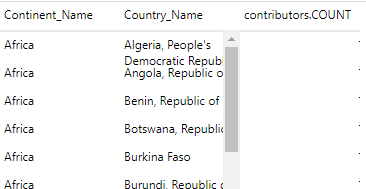
@activeviam/atoti-ui-scripts:
src/styles.
Import the one corresponding to your theme, in App.tsx:
Widget must have a parent with the "ant-root" className. Note that everything below the element with the "ant-root" className will be impacted by global styles, which can cause visual bugs to your application. You can therefore add this element just once at the top of your application if it works for you, or more locally around Atoti UI components otherwise.