The default implementation provided in Atoti Sign-Off comes with a defined workflow for the task definition creation, three defined workflows (default workflows) for the tasks and user roles (manager, user).
This documentation explains the default implementation, but the workflows and the user roles can be customized for specific business needs - see Customizing sign-off workflow
in the Atoti Sign-Off Developer Guide.
Required role
In the default implementation, you must have the Manager role to be able to create task definitions or perform any other actions on them. This requirement can be changed in the Activiti configuration settings.Default workflows
Out of the box, Atoti Sign-Off provides these workflow options for tasks:
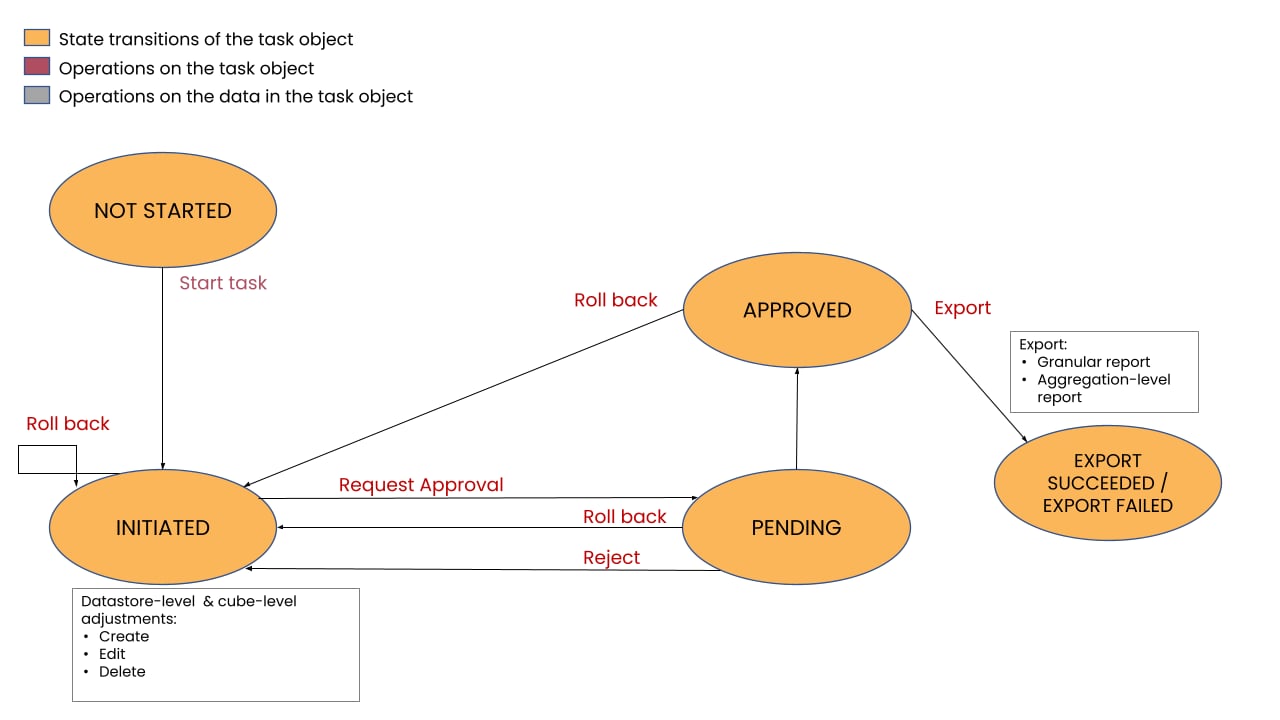
Taking the 4-eyes task workflow as an example, the default implementation provided in Atoti Sign-Off is detailed below.
Create and publish your task definitions
Role: Manager only Use the Task Configuration screen to define your tasks.- Create task definitions individually, or prepare your task definitions in CSV to upload in bulk.
- Publish the task definitions to create daily tasks that will be assigned to owners and approvers.
Process your assigned tasks
Role: the designated User/Manager Use the Tasks screen to perform actions on the data in tasks assigned to you. The default 4-eyes workflow is as follows:- The owner starts the task for a specific date, performs any adjustments required for that day’s data and submits the task for approval. See:
- The designated approver reviews any adjustments made, then approves or rejects the task. See:
- The Export service automatically exports the data from the tasks when they are approved.
To change the default workflows, your administrator can modify the
workflow types (that is, the actions available in the Tasks screen
for a given role).For information on the configurations available, see
Customizing sign-off workflow.
Task statuses
The following diagram illustrates the operations in the approval process of the default 4-eyes workflow, together with the corresponding status transitions of the task object and the data in the task.