
Documentation Index

Fetch the complete documentation index at: https://docs.activeviam.com/llms.txt

Use this file to discover all available pages before exploring further.

The Sign-Off Analysis Hierarchy reflects the parameters of the Sign-off process managed by the Sign-off server.

Analysis Hierarchy content

The Analysis hierarchy is three levels deep. The hierarchy is slicing, meaning it has no ALL Member level. By default, the selected level is [INTRA-DAY].
LevelDepthDescriptionMembers
Feed1How the data are updatedINTRA-DAY: the default member, the whole cube data at the latest value.
TOTAL REVIEWABLE: the whole data with frozen perimeters under review.
Status2The current sign-off task statusFor example, “UNAPPROVED”
Task3The unique sign-off task nameFor example: “Sensi BSM::2018-09-28”
The hierarchy depth depends on the information to display. The member [INTRA-DAY] has no deeper level. Additionally, the path [TOTAL REVIEWABLE].[UNAPPROVED] has no level 3.

Example

Here is an example of the Analysis Hierarchy structure:
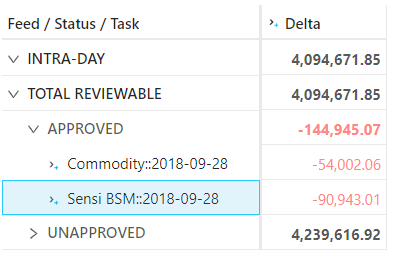
Feed / Status / TaskSample MeasureComment
INTRA-DAY16.2Default member, it displays the latest content of the cube
TOTAL REVIEWABLE16.0Sign-off view, the data belonging to an initiated sign-off task is frozen
> APPROVED3.0A specific status in the sign-off process, the level aggregates all the tasks with the same status
> > Commodity::2018-09-281.0A sign-off task with the “APPROVED” status
> > Sensi BSM::2018-09-282.0Another sign-off task with the “APPROVED” status
> INITIATED4.0A specific status in the sign-off process, the level aggregates all the tasks with the same status
> > Bonds::2018-09-284.0A sign-off task with the “INITIATED” status
> UNAPPROVED9.0Default status of the perimeter not yet included in a sign-off process. It uses the latest cube data

Setup

You can customize the analysis hierarchy using the configuration files.
KeyValueDescription
mr.sign-off.module.cubeName-adjustments.feed-levelFeed@Sign-off Status@Sign-off StatusName and path of the analysis hierarchy’s level 1
mr.sign-off.module.cubeName-adjustments.status-levelStatus@Sign-off Status@Sign-off StatusName and path of the analysis hierarchy’s level 2
mr.sign-off.module.cubeName-adjustments.task-levelTask@Sign-off Status@Sign-off StatusName and path of the analysis hierarchy’s level 3
mr.sign-off.common.hierarchy.*INTRA-DAY,TOTAL REVIEWABLE,UNAPPROVEDNames of the level members generated by the cube itself, the other names come from the sign-off server
mr.sign-off.cubeId.levelsAsOfDate@Date@Dates,Book@Books@Booking,Desk@Desks@BookingLevels eligible to be in a sign-off task perimeter

Sign-off task perimeter

The analysis hierarchy uses a side store to describe the perimeter for a given sign-off task. The eligible levels for task filtering are defined by the property “sign-off.cubeId.levels” for each cube. The defined levels must be a standard level associated with a store field and not an analysis hierarchy level. All non-empty criteria for the levels will generate a filtered location with the following pattern: WHERE ([dimension1].[hierarchy1].[level1].[filter1], [dimension2].[hierarchy2].[level2].[filter2], …)

Sign-off task store

The data linked to a sign-off task are stored in a specific store per cube.
CubeNameMain storeSign-off storecubeId
VaR-ES CubeTradePnLsTradePnLsSignOffvar
Sensitivity CubeTradeSensitivitiesTradeSensitivitiesSignOffsensi
PLCubePnLPnLSignOffpnl
The sign-off store is created dynamically from the list of filterable levels and has the following format:
FieldTypeKeyDescription
NamestringXSign-off task name
StatusstringCurrent sign-off status
hierarchy name 1computedHolds the content of the 1st filter, the column name is the hierarchy name of the filtered level, and the type is computed from the base store
hierarchy name 2computedHolds the content of the 2nd filter
hierarchy name ncomputedHolds the content of the last filter

The [_Version] hierarchy

To support the snapshotting feature, the cube now includes a specific single-level hierarchy named “_Version”. It is a technical, hidden hierarchy. This hierarchy is attached to a primary key that allows the system to duplicate the fact and create a snapshot. By default, the _Version equals LIVE, but in snapshotting, the snapshot version is OLD and the incoming version is NEW.
Feed / Status_Version / LIVE_Version / OLD_Version / NEW
INTRA-DAYXX
TOTAL REVIEWABLEXX
> APPROVEDXX
> INITIATEDXX
> UNAPPROVEDX

ETL

The _Version field, linked to the [_Version] hierarchy must be filled with the correct value. The ETL achieves this with the following logic: Does the input line belong to a task perimeter?
  • No : Set the _Version field to LIVE
  • Yes :
    1. Set the _Version field to NEW
    2. Update any existing line _Version field to OLD

Main store modifications

To generate the [_Version] hierarchy, an extra key field named _Version is added to the base store of the cube.

Discarding a sign-off task

When a sign-off task is discarded, all the lines tagged OLD inside the perimeter are deleted and the ones tagged NEW are re-tagged as LIVE.

REST service

The sign-off store is never updated from the default ETL but via REST service. The REST service is intended to be called by the sign-off server. It is located at the URL http://localhost:10010/mr-application/services/rest/v3/sign-off. and provides three main services:
  • createSignOffTask: create a new sign-off task on the cube.
  • updateState: update the status of a sign-off task
  • discardSignOffTask: remove the sign-off task

Technical configuration

ClassKindUsage
SignOffAnalysisConfigSpring configurationAbstract configuration, when implemented it activates the analysis hierarchy on a specific cube
PnLSignOffAnalysisConfigSpring configurationAnalysis hierarchy for Pnl cube
SensiSignOffAnalysisConfigSpring configurationAnalysis hierarchy for Sensi cube
VarSignOffAnalysisConfigSpring configurationAnalysis hierarchy for VaR cube
SignOffTaskConfigSpring configurationAnalysis hierarchy for all the cubes within the ecosystem
SignOffAnalysisHierarchyAnalysis HierarchyPost-processor that builds the members of the Sign-off analysis hierarchy
SignOffAggregationProcedureAggregation ProcedurePost-processor that re-buckets the facts to the relevant members of the analysis hierarchy
SignOffDatastoreSchemaDescriptionPostProcessorSchema Description Post-ProcessorPost-processor that modifies the datastore schema to add the sign-off store and the main store index
SignOffRestServiceREST serviceThe sign-off REST service
SignOffDtoDTOThe DTO used by the REST service to modify the sign-off tasks
SignOffTaskFinderBeanProvides the lookup functionality to find any sign-off task linked to a perimeter. It is used by the aggregation procedure and the tuple publisher
SignOffTuplePublisherFactoryTuple PublisherBean that provides the tuple publisher instances for the main stores to compute the _Version field in the ETL