

Full table caching
Overview
With this approach, at startup, a side store is copied in its entirety from the external database to an in-memory datastore. From there, the data can be queried with the full performance of an Atoti Server in-memory application. This is the default approach in Atoti Market Risk, used for all side stores.Configured stores
Specifically, the following stores will be cached:- SpotMarketData
- CurveMarketData
- SurfaceMarketData
- CubeMarketData
- FxRateMarketData
- Scenarios
- CorrelationMarketData
- DividendMarketData
- SplitRatioMarketData
- MarketShifts
- DynamicTenors
- DynamicMaturities
- DynamicMoneyness
- SensiLadders
- CubeLevelAdjustments (if using Atoti Sign-Off)
Quickstart
If you are using Atoti Market Risk out-of-the box, without customization, you don’t need to make any changes to use this feature. Simply follow the instructions to enable DirectQuery and the configured stores listed in the preceding section will be automatically cached at startup.Detailed setup
If you have made changes to Atoti Market Risk or are only using specific components, this section describes how caching is configured and the classes you need to ensure are present in your application. TheISideStoresToClone interface is used to declare stores to be cached. Beans of this type are autowired to DirectQueryActivePivotConfig where they
are configured for caching.
Atoti Market Risk has configuration classes that define these beans for you. Make sure they are imported in your project for the configured stores to be cached.
At startup, Atoti Market Risk will create the appropriate DirectQuery schema and copy all rows from the underlying database table to the cache store. Once
this is complete, you can query the cache stores just as you would query any of these stores when running Atoti Market Risk in-memory. Indeed, the cache stores
are created with the same name as the store would have in an in-memory application, so you should not need to make any changes to existing post-processors.
- This feature relies on the
Migrator, a component used by Atoti Market Risk to create the Atoti Server schema. Ensure you are using the Migrator in your project to use this feature. - The
DirectQueryActivePivotConfigclass in themr-directquerymodule contains the Migrator configuration. Ensure this class is imported in your project for the cache to work. This class is imported byMRDirectQueryConfigwhich is itself imported byMarketRiskConfigin themr-applicationmodule.
Customizations
Caching a new store
To create and cache a new side store, you must add the store to the datastore description and define a source configuration. The source configuration is used to load data into the store. With that in place, simply expose anISideStoresToClone bean providing the name of your store to be cached.
- This feature relies on the
Migrator, a component used by Atoti Market Risk to create the Atoti Server schema. Ensure you are using the Migrator in your project to use this feature. - The
DirectQueryActivePivotConfigclass in themr-directquerymodule contains the Migrator configuration. Ensure this class is imported in your project for the cache to work. This class is imported byMRDirectQueryConfigwhich is itself imported byMarketRiskConfigin themr-applicationmodule.
Validate the setup
You can validate that a cache is configured correctly by taking a look in Atoti Admin UI. You should see one store with the “_CACHE_SOURCE” suffix, this is the table in the database. The in-memory table is the one without the suffix. In the screenshot you can see the Table “FXRates” as both an in-memory store (named “FXRates”) and as a remote DirectQuery database table (named “FXRates_CACHE_SOURCE”). Both of these stores contain the same data.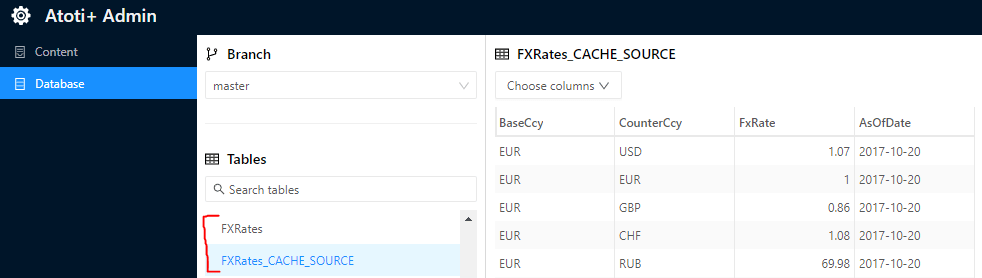
DirectQuery Local Cache
Overview
Full table caching provides excellent performance in terms of retrieving data. However, it may result in high memory consumption. Some side stores contain a significant volume of data and, particularly when the dataset spans a long time, it may be prohibitive to store this entirely in memory. The DirectQuery Local Cache is a solution for these cases. Instead of caching the entire table, the DirectQuery Local Cache only stores partitions of the underlying table. These partitions are loaded when required by a particular query and held in memory until the cache exceeds a specified size. This cache is built into Atoti Server, and Atoti Market Risk is configured to use this cache for specific side stores. See the Atoti Server DirectQuery Local Cache documentation to understand how the cache works, and for details on how to use it in an Atoti application. For this guide, we will assume you have read this documentation.Configured stores
The following stores are currently configured to work with the DirectQuery Local Cache:- SpotMarketData
- CurveMarketData
- SurfaceMarketData
- CubeMarketData
- FxRateMarketData
- CorrelationMarketData
- DividendMarketData
- SplitRatioMarketData
- MarketShifts
Quickstart
If you are using Atoti Market Risk out-of-the box, without customization, this feature is enabled by setting the following property:Cache partitioning
Each cache stores a number of cache partitions. Each partition is a subset of the overall table. Partitions are loaded into the cache based on the requirements of a query. For the market data stores (SpotMarketData, CurveMarketData, SurfaceMarketData, CubeMarketData, FxRateMarketData, CorrelationMarketData and DividendMarketData), the caches are partitioned by AsOfDate and MarketDataSet. The SplitRatioMarketData store is partitioned by AsOfDate only. For the MarketShifts store, the cache is partitioned by AsOfDate and ScenarioSet.Cache capacity
Each cache is created with a cache capacity, which determines the maximum number of rows or partitions to keep in the cache. You can configure the cache capacity by exposing a supplier bean for the relevant cache.Detailed setup
If you have made changes to Atoti Market Risk or are only using specific components, this section describes how caching is configured and the classes you need to ensure are present in your application.Cache descriptions
For a store to be cached, a cache description must be created at startup and fed into the Atoti application. Atoti Market Risk includes cache descriptions for each of the configured stores, contained in a Spring configuration class and exposed as a bean.If you aren’t using all of these stores in your project, you may remove the corresponding imports from MarketRiskConfig.
DirectQueryActivePivotConfig class in the mr-directquery module collects these cache description beans and feeds them into the application configuration.
Make sure this class is imported in your project for the cache to work. This class is imported by MRDirectQueryConfig which is itself imported by
MarketRiskConfig in the mr-application module.
IDatabaseCacheManager
You add data to the cache by defining aDatabaseCachePrefetcher in post-processors that query the cache. To create this prefetcher, the post-processor requires an instance of the
IDatabaseCacheManager.
The cache manager is exposed as a bean by the DirectQueryActivePivotConfig class in the mr-directquery module, after it has created
the application. Make sure this class is imported in your project to have access to the cache manager. This class is imported by MRDirectQueryConfig, which is
itself imported by MarketRiskConfig in the mr-application module.
The cache manager is injected into relevant post-processors by the RiskPostProcessorInjector configuration class in the mr-application module. Make sure
this class is imported in your project for the injection to take place. This class is imported by MarketRiskConfig in the mr-application module. If you are
not using the RiskPostProcessorInjector you will need to inject the cache manager yourself:
- Atoti Market Risk uses the Atoti Market Data module for the market data stores and post-processors. The
IDatabaseCacheManageris injected into Atoti Market Data post-processors by thecom.activeviam.marketdata.config.directquery.DatabaseCacheManagerInjectionConfigconfiguration class. Ensure this is imported in your project. - If you are using the out-of-the-box Atoti Market Risk project, it is imported in
AtotiMarketDataDirectQueryCacheConfig, which is itself imported byMarketRiskConfig.
Step 2: The measure configuration
We will define a custom measure to use our post-processor in the packagecom.activeviam.mr.application.examples.dqcache.measure.
We will use the annotation @SensitivitiesCopperContextBean to achieve that.
We simply create a post-processed measure with Copper, using the plugin key of the post-processor and assigning a name to the measure:
MarketRiskConfig class: