

Analysis hierarchy content
The Analysis Hierarchy is three levels deep. The hierarchy is slicing, meaning it has no ALL Member level. By default, the selected level is [INTRA-DAY].
The hierarchy depth depends on the information to display. The member [INTRA-DAY] has no deeper level. Additionally, the path [TOTAL REVIEWABLE].[UNAPPROVED] has no level 3.
Example
Here is an example of the Analysis Hierarchy structure: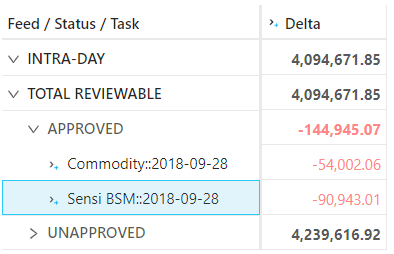
Setup
You can customize the analysis hierarchy using the configuration files.Sign-off task perimeter
The Analysis Hierarchy uses a side store to describe the perimeter for a given sign-off task. The eligible levels for task filtering are defined by the property “sign-off.cubeId.levels” for each cube. The defined levels must be a standard level associated with a store field and not an analysis hierarchy level. All non-empty criteria for the levels will generate a filtered location with the following pattern: WHERE ([dimension1].[hierarchy1].[level1].[filter1], [dimension2].[hierarchy2].[level2].[filter2], …)Sign-off task store
The data linked to a sign-off task are stored in a specific store per cube.
The sign-off store is created dynamically from the list of filterable levels and has the following format:
The [_Version] hierarchy
To support the snapshotting feature, the cube now includes a specific single-level hierarchy named “_Version”. It is a technical, hidden hierarchy. This hierarchy is attached to a primary key that allows the system to duplicate the fact and create a snapshot. By default, the _Version equals LIVE, but in snapshotting, the snapshot version is OLD and the incoming version is NEW.ETL
The _Version field, linked to the [_Version] hierarchy must be filled with the correct value. The ETL achieves this with the following logic: Does the input line belong to a task perimeter?- No : Set the _Version field to LIVE.
- Yes :
- Set the _Version field to NEW.
- Update any existing line _Version field to OLD.
Main store modifications
To generate the [_Version] hierarchy, an extra key field named _Version is added to the base store of the cube.Discarding a sign-off task
When a sign-off task is discarded, all the lines tagged OLD inside the perimeter are deleted and the ones tagged NEW are re-tagged as LIVE.REST service
The sign-off store is never updated from the default ETL but via REST service. The REST service is intended to be called by the sign-off server. It is located at the URL http://localhost:10010/risk-activepivot/services/rest/v3/sign-off. and provides three main services:- createSignOffTask: create a new sign-off task on the cube.
- updateState: update the status of a sign-off task.
- discardSignOffTask: remove the sign-off task.