
Documentation Index

Fetch the complete documentation index at: https://docs.activeviam.com/llms.txt

Use this file to discover all available pages before exploring further.

This shows how to watch a local directory and load files in a Table as they are added to the directory. Atoti is designed to efficiently handle data updates in its tables. When tables are updated, the new data will automatically be taken into account when querying the session. Let’s take the example of an application analyzing sales of a company. Sales data is stored in one CSV file for each day. Each day, a new CSV containing the sales of the day will be created and we want to load it into the application.

Creating the session

Let’s load the CSV files of the current folder in an Atoti session:
>>> import atoti as tt
>>> session = tt.Session.start()  
>>> sales_table = session.read_csv(
...     f"{resources_directory}/current/*.csv",
...     keys={"ID"},
...     table_name="Sales",
... )
>>> cube = session.create_cube(sales_table)
>>> l, m = cube.levels, cube.measures
At the beginning, there are only 7 rows in the table:
>>> initial_row_count = 7
>>> assert sales_table.row_count == initial_row_count
and just 2 dates:
>>> cube.query(m["Quantity.SUM"], levels=[l["Date"]])
           Quantity.SUM
Date
2021-05-01           10
2021-05-02            7

Starting the file watcher

We’ll use the popular watchdog library to watch our directory:
>>> from watchdog.events import FileSystemEventHandler
>>> from watchdog.observers.polling import PollingObserver
>>> class AtotiWatcher(FileSystemEventHandler):
...     def on_created(self, event):
...         csv_load = tt.CsvLoad(event.src_path)
...         sales_table.load(csv_load)
>>> observer = PollingObserver()
>>> _ = observer.schedule(AtotiWatcher(), resources_directory / "current")
>>> observer.start()

Simulating the arrival of a new file

>>> from shutil import copy
>>> # Copy the new file ...
>>> _ = copy(
...     resources_directory / "next" / "sales_2021_05_03.csv",
...     resources_directory / "current",
... )
>>> # ... and briefly wait until we see that new rows have been added to the table
>>> while sales_table.row_count <= initial_row_count:
...     _ = ...
That’s it! The new file has been loaded and queries on the cube will reflect it as the third date now shows up:
>>> cube.query(m["Quantity.SUM"], levels=[l["Date"]])
           Quantity.SUM
Date
2021-05-01           10
2021-05-02            7
2021-05-03            8

Seeing widgets change in real time

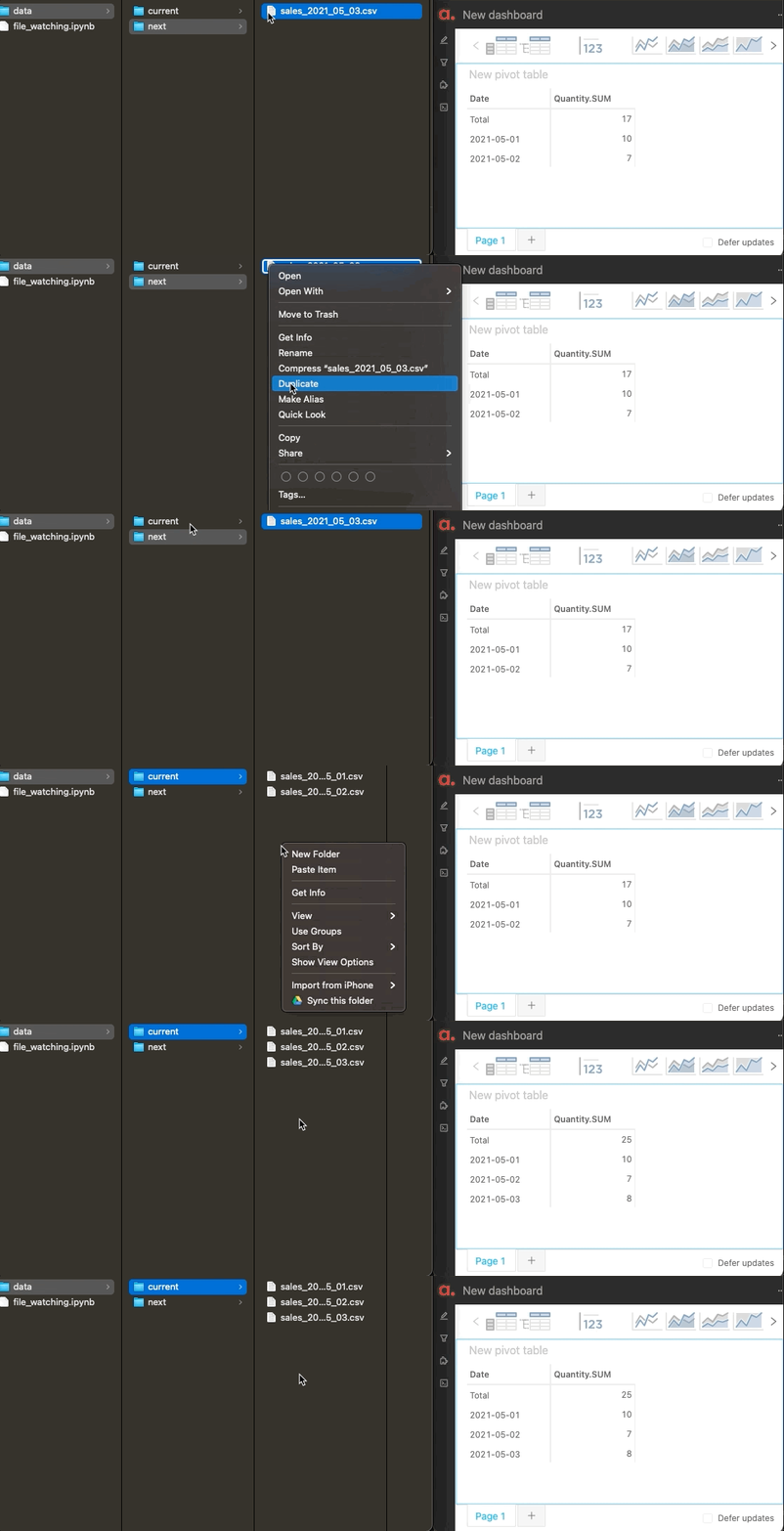
We can redo the same operation with the app opened on one side with a pivot table making a real-time query. The widget will rerender automatically to display the new date too: widget rerendering as a new file is picked up
Going further

  • watchdog supports multiple FileEvents, not just the creation of a file as described here.
  • If you need to preprocess the watched files before loading them into the Atoti session, you can do it inside the on_created() method of the event handler by first reading the file with pandas.read_csv(), editing the resulting dataframe, and then passing it to atoti.Table.load().
  • If you want to do multiple actions (e.g. dropping rows before loading new ones) when a file is updated, you can use data_transaction().