

Requesting an evaluation license
If you are not yet an ActiveViam customer and want to evaluate the full version of Atoti, you can request an evaluation license. Register here and you will get back an email containing a license key. To set up this license key, store it in an environment variable namedATOTI_LICENSE.
For instance: ATOTI_LICENSE="A8/nqkXXOMy9uf1EdQ472F…"
Using your ActiveViam customer license
If you are already an ActiveViam customer, you can use the license file that has been provided to you (namedAtotiLicense.lic for instance).
Copy this file in a directory of the computer where you will be running Atoti and store its path in an environment variable named ATOTI_LICENSE.
For instance: ATOTI_LICENSE="C:\Users\…\AtotiLicense.lic"
Declaring the ATOTI_LICENSE environment variable
The best way to declare theATOTI_LICENSE environment variable is at the OS level since that makes it available to all the programs.
If you cannot do this, there are some alternatives:
- In Google Colab or similar services, declare the variable through secrets:
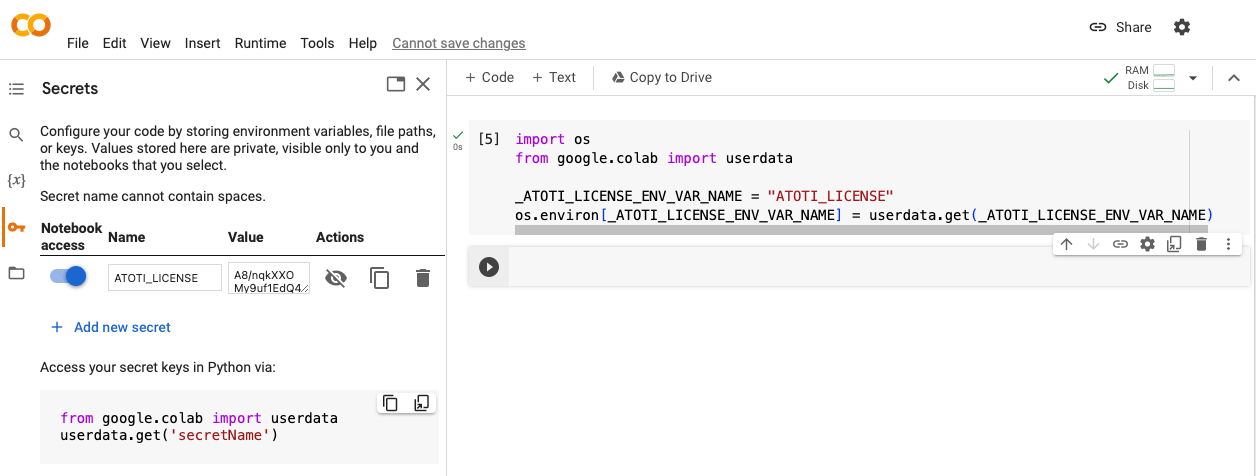
- Use dotenv to declare the variable in a
.envfile - As a last resort, inline the variable in the Python script: