

Atoti Intelligence SDK
This is part of the Atoti Intelligence SDK offer.Why connect with Postman?
Using Postman to connect to the MCP Server provides several benefits:- Test MCP Server configuration and availability
- Validate tool discovery and execution
- Explore available tools and their parameters
- Debug integration issues
- Test custom tools during development
Prerequisites
Before connecting with Postman, ensure the following requirements are met:- Atoti MCP Server is set up and running
- Postman is installed (desktop or web version)
- Atoti application credentials (username and password)
- The MCP Server endpoint URL,
http://localhost:9090/mcpfor the default Streamable HTTP transport
9090. Replace 9090 with the
port on which the application is running.
/sse is the older server-sent events transport, deprecated for removal in Spring AI 2.0.0 and not
served unless the deployment sets spring.ai.mcp.server.protocol=SSE. Use POST /mcp everywhere.
See MCP transport.How to configure authentication
Set up authentication in Postman to access the MCP Server. Follow these steps:- Open Postman
- Create a new request
- Select the Authorization tab
- Choose “Basic Auth” as the type and enter the Atoti username and password. Alternatively, choose “Bearer Token” and paste a token generated from the MCP credentials page.
How to discover available tools
Make a request to the MCP Server to discover available tools. The following example shows a request to list tools: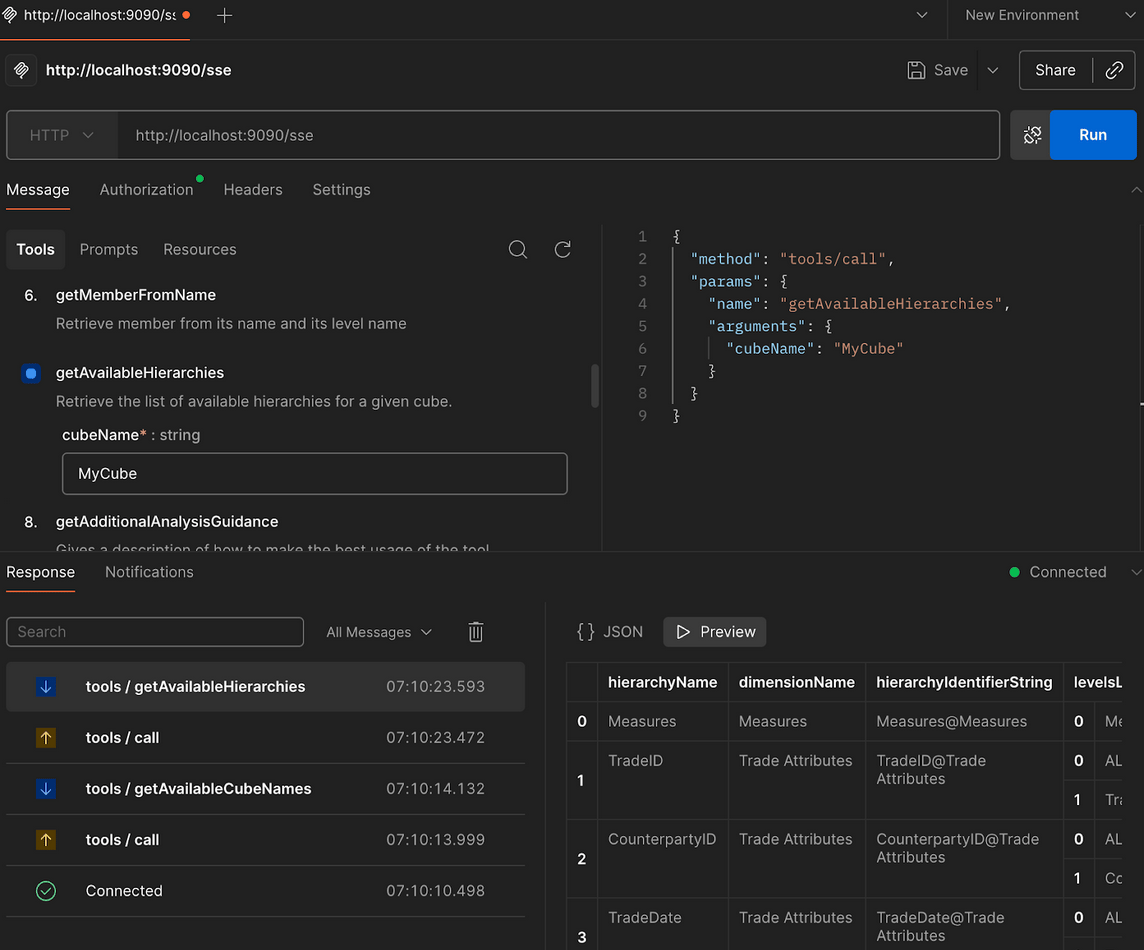
How to make tool requests
After discovering available tools, make requests to execute specific tools. Configure the request with the following components:- Method: POST
- URL: The MCP Server endpoint
- Headers:
Content-Type: application/jsonAccept: text/event-stream(for SSE endpoints)
- Body: JSON payload with tool name and parameters
What does an example request look like?
The following example shows a typical tool execution request:tool-name: The name of the tool to executeparameter1,parameter2: Tool-specific parametersvalue1,value2: Parameter values
How to interpret responses
The MCP Server returns responses in JSON-RPC format. A successful response includes:- Response data in the
resultfield - Request ID matching the original request
- HTTP status code 200
- Error details in the
errorfield - Error code and message
- HTTP error status code
Common use cases
Once connected, Postman can be used to test the following:- Verify MCP Server availability
- List all available tools
- Execute tools with different parameters
- Test authentication and authorization
- Validate custom tool implementations
- Debug integration issues
Troubleshooting
If connections fail, check the following:- The Atoti application is running
- The MCP Server endpoint is accessible
- Authentication credentials are correct
- The request format matches JSON-RPC specifications
- Firewall or network settings allow connections
Related reading
After testing with Postman, consider:- How the Atoti MCP Server works, and how to set it up in Java or in Python
- MCP credentials page to generate a Bearer token
- Connect with Claude for AI-powered interaction
- Add custom tools to extend functionality