Changelog

Atoti Admin UI version numbers mirror those of Atoti UI. Changes are most often delivered in Atoti UI alone, with no modifications to Admin UI.
Please refer to the release notes to see all the user facing changes.

5.2.22

2026-04-30

Added

  • SHERAF-864 - New Query history tab to visualize the server managed query history.

5.2.21

2026-04-01

5.2.20

2026-03-02

5.2.19

2026-01-30

5.2.18

2025-12-31

5.2.17

2025-12-09

5.2.16

2025-12-01

5.2.15

2025-10-31

5.2.14

2025-09-30

Fixed

  • ADMINUI-205 - Tables in the Database tab not being sorted alphabetically by default.

5.2.13

2025-08-29

Fixed

  • ADMINUI-201 - The filter popover in the Database tab not showing all the available values. This fix requires a connection to an Atoti Server version 6.1.12+.

5.2.12

2025-07-31

Changed

  • ADMINUI-49 - Searching for a table in the Database tab includes tables that have a field that matches the search.

5.2.11

2025-07-04

5.2.10

2025-06-30

Added

  • ADMINUI-197 - Tooltips to measure options in the Measure Lineage tab.

Changed

  • ADMINUI-197 - The name of the selected measure wraps when it doesn't fit in the Measure Lineage tab.

Fixed

  • ADMINUI-197 - Measure names overflowing the measure selector in the Measure Lineage tab, making it impossible to remove these measures.

5.2.9

2025-05-28

5.2.8

2025-04-30

Added

  • ADMINUI-186 Ability for users with role ROLE_ADMIN to initialize the /ui folder in the Content tab of Atoti Admin UI, even if they do not have role ROLE_CS_ROOT. In particular, this fixes 404 errors received by such admin users when trying to update organization settings or permissions in Atoti Admin UI.

Fixed

  • UI-10097 The logos in the public folder are not taken into account when starting the application in dev mode by running npm atoti-ui-cli start-application.

5.2.7

2025-04-01

Added

5.2.6

2025-02-28

Added

  • ADMINUI-102 Filtering on a column in a Database table supports server-side search if the underlying database supports it.
  • ADMINUI-102 Support for custom values when filtering a numerical or date column of a Database table.

Fixed

  • ADMINUI-102 When filtering a column of a Database table, all values are presented (instead of only the ones in the view).
  • ADMINUI-177 The database table remains empty when the username contains the character "\".

5.2.4

2025-01-09

5.2.3

2024-12-02

Fixed

  • Inability to create, delete or import files and folders inside other folders when connected to an Atoti server whose version is less than 6.0.0.

5.2.2

2024-10-11

Added

  • Visual feedback when the import or export functions fail.

Fixed

  • Importing large amounts of content causes the UI to hang.
  • Inability to delete a folder which contains multiple open files in the Content tab.
  • In the Content tab, deleting a folder at the root of the tree causes an unnamed folder to appear at the top of the tree.

5.2.1

2024-10-01

Added

  • Ability to sort table columns in the Database tab.
  • Faster initial loading time of the Content tab.

5.2.0

2024-08-30

Fixed

  • "Cannot fetch data from database tables, because window.env.atotiServers is not defined. Check your env.js file" error when reloading the page on the Database tab.
  • Upon closing a file with unsaved changes, clicking the Save button in the confirmation popup does not actually save the changes.

5.1.10

2024-06-28

Added

  • Support for Atoti Server 6.1.

5.1.9

2024-05-31

Added

  • Ability to restrict context values visibility using permissions.

5.1.8

2024-05-03

Fixed

  • Atoti Admin UI stays stuck on its loading screen when connected to a content server but no Atoti server (when activePivotServers is left undefined in env.js).

5.1.7

2024-03-29

Added

  • Ability to refresh the files in the Content tab through a refresh button. To refresh all of the content, right click in the area below the tree of files or click the refresh button above the tree. To refresh the content for a specific folder or file, right click on the folder or file.
  • When the content files or database tables are loading, visual indications hint it to the user.

Fixed

  • Inability to delete calculated measures that contain special characters in the name.

5.1.6

2024-01-31

Added

  • Ability to edit permissions through a graphical user interface, on top of being able to edit them as JSON.

5.1.5

2023-12-29

Fixed

  • Application crashing when clicking the Properties menu item.
  • jwtServer: myServerUrl opt-in in env.js to fix the double login popup issue, and the inability to make Atoti Admin UI work with Kerberos.

5.1.4

2023-12-05

Added

  • Ability to edit settings through a graphical user interface, on top of being able to edit them as JSON.

Fixed

  • Unable to deploy on an Atoti server without a content server.

5.1.3

2023-10-02

Fixed

  • Loading background failing to show in the login page.
  • The servers are unexpectedly not notified when the user logs out.

5.1.2

2023-08-31

Fixed

  • When users deselect all members in the tree of the filter popover in the Database and then switch to Type or paste members mode, the Apply button remains disabled even after they type or paste members.
  • Clicking in the text area within FilterPopover makes it lose its focus.
  • The Database tab flashes and the current search is unexpectedly cleared when the user selects another table from the list of tables on the left.
  • Headers disappear unexpectedly in the Database tab when the table is filtered in a too restrictive way, disallowing the user from editing filters.
  • When the user attempts to visualize an empty table in the Database tab, they are stuck with a loading background, and a never-ending loop of network calls behind the scenes.

5.1.1

2023-02-28

Added

  • Ability to type column values to filter on in the Database Viewer.

Changed

  • Filtering in the Database Viewer is done on the server side. In particular, pagination adapts to the filtered data.

Removed

  • window.env.isPrometheusEndpointEnabled

Fixed

  • Tables unexpectedly scroll all the way back left when users click a cell in the Database Viewer.
  • Too many pages are displayed in the Database Viewer pagination, and clicking one of these pages yields an empty table.

5.1.0

Added

  • Compatibility with Atoti UI 5.1.0.

5.0.11

Added

  • In the Content page, the Import and Export menu items also work at the root of the tree.

5.0.10

Fixed

  • Updates on files whose names include special characters.

5.0.9

Added

  • Support for deployment on a remote 6.0 content server.

Fixed

  • 404 error when fetching the loading background.

5.0.8

Added

  • Support for deployment on a standalone 6.0 content server.

5.0.7

Added

  • Support for Atoti Server 6.0.0.

5.0.6

Added

  • Ability to search through table names under Database.
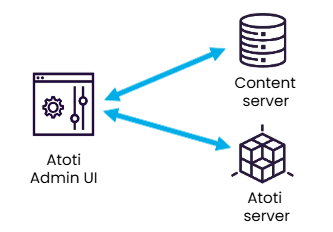
  • Ability to use Atoti+ Admin to administrate a remote content server. To do it, remove activePivotServers from your env.js. This makes the Database page inaccessible.
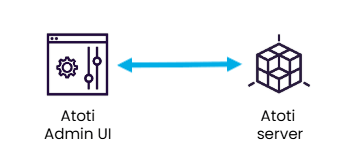
  • Ability to use Atoti+ Admin to administrate an Atoti server with no content server. To do it, remove contentServerURL and contentServerVersion from your env.js. This makes the Content page inaccessible.

Fixed

  • Blank page and Cannot read properties of undefined (reading 'versions') error in console when the Content Server is at a different URL than the Atoti server.

5.0.5

Fixed

  • Blank page when the cube does not contain a branch named "master".

5.0.4

Changed

  • JSON file contents are formatted.

5.0.2

Added

  • Initialize UI folder button at the bottom of the left bar, only visible when there is no UI folder and allowing to create this folder easily.

5.0.1

Added

  • User menu in the header, allowing to see which user is connected and to logout.
  • Support serving admin-ui from a remote content server.
  • New option to opt out of trying to hit the Prometheus endpoint for 5.11+ servers where it is not enabled. Set window.env.isPrometheusEndpointEnabled to false in your env.js if applicable.

Changed

  • The content of non-numeric cells is left-aligned.

Fixed

  • Resizing a table column unexpectedly changes the width of other columns.
  • Unable to scroll the list of database tables.
  • Unable to edit file permissions in the content manager.
  • The last selected menu item remains displayed as active when re-opening a context menu in the content manager.

5.0.0

Changed

  • The project becomes Atoti+ Admin: it offers both the Content Manager and a new view to explore the database, called the Database Viewer.

2.0.1

Fixed

  • Real time updates and custom parsing on the /ui/bookmarks and /ui/settings folders are removed, as they were causing a bug when these folders don't exist, in particular when the content server is used for Atoti UI 5.0 applications.

1.1.2

Fixed

  • Fix the import, changing the URL of this operation.

1.1.1

Fixed

  • Correctly encode the path to files in the URLs.

1.1.0

Added

  • Offers a new system to export from and import to the server entire Content. This is allowed as a raw feature, where one must past the content to import. It is not possible yet to load content from a file. When importing the data, one can ask to first clean the directory.

1.0.1

Fixed

  • Correct REST calls to get metadata and permissions.

1.0.0

This new base for the UI creates a new interface to access and modify the information stored in a Content Server. This mainly focuses on bringing lazy-loading of the available entries and uses modern technologies.