Introduction to Atoti Admin UI
What is Atoti Admin UI?
Atoti Admin UI is a web-based interface that simplifies the administration and monitoring of your Atoti server applications.
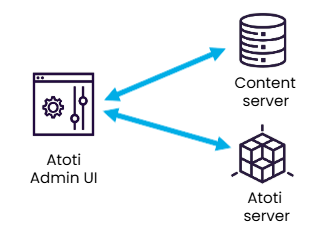
Admin UI connects to an Atoti server and a Content server.
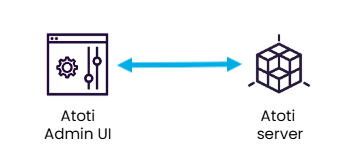
Most of the time Atoti Server is also the Content server.
What can be done with Atoti Admin UI?
Inspect and manage the Content server
Content Service is served by your Atoti application. This hierarchical key-value store is used by various components to persist data.
- Atoti Server
- User content data (KPI, calculated members and named sets)
- Branch permissions
- Content service API version
- User locale
- Atoti Admin UI
- User settings
- Atoti UI
- User permissions
- User settings
- User content data (dashboards, filters...)
The administration interface allows to :
- Inspect the data stored into the content server
- Manage the users permissions, preferences and content data for Atoti UI
- Manage the user content data for Atoti Server
Inspect the database content
The Database tab lets you inspect the content of the database that Atoti Server uses for aggregation. This is especially useful for inspecting in-memory store content.
Explore Measure lineage
Explore measure dependencies and attributes to help with debugging, auditing, and optimizing calculation logic.
What is the relationship to other Atoti products?
Atoti Admin UI is part of the Atoti platform and requires an existing Atoti application built on Atoti Server. It operates alongside applications configured using the Atoti Java SDK or the Atoti Python SDK, and provides an operational interface for environments where Atoti UI is deployed.
Atoti Admin UI does not affect how data is modeled or calculated. It provides visibility and control over configuration, permissions, and data state without requiring changes to the application itself.