Indexing the Stores
What is an Index
An index allows better search performances. When a column is indexed, it allows knowing in which records a given value exists, without having to actually read all records in the column.
There are two types of indexes based on their usage:
- Unique index: an index that allows to ensure uniqueness of a given value. Used for the key fields of a store.
- Secondary index: an index that allows repetition of the same value in different records. Used "only" for query performance.
Orthogonally to the unique/secondary nature of an index, there are two types of indexes based on the structure of the data they represent:
- Single column index: an index based on the value of a single column in a store
- Composite index: an index based on the combination of values from several columns in a store
A unique index is automatically created over all the key fields of a store, allowing quick searching of a record by its key, and enforcing key uniqueness.
In some cases, queries might hit the datastore directly, for instance when using JUST_IN_TIME aggregates provider,
or when project code is written to directly query the stores.
In such cases, additional indexes on other columns or groups of columns may be needed to improve performance.
Key Fields Index
When a store is created with one key field, a unique, single column index is automatically created for that one field.
When a store is created with more than one key field, a unique, composite index that encompasses all these key fields is automatically created. The composite key ensures uniqueness in the index and in the store.
The following example shows a key comprising three key fields.
StoreDescription.builder()
    .withStoreName("Store")
    .withField("ID_1")
    .asKeyField()
    .withField("ID_2")
    .asKeyField()
    .withField("ID_3")
    .asKeyField()
As the unique key on this store is a combination of ID_1, ID_2, and ID_3, the composite index will only be used if all three are present in a query.
Index on Individual Columns
If a single column is the key field of a store, it is automatically indexed. But one might also want to index an individual column, even if it is not a key field: indexing allows faster searches when a search is done directly on an indexed column.
The following example shows a field called "A", which isn't a key field but requires an index for faster searching.
StoreDescription.builder()
    .withStoreName("Store")
    .withField("ID")
    .asKeyField()
    .withField("A")
    .indexed()
Contrary to the automatically created indexes for key fields, the indexes created with the indexed() method are
secondary indexes (do not ensure uniqueness).
If a key field needs to be indexed (for example, there are two key fields so a composite index is created,
but one key field is often queried alone), it is also possible to use the indexed() method:
StoreDescription.builder()
    .withStoreName("Store")
    .withField("ID_1")
    .asKeyField()
    .withField("ID_2")
    .indexed()
    .asKeyField()
Composite Index
When several columns are frequently queried together, an index that combines these columns can be defined using
the withIndexOn() method, as shown below.
StoreDescription.builder()
    .withStoreName("Store")
    .withField("ID")
    .asKeyField()
    .withField("A")
    .withField("B")
    .withField("C")
    .withField("D")
    .withIndexOn("A", "B", "C")
Queries that then specify all three values of A, B, and C will use this index.
Queries that only specify values A and C will not use this index, as a third value is required. If there are a lot of searches involving just A and C, it may be worth adding another composite index just for those two fields.
Log Query Plans
When query performance needs to be investigated, the server can be set to log more detailed information about which indexes, if any, are being used.
The associated logger atoti.server.datastore.query (see the logger hierarchy) can be (temporarily) set to the
TRACE (logback) or FINER (jul) level to log such query plans.
The following sample log file output shows that a query has effectively done a table scan for the three columns:
Search on store Store, composed of:
    Scan of field A
    Scan of field B
    Scan of field C
When analyzing typical usage, if such scans occur frequently, there is a good case to add a composite index on columns A, B, and C.
The output after adding such a composite index may then appear as follows, showing that the index is being used:
Secondary index lookup on (A, B, C)
Creating indexes will incur a memory usage overhead, so as with traditional database design, they should only be added for the most commonly-executed queries.
Having too many indexes could impact data loading times as there is also an overhead of maintaining those indexes.
Automatic Indexing
Atoti automatically creates a unique index containing all the key fields.
It will also create a secondary index on all fields used in a reference between two stores.
For example, if Store-1 references Store-2 through fields A, B, and C, then a secondary composite index using
A, B, and C is automatically created on Store-1. A unique index on fields A, B, C will also be created for Store-2.
Consequently, when analyzing queries for scans and indexes used, a secondary index lookup may appear to be performed even if no explicit index for those fields has been created.
This automatic index creation can be overridden by calling dontIndexOwner() on the store reference builder.
Calling dontIndexOwner() will have several effects:
- It will reduce the memory footprint.
- It will speed up commits in the owner store.
- It will slow down the queries on those fields.
- It will slow down the propagation of updates from the target store to the owner store, and hence slow down the commit when committing in the target store.
The automatic indexes should be kept, unless issues with them are encountered.
Store Index Recommendation
Atoti provides a utility that helps create the necessary indexes for a project, based on the actual usage when querying the stores.
This utility is available via MBeans, so it must be accessed via a tool which supports them, such as JConsole or jvisualvm. The screenshots provided below use JConsole.
After launching JConsole (or an equivalent tool) and connecting to the application, go to the MBeans tab and
navigate to com.activeviam > Datastore > Datastore schema > Operations. The void enableStoreIndexRecommendation()
operation is available there.
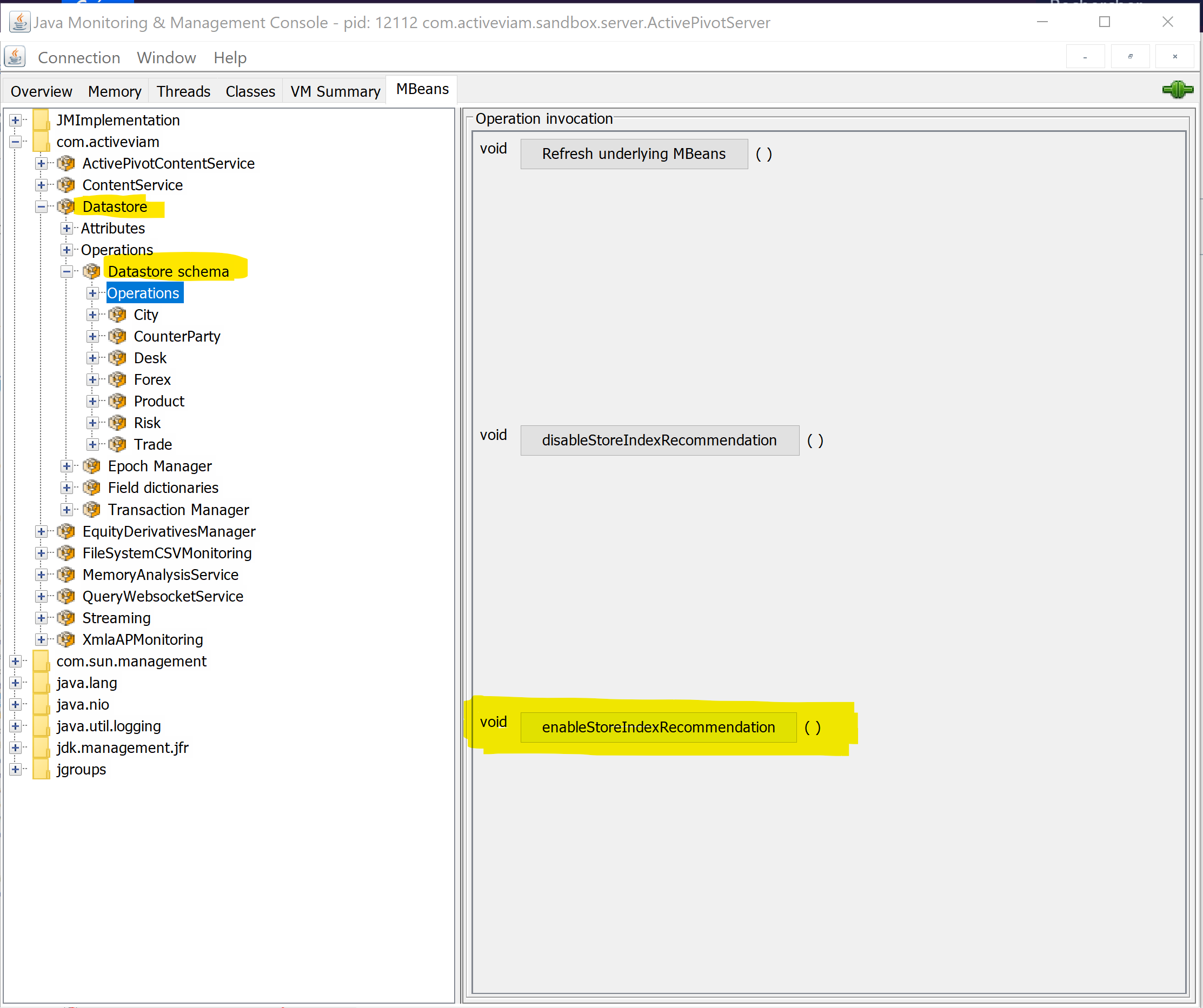
Launching this operation allows the datastore to register data about the queries it receives in order to produce index recommendations. Clicking on the operation does not appear to do anything at first, except for a confirmation popup.
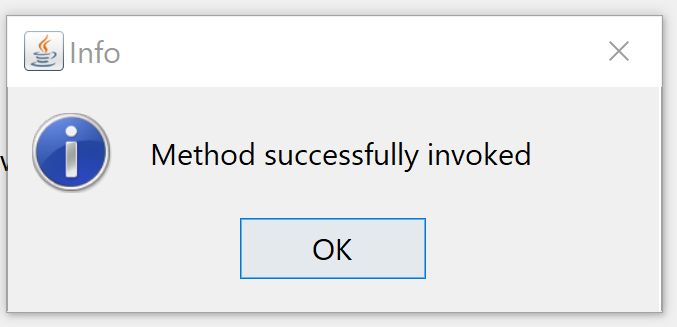
Then, run the application with a typical workload of queries and operations (such as update-where). The datastore will register data about how each store is queried, and will be able to produce indexing recommendations for each store.
Navigate to each individual store in the Datastore schema MBean, and look for the IndexRecommendations attribute.
If the store index recommendation was not enabled, or if the provided workload did not mandate using indexes on
that store, only an empty array will be displayed.
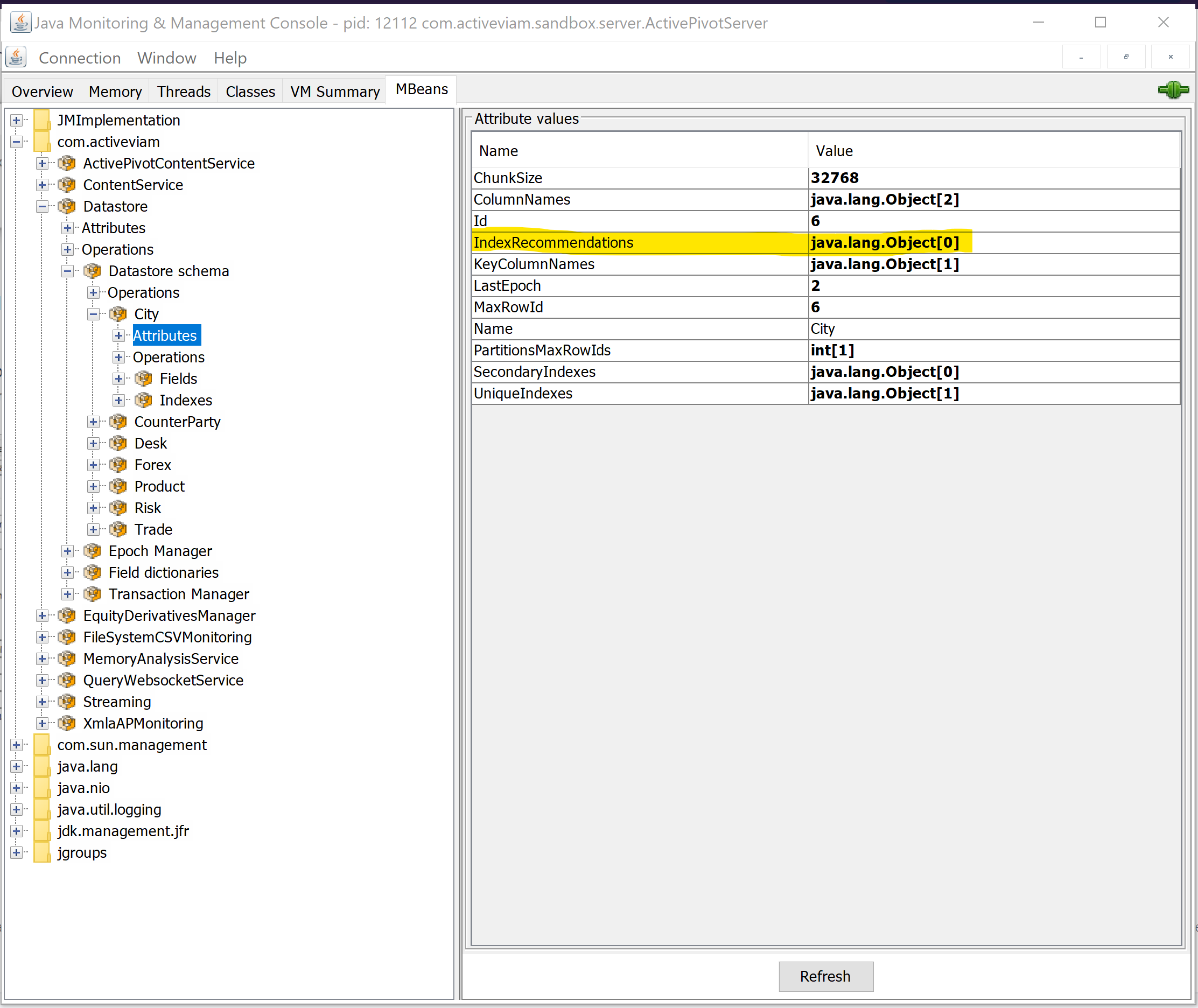
However, if there are some recommendations for indexes on the store, based on the workload that happened since enabling the index recommendation feature, a non-empty array will be displayed and can be expanded by double-clicking on the value:

Note that each element of the array presents a field name and a number. The field name is the field on which creating an index is recommended, while the number represents the number of times an index on that field would have been useful for the queries that were inspected since enabling the index recommendation feature. Recommendations are ordered with that number descending, so that attention can be focused on the fields that are most frequently queried. The closer the test workload is to real usage, the more useful the recommendations!
These recommendations are based on the actual queries that hit each individual store. Thus, only queries that are directly made to the datastore or aggregates / MDX queries that hit the JIT (Just In Time) Aggregates Provider are taken into account.
Index Memory Management
Datastore indexes significantly improve query performance but come with a high memory cost. Two complementary options are offered to manage it: compressed indexes at build time, and index rebuilding at runtime.
Why does index memory usage grow over time
A datastore index consists of a dictionary plus additional arrays:
- Unique index: one integer array with the same size as the index dictionary.
- Secondary index: one integer array with the same size as the index dictionary, plus another integer array sized accordingly to the maximum row ID of the partition.
Because indexes build their own dictionaries on top of the field dictionaries, their size keeps growing over time. Even when only the latest application version is kept, the index dictionaries, and thus their associated arrays, continue to expand.
Compress indexes
To reduce the memory footprint of a store's indexes, .compressIndexes() can be called on the store description
builder. Indexes are then stored in a compressed format, at the cost of additional computation on reads (decompression,
and potentially extra memory accesses when looking up a key).
Compression is disabled by default. It should be enabled only when memory issues are encountered on a store that has many or large indexes.
Rebuild indexes
Indexes can be rebuilt at runtime to reclaim memory. This process recomputes the index data structures and only includes active (non-deleted) records. As a result, dictionary sizes may shrink, reducing the size of the integer arrays as well.
To rebuild all indexes (key, unique, and secondary) for a store:
datastore.rebuildIndexes(storeName);
To rebuild an index on specific fields:
datastore.rebuildIndex(storeName, indexedFields);
Rebuilding indexes retains only the latest version per branch. Historical datastore versions will be permanently lost and cannot be recovered.
When to rebuild indexes
Rebuilding indexes is not required during normal operation. Consider rebuilding when:
- A store has undergone heavy updates or deletions.
- Index memory usage has grown excessively.
- The memory footprint needs to be optimized after loading large amounts of temporary data.