> ## Documentation Index
> Fetch the complete documentation index at: https://docs.activeviam.com/llms.txt
> Use this file to discover all available pages before exploring further.
# Trade Scaling
Atoti ISDA-SIMM provides scaling simulations to display instant recalculations of and incremental impact from simulated adjustments to a given trade or set of trades.
## Scaling factor options
You can select an existing trade and modify its size to measure the
impact of increasing or partially or completely closing down a position.
| Scaling factor | Impact on trade |
| -------------- | --------------------------------- |
| > 1 | Adjusts the trade up |
| \< 1 | Adjusts the trade down |
| negative | Inverts the trade risk profile |
| zero (0) | Closes down the position entirely |
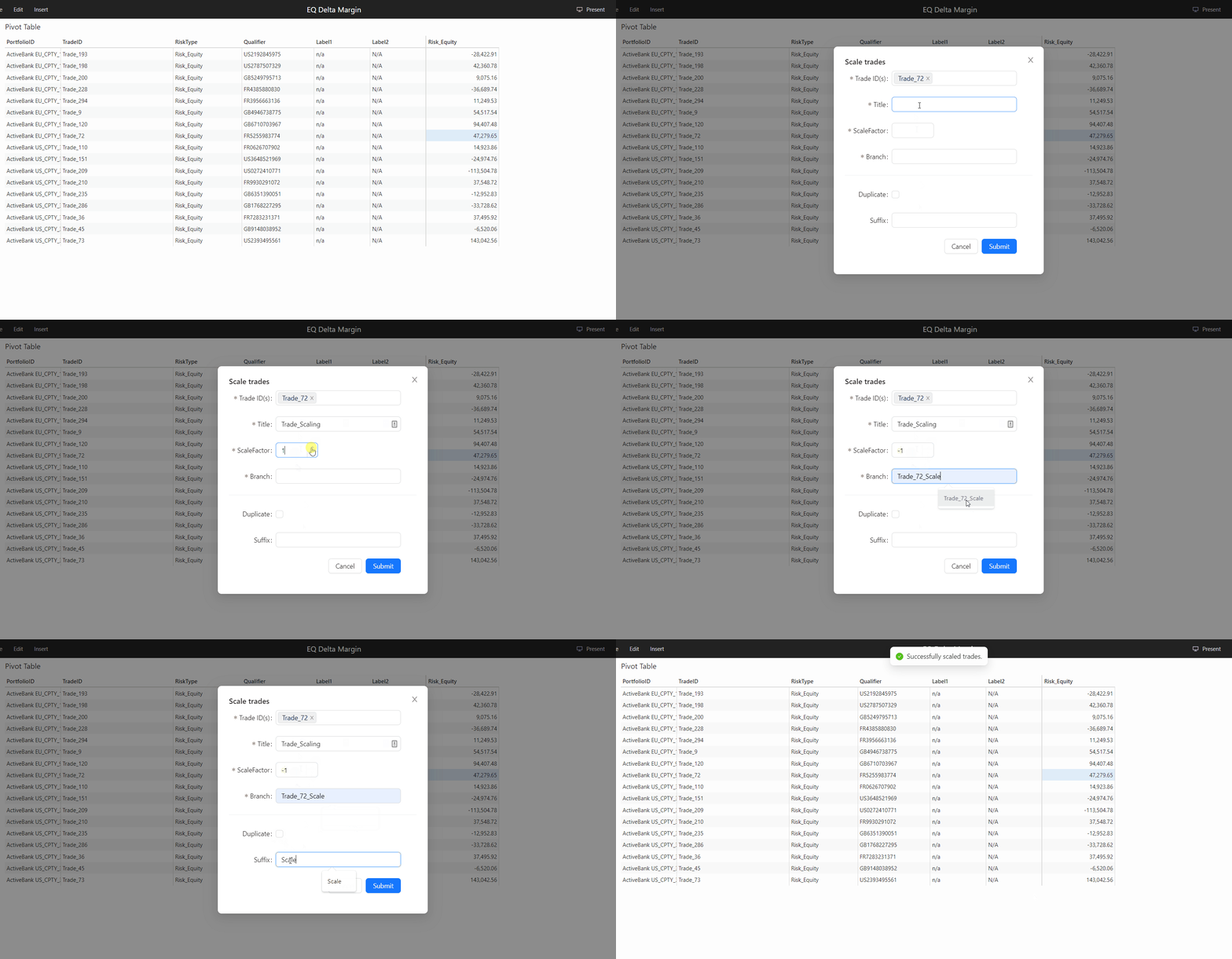
## Trade scaling
1. Select the TradeId you want to work on. This can be from any pivot
table that has the TradeId dimension. Right-click and select
**Scale Trade**.
The **Scale trades** dialog box is displayed. Fill in the following information:
| Field | Description |
| ----------- | ---------------------------------------------------------------------------------------------------------------------------------------------------------------------------------------------------------------------------------- |
| TradeID | The ID of the selected Trade(s). |
| Title | A short caption describing the meaning of the trade scale task. |
| ScaleFactor | The factor by which to multiply the underlying trade. See [Scaling factor options](#scaling-factor-options). |
| Branch | The name of the branch on which to save the scaling result. If the branch does not exist, a new branch will be created. |
| Duplicate | Check this checkbox if you want to duplicate the trade and scale its copy. Since the new duplicated trade is a completely new trade, it is only contained in the new branch and does not appear on the master branch. |
| Suffix | When copying the trade, you can specify the suffix to be added to the copy's name. |
4. Click **Submit**.
In the Pivot table, if the Epoch dimension is selected, the new
branch you created is displayed adjacent to the master. The new
branch contains the same data as the master branch except for the
selected trade, which is adjusted by the scaling you applied.
5. To manage your branches and the simulations on them, use the [WhatIf Manager](../what-if#whatif-manager).
### Example
Here's an example of scaling a trade: