> ## Documentation Index
> Fetch the complete documentation index at: https://docs.activeviam.com/llms.txt
> Use this file to discover all available pages before exploring further.
# Admin UI
## Overview
The Admin UI is a user interface to view the contents of the Content Server and the datastore. For more information on
the Content Server, see Atoti Server documentation [Atoti Server Content Server](https://docs.activeviam.com/products/atoti/server/6.0.11/docs/content_server/cs_overview/#admin-ui)
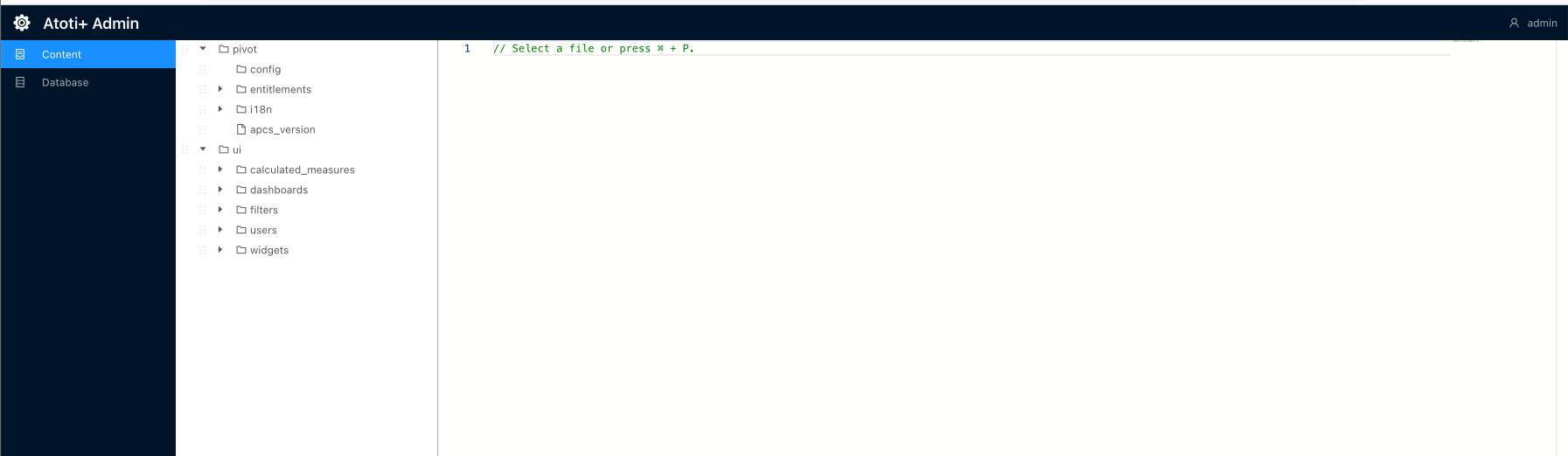 ## Set up the Admin UI
To set up the Admin UI:
1. Import the admin-ui dependency into the `simm-starter` module:
```xml theme={"languages":{"custom":["/engine/python-sdk/6.2/languages/pycon.tmLanguage.json"]}}
com.activeviam.tech
admin-ui
5.1.0
```
2. Create a new directory, `admin-ui`, within`./simm-starter/src/main/resources/static`.
3. Add this `env*.js` file to `/static/admin-ui` directory:
```javascript theme={"languages":{"custom":["/engine/python-sdk/6.2/languages/pycon.tmLanguage.json"]}}
var baseUrl = (window.serverUrl =
location.protocol + "//" + window.location.host + "/simm-starter");
var atotiServerVersion = "5.10.x";
window.env = {
contentServerUrl: baseUrl,
contentServerVersion: atotiServerVersion,
activePivotServers: {
SIMM: {
url: baseUrl,
version: atotiServerVersion,
},
},
};
```
4. Import this `env*.js` as a static resource. This can be accomplished by registering a new static resource handler to our
ResourceHandlerRegistry.
## Set up the Admin UI
To set up the Admin UI:
1. Import the admin-ui dependency into the `simm-starter` module:
```xml theme={"languages":{"custom":["/engine/python-sdk/6.2/languages/pycon.tmLanguage.json"]}}
com.activeviam.tech
admin-ui
5.1.0
```
2. Create a new directory, `admin-ui`, within`./simm-starter/src/main/resources/static`.
3. Add this `env*.js` file to `/static/admin-ui` directory:
```javascript theme={"languages":{"custom":["/engine/python-sdk/6.2/languages/pycon.tmLanguage.json"]}}
var baseUrl = (window.serverUrl =
location.protocol + "//" + window.location.host + "/simm-starter");
var atotiServerVersion = "5.10.x";
window.env = {
contentServerUrl: baseUrl,
contentServerVersion: atotiServerVersion,
activePivotServers: {
SIMM: {
url: baseUrl,
version: atotiServerVersion,
},
},
};
```
4. Import this `env*.js` as a static resource. This can be accomplished by registering a new static resource handler to our
ResourceHandlerRegistry.
Here is a snippet of how to add a new static resource with the ResourceHandlerRegistry fluent API:
```java theme={"languages":{"custom":["/engine/python-sdk/6.2/languages/pycon.tmLanguage.json"]}}
public class StaticResourcesHandler implements WebMvcConfigurer {
// Env.js location within the project
public static final String ADMIN_UI_DIRECTORY = "/static/admin-ui/";
// The Admin UI url path
public static final String ADMIN_UI_PATH = "/admin/ui/";
@Override
public void addResourceHandlers(final ResourceHandlerRegistry registry) {
LoggerFactory.getLogger(StaticResourcesHandler.class.getCanonicalName()).info("Loading static resources");
// Adding the Admin UI as a static resource
registry.addResourceHandler(ADMIN_UI_PATH + "env*.js").
addResourceLocations("classpath:" + ADMIN_UI_DIRECTORY).
resourceChain(true).
// Resolve env.js to the temp file with the custom port
// Could also just use {window.host}:{window.port} ?
addResolver(new EnvJsResourceResolver(tempEnvJsGenerator("classpath:" + ADMIN_UI_DIRECTORY))).
addResolver(new EncodedResourceResolver()).
addResolver(new PathResourceResolver());
}
}
```
5. Update the resource location in `ContentServerResourceServerConfig` configuration class to point to the new static resource.
In this case, we are pointing to `admin/ui` URL path. This step will only applies if the Atoti ISDA-SIMM solution is NOT
on Atoti Server 6.0.
```java theme={"languages":{"custom":["/engine/python-sdk/6.2/languages/pycon.tmLanguage.json"]}}
@Conditional(UseContentServerUI.class)
@Configuration
public class ContentServerResourceServerConfig extends ASpringResourceServerConfig {
/** The namespace of the ContentServer web application. */
public static final String NAMESPACE = "admin/ui";
/** Constructor. */
public ContentServerResourceServerConfig() {
super("/" + NAMESPACE);
}
@Override
protected void registerRedirections(final ResourceRegistry registry) {
super.registerRedirections(registry);
// Redirect from /content to the UI
registry.redirectTo("ui", "/admin", "/admin/");
}
/**
* Registers resources to serve.
*
* @param registry registry to use
*/
@Override
protected void registerResources(final ResourceRegistry registry) {
super.registerResources(registry);
// ContentServer web app also serves request to the root, so that the redirection from root to
// ContentServer works
registry.serve("/", "/admin")
.addResourceLocations(
"/",
"classpath:META-INF/resources/")
.setCacheControl(getDefaultCacheControl());
}
/**
* Gets the extensions of files to serve.
* @return all files extensions
*/
@Override
public Set getServedExtensions() {
return QfsArrays.mutableSet(
// Default HTML files
"html", "js", "css", "map", "json",
// Image extensions
"png", "jpg", "gif", "ico",
// Font extensions
"eot", "svg", "ttf", "woff", "woff2"
);
}
@Override
public Set getServedDirectories() {
return QfsArrays.mutableSet("/");
}
@Override
public Set getResourceLocations() {
return QfsArrays.mutableSet(
"/admin/", // index.html, favicon.ico, etc.
"classpath:META-INF/resources/webjars/admin-ui/"); // Admin UI jar assets
}
}
```
6. See "Access the Admin UI" section to navigate to the Admin UI.
## Access the Admin UI
To access the Admin UI, after starting up Atoti ISDA-SIMM, navigate to the URL below and enter your credentials.
`https://localhost:12000/simm-starter/admin/ui/index.html`