> ## Documentation Index
> Fetch the complete documentation index at: https://docs.activeviam.com/llms.txt
> Use this file to discover all available pages before exploring further.

# Sign-Off Analysis Hierarchy

The Sign-Off Analysis Hierarchy reflects the parameters of the Sign-off process managed by the Sign-off server.

## Analysis Hierarchy content

The Analysis hierarchy is three levels deep. The hierarchy is slicing, meaning it has no ALL Member level. By default, the selected level is \[INTRA-DAY].

<table><thead><tr><th>Level</th><th>Depth</th><th>Description</th><th>Members</th></tr></thead><tbody><tr><td>Feed</td><td>1</td><td>How the data are updated</td><td>INTRA-DAY: the default member, the whole cube data at the latest value.<br />TOTAL REVIEWABLE: the whole data with frozen perimeters under review.</td></tr><tr><td>Status</td><td>2</td><td>The current sign-off task status</td><td>For example, “UNAPPROVED”</td></tr><tr><td>Task</td><td>3</td><td>The unique sign-off task name</td><td>For example: “Sensi BSM::2018-09-28”</td></tr></tbody></table>

The hierarchy depth depends on the information to display. The member \[INTRA-DAY] has no deeper level. Additionally, the path \[TOTAL REVIEWABLE].\[UNAPPROVED] has no level 3.

### Example

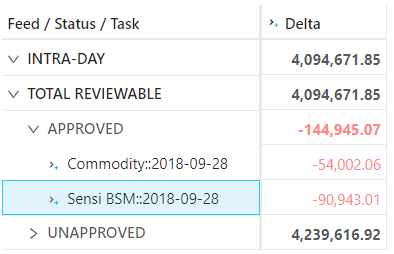
Here is an example of the Analysis Hierarchy structure:

<Frame>
  <img src="https://mintcdn.com/activeviam/gaoX7QceXzVFVfYn/solutions/market-risk/6.0/images/sign-off-analysis-hierarchy.png?fit=max&auto=format&n=gaoX7QceXzVFVfYn&q=85&s=3796b2c601f97c0769adf6a91ceb8e6d" alt="" width="394" height="254" data-path="solutions/market-risk/6.0/images/sign-off-analysis-hierarchy.png" />
</Frame>

<table><thead><tr><th>Feed / Status / Task</th><th>Sample Measure</th><th>Comment</th></tr></thead><tbody><tr><td>INTRA-DAY</td><td>16.2</td><td>Default member, it displays the latest content of the cube</td></tr><tr><td>TOTAL REVIEWABLE</td><td>16.0</td><td>Sign-off view, the data belonging to an initiated sign-off task is frozen</td></tr><tr><td>> APPROVED</td><td>3.0</td><td>A specific status in the sign-off process, the level aggregates all the tasks with the same status</td></tr><tr><td>> > Commodity::2018-09-28</td><td>1.0</td><td>A sign-off task with the “APPROVED” status</td></tr><tr><td>> > Sensi BSM::2018-09-28</td><td>2.0</td><td>Another sign-off task with the “APPROVED” status</td></tr><tr><td>> INITIATED</td><td>4.0</td><td>A specific status in the sign-off process, the level aggregates all the tasks with the same status</td></tr><tr><td>> > Bonds::2018-09-28</td><td>4.0</td><td>A sign-off task with the “INITIATED” status</td></tr><tr><td>> UNAPPROVED</td><td>9.0</td><td>Default status of the perimeter not yet included in a sign-off process. It uses the latest cube data</td></tr></tbody></table>

## Setup

You can customize the analysis hierarchy using the configuration files.

<table><thead><tr><th>Key</th><th>Value</th><th>Description</th></tr></thead><tbody><tr><td>mr.sign-off.<em>module</em>.<em>cubeName</em>-adjustments.feed-level</td><td>Feed\@Sign-off Status\@Sign-off Status</td><td>Name and path of the analysis hierarchy’s level 1</td></tr><tr><td>mr.sign-off.<em>module</em>.<em>cubeName</em>-adjustments.status-level</td><td>Status\@Sign-off Status\@Sign-off Status</td><td>Name and path of the analysis hierarchy’s level 2</td></tr><tr><td>mr.sign-off.<em>module</em>.<em>cubeName</em>-adjustments.task-level</td><td>Task\@Sign-off Status\@Sign-off Status</td><td>Name and path of the analysis hierarchy’s level 3</td></tr><tr><td>mr.sign-off.common.hierarchy.\*</td><td>INTRA-DAY,TOTAL REVIEWABLE,UNAPPROVED</td><td>Names of the level members generated by the cube itself, the other names come from the sign-off server</td></tr><tr><td>mr.sign-off.<em>cubeId</em>.levels</td><td>AsOfDate\@Date\@Dates,Book\@Books\@Booking,Desk\@Desks\@Booking</td><td>Levels eligible to be in a sign-off task perimeter</td></tr></tbody></table>

## Sign-off task perimeter

The analysis hierarchy uses a side store to describe the perimeter for a given sign-off task. The eligible levels for task filtering are defined by the property “sign-off.*cubeId*.levels” for each cube.
The defined levels must be a standard level associated with a store field and not an analysis hierarchy level.
All non-empty criteria for the levels will generate a filtered location with the following pattern:

**WHERE (\[dimension1].\[hierarchy1].\[level1].\[filter1], \[dimension2].\[hierarchy2].\[level2].\[filter2], …)**

## Sign-off task store

The data linked to a sign-off task are stored in a specific store per cube.

<table><thead><tr><th>CubeName</th><th>Main store</th><th>Sign-off store</th><th>cubeId</th></tr></thead><tbody><tr><td>VaR-ES Cube</td><td>TradePnLs</td><td>TradePnLsSignOff</td><td>var</td></tr><tr><td>Sensitivity Cube</td><td>TradeSensitivities</td><td>TradeSensitivitiesSignOff</td><td>sensi</td></tr><tr><td>PLCube</td><td>PnL</td><td>PnLSignOff</td><td>pnl</td></tr></tbody></table>

The sign-off store is created dynamically from the list of filterable levels and has the following format:

<table><thead><tr><th>Field</th><th>Type</th><th>Key</th><th>Description</th></tr></thead><tbody><tr><td>Name</td><td>string</td><td>X</td><td>Sign-off task name</td></tr><tr><td>Status</td><td>string</td><td /><td>Current sign-off status</td></tr><tr><td>hierarchy name 1</td><td>computed</td><td /><td>Holds the content of the 1st filter, the column name is the hierarchy name of the filtered level, and the type is computed from the base store</td></tr><tr><td>hierarchy name 2</td><td>computed</td><td /><td>Holds the content of the 2nd filter</td></tr><tr><td>…</td><td>…</td><td /><td>…</td></tr><tr><td>hierarchy name n</td><td>computed</td><td /><td>Holds the content of the last filter</td></tr></tbody></table>

## The \[\_Version] hierarchy

To support the snapshotting feature, the cube now includes a specific single-level hierarchy named “\_Version”. It is a technical, hidden hierarchy. This
hierarchy is attached to a primary key that allows the system to duplicate the fact and create a snapshot. By default, the \_Version equals LIVE, but in snapshotting,
the snapshot version is OLD and the incoming version is NEW.

<table><thead><tr><th>Feed / Status</th><th>\_Version / LIVE</th><th>\_Version / OLD</th><th>\_Version / NEW</th></tr></thead><tbody><tr><td>INTRA-DAY</td><td>X</td><td /><td>X</td></tr><tr><td>TOTAL REVIEWABLE</td><td>X</td><td>X</td><td /></tr><tr><td>> APPROVED</td><td>X</td><td>X</td><td /></tr><tr><td>> INITIATED</td><td>X</td><td>X</td><td /></tr><tr><td>> UNAPPROVED</td><td>X</td><td /><td /></tr></tbody></table>

## ETL

The \_Version field, linked to the \[\_Version] hierarchy must be filled with the correct value. The ETL achieves this with the following logic:

Does the input line belong to a task perimeter?

* No : Set the \_Version field to LIVE
* Yes :
  1. Set the \_Version field to NEW
  2. Update any existing line \_Version field to OLD

## Main store modifications

To generate the \[\_Version] hierarchy, an extra key field named \_Version is added to the base store of the cube.

## Discarding a sign-off task

When a sign-off task is discarded, all the lines tagged OLD inside the perimeter are deleted and the ones tagged NEW are re-tagged as LIVE.

## REST service

The sign-off store is never updated from the default ETL but via REST service. The REST service is intended to be called by the sign-off server. It is located at the URL
[http://localhost:10010/mr-application/services/rest/v3/sign-off](http://localhost:10010/mr-application/services/rest/v3/sign-off).
and provides three main services:

* **createSignOffTask**: create a new sign-off task on the cube.
* **updateState**: update the status of a sign-off task
* **discardSignOffTask**: remove the sign-off task

## Technical configuration

<table><thead><tr><th>Class</th><th>Kind</th><th>Usage</th></tr></thead><tbody><tr><td>SignOffAnalysisConfig</td><td>Spring configuration</td><td>Abstract configuration, when implemented it activates the analysis hierarchy on a specific cube</td></tr><tr><td>PnLSignOffAnalysisConfig</td><td>Spring configuration</td><td>Analysis hierarchy for Pnl cube</td></tr><tr><td>SensiSignOffAnalysisConfig</td><td>Spring configuration</td><td>Analysis hierarchy for Sensi cube</td></tr><tr><td>VarSignOffAnalysisConfig</td><td>Spring configuration</td><td>Analysis hierarchy for VaR cube</td></tr><tr><td>SignOffTaskConfig</td><td>Spring configuration</td><td>Analysis hierarchy for all the cubes within the ecosystem</td></tr><tr><td>SignOffAnalysisHierarchy</td><td>Analysis Hierarchy</td><td>Post-processor that builds the members of the Sign-off analysis hierarchy</td></tr><tr><td>SignOffAggregationProcedure</td><td>Aggregation Procedure</td><td>Post-processor that re-buckets the facts to the relevant members of the analysis hierarchy</td></tr><tr><td>SignOffDatastoreSchemaDescriptionPostProcessor</td><td>Schema Description Post-Processor</td><td>Post-processor that modifies the datastore schema to add the sign-off store and the main store index</td></tr><tr><td>SignOffRestService</td><td>REST service</td><td>The sign-off REST service</td></tr><tr><td>SignOffDto</td><td>DTO</td><td>The DTO used by the REST service to modify the sign-off tasks</td></tr><tr><td>SignOffTaskFinder</td><td>Bean</td><td>Provides the lookup functionality to find any sign-off task linked to a perimeter. It is used by the aggregation procedure and the tuple publisher</td></tr><tr><td>SignOffTuplePublisherFactory</td><td>Tuple Publisher</td><td>Bean that provides the tuple publisher instances for the main stores to compute the \_Version field in the ETL</td></tr></tbody></table>