> ## Documentation Index
> Fetch the complete documentation index at: https://docs.activeviam.com/llms.txt
> Use this file to discover all available pages before exploring further.
# Parameter Sets Widget
## Overview
| Plugin key | BAS Setting key |
| --------------------------------------------- | ---------------------------------- |
| `accelerator_parameter-sets-widget-container` | `bas-plugin-widget-parameter-sets` |
The Parameter Sets widget is one of the What-If tools that can be used to create a What-If in your Atoti Server project. It can be configured to connect to any parameter set datastore, and used to change the values of that datastore.
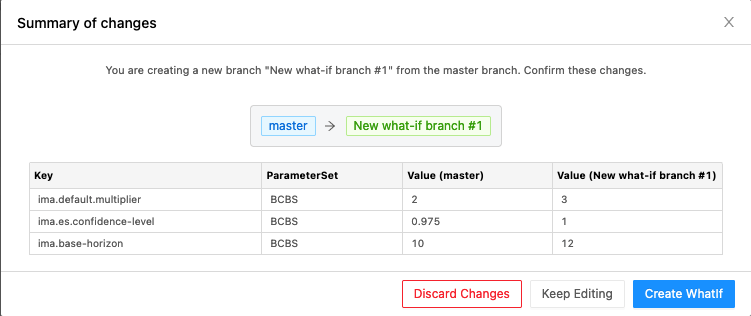
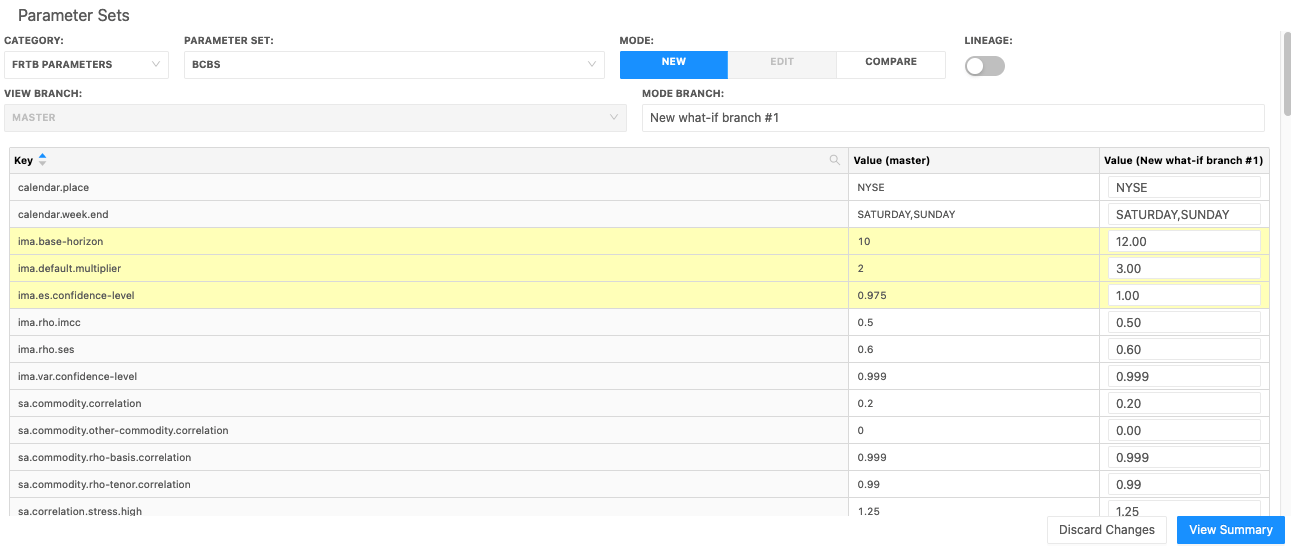 After making changes to the values in the store, click **View Summary** at the bottom to review your changes before you create your new What-If branch.
 ## Availability
| Solution | Enabled |
| ----------- | ------- |
| FRTB | ✅ |
| Market risk | ❌ |
| SIMM | ✅ |
| CVARC | ✅ |
| Limits | ❌ |
| Sign-off | ❌ |
## Settings
| Key | Type | Description | Example |
| ----------------------- | -------------------------------- | -------------------------------------------------- | ------- |
| `asOfDateDimensionName` | `string` | Name of the dimension holding the as-of dates | |
| `asOfDateHierarchyName` | `string` | Name of the hierarchy holding the as-of dates | |
| `store` | `string` | Name of the store selected by default | |
| `parameterSet` | `string` | Name of the parameter set selected by default | |
| `parameterStores` | `Record<string, string[]>` | Maps a store name to a list of editable its fields | |
## How to modify a setting
To modify a setting, you need to modify the `basSettings` that you provide to the `activate` function. The following example shows how to provide the activate function with the default `basSettings` while updating the settings for the Parameter Sets widget:
```javascript theme={"languages":{"custom":["/engine/python-sdk/0.9/languages/pycon.tmLanguage.json"]}}
import { activate, basSettings } from "@activeviam/frtb-sdk";
const frtbServerKey = "FRTB";
const customSettings = structuredClone(basSettings);
customSettings[frtbServerKey]["bas-plugin-widget-parameter-sets"].store =
"CustomDataStoreName";
activate({
configuration,
basSettings: customSettings,
});
```
## How to disable it
### Disable universally
To disable this feature for all solutions, add this line at the end of your extension’s `activate` function to unregister the plugin:
```diff theme={"languages":{"custom":["/engine/python-sdk/0.9/languages/pycon.tmLanguage.json"]}}
const extension: ExtensionModule = {
activate: async (configuration: Configuration) => {
...
+ delete configuration.pluginRegistry["widget"]["accelerator_parameter-sets-widget-container"];
}
}
```
### Disable for specific servers
To disable this feature for a given server, you must delete this feature’s settings for that server key by altering the `basSettings` parameter before calling the `activate` function.
**Example**
Disabling this feature for the `FRTB` server only:
```diff theme={"languages":{"custom":["/engine/python-sdk/0.9/languages/pycon.tmLanguage.json"]}}
+ import {produce} from "immer";
- import {activate as activateFrtb} from "@activeviam/frtb-sdk";
+ import {activate as activateFrtb, basSettings as frtbBASSettings} from "@activeviam/frtb-sdk";
import {activate as activeMarketRisk} from "@activeviam/mr-sdk";
const extension: ExtensionModule = {
activate: async (configuration: Configuration) => {
...
+ const frtbBASSettingsWithFeatureDisabled = produce(frtbBASSettings, draft => {
+ delete draft["FRTB"]["bas-plugin-widget-parameter-sets"];
+ });
- activateFrtb({configuration});
+ activateFrtb({configuration, basSetttings: frtbBASSettingsWithFeatureDisabled})
activeMarketRisk({configuration});
}
}
```
## Availability
| Solution | Enabled |
| ----------- | ------- |
| FRTB | ✅ |
| Market risk | ❌ |
| SIMM | ✅ |
| CVARC | ✅ |
| Limits | ❌ |
| Sign-off | ❌ |
## Settings
| Key | Type | Description | Example |
| ----------------------- | -------------------------------- | -------------------------------------------------- | ------- |
| `asOfDateDimensionName` | `string` | Name of the dimension holding the as-of dates | |
| `asOfDateHierarchyName` | `string` | Name of the hierarchy holding the as-of dates | |
| `store` | `string` | Name of the store selected by default | |
| `parameterSet` | `string` | Name of the parameter set selected by default | |
| `parameterStores` | `Record<string, string[]>` | Maps a store name to a list of editable its fields | |
## How to modify a setting
To modify a setting, you need to modify the `basSettings` that you provide to the `activate` function. The following example shows how to provide the activate function with the default `basSettings` while updating the settings for the Parameter Sets widget:
```javascript theme={"languages":{"custom":["/engine/python-sdk/0.9/languages/pycon.tmLanguage.json"]}}
import { activate, basSettings } from "@activeviam/frtb-sdk";
const frtbServerKey = "FRTB";
const customSettings = structuredClone(basSettings);
customSettings[frtbServerKey]["bas-plugin-widget-parameter-sets"].store =
"CustomDataStoreName";
activate({
configuration,
basSettings: customSettings,
});
```
## How to disable it
### Disable universally
To disable this feature for all solutions, add this line at the end of your extension’s `activate` function to unregister the plugin:
```diff theme={"languages":{"custom":["/engine/python-sdk/0.9/languages/pycon.tmLanguage.json"]}}
const extension: ExtensionModule = {
activate: async (configuration: Configuration) => {
...
+ delete configuration.pluginRegistry["widget"]["accelerator_parameter-sets-widget-container"];
}
}
```
### Disable for specific servers
To disable this feature for a given server, you must delete this feature’s settings for that server key by altering the `basSettings` parameter before calling the `activate` function.
**Example**
Disabling this feature for the `FRTB` server only:
```diff theme={"languages":{"custom":["/engine/python-sdk/0.9/languages/pycon.tmLanguage.json"]}}
+ import {produce} from "immer";
- import {activate as activateFrtb} from "@activeviam/frtb-sdk";
+ import {activate as activateFrtb, basSettings as frtbBASSettings} from "@activeviam/frtb-sdk";
import {activate as activeMarketRisk} from "@activeviam/mr-sdk";
const extension: ExtensionModule = {
activate: async (configuration: Configuration) => {
...
+ const frtbBASSettingsWithFeatureDisabled = produce(frtbBASSettings, draft => {
+ delete draft["FRTB"]["bas-plugin-widget-parameter-sets"];
+ });
- activateFrtb({configuration});
+ activateFrtb({configuration, basSetttings: frtbBASSettingsWithFeatureDisabled})
activeMarketRisk({configuration});
}
}
```