> ## Documentation Index
> Fetch the complete documentation index at: https://docs.activeviam.com/llms.txt
> Use this file to discover all available pages before exploring further.
# Supported What-If Table Context Menu
## Overview
| Plugin key | BAS Setting key |
| -------------------------------------- | ---------------------------------------- |
| `accelerator_plugin-supported-what-if` | `bas-plugin-menu-item-supported-what-if` |
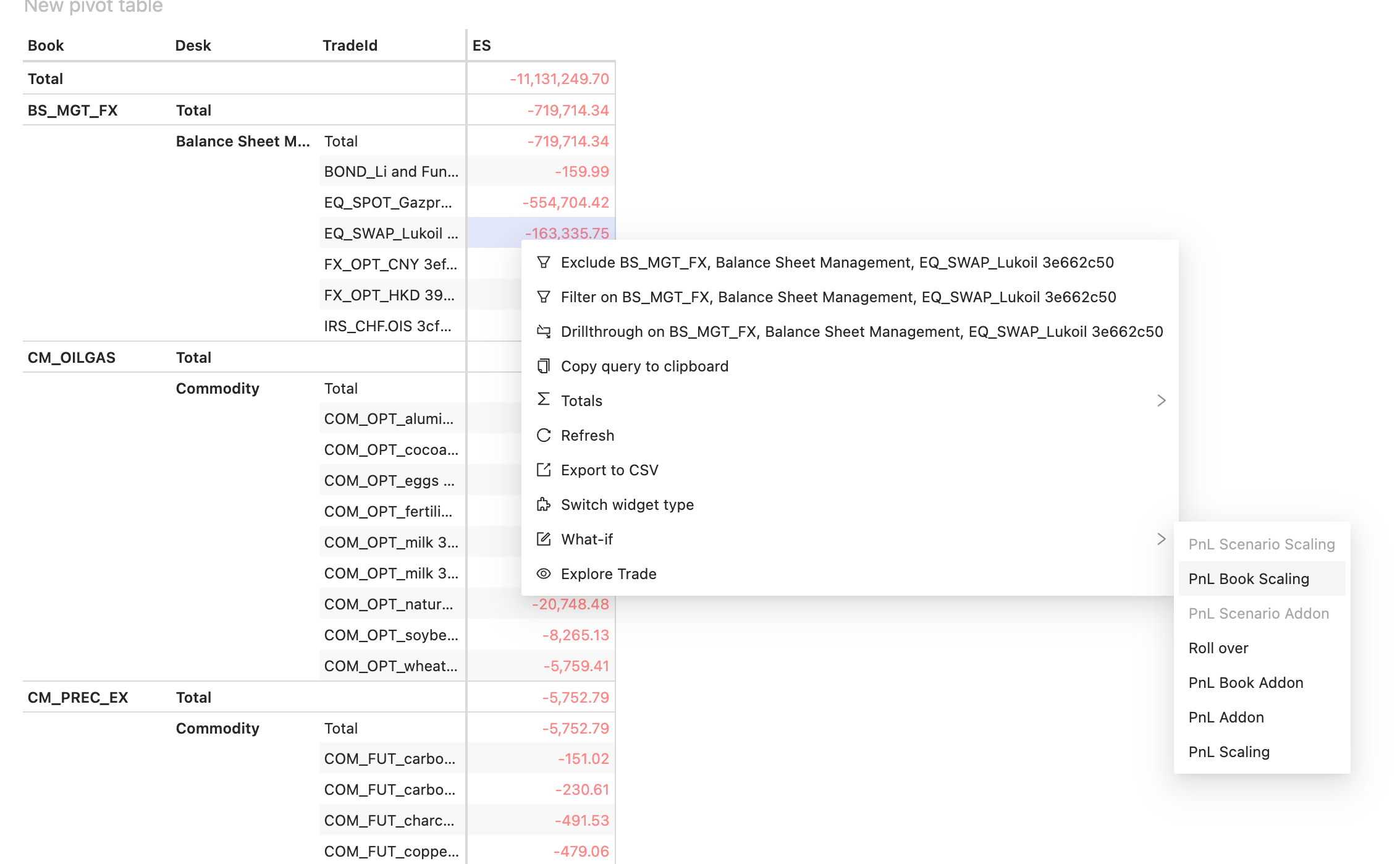
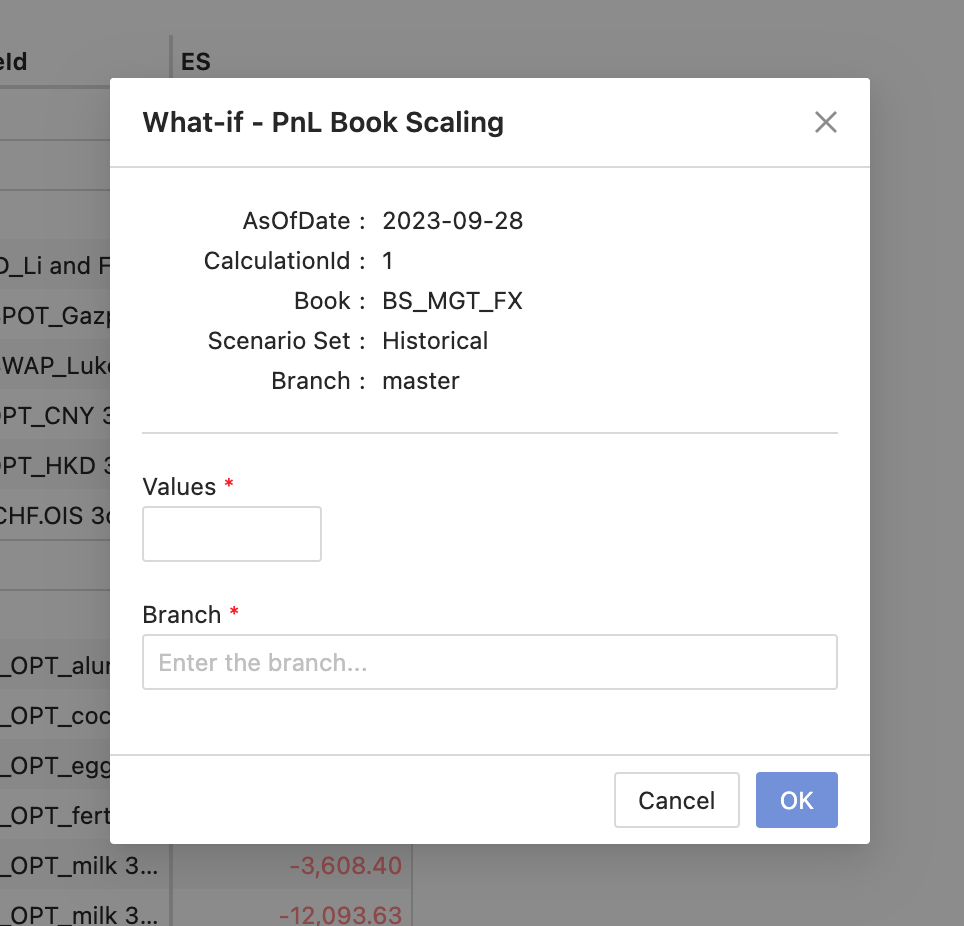
This plugin allows you to perform a what-if simulation to display instant recalculations and incremental impact on a given measure for a predefined set of levels. To use this feature, right-click on a measure and select the **What-If** option from the context menu. The options you can select are determined by the configuration on the server. This will open a dialog box where you can enter your inputs to execute the simulation.
 ## Availability
| Solution | Enabled |
| ----------- | ------- |
| FRTB | ❌ |
| Market risk | ✅ |
| SIMM | ❌ |
| CVARC | ❌ |
| Limits | ❌ |
| Sign-off | ❌ |
## Settings
None: an empty object signals that the widget is enabled for the given server.
## How to disable it
### Disable universally
To disable this feature for all solutions, add this line at the end of your extension’s `activate` function to unregister the plugin:
```diff theme={"languages":{"custom":["/engine/python-sdk/0.9/languages/pycon.tmLanguage.json"]}}
const extension: ExtensionModule = {
activate: async (configuration: Configuration) => {
...
+ delete configuration.pluginRegistry["menu-item"]["accelerator_plugin-supported-what-if"];
+ Object.values(configuration.pluginRegistry["widget"]).forEach(widgetPlugin => {
+ widgetPlugin.contextMenuItems = widgetPlugin.contextMenuItems.filter( menuItem => menuItem.key !== "accelerator_plugin-supported-what-if")
+ })
}
}
```
### Disable for specific servers
To disable this feature for a given server, you must delete this feature’s settings for that server key by altering the `basSettings` parameter before calling the `activate` function.
**Example**
Disabling this feature for the `MR` server only:
```diff theme={"languages":{"custom":["/engine/python-sdk/0.9/languages/pycon.tmLanguage.json"]}}
+ import {produce} from "immer";
- import {activate as activateMr} from "@activeviam/mr-sdk";
+ import {activate as activateMr, basSettings as mrBASSettings} from "@activeviam/mr-sdk";
import {activate as activateFrtb} from "@activeviam/frtb-sdk";
const extension: ExtensionModule = {
activate: async (configuration: Configuration) => {
...
+ const mrBASSettingsWithFeatureDisabled = produce(mrBASSettings, draft => {
+ delete draft["MR"]["bas-plugin-menu-item-supported-what-if"];
+ });
- activateMr({configuration});
+ activateMr({configuration, basSetttings: mrBASSettingsWithFeatureDisabled})
activateFrtb({configuration});
}
}
```
## Availability
| Solution | Enabled |
| ----------- | ------- |
| FRTB | ❌ |
| Market risk | ✅ |
| SIMM | ❌ |
| CVARC | ❌ |
| Limits | ❌ |
| Sign-off | ❌ |
## Settings
None: an empty object signals that the widget is enabled for the given server.
## How to disable it
### Disable universally
To disable this feature for all solutions, add this line at the end of your extension’s `activate` function to unregister the plugin:
```diff theme={"languages":{"custom":["/engine/python-sdk/0.9/languages/pycon.tmLanguage.json"]}}
const extension: ExtensionModule = {
activate: async (configuration: Configuration) => {
...
+ delete configuration.pluginRegistry["menu-item"]["accelerator_plugin-supported-what-if"];
+ Object.values(configuration.pluginRegistry["widget"]).forEach(widgetPlugin => {
+ widgetPlugin.contextMenuItems = widgetPlugin.contextMenuItems.filter( menuItem => menuItem.key !== "accelerator_plugin-supported-what-if")
+ })
}
}
```
### Disable for specific servers
To disable this feature for a given server, you must delete this feature’s settings for that server key by altering the `basSettings` parameter before calling the `activate` function.
**Example**
Disabling this feature for the `MR` server only:
```diff theme={"languages":{"custom":["/engine/python-sdk/0.9/languages/pycon.tmLanguage.json"]}}
+ import {produce} from "immer";
- import {activate as activateMr} from "@activeviam/mr-sdk";
+ import {activate as activateMr, basSettings as mrBASSettings} from "@activeviam/mr-sdk";
import {activate as activateFrtb} from "@activeviam/frtb-sdk";
const extension: ExtensionModule = {
activate: async (configuration: Configuration) => {
...
+ const mrBASSettingsWithFeatureDisabled = produce(mrBASSettings, draft => {
+ delete draft["MR"]["bas-plugin-menu-item-supported-what-if"];
+ });
- activateMr({configuration});
+ activateMr({configuration, basSetttings: mrBASSettingsWithFeatureDisabled})
activateFrtb({configuration});
}
}
```