> ## Documentation Index
> Fetch the complete documentation index at: https://docs.activeviam.com/llms.txt
> Use this file to discover all available pages before exploring further.
# Context values
> Reference for the context values used to override default FRTB calculation parameters, including CA-Lookback, ReferenceLevel, and ProRataHierarchy, exposed via the Context Values drawer.
export function baselLink(std, chapter, paragraph, text) {
const base = "https://www.bis.org/committees/bcbs/basel-framework/standard";
const versions = {
MAR: {
inforce: "2023-01-01",
published: "2020-03-27"
},
MAR21: {
inforce: "2023-01-01",
published: "2026-03-23"
},
MAR30: {
inforce: "2023-01-01",
published: "2024-07-05"
},
MAR33: {
inforce: "2023-01-01",
published: "2020-06-05"
},
SCO: {
inforce: "2026-01-01",
published: "2024-11-27"
},
CRE: {
inforce: "2023-01-01",
published: "2023-01-01"
},
CRE41: {
inforce: "2019-12-15",
published: "2019-12-15"
}
};
const v = versions[`${std}${chapter}`] ?? versions[std];
if (!v) {
throw new Error(`basel-link: no version stamp for ${std}${chapter}`);
}
const path = `${base}/${std.toLowerCase()}/${chapter}` + `/inforce/${v.inforce}/published/${v.published}`;
const href = paragraph ? `${path}#${chapter}.${paragraph}` : path;
const label = text ?? (paragraph ? `[${std}${chapter}.${paragraph}]` : `[${std}${chapter}]`);
return
{label}
;
}
export const productName = "Atoti FRTB";
Context values are parameters which can be set to provide additional context for a query, in order to obtain more meaningful results. The default values of these parameters can be overridden using the "Context Values" drawer.
Find out more about [context values](/data-visualization/atoti-ui/latest/user-guide/analyze-data/context-values#context-values) and how they work in Atoti UI.
### CA-Lookback
[Lookback](../../tags/lookback)
| | |
| - | - |
| **Description** | The number of days for IMCC and SES average calculations |
| **Default value** | 60 (business days) |
| **Reference** | {baselLink("MAR", 33, 41)} |
### DifferentiationStepSize
| | |
| - | - |
| **Description** | Size of the step in numerical approximation calculation |
| **Default value** | 1E-8 (i.e. 10-8 or 0.00000001) |
| **Variations** | [Euler](../measures/measure-variations#euler) |
This applies to the numerical Euler calculations only.
### ES (Model Variation) Lookback (context value)
[Lookback](../../tags/lookback)
| | |
| - | - |
| **Description** | The lookback period for calculating the average of the ES (Model Variation) for the measure "ES (Model Variation) avg" |
| **Default value** | 12W (twelve weeks) |
| **Reference** | {baselLink("MAR", 33, 5)} |
### IMADRC-Lookback (context value)
[Lookback](../../tags/lookback)
| | |
| - | - |
| **Description** | The number of days for IMA DRC average calculations |
| **Default value** | 12W (12 weeks) |
| **Reference** | {baselLink("MAR", 33, 22)} |
### ImaNbExceptions
[ImaNbExceptions](../../tags/imanbexceptions)
| | |
| - | - |
| **Description** | The number of backtesting exceptions used to control the multiplier $m_c$ in the formula for **CA** and CA-IMA |
The multiplier $m_c$ in the formula for **CA** and CA-IMA can be controlled by setting the **ImaNbExceptions** context value to the number of exceptions.
See {baselLink("MAR", 99)} Table 2 in the section "Supervisory framework for the interpretation of backtesting" for the numbers of exceptions and the corresponding multipliers.
### NbDaysPLMeasures
[ModelEligibility](../../tags/modeleligibility)
| | |
| - | - |
| **Description** | The number of business days to look back when calculating the Mean, Variance, and Standard Deviation measures for PL Attribution Tests. |
This may also be expressed as a period, to look back a number of calendar days. For example, "1M", "3M", "1Y" (para 183 (d) of BCBS 352).
### PropagateAboveReference (experimental)
| | |
| - | - |
| **Description** | Display aggregated values above the Reference Level choice for specific measures. |
| **Default value** | false |
| **Variations** | [Pro-Rata](../measures/measure-variations#pro-rata) |
**EXPERIMENTAL(!)**
This context value enables the [**SBM Risk Charge Pro-Rata**](../measures/standardisedapproach/aggregated-riskcharge-by-class#sbm-risk-charge) and the [**Portfolio Risk Charge Pro-Rata**](../measures/standardisedapproach/aggregated-riskcharge-by-class#portfolio-risk-charge) measures to return aggregated
values above the Reference Level set by the **ReferenceLevel** context value.
This is an **experimental** feature, as the aggregated values are only meaningful for certain choices of the **ReferenceLevel** and **ProRataHierarchy** context values.
When disabled (the default), the values above the Reference Level are null. When the context value is set to true, the values above the Reference Level are the sum of the values at the Reference Level.
Consider this example:
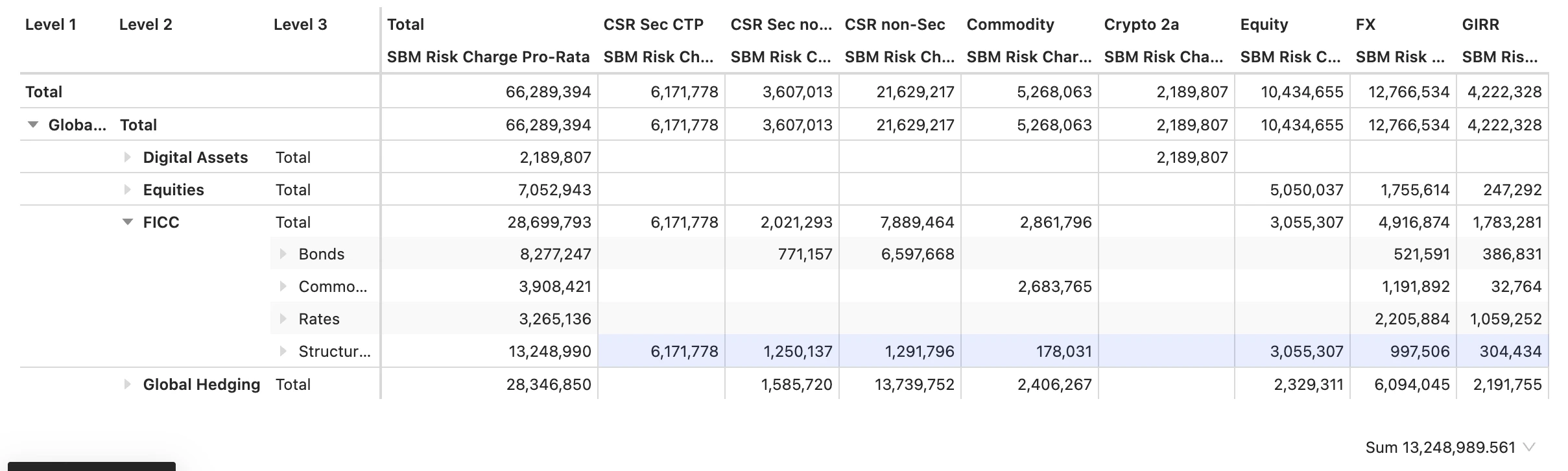 * The [Risk Classes](../dimensions/risk#risk-classes) hierarchy is on the columns and selected as the **ReferenceLevel** context value.
* The [BookHierarchy](../dimensions/organization#bookhierarchy) hierarchy is on the rows and selected as the **ProRataHierarchy** context value.
* The [SBM Risk Charge Pro-Rata](../measures/standardisedapproach/aggregated-riskcharge-by-class#sbm-risk-charge) measure is on the columns.
* The [Correlation Scenario](../dimensions/correlation-scenario) = "high" filter is added to the widget to ensure all numbers displayed correspond
to the same correlation scenario.
Result:
* The first columns displays the new aggregated values of the [SBM Risk Charge Pro-Rata](../measures/standardisedapproach/aggregated-riskcharge-by-class#sbm-risk-charge) measure at the "Total" level, corresponding to all Risk Classes.
* All other columns, corresponding to a specific Risk Class are unaffected by the context value.
* The Total column shows the sum of all other columns at every row.
The table above can also be produced without **PropagateAboveReference**. Set [ProRataHierarchy](#proratahierarchy) to `BookHierarchy;Risk Classes` and enable `frtb.pro-rata.multi-hierarchy-totals`. Leave **ReferenceLevel** at `Enterprise` and filter [Correlation Scenario](../dimensions/correlation-scenario) on `Reference`.
### ProRataHierarchy
| | |
| - | - |
| **Description** | Select a hierarchy for Pro-Rata Russian Doll allocation |
| **Variations** | [Pro-Rata](../measures/measure-variations#pro-rata) |
This context value enables "Russian Doll" calculation for a Pro-rata measure along the selected hierarchy. The **ProRataLeafLevel** context value must be set to "NONE".
First, select a hierarchy from the list:
* \[Booking].\[Books]
* \[Booking].\[Desks]
* \[Organization].\[BookHierarchy]
* \[Organization].\[Legal Entities]
* \[Organization].\[LegalEntityHierarchy]
The pro-rata measure computes capital allocation recursively, so that the sum at each level in the hierarchy is equal to the Pro-Rata capital allocation of the parent level.
Consider this example:
* The [Risk Classes](../dimensions/risk#risk-classes) hierarchy is on the columns and selected as the **ReferenceLevel** context value.
* The [BookHierarchy](../dimensions/organization#bookhierarchy) hierarchy is on the rows and selected as the **ProRataHierarchy** context value.
* The [SBM Risk Charge Pro-Rata](../measures/standardisedapproach/aggregated-riskcharge-by-class#sbm-risk-charge) measure is on the columns.
* The [Correlation Scenario](../dimensions/correlation-scenario) = "high" filter is added to the widget to ensure all numbers displayed correspond
to the same correlation scenario.
Result:
* The first columns displays the new aggregated values of the [SBM Risk Charge Pro-Rata](../measures/standardisedapproach/aggregated-riskcharge-by-class#sbm-risk-charge) measure at the "Total" level, corresponding to all Risk Classes.
* All other columns, corresponding to a specific Risk Class are unaffected by the context value.
* The Total column shows the sum of all other columns at every row.
The table above can also be produced without **PropagateAboveReference**. Set [ProRataHierarchy](#proratahierarchy) to `BookHierarchy;Risk Classes` and enable `frtb.pro-rata.multi-hierarchy-totals`. Leave **ReferenceLevel** at `Enterprise` and filter [Correlation Scenario](../dimensions/correlation-scenario) on `Reference`.
### ProRataHierarchy
| | |
| - | - |
| **Description** | Select a hierarchy for Pro-Rata Russian Doll allocation |
| **Variations** | [Pro-Rata](../measures/measure-variations#pro-rata) |
This context value enables "Russian Doll" calculation for a Pro-rata measure along the selected hierarchy. The **ProRataLeafLevel** context value must be set to "NONE".
First, select a hierarchy from the list:
* \[Booking].\[Books]
* \[Booking].\[Desks]
* \[Organization].\[BookHierarchy]
* \[Organization].\[Legal Entities]
* \[Organization].\[LegalEntityHierarchy]
The pro-rata measure computes capital allocation recursively, so that the sum at each level in the hierarchy is equal to the Pro-Rata capital allocation of the parent level.
Consider this example:
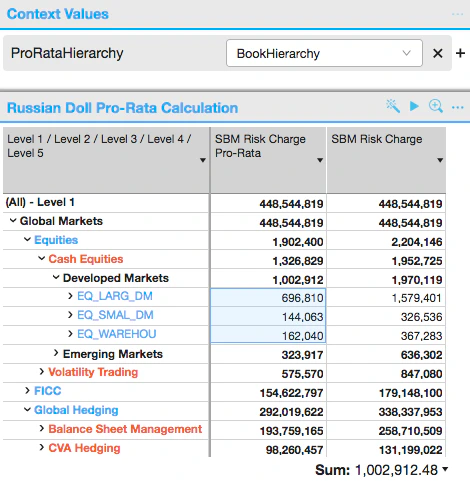 * **SBM Risk Charge** Pro-Rata and **SBM Risk Charge** measures are on columns,
* the multi-level \[Organization].\[BookHierarchy] is on the rows and selected in the context value.
Result:
* **SBM Risk Charge** and **SBM Risk Charge** Pro-Rata are equal at the Enterprise level.
* **SBM Risk Charge** Pro-Rata values at lower levels are additive. See for instance, that the total for books under "Developed Markets" is equal to the desk total (`1.002.912`).
Available from {productName} 6.0.10, `ProRataHierarchy` can name several hierarchies when the `frtb.pro-rata.multi-hierarchy-totals` property is `true`. The hierarchies are separated by `;`, innermost first, for example `BookHierarchy;Risk Classes`. The combination is offered in the ProRataHierarchy dropdown once it is added to `pro-rata.hierarchies.list`.
With `BookHierarchy;Risk Classes`, the charge is allocated to the risk classes first. Each risk class allocation is then allocated down the books. In a table with books on the rows and risk classes on the columns, every row adds up across the risk classes, and every column adds up down the books.
With the property `false`, the default, the Total column is an allocation of the whole charge down the books. It does not equal the sum of the risk classes.
### ProRataLeafLevel
| | |
| - | - |
| **Description** | Select a level for bottom-up Pro-Rata Capital Allocations |
| **Variations** | [Pro-Rata](../measures/measure-variations#pro-rata) |
This context value enables bottom-up calculation for a Pro-rata measure. The **ProRataHierarchy** context value must be set to "NONE".
The capital charge is calculated at the leaf level, then pro-rata coefficients are computed so that the scaled leaf-level charges sum to the charge at the **ReferenceLevel**.
Scaled Leaf-level charges are additive and can be rolled up to any level.
### ReferenceLevel
| | |
| - | - |
| **Description** | Specifies the level at which the charge is calculated for capital allocation |
| **Default value** | Enterprise |
| **Variations** | [Euler](../measures/measure-variations#euler), [Pro-Rata](../measures/measure-variations#pro-rata), [Incremental](../measures/measure-variations#incremental) |
Enterprise represents the top of house. All capital allocations are relative to the **ReferenceLevel**.
A level can be selected from the drop-down list. The labels in the list can be read as follows:
* Desk\@Desks stands for the level "Desk" in the hierarchy **Desks**
* Level 5\@BookHierarchy stands for level "Level 5" in the hierarchy **BookHierarchy**
Once a specific level is selected, capital charges are computed for the *members* of this level and are then further allocated down to components according to a capital allocation methodology.
Consider the following example - Euler allocation of IMCC:
* **SBM Risk Charge** Pro-Rata and **SBM Risk Charge** measures are on columns,
* the multi-level \[Organization].\[BookHierarchy] is on the rows and selected in the context value.
Result:
* **SBM Risk Charge** and **SBM Risk Charge** Pro-Rata are equal at the Enterprise level.
* **SBM Risk Charge** Pro-Rata values at lower levels are additive. See for instance, that the total for books under "Developed Markets" is equal to the desk total (`1.002.912`).
Available from {productName} 6.0.10, `ProRataHierarchy` can name several hierarchies when the `frtb.pro-rata.multi-hierarchy-totals` property is `true`. The hierarchies are separated by `;`, innermost first, for example `BookHierarchy;Risk Classes`. The combination is offered in the ProRataHierarchy dropdown once it is added to `pro-rata.hierarchies.list`.
With `BookHierarchy;Risk Classes`, the charge is allocated to the risk classes first. Each risk class allocation is then allocated down the books. In a table with books on the rows and risk classes on the columns, every row adds up across the risk classes, and every column adds up down the books.
With the property `false`, the default, the Total column is an allocation of the whole charge down the books. It does not equal the sum of the risk classes.
### ProRataLeafLevel
| | |
| - | - |
| **Description** | Select a level for bottom-up Pro-Rata Capital Allocations |
| **Variations** | [Pro-Rata](../measures/measure-variations#pro-rata) |
This context value enables bottom-up calculation for a Pro-rata measure. The **ProRataHierarchy** context value must be set to "NONE".
The capital charge is calculated at the leaf level, then pro-rata coefficients are computed so that the scaled leaf-level charges sum to the charge at the **ReferenceLevel**.
Scaled Leaf-level charges are additive and can be rolled up to any level.
### ReferenceLevel
| | |
| - | - |
| **Description** | Specifies the level at which the charge is calculated for capital allocation |
| **Default value** | Enterprise |
| **Variations** | [Euler](../measures/measure-variations#euler), [Pro-Rata](../measures/measure-variations#pro-rata), [Incremental](../measures/measure-variations#incremental) |
Enterprise represents the top of house. All capital allocations are relative to the **ReferenceLevel**.
A level can be selected from the drop-down list. The labels in the list can be read as follows:
* Desk\@Desks stands for the level "Desk" in the hierarchy **Desks**
* Level 5\@BookHierarchy stands for level "Level 5" in the hierarchy **BookHierarchy**
Once a specific level is selected, capital charges are computed for the *members* of this level and are then further allocated down to components according to a capital allocation methodology.
Consider the following example - Euler allocation of IMCC:
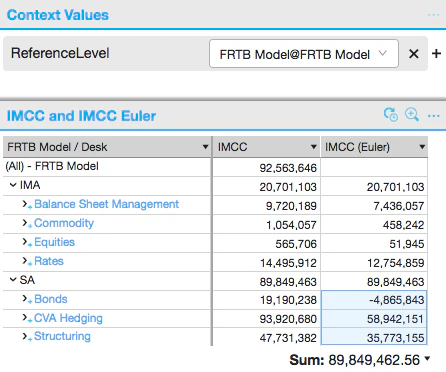 * [IMCC](../measures/internalmodelapproach#imcc) measure computes the result for each individual cell as a standalone portfolio, for example, 20.7 mio is capital charge for a portfolio of all positions approved for IMA.
* **IMCC (Euler)** measures computes the result at the specified **ReferenceLevel** and then allocates the computed charges down to components.
In this example, **FRTB Model** is the selected Reference level:
* The measures [IMCC](../measures/internalmodelapproach#imcc) and **IMCC (Euler)** are equal for the rows "IMA" and "SA", which are the *members* of the selected ReferenceLevel "FRTB Model".
* Below the reference level, the measures are not equal. [IMCC](../measures/internalmodelapproach#imcc) is computed for each contributing desk as a standalone portfolio. By contrast, IMCC [Euler](../measures/measure-variations#euler) numbers for desks sum to the capital charge at the reference level. For example, the sum of Euler charges for "Bonds", "CVA hedging" and "Structuring" under "SA" is equal to the charge at the reference level "SA".
### ReferenceLevelVisualTotalsMode
| | |
| - | - |
| **Description** | Specifies whether to use visual or non-visual totals for marginal and incremental measures |
| **Default value** | COMPATIBILITY |
This context value affects the interpretation of filters for capital allocation (Euler and Pro-Rata) and incremental measures.
When a capital allocation query includes filters, then the filtering is applied as follows:
* With VISUAL TOTALS, filtering is applied to the underlying data before calculating the capital allocation.
The capital allocations sum to the capital charge of the filtered data.
* With NON-VISUAL TOTALS, the results are as if the filtering was applied to the result set after calculating the capital allocation.
The capital allocations would sum to the capital charge of the unfiltered data, though some are filtered out of the results.
In each case the capital charge is determined at the [ReferenceLevel](#referencelevel).
This context value can take three values, each corresponding to a specific mode:
| Mode | Description |
| - | - |
| `COMPATIBILITY` | Uses the visual or non-visual totals specified in the MDX. For example`WHERE`-clause for non-visual totals`SUBSELECT`-clause for visual totals |
| `VISUAL` | Forces the use of visual totals. |
| `NON VISUAL` | Forces the use of non-visual totals. |
* [IMCC](../measures/internalmodelapproach#imcc) measure computes the result for each individual cell as a standalone portfolio, for example, 20.7 mio is capital charge for a portfolio of all positions approved for IMA.
* **IMCC (Euler)** measures computes the result at the specified **ReferenceLevel** and then allocates the computed charges down to components.
In this example, **FRTB Model** is the selected Reference level:
* The measures [IMCC](../measures/internalmodelapproach#imcc) and **IMCC (Euler)** are equal for the rows "IMA" and "SA", which are the *members* of the selected ReferenceLevel "FRTB Model".
* Below the reference level, the measures are not equal. [IMCC](../measures/internalmodelapproach#imcc) is computed for each contributing desk as a standalone portfolio. By contrast, IMCC [Euler](../measures/measure-variations#euler) numbers for desks sum to the capital charge at the reference level. For example, the sum of Euler charges for "Bonds", "CVA hedging" and "Structuring" under "SA" is equal to the charge at the reference level "SA".
### ReferenceLevelVisualTotalsMode
| | |
| - | - |
| **Description** | Specifies whether to use visual or non-visual totals for marginal and incremental measures |
| **Default value** | COMPATIBILITY |
This context value affects the interpretation of filters for capital allocation (Euler and Pro-Rata) and incremental measures.
When a capital allocation query includes filters, then the filtering is applied as follows:
* With VISUAL TOTALS, filtering is applied to the underlying data before calculating the capital allocation.
The capital allocations sum to the capital charge of the filtered data.
* With NON-VISUAL TOTALS, the results are as if the filtering was applied to the result set after calculating the capital allocation.
The capital allocations would sum to the capital charge of the unfiltered data, though some are filtered out of the results.
In each case the capital charge is determined at the [ReferenceLevel](#referencelevel).
This context value can take three values, each corresponding to a specific mode:
| Mode | Description |
| - | - |
| `COMPATIBILITY` | Uses the visual or non-visual totals specified in the MDX. For example`WHERE`-clause for non-visual totals`SUBSELECT`-clause for visual totals |
| `VISUAL` | Forces the use of visual totals. |
| `NON VISUAL` | Forces the use of non-visual totals. |