
Expected Shortfall PL Trade
This file contains input fields for various risk scenarios, liquidity horizons and risk classes, used to calculate the Expected shortfall. There should be one file per risk class and an additional file that contains all trades.
File pattern match
The pattern match for the Expected Shortfall PL Trade file is: **/IMA_*_Trades*.csv*
For information on the glob patterns used and how to customise them, see Note on glob file pattern matching
Field usage
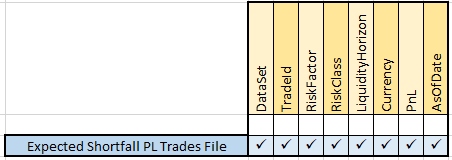
Field | Field Type | Description |
|---|---|---|
DataSet | Alphanumeric String | The data set to which the entry belongs. The following different values are possible:
Note:For non-modellable trades, this value should be blank. |
TradeId | Alphanumeric String | The trade Id |
RiskFactor | Alphanumeric String | The risk factor Note: This is used only for non-modellable trades, and should be blank for modellable trades. |
RiskClass | Alphanumeric String | The risk class, which will be one of the following:
Note: For non-modellable, non-idiosyncratic trades, this value should be blank. |
LiquidityHorizon | Integer | The Liquidity Horizon in days: 10, 20, 40, 60 or 120 Note: For non-modellable trades, this value should be blank. To ensure correct results, if a particular Liquidity Horizon is specified, then all lower Liquidity Horizons must also be included. So, for example, for Trade Id and Risk Class, if 40 is available, then 20 and 10 must be available as well. |
Currency | Alphanumeric String | The currency in which the PnL vector is expressed. |
PnL | Double | The PnL vector for 12 months’ worth of data - there is one value per day, which needs to be computed for a liquidity horizon of 10 days in the risk engine - the values are separated by a semi-colon. This is effectively an extra ‘PnL vector Liquidity Horizon’ column to use as the reference into the new PnL Vector store. This new column will be copied from the existing Liquidity Horizon column for lines in the input files where PnL vectors exist. Then once the file is loaded (or transaction complete), a second pass will fill in the gaps by adding facts with missing Liquidity Horizons and existing PnL vectors. The advantage gained from this is that ‘Liquidity Horizon gaps’ do not need to be filled any more. |
AsOfDate | Date‘YYYY-MM-DD’ | Timestamp (at close of business) for the data. |
Copyright © 2020 ActiveViam Ltd. All rights reserved.