How to safely remove data in overlap configuration
What is the challenge?
Removing data from a distributed data cube with overlapping data can lead to query inconsistencies. A query may be planned before data removal but executed after the removal, causing missing or incorrect results. This happens even if the removed members exist in another data cube because the query node already decided where to retrieve them.
Why is this important?
Without proper coordination, queries can return incomplete results, impacting data accuracy and reliability.
How does the timing issue occur?
In the example below, the query node accesses two data nodes: data node 1 and data node 2.
- Date2 and Date3 are duplicated across both data nodes.
- Data node 2 has a higher priority than data node 1.
- Date2 and Date3 can be retrieved from data node 2.
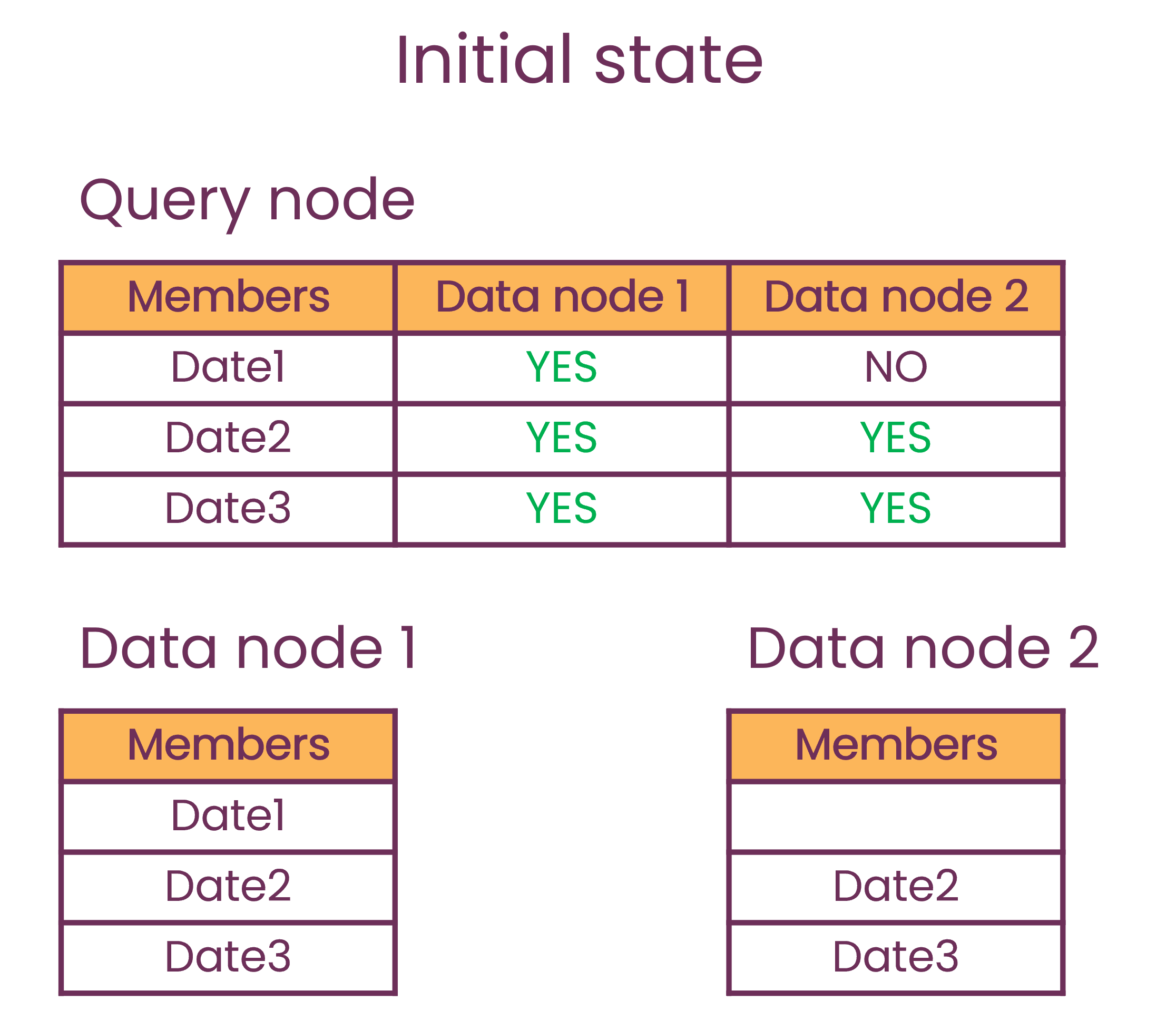
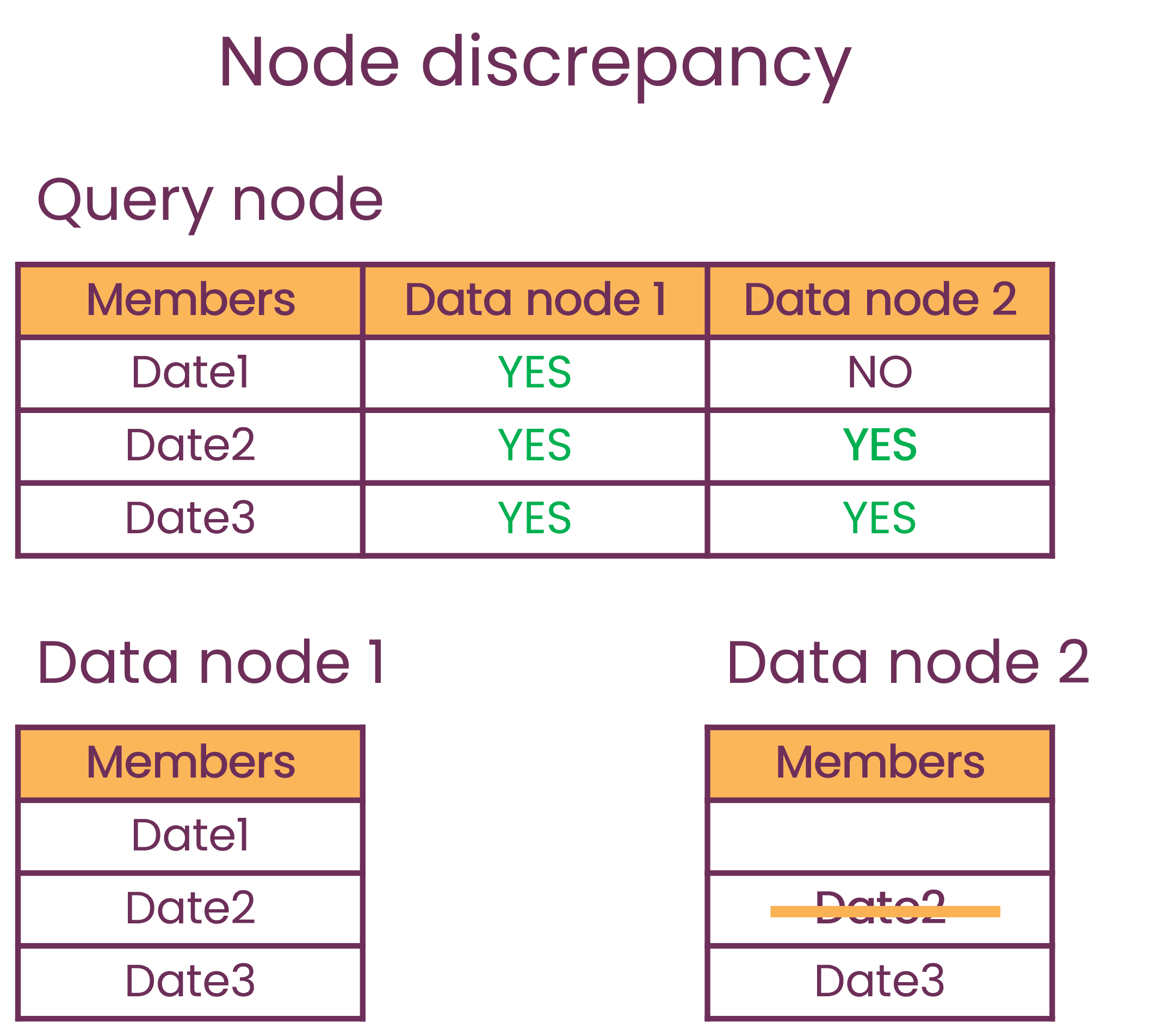
But, before the query is executed, Date2 is removed from data node 2.
- The query node executes a query that includes Date2
- The query node expects the Date2 to be in data node 2
- But Date2 has been removed from data node 2
- There is a discrepancy between the query node and the data node
- Query results are incomplete, missing data for Date2
How to avoid data discrepancy and ensure safe data removal
Atoti provides masking operations through the data cube API to coordinate data removal with query execution.
What is masking?
Masking prevents a query node from retrieving specific members from a data cube, even if they are still physically present. When members are masked:
- Query nodes are notified not to retrieve these members.
- Future queries will fetch them from other cubes where they exist.
- Data removal occurs only after all query nodes acknowledge the masking.
This guarantees that queries planned after masking will not attempt to retrieve masked members.
API overview
The masking operations are available directly on data cubes via the IMultiVersionDataActivePivot interface.
The main method is maskMembers:
final LevelMembers memberToMask =
    new LevelMembers(LevelIdentifier.simple("Country"), List.of("US", "France"));
final CompletableFuture<IMaskingOperationReport> maskingResult =
    dataNode.maskMembers(memberToMask, branch, retryNumber);
The LevelMembers record encapsulates the distributing level and its associated members to mask.
Are there any constraints for masking?
Required condition
Masking is only effective when horizontal data duplication is enabled (IQueryClusterDefinition.HORIZONTAL_DATA_DUPLICATION_PROPERTY is true).
Forbidden configurations
Masking is not allowed when:
- The target level provided in the
LevelMembersparameter is a distributing level of a query cube that has multiple distributing levels and horizontal data duplication enabled - That level is not the distributing level of the application associated with the data cube
The cluster must be stable during the masking operation. In particular, a query cube joining in the middle of a masking may keep trying to retrieve the removed members from the data node because it is not aware of the masking.
The masking operations are forbidden in query cubes where the deprecated IMultiVersionDistributedActivePivot.unloadMembersFromDataNode has already been invoked.
Cross-application considerations
If data removal affects multiple cubes across applications, mask the relevant distributing level members in all impacted cubes before removal.
How does the retry mechanism work?
The retryNumber parameter allows automatic retries in case of transient failures such as:
- Network failures
- Target branch not yet published when the masking operation is consumed by the query cube
Important: There is no retry if the masking fails because it is forbidden (e.g., multiple distributing levels scenario).
Is it possible to unmask?
The IMultiVersionDataActivePivot.unmaskMembers method reverses a masking operation, re-enabling the query cube to retrieve the unmasked members from the data cube.
Unmasking should not be part of a usual data removal workflow.
It should only be used to roll back a masking operation that was performed in error or is no longer needed.
Note: Unmasking members that are not currently masked has no effect.
Does masking show in the operation report?
Both maskMembers and unmaskMembers methods return a CompletableFuture<IMaskingOperationReport> that completes once the operation has been processed across all query cubes. The IMaskingOperationReport provides detailed information about the operation outcome:
- Success status: Whether the operation succeeded across all query cubes
- Successful query cubes: A list of query cube addresses where the operation was successfully applied
- Failed query cubes with reasons: A map of query cube addresses to failure reasons for those where the operation failed. In case of repeated failures due to the retry mechanism, only the failure reason from the last attempt is provided.
A failure does not mean the operation failed for all query cubes - the masking or unmasking may be successful for some query cubes but not for others. If masking or unmasking is not successful, the cube continues to operate, but members that are masked cannot be retrieved from the data cube where they are masked.
To observe which members are actually masked from which data cubes, see the Monitoring section.
Example: Cross-application data removal
This example demonstrates a removal in the datastore impacting two data cubes belonging to distinct applications with different distributing levels.
Setup
Scenario: Remove facts where Country IN ("US", "France") from the underlying database
Impact on data cubes:
-
Data Cube A (Application A):
- Distributing level:
Country - Members to mask:
"US","France"
- Distributing level:
-
Data Cube B (Application B):
- Distributing level:
Currency - Members to mask:
"USD","EUR"(currencies corresponding to the removed facts)
- Distributing level:
Implementation
// Create LevelMembers records
final LevelMembers countryMemberToMask =
    new LevelMembers(LevelIdentifier.simple("Country"), List.of("US", "France"));
final LevelMembers currencyMemberToMask =
    new LevelMembers(LevelIdentifier.simple("Currency"), List.of("USD", "EUR"));
// Mask members on both data cubes (with 3 retries)
final CompletableFuture<IMaskingOperationReport> maskingA =
    dataCubeA.maskMembers(countryMemberToMask, IEpoch.MASTER_BRANCH_NAME, 3);
final CompletableFuture<IMaskingOperationReport> maskingB =
    dataCubeB.maskMembers(currencyMemberToMask, IEpoch.MASTER_BRANCH_NAME, 3);
// Wait for both masking operations to complete
CompletableFuture.allOf(maskingA, maskingB).join();
// Check that both masking operations were successful
final IMaskingOperationReport maskingReportA = maskingA.join();
final IMaskingOperationReport maskingReportB = maskingB.join();
if (!maskingReportA.isSuccessful() || !maskingReportB.isSuccessful()) {
  throw new IllegalStateException(
      "Masking failed. Report A: " + maskingReportA + ", Report B: " + maskingReportB);
}
// Now it is safe to remove the data from the database:
try {
  transactionManager.startTransaction("baseStore");
  try {
    transactionManager.removeWhere(
        "baseStore", BaseConditions.in(FieldPath.of("country"), "US", "France"));
  } catch (final Exception exception) {
    transactionManager.rollbackTransaction();
    throw new RuntimeException("Problem while removing data in transaction", exception);
  }
  transactionManager.commitTransaction();
} catch (final Exception exception) {
  // Unmask members on both data cubes (with 3 retries)
  final CompletableFuture<IMaskingOperationReport> unmaskingA =
      dataCubeA.unmaskMembers(countryMemberToMask, IEpoch.MASTER_BRANCH_NAME, 3);
  final CompletableFuture<IMaskingOperationReport> unmaskingB =
      dataCubeB.unmaskMembers(currencyMemberToMask, IEpoch.MASTER_BRANCH_NAME, 3);
  // Wait for both unmasking operations to complete
  CompletableFuture.allOf(unmaskingA, unmaskingB).join();
  // Check that both unmasking operations were successful
  final IMaskingOperationReport unmaskingReportA = unmaskingA.join();
  final IMaskingOperationReport unmaskingReportB = unmaskingB.join();
  if (!unmaskingReportA.isSuccessful() || !unmaskingReportB.isSuccessful()) {
    throw new IllegalStateException(
        "Unmasking failed. Report A: " + unmaskingReportA + ", Report B: " + unmaskingReportB);
  }
}
This approach ensures that:
- Both data cubes mask their respective members before any data is removed
- All query cubes are aware of the masking before the database removal
- Query results remain consistent throughout the operation
- The actual data removal only happens after all masking operations complete successfully
How to monitor masked members in distributing levels
Masked distributing level members can be monitored in two ways:
Use the Java API
Programmatically retrieve masked member information using the IDistributedActivePivotVersion API:
final IDistributedActivePivotVersion version = distributedCube.getHead();
final IDistributionInformation distributionInfo = version.getDistributionInformation();
final MemberMapping maskedMembers = distributionInfo.getMaskedMemberMapping();
Use JMX
The same information can be accessed through JMX using the getDistributingLevelMemberMapping operation in the MBean
com.activeviam:node0=ActivePivotManager,node1=<SchemaName>,node2=<CubeName>.