Data Versioning (MVCC)
One of the strong points of Atoti is its native handling of data temporality through version control.
It is possible to configure the application so that the state of the data at any given point stays available during the entire lifetime of the application.
A what-if scenario can be designed, the corresponding data introduced into the Datastore, the scenario analyzed, and then dropped if needed.
Multi-version Concurrency Control
Multi-version Concurrency Control (or MVCC) is the concurrency control method used within Atoti to allow for fast concurrent transactions and queries.
If a user is reading from a database at the same time as another user is writing to it, it is possible that the user who is attempting to read will see a half-written or inconsistent piece of data.
There are several ways to solve this problem, known as concurrency control methods. The simplest way is to make all readers wait until the writer is done, which is known as a lock.
If the writer brings consequent changes to the database, this can be very slow for the awaiting readers. Thus, Atoti, through its MVCC mechanism, takes a different approach: each user connected to the database sees a snapshot of the database at a particular instant in time. Any changes made by a writer will not be seen by other users of the database until the changes have been completed (or, in database terms: until the transaction has been committed into the Datastore).
The consequence of this concurrency control method is the existence of components being "snapshot" each time a transaction is committed.
Those components are called multi-versioned. The most important multi-versioned components are the Datastore and the Pivot instances themselves.
Epochs
In Atoti, an
IEpochcan be seen as an "enriched timestamp".
Epochs are created when a transaction is committed on a Datastore:
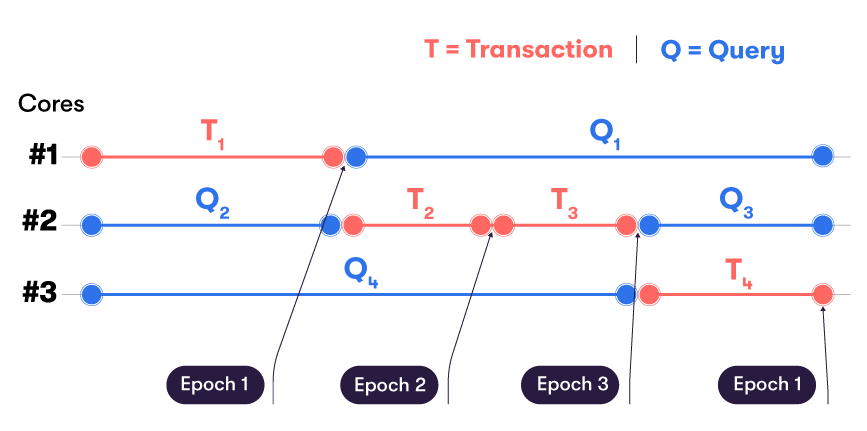
The Epoch Counter is set to 0 at system startup. A timestamp is recorded for Epoch 0.
The Epoch Counter is incremented whenever a transaction is committed to the Datastore. The Epoch Counter (otherwise known as Epoch Id) becomes the new version number for the Datastore. For each new epoch, a new timestamp is also recorded.
Versions
An
IVersion(or version) in Atoti corresponds to the state of a multi-versioned component for a givenIEpoch.
Every committed transaction implies a new version of the Datastore. However, for each epoch, depending on the nature of the transaction, other multi-versioned components may or may not hold a version associated to this epoch.
Example
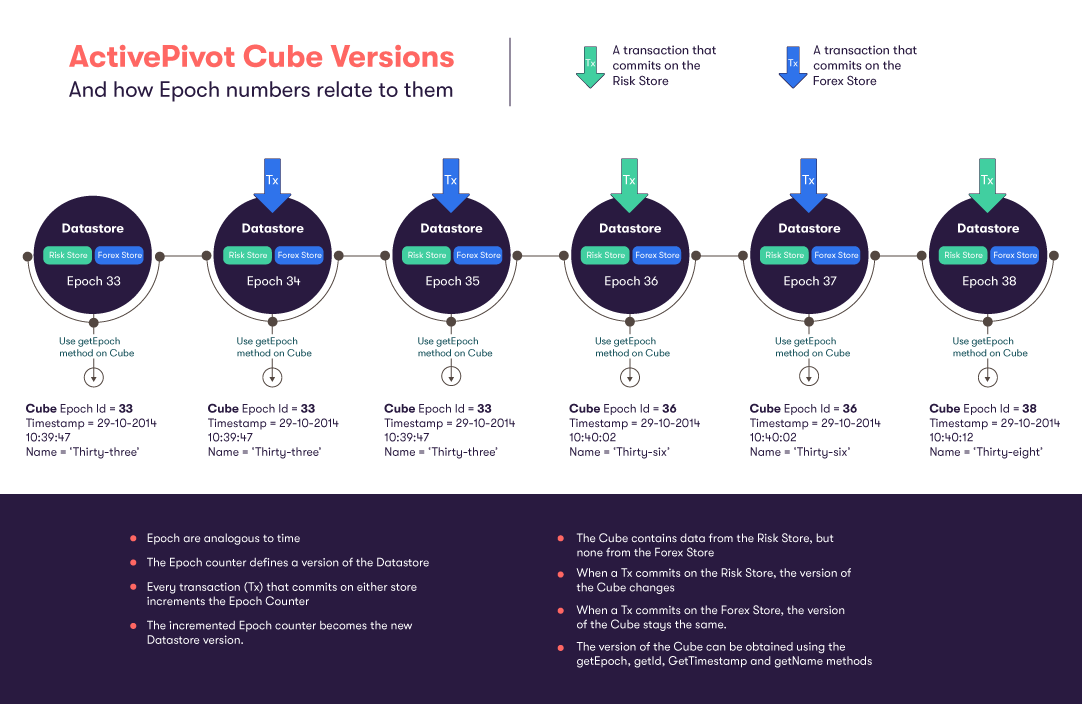
Let's consider the following example: within the Datastore, there are two stores, the Risk store and the Forex store.
No data from the Forex Store is ever used within the Cube. The Forex Store exists purely to provide parameters for post-processing. It does not contribute to any pivot tables.
The Risk Store is the base store within the Datastore and there are no references between the Risk Store and the Forex store.
When a transaction commits in the Forex Store, no new IActivePivotVersion will be created, because the cube is not
directly affected by anything in the Forex store.
So a new version of the Datastore will be created (with an incremented Epoch Counter as its Id),
but NOT a new IActivePivotVersion.
The IActivePivotVersion is associated with an Epoch, but not necessarily the same one as the latest version of the
Datastore.
The Epoch of any version can be found by using the getEpoch() method of the IVersion interface.
Note about
IActivePivotVersions: each time anIActivePivotVersionis created, a new instance of the Aggregates Cache and Post-processors defined in the cube are associated with the new version.
The illustration below shows transactions committing on either the Risk Store or the Forex store for the presented example:
Epoch management
As long as an epoch is considered valid, all corresponding versions will be kept by their respective multi-versioned components. This automatically implies a memory cost (and the potential performance cost) of keeping multiple epochs and their associated versions.
Epochs that are no longer needed can be released, meaning that the corresponding versions may be discarded and garbage collected. Released epochs are no longer accessible for queries.
Epoch management policy
The epoch manager and its IEpochManagementPolicy are defined when building the application:
StartBuilding.application().withEpochPolicy(IEpochManagementPolicy policy);
The default IEpochManagementPolicy is the KeepLastEpochPolicy, which is a policy that keeps only the latest few
epochs, according to creation time criteria and/or number of epochs criteria. It guarantees to keep the heads of all
defined branches.
The default configuration of this epoch policy implies that old epochs may only be discarded when a commit happens or when a garbage collection cycle is triggered by the JVM. This can however be customized further:
application.withEpochPolicy(
    new KeepLastEpochPolicy().setEpochsToKeep(20).setTimeToKeep(Duration.ofSeconds(5)));
will force the application to keep at least the 20 latest epochs and at least 5 seconds of history.
Alternatively, the KeepAllEpochPolicy can be used to retain all epochs for the entire lifetime of the application.
Inspecting epochs
Since the Epoch counter is incremented each time a transaction is committed, it may be hard to track which epochs are available on a running Atoti application.
The epoch manager is responsible for applying the IEpochManagementPolicy on the application during its lifespan.
Release of old epochs is performed automatically according to the policy, or can be performed manually through MBeans
in com.activeviam > Datastore > Epoch Manager (releasing epochs, dropping branches, listing existing branches).
The same operations are available programmatically via the IEpochManager interface.
The IDatabase interface provides methods to access non-released versions:
getMasterHead()returns the latest version on the master branchgetHead(String branchName)returns the latest version on a specific branchgetVersion(long epochId)returns the version at a specific valid epoch
More methods to access past versions can be found in IVersionHistory interface.
The getEpochsUsage operation, available in the Epoch Manager MBean, provides statistics about the versions held by
each multi-versioned component of the application as well as the released and discarded epochs.
Querying a specific version
Each IDatabaseVersion provides a getQueryRunner() method to execute queries on that version of the data.
Queries performed on this IQueryRunner interface will return data corresponding to facts as-of the corresponding
epoch.
The Epoch Dimension is available when performing MDX Queries and allows for complex cross-epoch calculations.
Branches
Branches allow the user to efficiently maintain several states of the data. This feature is most often used to perform a simulation without affecting the real data. A user can thus study the impact of a change without affecting the data used in other branches, such as the one used in production.
The concept of "What-if" is the idea of performing a business-related Projection or Simulation that does not alter the main dataset.
There are several ways to perform "What-If" analysis in Atoti: the use of branches is especially flexible and straightforward from a user standpoint.
It is possible to perform a memory-efficient modification of the dataset on a new branch,
investigate that scenario, then return to the master branch to leave the scenario.
The branch created for the scenario can be deleted after use, or it can be kept for future reference
and further modifications. Branch-specific security implies that a branch can be personal to the one testing a scenario,
or shared among a team as needed.
In practice every transaction is made on some branch, which is assumed to be "master" if unspecified. A branch can therefore be represented by the set of the transactions done on it.
How branches differ from Git
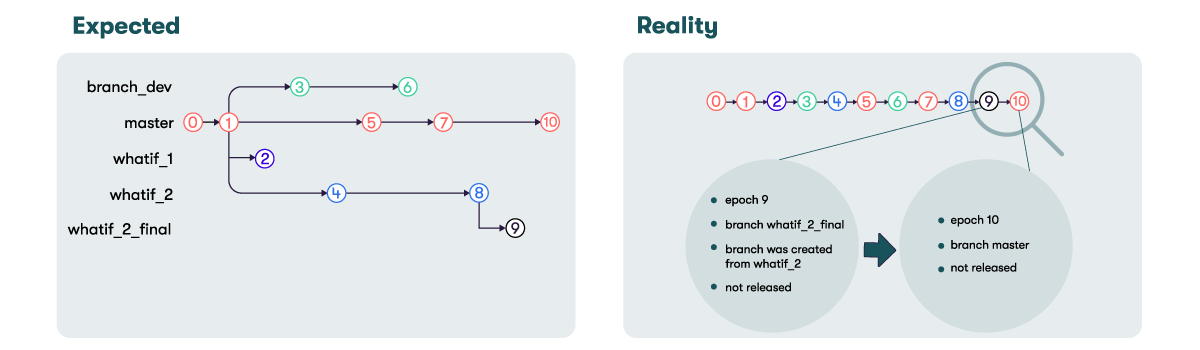
Git's implementation of a versioned system is remarkably well-known amongst developers. It uses two dimensions for navigation: the first one holds the branches while the second one represents time, the succession of actions performed.

Atoti uses a Version History to link all the versions of the components using MVCC together.
This IVersionHistory is always linear, even with multiple branches.
Branch information is held in the IHistoryNodes of the IVersionHistory, which is created temporally,
commit after commit:
It is possible to define, use and navigate through branches with Atoti:
-
By default, there is only one branch called
master. -
When feeding data into a datastore, each transaction can be applied from any existing branch and committed on any other branch, creating a new one if needed.
-
Once created, it is possible to continue committing data on a branch and update its head (the latest version of a branch).
There are however operations that are limited or not possible with branches in Atoti:
-
When performing a transaction, only the mentioned branch will be updated. If some data must be committed on multiple branches, a transaction must be performed on each of the impacted branches.
-
It is not possible to merge or rebase branches in Atoti. However, a branch can be fast-forwarded to another branch's head using
IDatabaseService.fastForward().
Creating a branch
Branches can be specified when starting transactions and using the following signatures:
ITransactionManager.startTransactionOnBranch(String branchName, String... storeNames)
or
ITransactionManager.startTransactionFromBranch(
    String branchName, String parentBranchName, String... storeNames)
Note that the branch will only be created once the transaction is committed and the corresponding epoch is created:
ITransactionManager.commitTransaction()
Querying data on a branch
It is possible to perform a query on any version of any branch as long as the specified Epoch is still valid. The query's results will correspond to the data as it was at the specified epoch within its corresponding branch. For more information about the epoch policy, see the Epoch management policy section.
-
The Database REST API allows the user to perform branch-specific queries on the Database. Note that the query will return data corresponding to the HEAD of the requested branch.
-
The Epoch Dimension's Branch/What-if level allows the user to analyze their aggregated data set along a scenario or another by simply changing the member of the Epoch Dimension queried by the MDX code.
Listing and deleting branches
In order to keep track of the existing branches on an Atoti application, the following method
IEpochManager.getBranches() is available and returns the names of the current valid branches. The application also
exposes an MBean named showBranches that will print various information about branches such as the first epoch of a
branch, the latest epoch of a branch and the epoch on which a branch was created.
When a branch is no longer necessary, it can be dropped to free the memory held by the versions corresponding to its underlying epochs and their associated versions.
It is possible to delete a branch by calling IEpochManager.releaseBranch(String branchName), which is available as an
MBean named dropBranch.
Note that a branch can only be dropped if it does not contain the latest version. If the branch contains the latest
version, it will be dropped after the next commit.
Similarly, a branch will be effectively dropped if none of the related versions are being used.
Performance characteristics
Thanks to the linear design of branches in Atoti, using branches does not imply an additional memory usage cost. Moreover, there is no inherent cost incurred by the used branches count increase.
However, the current design leads to the following caveat:
Performing a commit on a branch B will have a time cost equal to the cost of this commit in a branch-less scenario PLUS the cost of reverting the state of the store from its current head to the head of the branch B. Unfortunately, this additional cost is uncorrelated to the commit itself, but depends not only on the operations that occur on the datastore, but also on the order on which they occurred.
It is also worth mentioning that Indexed aggregate providers are multi-versioned components as well and therefore support branches. As a consequence, they contribute to the memory consumption of each branch by holding pre-aggregated data. Note that it is not the case for the Just-In-Time aggregates provider, as aggregates are computed on the fly.
In a distributed environment, the Query Cube does not have an Epoch Dimension by default. In order to support the Epoch Dimension in a query node, it must be specified when building the cube definition. To learn more about what-if in a distributed environment, see What-if.
Epoch Dimension
In order to perform cross-epoch or cross-branch analysis it is possible to rely on the Epoch Dimension for MDX queries.
The Epoch Dimension is a dimension which permits the retrieval of values from previous versions of the cube and the building of new indicators based on time.
The Epoch Dimension can only be used in MDX queries but NOT inside post processors. The MDX function
Aggregatecannot be used on the members of the Epoch Dimension.
The Epoch Dimension is by default composed of a hierarchy named after the dimension,
with two levels Branch and Epoch:
Dimension: Epoch
Hierarchy: Epoch
Levels: Branch > Level

- master
    +- Epoch 1
    +- Epoch 3
- Branch Scenario 1
    +- Epoch 2
The Branch level is populated by branches on which a transaction was committed.
Configuration
In the cube description, the following line must be entered directly after the other dimensions:
.withEpochDimension()
By default, the Epoch Dimension will create a dimension with a single Branch level available on the Epoch hierarchy.
The above call however returns a builder that can let the user customize further the Epoch Dimension and its two levels:
Branch and Epoch:
.withEpochDimension()
.withinFolder("f")
.withMeasureGroups("mg")
.withEpochLevel()
.withFormatter("FFF")
.end()
Note that the Epoch Dimension must be defined entirely in one call of the builder, or an error message will be prompted.
Disabling the dimension for some users
It is possible to restrict the usage of the Epoch Dimension. The dimension can be disabled for some users while the dimension is enabled for others by attaching an MdxContext to their roles, using the following method:
context.setDisableEpochDimension(true);
Real-Time What-If Queries
A real-time query including the Epoch Dimension such as:
SELECT NON EMPTY [Epoch].[Epoch].[Branch].Members ON ROWS
  FROM cube
respects the following contract regarding updates on the Epoch Dimension:
- On first registration (i.e. activating real-time), all the user visible branches should be in the result
- Upon creating a branch without changes, the query won't reflect the newly created branch (No transaction on the branch means no update)
- A commit on any visible branch will update the query and reflect the new branch
Misc
- Calculated members which use the Epoch Dimension can be defined:
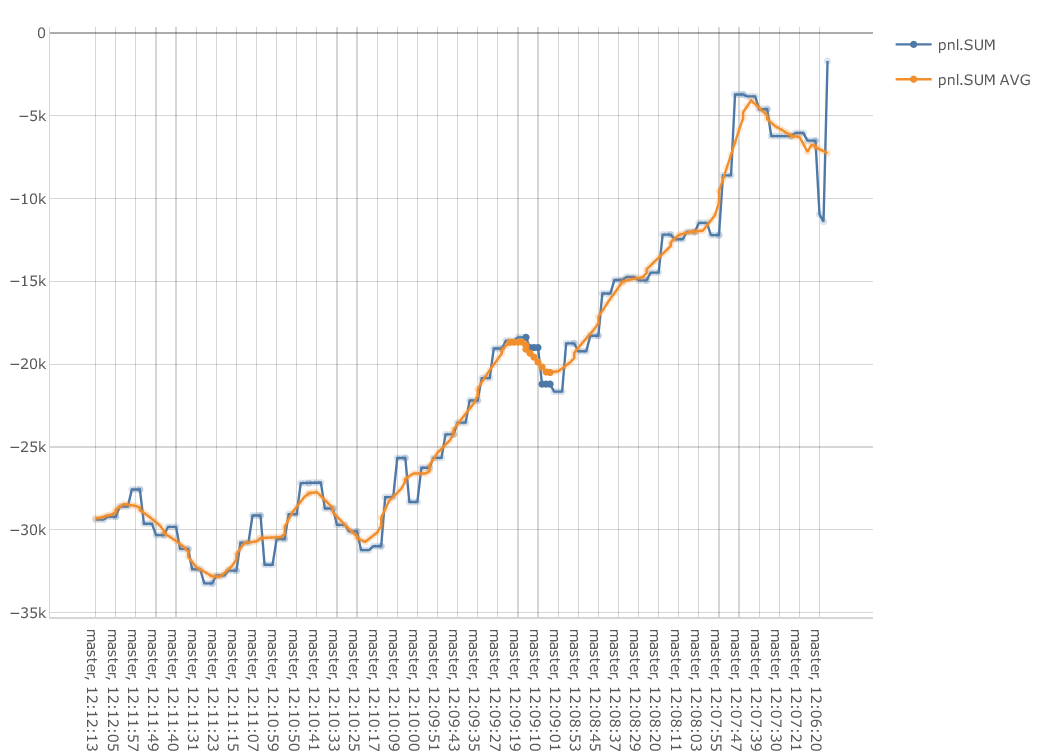
 WITH MEMBER [Measures].[pnl.SUM AVG] AS
    AVG([Epoch].[Epoch].CurrentMember.Lag(5):[Epoch].[Epoch].CurrentMember.Lead(5), [Measures].[pnl.SUM])
SELECT {[Measures].[pnl.SUM], [Measures].[pnl.SUM AVG]} ON COLUMNS,
[Epoch].[Epoch].[Epoch].Members ON ROWS
FROM cube
The previous snippet defines a Calculated Member corresponding to the rolling average of the pnl.SUM aggregated measure, with a centered 10 epoch-wide window:
-
The members that are available in the dimension depend on the Epoch Management Policy. The released epochs are not available in the dimension.
-
The name of the Epoch Dimension can be changed to "Branch" (useful if the epoch level is disabled) by setting the following property:
activeviam.mdx.epoch.dimension.legacyName=false
This will impact the final MDX send to the server. To change the name of this hierarchy and its levels according to user domain names, use the Internationalization feature.
Efficient queries and Examples
Efficient queries
The filters on the Epoch Dimension must be performed inside sub-selects.
The 2 following queries will return the same results (i.e. the values of pnl.SUM for 5 epochs):
Inefficient Query:
SELECT [Measures].[pnl.SUM] ON COLUMNS,
Subset([Epoch].[Epoch].[Epoch].Members, 0, 5) ON ROWS
FROM cube
Efficient Query:
SELECT [Measures].[pnl.SUM] ON COLUMNS,
[Epoch].[Epoch].[Epoch].Members ON ROWS
    FROM (SELECT Subset([Epoch].[Epoch].[Epoch].Members, 0, 5) ON 0
        FROM cube)
The MDX engine evaluates the cells before building the axes. Because of this behavior, the MDX engine will, for the first query, retrieve the values of pnl.SUM on all the available versions of the cube and then only display 5 of them.
The second query creates a restriction on the Epoch Dimension due to a sub-select. As the sub-selects are computed before the cells of the pivot table, the MDX engine will only retrieve the values of pnl.SUM for the 5 selected epochs.
Queries and Real-Time
With the Epoch Dimension, the user has the ability to look in the past.
Some of the queries will receive real time updates if the AllMember member is not filtered out by the sub-select
filtering the Epochs.
Here are some examples:
The following query will receive real time updates. |  |
As this query aims to display the value of Epoch 20 from the branch master, |  |
This query is like the previous one but uses a subselect to choose 2 epochs.
|  |
This query that displays the five oldest epochs will never be updated because the MDX engine cannot register continuous queries on past Epochs.
|  |
This query will always display the five most recent epochs.
|  |