> ## Documentation Index
> Fetch the complete documentation index at: https://docs.activeviam.com/llms.txt
> Use this file to discover all available pages before exploring further.
# Watching local files
This shows how to watch a local directory and load files in a [`Table`](../api/atoti.table#atoti.Table) as they are added to the directory.
Atoti is designed to efficiently handle data updates in its tables.
When tables are updated, the new data will automatically be taken into account when querying the session.
Let’s take the example of an application analyzing sales of a company.
Sales data is stored in one CSV file for each day.
Each day, a new CSV containing the sales of the day will be created and we want to load it into the application.
## Creating the session
Let’s load the CSV files of the `current` folder in an Atoti session:
```pycon theme={"languages":{"custom":["/engine/python-sdk/0.9/languages/pycon.tmLanguage.json"]}}
>>> import atoti as tt
```
```pycon theme={"languages":{"custom":["/engine/python-sdk/0.9/languages/pycon.tmLanguage.json"]}}
>>> session = tt.Session.start()
```
```pycon theme={"languages":{"custom":["/engine/python-sdk/0.9/languages/pycon.tmLanguage.json"]}}
>>> sales_table = session.read_csv(
... f"{resources_directory}/current/*.csv",
... keys={"ID"},
... table_name="Sales",
... )
>>> cube = session.create_cube(sales_table)
>>> l, m = cube.levels, cube.measures
```
At the beginning, there are only 7 rows in the table:
```pycon theme={"languages":{"custom":["/engine/python-sdk/0.9/languages/pycon.tmLanguage.json"]}}
>>> initial_row_count = 7
>>> assert sales_table.row_count == initial_row_count
```
and just 2 dates:
```pycon theme={"languages":{"custom":["/engine/python-sdk/0.9/languages/pycon.tmLanguage.json"]}}
>>> cube.query(m["Quantity.SUM"], levels=[l["Date"]])
Quantity.SUM
Date
2021-05-01 10
2021-05-02 7
```
## Starting the file watcher
We’ll use the popular [watchdog](https://github.com/gorakhargosh/watchdog) library to watch our directory:
```pycon theme={"languages":{"custom":["/engine/python-sdk/0.9/languages/pycon.tmLanguage.json"]}}
>>> from watchdog.events import FileSystemEventHandler
>>> from watchdog.observers.polling import PollingObserver
```
```pycon theme={"languages":{"custom":["/engine/python-sdk/0.9/languages/pycon.tmLanguage.json"]}}
>>> class AtotiWatcher(FileSystemEventHandler):
... def on_created(self, event):
... csv_load = tt.CsvLoad(event.src_path)
... sales_table.load(csv_load)
```
```pycon theme={"languages":{"custom":["/engine/python-sdk/0.9/languages/pycon.tmLanguage.json"]}}
>>> observer = PollingObserver()
>>> _ = observer.schedule(AtotiWatcher(), resources_directory / "current")
>>> observer.start()
```
## Simulating the arrival of a new file
```pycon theme={"languages":{"custom":["/engine/python-sdk/0.9/languages/pycon.tmLanguage.json"]}}
>>> from shutil import copy
```
```pycon theme={"languages":{"custom":["/engine/python-sdk/0.9/languages/pycon.tmLanguage.json"]}}
>>> # Copy the new file ...
>>> _ = copy(
... resources_directory / "next" / "sales_2021_05_03.csv",
... resources_directory / "current",
... )
```
```pycon theme={"languages":{"custom":["/engine/python-sdk/0.9/languages/pycon.tmLanguage.json"]}}
>>> # ... and briefly wait until we see that new rows have been added to the table
>>> while sales_table.row_count <= initial_row_count:
... _ = ...
```
That’s it!
The new file has been loaded and queries on the cube will reflect it as the third date now shows up:
```pycon theme={"languages":{"custom":["/engine/python-sdk/0.9/languages/pycon.tmLanguage.json"]}}
>>> cube.query(m["Quantity.SUM"], levels=[l["Date"]])
Quantity.SUM
Date
2021-05-01 10
2021-05-02 7
2021-05-03 8
```
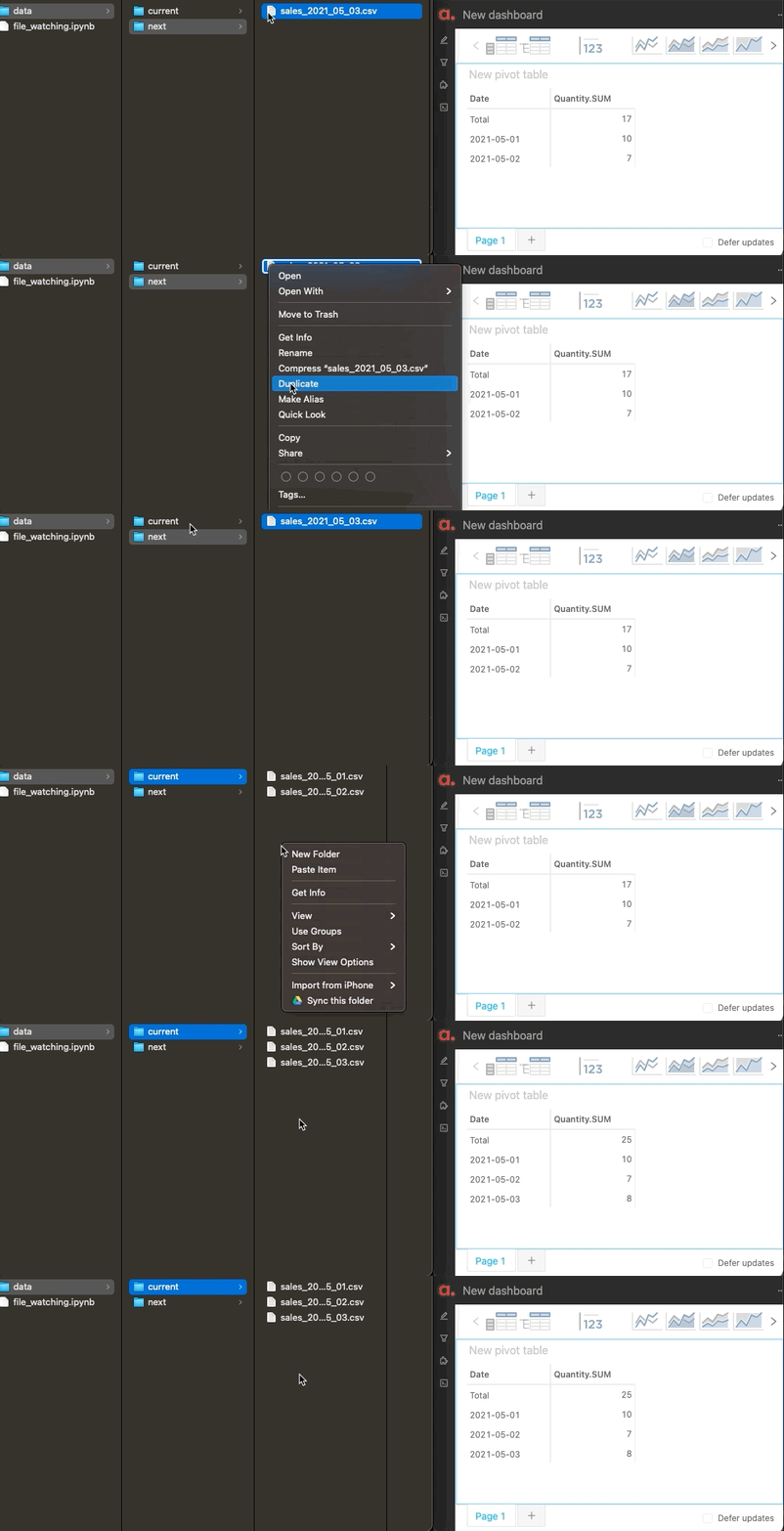
## Seeing widgets change in real time
We can redo the same operation with the app opened on one side with a pivot table making a real-time query.
The widget will rerender automatically to display the new date too:
 ## Going further
* [watchdog](https://github.com/gorakhargosh/watchdog) supports multiple [FileEvents](https://github.com/gorakhargosh/watchdog/blob/master/src/watchdog/events.py), not just the creation of a file as described here.
* If you need to preprocess the watched files before loading them into the Atoti session, you can do it inside the `on_created()` method of the event handler by first reading the file with [`pandas.read_csv()`](https://pandas.pydata.org/pandas-docs/version/2.3/reference/api/pandas.read_csv.html#pandas.read_csv), editing the resulting dataframe, and then passing it to [`atoti.Table.load()`](../api/atoti.Table.load#atoti.Table.load).
* If you want to do multiple actions (e.g. dropping rows before loading new ones) when a file is updated, you can use [`data_transaction()`](../api/atoti.tables.Tables.data_transaction#atoti.tables.Tables.data_transaction).
## Going further
* [watchdog](https://github.com/gorakhargosh/watchdog) supports multiple [FileEvents](https://github.com/gorakhargosh/watchdog/blob/master/src/watchdog/events.py), not just the creation of a file as described here.
* If you need to preprocess the watched files before loading them into the Atoti session, you can do it inside the `on_created()` method of the event handler by first reading the file with [`pandas.read_csv()`](https://pandas.pydata.org/pandas-docs/version/2.3/reference/api/pandas.read_csv.html#pandas.read_csv), editing the resulting dataframe, and then passing it to [`atoti.Table.load()`](../api/atoti.Table.load#atoti.Table.load).
* If you want to do multiple actions (e.g. dropping rows before loading new ones) when a file is updated, you can use [`data_transaction()`](../api/atoti.tables.Tables.data_transaction#atoti.tables.Tables.data_transaction).