> ## Documentation Index
> Fetch the complete documentation index at: https://docs.activeviam.com/llms.txt
> Use this file to discover all available pages before exploring further.
# Extending the app
This feature is not part of the community edition: it needs to be [unlocked](./unlocking_all_features).
Both the server and the embedded UI can be extended.
## Server extension
[Atoti Server extensions are developed in Java](https://docs.activeviam.com/products/atoti/server/6.2/docs/starters/atoti_server_extension) and packaged as [`JARs`](../api/atoti.config.session_config#atoti.SessionConfig.extra_jars).
They can register:
* measure plugins which can then be used in Python with [`atoti.plugin_measure()`](../api/atoti.function.plugin_measure#atoti.plugin_measure).
* Spring webservices.
## UI extension
Atoti UI extensions are developed in JavaScript/TypeScript.
They can change the behavior of the web app or augment it with new features.
### Branding
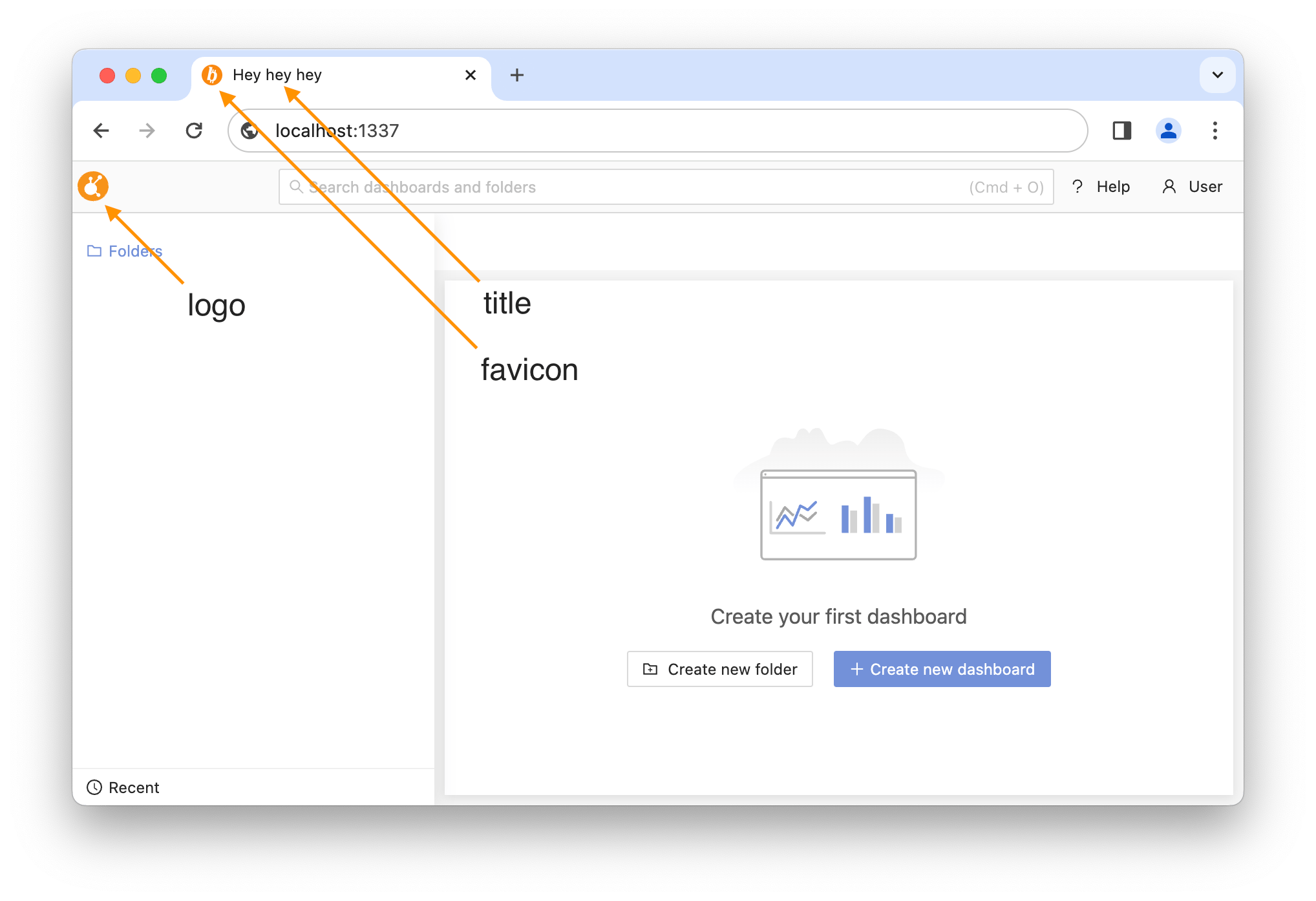
The Atoti branding can be replaced with a custom one (also called white-labeling):
```pycon theme={"languages":{"custom":["/engine/python-sdk/0.9/languages/pycon.tmLanguage.json"]}}
>>> from pathlib import Path
```
```pycon theme={"languages":{"custom":["/engine/python-sdk/0.9/languages/pycon.tmLanguage.json"]}}
>>> import atoti as tt
```
```pycon theme={"languages":{"custom":["/engine/python-sdk/0.9/languages/pycon.tmLanguage.json"]}}
>>> resources_directory = Path("__resources__") / "extending_the_app"
```
```pycon theme={"languages":{"custom":["/engine/python-sdk/0.9/languages/pycon.tmLanguage.json"]}}
>>> session_config = tt.SessionConfig(
... branding=tt.BrandingConfig(
... favicon=resources_directory / "favicon.ico",
... logo=resources_directory / "logo.svg",
... title="Hey hey hey",
... ),
... )
```
```pycon theme={"languages":{"custom":["/engine/python-sdk/0.9/languages/pycon.tmLanguage.json"]}}
>>> session = tt.Session.start(session_config)
```
The app of this session looks like this:
 ### UI app extension
There are some prebuilt extensions in [`atoti.app_extension`](../api/atoti.app_extension#module-atoti.app_extension).
For instance:
```pycon theme={"languages":{"custom":["/engine/python-sdk/0.9/languages/pycon.tmLanguage.json"]}}
>>> session_config = tt.SessionConfig(app_extensions=tt.ADVANCED_APP_EXTENSION)
```
```pycon theme={"languages":{"custom":["/engine/python-sdk/0.9/languages/pycon.tmLanguage.json"]}}
>>> session = tt.Session.start(session_config)
```
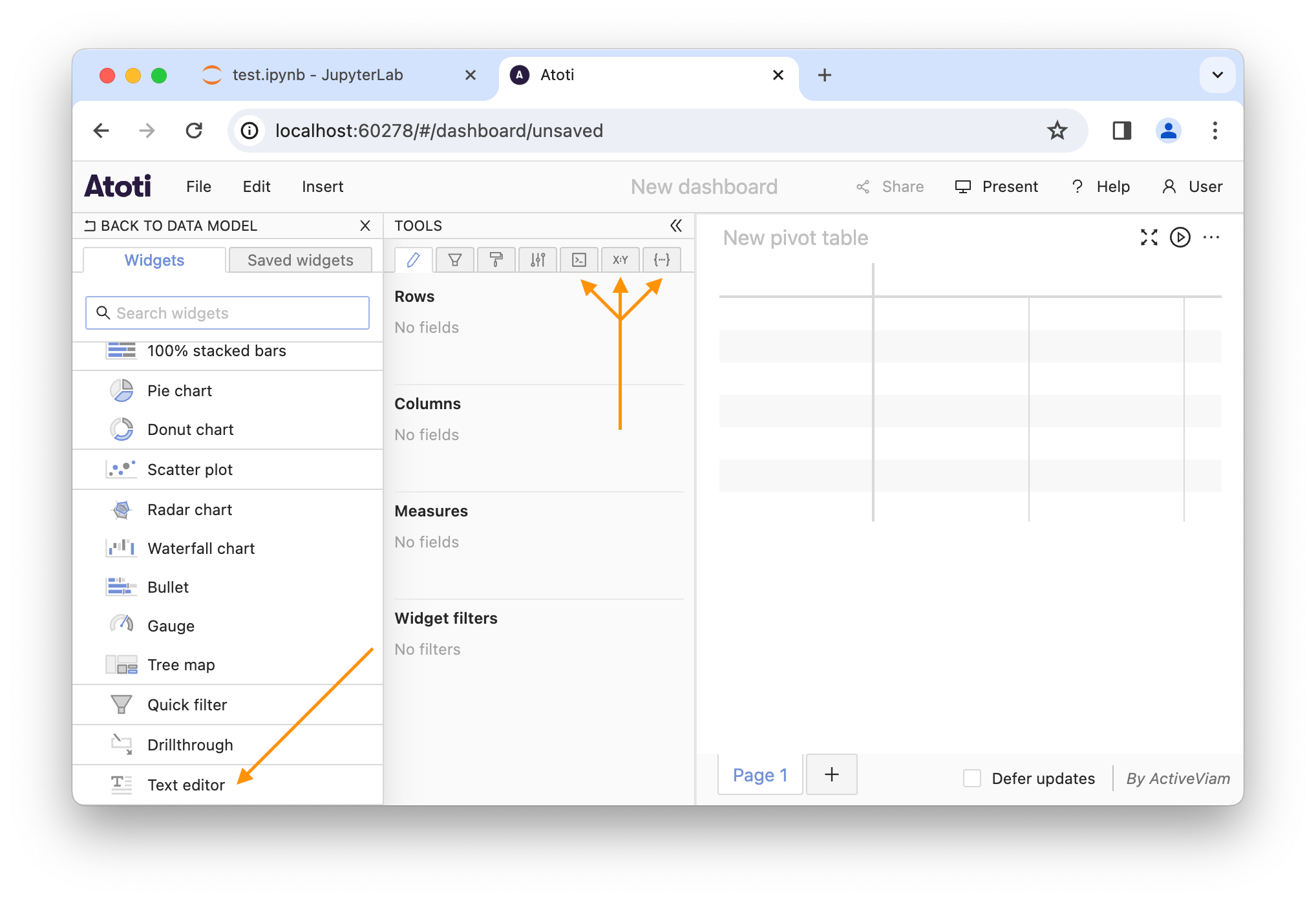
This extension will add some advanced tools and a **Text editor** widget:
### UI app extension
There are some prebuilt extensions in [`atoti.app_extension`](../api/atoti.app_extension#module-atoti.app_extension).
For instance:
```pycon theme={"languages":{"custom":["/engine/python-sdk/0.9/languages/pycon.tmLanguage.json"]}}
>>> session_config = tt.SessionConfig(app_extensions=tt.ADVANCED_APP_EXTENSION)
```
```pycon theme={"languages":{"custom":["/engine/python-sdk/0.9/languages/pycon.tmLanguage.json"]}}
>>> session = tt.Session.start(session_config)
```
This extension will add some advanced tools and a **Text editor** widget:
 Take a look at the documentation of [`atoti.SessionConfig.app_extensions`](../api/atoti.config.session_config#atoti.SessionConfig.app_extensions) to learn how to create your own extensions.