> ## Documentation Index
> Fetch the complete documentation index at: https://docs.activeviam.com/llms.txt
> Use this file to discover all available pages before exploring further.
# Monitoring Query Execution
## Query service logging
Atoti Server can emit a per-query report log at the end of each query.
The report includes the query description, result description, completion time, and optionally memory statistics.
Logging is disabled by default for all three query services. Each service has its own property and logger.
### What properties control query service logging
| Property | Service | Logger | Default |
| ------------------------------------------------------- | ----------------- | -------------------------------------- | ------- |
| `atoti.server.query.service.logging` | Queries | `atoti.server.query.service` | `false` |
| `atoti.server.query.service.detailed-logging` | Queries | `atoti.server.query.service` | `false` |
| `atoti.server.query.service.log-memory-stats` | Queries | `atoti.server.query.service` | `false` |
| `atoti.server.query.service.json.logging` | JSON Queries | `atoti.server.query.service.json` | `false` |
| `atoti.server.query.service.json.detailed-logging` | JSON Queries | `atoti.server.query.service.json` | `false` |
| `atoti.server.query.service.json.log-memory-stats` | JSON Queries | `atoti.server.query.service.json` | `false` |
| `atoti.server.query.service.streaming.logging` | Streaming Queries | `atoti.server.query.service.streaming` | `false` |
| `atoti.server.query.service.streaming.detailed-logging` | Streaming Queries | `atoti.server.query.service.streaming` | `false` |
| `atoti.server.query.service.streaming.log-memory-stats` | Streaming Queries | `atoti.server.query.service.streaming` | `false` |
The three properties for each service are independent:
* `logging` enables the basic per-query report.
* `detailed-logging` adds extra query details to the report.
* `log-memory-stats` adds memory usage statistics to the report.
### How to toggle query service logging at runtime
You can toggle each service's logging at runtime via JMX without restarting the server. Three MBeans are available:
* `QueriesServiceLogging` — controls the Queries service.
* `JsonQueriesServiceLogging` — controls the JSON Queries service.
* `StreamingQueriesServiceLogging` — controls the Streaming Queries service.
## What are the additional query loggers
The three services above expose their logging via Spring Boot properties.
There are additional query-related plain loggers that do not have those property toggles.
Control their level with the standard `logging.level` configuration in your `application.properties` or `application.yml`.
| Logger | Source | Description |
| -------------------------------------- | --------------------------------- | --------------------------------------------------------------------------------------------------- |
| `atoti.server.query.service.xmla` | `AXmlaMonitor` | XMLA endpoint queries. |
| `atoti.server.query.service.export` | `DataExportRestServiceController` | Data export requests. |
| `atoti.server.query.service.websocket` | `QueryWebSocketEndPoint` | WebSocket query requests. Logs the `WEB_SOCKET_REQUEST_START` and `WEB_SOCKET_REQUEST_STOP` events. |
## Setting limits for Query Results
Controlling the size of **GetAggregatesQuery** queries can be very handy when there is a need to limit the number of resulting locations.
A typical example is the possibility to control big queries hitting a cluster at a data node level, allowing thus to limit / reduce
the traffic when using distribution. It can also act as a safeguard to prevent queries from consuming too much memory.
### Configurable limits on Query Results
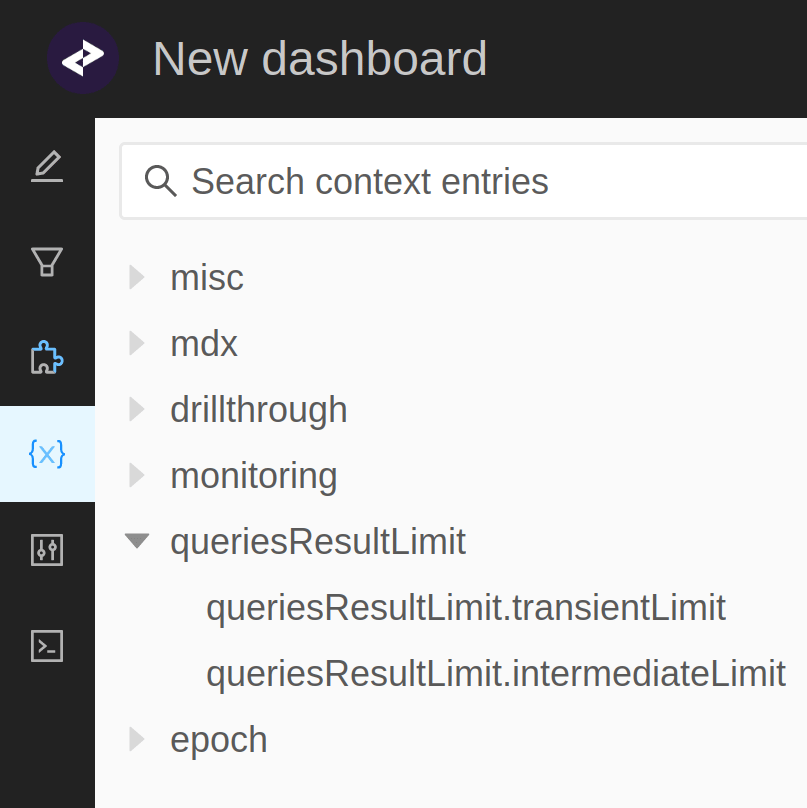
Limiting queries results can be achieved using the `IQueriesResultLimit` context value. We distinguish two types of limit:
* **intermediateLimit**: It defines the limit number of point locations for a single intermediate result (i.e. retrieval).
* **transientLimit**: It defines the transient limit resulting from the accumulation of all the intermediate results within
**a single query**.
> Note that the default transient and intermediate result limit amount to 100,000 and 1,000,000 point locations respectively, and can be obtained by calling
> `QueriesResultLimit#defaultLimit()`.
Query results limit property can be enabled through Atoti context values,
```java theme={"languages":{"custom":["/engine/python-sdk/0.9/languages/pycon.tmLanguage.json"]}}
pivot.getContext().set(IQueriesResultLimit.class, QueriesResultLimit.defaultLimit());
```
or in the cube description
```java theme={"languages":{"custom":["/engine/python-sdk/0.9/languages/pycon.tmLanguage.json"]}}
StartBuilding.cube("tweets")
.withSingleLevelDimensions("sender_id")
.withDimension("time")
.withHierarchy("time")
.withLevel("year")
.withLevel("month")
.withLevel("day")
.withSharedContextValue(QueriesResultLimit.withLimit(10_000, 1_000_000))
```
or through query context values
 > Not defining a limit for queries is equivalent to using `QueriesResultLimit#withoutLimit()`.
Exceeding the configured limit will result in a `RetrievalResultSizeException`, aborting the execution of all operations involved in the query.
### Miscellaneous
When setting a limit for queries results, there is a couple of points to keep in mind:
* Intermediate queries results may exceed the configured limit even though the final result does not. A typical example is a copper join
including factless points that will be removed from the final result.
* In a distributed setup, if a data node exceeds the configured limit then the initial query will fail (partial results from other data nodes won't be accounted for).
* In a distributed polymorphic setup, expect the replication to produce additional locations and in some cases introduce points without underlying contribution.
> Not defining a limit for queries is equivalent to using `QueriesResultLimit#withoutLimit()`.
Exceeding the configured limit will result in a `RetrievalResultSizeException`, aborting the execution of all operations involved in the query.
### Miscellaneous
When setting a limit for queries results, there is a couple of points to keep in mind:
* Intermediate queries results may exceed the configured limit even though the final result does not. A typical example is a copper join
including factless points that will be removed from the final result.
* In a distributed setup, if a data node exceeds the configured limit then the initial query will fail (partial results from other data nodes won't be accounted for).
* In a distributed polymorphic setup, expect the replication to produce additional locations and in some cases introduce points without underlying contribution.