> ## Documentation Index
> Fetch the complete documentation index at: https://docs.activeviam.com/llms.txt
> Use this file to discover all available pages before exploring further.
# Cloud Source
## Introduction
Amazon S3, Azure Blob Storage, and Google Cloud Storage share a common set of interfaces in Atoti: `ICloudDirectory`, `ICloudEntity`, and `ICloudEntityPath`. These interfaces form the Cloud Source abstraction layer, which CSV Source and Parquet Source use to retrieve data directly from cloud storage without provider-specific code in the data pipeline.
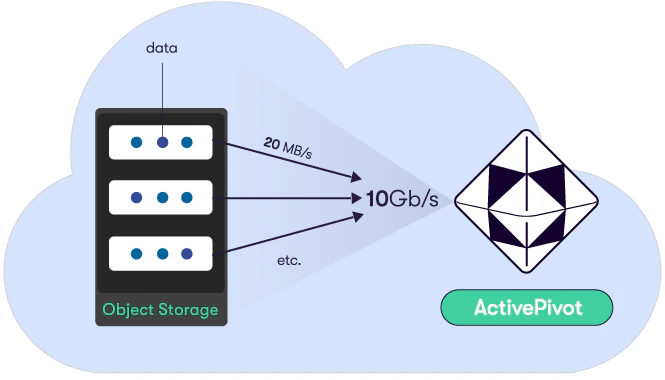 Supported cloud providers for the Cloud Source are:
* [Amazon Simple Storage Service (S3)](./aws_cloud_source)
* [Microsoft Azure Blob Storage](./azure_cloud_source)
* [Google Cloud Storage](./google_cloud_source)
These storages share interesting characteristics:
* Very good performance
* Unlimited storage capacity
* Affordable (\~\$0.3 per GB/year)
* Free upload
You can deploy an Atoti application in the cloud that will download a huge
amount of data in a few minutes (see [Azure's blog post](https://azure.microsoft.com/fr-fr/blog/40tib-of-advanced-in-memory-analytics-with-azure-and-activepivot/)).
> Be careful to deploy your code and your data in the same region otherwise you
> will incur extra fees when the CSV Source loads data.
## Cloud Source Abstractions
All cloud providers organize their data in a structure that can be assimilated
with [*directories*](#iclouddirectory) and [*entities*](#icloudentity) (which
can be associated with what a file is in a traditional local file system).
The abstractions used by the cloud source refer to these two concepts for all
cloud sources. Specific information on usage and on what exactly these terms
refer to can be found in the appropriate cloud provider page.
> For each of the following interfaces, additional methods are usually available
> when using cloud-provider-specific implementors instead. Refer to the
> appropriate cloud provider page for more detail.
### `ICloudDirectory`
This interface represents a directory in the cloud storage. The directory
structure is emulated by using the `/` character.
It exposes methods for listing all contained subdirectories and entities.
Assuming the following folder structure:
```
📦someDirectory
┣ 📂subdirectory1
┃ ┗ 📜entity2.csv
┣ 📂subdirectory2
┃ ┃ 📜entity3.csv
┃ ┗ 📂subdirectory3
┗ 📜entity1.csv
```
The listing methods will return the following objects:
```java theme={"languages":{"custom":["/engine/python-sdk/0.9/languages/pycon.tmLanguage.json"]}}
final ICloudDirectory directory = someDirectory;
final List> subdirectories = directory.listDirectories();
final List> entities = directory.listEntities(false);
final List> allEntities = directory.listEntities(true);
```
* `subdirectories` will contain *subdirectory1* and *subdirectory2*
* `entities` will contain *entity1.txt*
* `allEntities` will contain *entity1.txt*, *entity2.txt* and *entity3.txt*
An entity or subdirectory can also be retrieved directly from a parent
directory.
```java theme={"languages":{"custom":["/engine/python-sdk/0.9/languages/pycon.tmLanguage.json"]}}
final ICloudDirectory directory = someDirectory;
final ICloudDirectory subdirectory1 =
someDirectory.getSubDirectory("subdirectory1");
final ICloudDirectory subdirectory3 =
someDirectory.getSubDirectory("subdirectory2/subdirectory3");
final ICloudEntityPath entity1 = someDirectory.getEntity("entity1.csv");
final ICloudEntityPath entity2 =
someDirectory.getEntity("subdirectory1/entity2.csv");
```
### `ICloudEntity`
This interface is associated with a unit of data on the cloud storage, much like
a file in a traditional local file system. Instances can be created without
performing remote calls.
It serves as a facade to an entity on a cloud storage. It provides various
methods to retrieve an entity's metadata and content:
```java theme={"languages":{"custom":["/engine/python-sdk/0.9/languages/pycon.tmLanguage.json"]}}
final EntityType entity = someEntity;
final String entityName = entity.getName();
final String parentBucket = entity.getBucket();
final long size = entity.getLength();
final Date lastModified = entity.getLastModified();
final byte[] contents = entity.download();
// ...
entity.delete();
```
### `ICloudEntityPath`
This interface represents a path to a potential [`ICloudEntity`](#icloudentity)
object. It allows the creation of the referred-to `ICloudEntity`, or/and its
retrieval once it is created.
Much like `ICloudEntity` it provides various methods to retrieve the entity's
metadata.
```java theme={"languages":{"custom":["/engine/python-sdk/0.9/languages/pycon.tmLanguage.json"]}}
final ICloudEntityPath entityPath = someDirectory.getEntity("example.csv");
if (entityPath.exists()) {
final String name = entityPath.getName();
final String parentBucket = entityPath.getBucket();
final Date lastModified = entityPath.getLastModifiedTime();
}
final EntityType entity = entityPath.toEntity();
// ...
```
It additionally exposes methods to upload content to the referenced entity,
which is not required to already exist. In this case, an actual entity is
created on the cloud storage using the information held by the
`ICloudEntityPath`.
```java theme={"languages":{"custom":["/engine/python-sdk/0.9/languages/pycon.tmLanguage.json"]}}
entityPath.upload("data".getBytes());
entityPath.upload(Path.of("path", "to", "file"));
entityPath.upload(csvInputStream(), contentLength);
```
> **Warning**: if the entity already exists at the referenced path, its contents
> will be overwritten.
## Usage with Data Sources
### Concurrently Fetching Channel
In order to download data from the cloud, Atoti Server uses
`AConcurrentlyFetchingChannel`, a custom high-throughput implementation
[`SeekableByteChannel`](https://docs.oracle.com/en/java/javase/11/docs/api/java.base/java/nio/channels/SeekableByteChannel.html)
specialized for downloading data from the cloud. The class is specialized for
each supported cloud provider.
This channel implementation downloads the file in multiple parts concurrently,
and does not block, which means data from downloaded parts can be read while the
others finish downloading.
Atoti Data Sources use internally a concurrently fetching channel to
retrieve data from the cloud. The channel can be configured with a number of
parameters:
* `threadCount`: the maximum number of downloader threads for **one single
file**. Our experiments have shown that the optimal number of threads
downloading files in parallel is around 1.5 times the number of the server's
logical cores.
* `prefetchedPartsLimit`: the amount of chunks that can be downloaded in
advance. This is used to compensate network speed instability.
* `partLength`: the size in bytes of an individual downloaded part. Our
experiments have shown that the optimal value is around 8MB.
These parameters are regrouped into a `CloudFetchingConfig` object:
```java theme={"languages":{"custom":["/engine/python-sdk/0.9/languages/pycon.tmLanguage.json"]}}
final CloudFetchingConfig cloudConfig =
CloudFetchingConfig.builder()
.downloadThreadCount(threadCount)
.prefetchedPartsLimit(prefetchedPartsLimit)
.partLength(partLength)
.build();
```
### Usage with the CSV Source
Cloud-based implementations of CSV topics are available through
`CloudEntityCsvTopic` and `CloudDirectoryCsvTopic`.
They are used similarly to regular CSV topics, except they require one
additional argument of type `ICloudCsvDataProviderFactory`. It is a factory that
provides the implementation to use for downloading. The appropriate
implementation should be selected based on your cloud provider.
One default implementation is made available for each cloud provider. These implementations
accept a [`CloudFetchingConfig`](#concurrently-fetching-channel) that they can use in
the underlying concurrently fetching channel.
A CSV topic can be created either for a single entity:
```java theme={"languages":{"custom":["/engine/python-sdk/0.9/languages/pycon.tmLanguage.json"]}}
final CsvParserConfiguration parserConfig =
CsvParserConfiguration.builder().withColumnCount(COLUMN_COUNT).build();
final CloudFetchingConfig cloudConfig =
CloudFetchingConfig.builder()
.downloadThreadCount(threadCount)
.prefetchedPartsLimit(prefetchedPartsLimit)
.partLength(partLength)
.build();
final ICloudCsvDataProviderFactory factory =
new AwsCsvDataProviderFactory(cloudConfig);
final ICloudEntityPath entityPath = someEntity;
final ICsvTopic> entityTopic =
new CloudEntityCsvTopic<>("entityTopic", parserConfig, factory, entityPath);
```
or for multiple entities (for dataset split between several files).
In this case, the files can either be listed explicitly:
```java theme={"languages":{"custom":["/engine/python-sdk/0.9/languages/pycon.tmLanguage.json"]}}
final Set> cloudPaths = Set.of(someEntity1, someEntity2);
final ICsvTopic> multipleEntitiesTopic =
new CloudMultipleEntitiesCsvTopic<>("entityTopic", parserConfig, factory, cloudPaths);
```
or can be defined by specifying a whole directory, in which case files to consider can be filtered using
a regular expression:
```java theme={"languages":{"custom":["/engine/python-sdk/0.9/languages/pycon.tmLanguage.json"]}}
final ICloudDirectory directory = someDirectory;
final ICsvTopic> directoryTopic =
new CloudDirectoryCsvTopic<>(
"directoryTopic", parserConfig, factory, directory, "(R|r)egex");
```
### Usage with the Parquet Source
The `IParquetParser` interface exposes special overloads of the
`IParquetParser.parse()` method to retrieve and parse parquet data from the
cloud.
Compared to the regular parsing methods, they require one additional `Function`
argument, that should act as a factory for `AzureBlobChannel`,
`S3ObjectChannel` or `GoogleBlobChannel` depending on the relevant cloud
provider.
Parquet data can either be fetched from a single entity:
```java theme={"languages":{"custom":["/engine/python-sdk/0.9/languages/pycon.tmLanguage.json"]}}
final CloudFetchingConfig cloudConfig =
CloudFetchingConfig.builder()
.downloadThreadCount(threadCount)
.prefetchedPartsLimit(prefetchedPartsLimit)
.partLength(partLength)
.build();
final ExecutorService executor = Executors.newFixedThreadPool(2);
final ICloudEntityChannelFactory cloudEntityChannelFactory =
getCloudEntityChannelFactory(cloudConfig, executor);
final ICloudEntityPath entityPath = someEntity;
datastore.edit(
transaction ->
parser.parse(entityPath, cloudEntityChannelFactory::createChannel, parsers, mapping));
```
or for a whole directory:
```java theme={"languages":{"custom":["/engine/python-sdk/0.9/languages/pycon.tmLanguage.json"]}}
final ICloudDirectory directory = someDirectory;
datastore.edit(
transaction ->
parser.parse(directory, cloudEntityChannelFactory::createChannel, parsers, mapping));
```
### What impacts the download speed?
* The power of the cores. HTTPS connections and client side-encryption consume
CPU resources.
* The bandwidth of the network interface.
* Other CPU-hungry tasks performed by your application while downloading the
data.
* Having a multitude of small files instead of big files (Due to the fact that
the `AConcurrentlyFetchingChannel` is tailored for a high-performance
multithreaded download of a single file).
* The type of the storage: Hot or Cold (Do not use cold storage!).
* For Azure the redundancy has an impact. Locally redundant storage (LRS) is
better (for the speed) than Zone-redundant storage (ZRS) which is better
than Geo-redundant storage (GRS)
* Whether the Atoti application and your data are in the same cloud region.
* [Receive Side Scaling (RSS)](https://docs.microsoft.com/en-us/windows-hardware/drivers/network/introduction-to-receive-side-scaling)
must be enabled in the network driver. (Seems to be enabled by default now on
all cloud providers)
Supported cloud providers for the Cloud Source are:
* [Amazon Simple Storage Service (S3)](./aws_cloud_source)
* [Microsoft Azure Blob Storage](./azure_cloud_source)
* [Google Cloud Storage](./google_cloud_source)
These storages share interesting characteristics:
* Very good performance
* Unlimited storage capacity
* Affordable (\~\$0.3 per GB/year)
* Free upload
You can deploy an Atoti application in the cloud that will download a huge
amount of data in a few minutes (see [Azure's blog post](https://azure.microsoft.com/fr-fr/blog/40tib-of-advanced-in-memory-analytics-with-azure-and-activepivot/)).
> Be careful to deploy your code and your data in the same region otherwise you
> will incur extra fees when the CSV Source loads data.
## Cloud Source Abstractions
All cloud providers organize their data in a structure that can be assimilated
with [*directories*](#iclouddirectory) and [*entities*](#icloudentity) (which
can be associated with what a file is in a traditional local file system).
The abstractions used by the cloud source refer to these two concepts for all
cloud sources. Specific information on usage and on what exactly these terms
refer to can be found in the appropriate cloud provider page.
> For each of the following interfaces, additional methods are usually available
> when using cloud-provider-specific implementors instead. Refer to the
> appropriate cloud provider page for more detail.
### `ICloudDirectory`
This interface represents a directory in the cloud storage. The directory
structure is emulated by using the `/` character.
It exposes methods for listing all contained subdirectories and entities.
Assuming the following folder structure:
```
📦someDirectory
┣ 📂subdirectory1
┃ ┗ 📜entity2.csv
┣ 📂subdirectory2
┃ ┃ 📜entity3.csv
┃ ┗ 📂subdirectory3
┗ 📜entity1.csv
```
The listing methods will return the following objects:
```java theme={"languages":{"custom":["/engine/python-sdk/0.9/languages/pycon.tmLanguage.json"]}}
final ICloudDirectory directory = someDirectory;
final List> subdirectories = directory.listDirectories();
final List> entities = directory.listEntities(false);
final List> allEntities = directory.listEntities(true);
```
* `subdirectories` will contain *subdirectory1* and *subdirectory2*
* `entities` will contain *entity1.txt*
* `allEntities` will contain *entity1.txt*, *entity2.txt* and *entity3.txt*
An entity or subdirectory can also be retrieved directly from a parent
directory.
```java theme={"languages":{"custom":["/engine/python-sdk/0.9/languages/pycon.tmLanguage.json"]}}
final ICloudDirectory directory = someDirectory;
final ICloudDirectory subdirectory1 =
someDirectory.getSubDirectory("subdirectory1");
final ICloudDirectory subdirectory3 =
someDirectory.getSubDirectory("subdirectory2/subdirectory3");
final ICloudEntityPath entity1 = someDirectory.getEntity("entity1.csv");
final ICloudEntityPath entity2 =
someDirectory.getEntity("subdirectory1/entity2.csv");
```
### `ICloudEntity`
This interface is associated with a unit of data on the cloud storage, much like
a file in a traditional local file system. Instances can be created without
performing remote calls.
It serves as a facade to an entity on a cloud storage. It provides various
methods to retrieve an entity's metadata and content:
```java theme={"languages":{"custom":["/engine/python-sdk/0.9/languages/pycon.tmLanguage.json"]}}
final EntityType entity = someEntity;
final String entityName = entity.getName();
final String parentBucket = entity.getBucket();
final long size = entity.getLength();
final Date lastModified = entity.getLastModified();
final byte[] contents = entity.download();
// ...
entity.delete();
```
### `ICloudEntityPath`
This interface represents a path to a potential [`ICloudEntity`](#icloudentity)
object. It allows the creation of the referred-to `ICloudEntity`, or/and its
retrieval once it is created.
Much like `ICloudEntity` it provides various methods to retrieve the entity's
metadata.
```java theme={"languages":{"custom":["/engine/python-sdk/0.9/languages/pycon.tmLanguage.json"]}}
final ICloudEntityPath entityPath = someDirectory.getEntity("example.csv");
if (entityPath.exists()) {
final String name = entityPath.getName();
final String parentBucket = entityPath.getBucket();
final Date lastModified = entityPath.getLastModifiedTime();
}
final EntityType entity = entityPath.toEntity();
// ...
```
It additionally exposes methods to upload content to the referenced entity,
which is not required to already exist. In this case, an actual entity is
created on the cloud storage using the information held by the
`ICloudEntityPath`.
```java theme={"languages":{"custom":["/engine/python-sdk/0.9/languages/pycon.tmLanguage.json"]}}
entityPath.upload("data".getBytes());
entityPath.upload(Path.of("path", "to", "file"));
entityPath.upload(csvInputStream(), contentLength);
```
> **Warning**: if the entity already exists at the referenced path, its contents
> will be overwritten.
## Usage with Data Sources
### Concurrently Fetching Channel
In order to download data from the cloud, Atoti Server uses
`AConcurrentlyFetchingChannel`, a custom high-throughput implementation
[`SeekableByteChannel`](https://docs.oracle.com/en/java/javase/11/docs/api/java.base/java/nio/channels/SeekableByteChannel.html)
specialized for downloading data from the cloud. The class is specialized for
each supported cloud provider.
This channel implementation downloads the file in multiple parts concurrently,
and does not block, which means data from downloaded parts can be read while the
others finish downloading.
Atoti Data Sources use internally a concurrently fetching channel to
retrieve data from the cloud. The channel can be configured with a number of
parameters:
* `threadCount`: the maximum number of downloader threads for **one single
file**. Our experiments have shown that the optimal number of threads
downloading files in parallel is around 1.5 times the number of the server's
logical cores.
* `prefetchedPartsLimit`: the amount of chunks that can be downloaded in
advance. This is used to compensate network speed instability.
* `partLength`: the size in bytes of an individual downloaded part. Our
experiments have shown that the optimal value is around 8MB.
These parameters are regrouped into a `CloudFetchingConfig` object:
```java theme={"languages":{"custom":["/engine/python-sdk/0.9/languages/pycon.tmLanguage.json"]}}
final CloudFetchingConfig cloudConfig =
CloudFetchingConfig.builder()
.downloadThreadCount(threadCount)
.prefetchedPartsLimit(prefetchedPartsLimit)
.partLength(partLength)
.build();
```
### Usage with the CSV Source
Cloud-based implementations of CSV topics are available through
`CloudEntityCsvTopic` and `CloudDirectoryCsvTopic`.
They are used similarly to regular CSV topics, except they require one
additional argument of type `ICloudCsvDataProviderFactory`. It is a factory that
provides the implementation to use for downloading. The appropriate
implementation should be selected based on your cloud provider.
One default implementation is made available for each cloud provider. These implementations
accept a [`CloudFetchingConfig`](#concurrently-fetching-channel) that they can use in
the underlying concurrently fetching channel.
A CSV topic can be created either for a single entity:
```java theme={"languages":{"custom":["/engine/python-sdk/0.9/languages/pycon.tmLanguage.json"]}}
final CsvParserConfiguration parserConfig =
CsvParserConfiguration.builder().withColumnCount(COLUMN_COUNT).build();
final CloudFetchingConfig cloudConfig =
CloudFetchingConfig.builder()
.downloadThreadCount(threadCount)
.prefetchedPartsLimit(prefetchedPartsLimit)
.partLength(partLength)
.build();
final ICloudCsvDataProviderFactory factory =
new AwsCsvDataProviderFactory(cloudConfig);
final ICloudEntityPath entityPath = someEntity;
final ICsvTopic> entityTopic =
new CloudEntityCsvTopic<>("entityTopic", parserConfig, factory, entityPath);
```
or for multiple entities (for dataset split between several files).
In this case, the files can either be listed explicitly:
```java theme={"languages":{"custom":["/engine/python-sdk/0.9/languages/pycon.tmLanguage.json"]}}
final Set> cloudPaths = Set.of(someEntity1, someEntity2);
final ICsvTopic> multipleEntitiesTopic =
new CloudMultipleEntitiesCsvTopic<>("entityTopic", parserConfig, factory, cloudPaths);
```
or can be defined by specifying a whole directory, in which case files to consider can be filtered using
a regular expression:
```java theme={"languages":{"custom":["/engine/python-sdk/0.9/languages/pycon.tmLanguage.json"]}}
final ICloudDirectory directory = someDirectory;
final ICsvTopic> directoryTopic =
new CloudDirectoryCsvTopic<>(
"directoryTopic", parserConfig, factory, directory, "(R|r)egex");
```
### Usage with the Parquet Source
The `IParquetParser` interface exposes special overloads of the
`IParquetParser.parse()` method to retrieve and parse parquet data from the
cloud.
Compared to the regular parsing methods, they require one additional `Function`
argument, that should act as a factory for `AzureBlobChannel`,
`S3ObjectChannel` or `GoogleBlobChannel` depending on the relevant cloud
provider.
Parquet data can either be fetched from a single entity:
```java theme={"languages":{"custom":["/engine/python-sdk/0.9/languages/pycon.tmLanguage.json"]}}
final CloudFetchingConfig cloudConfig =
CloudFetchingConfig.builder()
.downloadThreadCount(threadCount)
.prefetchedPartsLimit(prefetchedPartsLimit)
.partLength(partLength)
.build();
final ExecutorService executor = Executors.newFixedThreadPool(2);
final ICloudEntityChannelFactory cloudEntityChannelFactory =
getCloudEntityChannelFactory(cloudConfig, executor);
final ICloudEntityPath entityPath = someEntity;
datastore.edit(
transaction ->
parser.parse(entityPath, cloudEntityChannelFactory::createChannel, parsers, mapping));
```
or for a whole directory:
```java theme={"languages":{"custom":["/engine/python-sdk/0.9/languages/pycon.tmLanguage.json"]}}
final ICloudDirectory directory = someDirectory;
datastore.edit(
transaction ->
parser.parse(directory, cloudEntityChannelFactory::createChannel, parsers, mapping));
```
### What impacts the download speed?
* The power of the cores. HTTPS connections and client side-encryption consume
CPU resources.
* The bandwidth of the network interface.
* Other CPU-hungry tasks performed by your application while downloading the
data.
* Having a multitude of small files instead of big files (Due to the fact that
the `AConcurrentlyFetchingChannel` is tailored for a high-performance
multithreaded download of a single file).
* The type of the storage: Hot or Cold (Do not use cold storage!).
* For Azure the redundancy has an impact. Locally redundant storage (LRS) is
better (for the speed) than Zone-redundant storage (ZRS) which is better
than Geo-redundant storage (GRS)
* Whether the Atoti application and your data are in the same cloud region.
* [Receive Side Scaling (RSS)](https://docs.microsoft.com/en-us/windows-hardware/drivers/network/introduction-to-receive-side-scaling)
must be enabled in the network driver. (Seems to be enabled by default now on
all cloud providers)