> ## Documentation Index
> Fetch the complete documentation index at: https://docs.activeviam.com/llms.txt
> Use this file to discover all available pages before exploring further.
# Query Execution Plan
## Introduction
A query can be made against a Cube either through external sources (such as Atoti UI, ActiveMonitor, Excel
or through QueriesService), or internally by instantiating a GetAggregatesQuery and executing it
against the Cube.
## What is an Execution Plan?
An **Execution Plan** is a specification of how Measures are queried.
During its evaluation, a submitted query is split up into requested locations and measures. There are two classes of measures:
* **Native and Primitive measures**: Native measures are defined as being either of the `count` and `update.timestamp` built-in measures. Primitive measures are measures defined using a standard
aggregation function on a datastore field (e.g. `value.SUM`)
* **Post-processed measures**: These measures are produced by transforming existing measures.
They are created using a Post-processor and are calculated at query time. Post-processed measures can also be chained together, each measure feeding the next one.
* **Joined measures**: These measures are produced by joining (with Copper) an isolated store to the cube.
Atoti relies on the concept of `IRetrieval` to retrieve the requested measures for the queried locations.
These retrievals are made against either the Cube aggregate providers (for primitive measures), isolated store (for joined measures) or on the fly (for Post-processors).
For primitive measures, we use a single `IAggregatesRetrieval` per location, which calculates the value at the given location for all primitive measures with only one retrieval.
For post-processed measures, we create as many `IAggregatesRetrieval`s as there are Post-processors at the given location.
On the other hand, joined measures are fetched using `IDatabaseRetrieval`
The query **Execution Plan** (also referred to as the *Query Plan*) is built by Atoti based on the involved measures.
It details the retrievals together with their dependencies, depending on the required Measures.
### Partitioning
Retrievals can have one of the following partitioning types:
* **ConstantPartitioning** means that either the datastore has no partition or the Retrieval is at the top-most level of the query plan
* **SinglePartitioning** means that only one field is used for partitioning. For instance `hash16(TradeId)`
* **MultiplePartitioning** results from the concatenation of multiple partitioning fields, together with their partitioning functions. For instance: `hash16(TradeId)|IdentityFunction(AsOfDate)`
### Retrieval Types
Retrievals are categorized based on their complexity into two classes, as follows:
#### Standard Retrievals
They represent the basic retrieval for retrieving measures.
**`JITPrimitiveAggregatesRetrieval`**
This type of retrieval works with the JIT aggregates provider.
**`BitmapPrimitiveAggregatesRetrieval`**
This type of retrieval will calculate the measure on a single partition, and then
report its result to a Merger.
**`PartialPrimitiveAggregatesRetrieval`**
This type works with the partial aggregates provider.
**`PostProcessedAggregatesRetrieval`**
This type of retrieval will calculate the value of a post-processed measure,
once all of its underlying measures have finished their evaluation.
**`DistributedAggregatesRetrieval`**
This retrieval type will send a distributed message to a remote AP instance
to retrieve a measure.
**`DistributedPostProcessedRetrieval`**
This is the equivalent of `DistributedAggregatesRetrieval` for post-processors.
#### Advanced Retrievals
These types of Retrieval are more advanced in the sense that they leverage Atoti capabilities during queries (cache usage, partitioning, rangesharing).
**`NoOpPrimitiveAggregatesRetrieval`**
This type of retrieval represents a retrieval operations where there is no content
for the requested locations and measures.
**`PrimitiveAggregatesCacheRetrieval`**
This type retrieves primitive measures in the `AggregatesCache`.
**`PostProcessedCacheRetrieval`**
This is the equivalent of `PrimitiveAggregatesCacheRetrieval` for post-processors.
**`RangeSharingPrimitiveAggregatesRetrieval`**
This retrieval type implements the range sharing logic for primitive measures.
**`RangeSharingLinearPostProcessorAggregatesRetrieval`**
This retrieval type implements the range sharing logic for linear post-processors.
**`PrimitiveAnalysisAggregationRetrieval`**
This type of retrieval performs the aggregation on analysis hierarchies.
**`PrimitiveResultsMerger`**
If the evaluation of a measure needs to be done on the Datastore partitions,
then one retrieval is created for each partition and these partitioned retrievals are then given to a Merger.
The merger will wait for its children to finish and aggregate its children's results to create its own result.
**`PostProcessedResultsMerger`**
This is the equivalent of `PrimitiveResultsMerger` for post-processors.
#### Database Retrievals
**`DatabaseRetrieval`**
This type of retrieval represents a retrieval on an isolated store outside a pivot selection.
**`NoOpDatabaseRetrieval`**
This type of retrieval represents a retrieval that does not perform any computation
and/or datastore request and contains an initially empty result.
## Enable Execution Plan Logging
There are two modes for displaying the query plan.
* **Execution plan print**: This mode prints the Execution Plan of the `GetAggregatesQuery` **before** its execution.
The Execution Plan will therefore not contain any timing information.
* **Execution plan timing print**: This mode prints the Execution Plan timing of the `GetAggregatesQuery` after its execution. The Execution Plan will therefore contain all the timing information.
These modes can be enabled dynamically using the `QueryPlan` MBean,
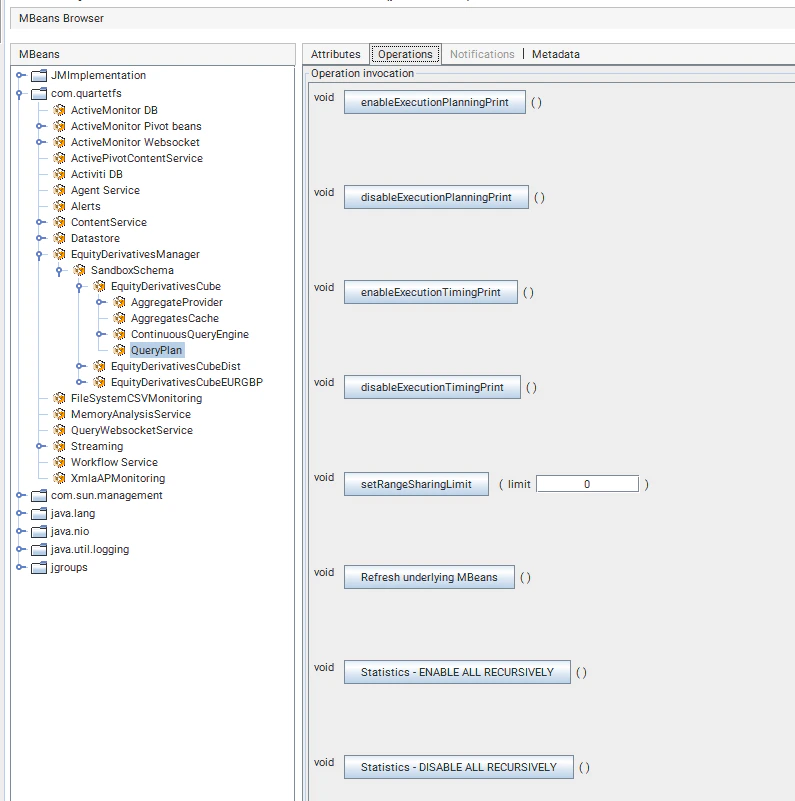 or through query context values.
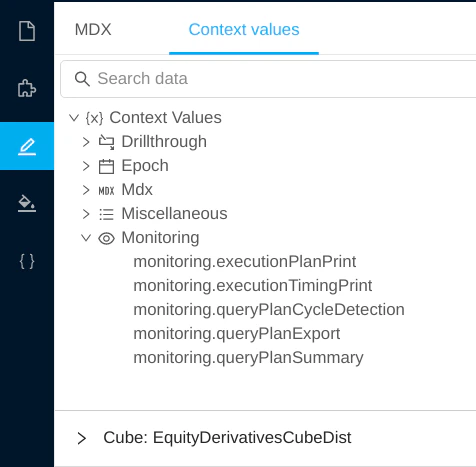 They can also be enabled through the Pivot context values,
```java theme={"languages":{"custom":["/engine/python-sdk/0.9/languages/pycon.tmLanguage.json"]}}
pivot
.getContext()
.set(IQueryMonitoring.class, new QueryMonitoring().enableExecutionPlanningPrint());
```
and in the Pivot description.
```java theme={"languages":{"custom":["/engine/python-sdk/0.9/languages/pycon.tmLanguage.json"]}}
StartBuilding.cube("tweets")
.withSingleLevelDimensions("sender_id")
.withDimension("time")
.withHierarchy("time")
.withLevel("year")
.withLevel("month")
.withLevel("day")
.withSharedContextValue(new QueryMonitoring().enableExecutionPlanningPrint())
```
> In some cases the query plan may yield huge number of retrievals (thousands) which makes it almost impossible to read such plan and can even cause performance issue.
> The `queryPlanSummary` property allows to bypass this problem by excluding the retrieval descriptions from the query plan. Alternatively, it provides a query plan summary
> section grouping information such as the total number of retrievals, the list of retrieved measures, the retrievals count by type and the partitioning count by type (see example below).
## Execution Plan Snippet
We distinguish two important sections within the query plan. For both sections, the snippets were extracted from an actual query plan for illustration purposes.
### General Information
This section provides query general information such as the Pivot ID, the query context values, and other properties
such as the range sharing limit for instance.
```
General information:
-------------------
ActivePivot: ActivePivotVersion [id=TestRangeSharingExecution-Pivot, epoch=7]
RetrieverActivePivotAggregatesRetriever : Standard aggregates retriever on cube TestRangeSharingExecution-Pivot
Context values:
--------------
IQueryMonitoring: QueryMonitoring [printExecutionPlan=true, printExecutionTiming=false]
IBranch: null
ISubCubeProperties: null
ICubeFilter: null
IAsOfEpoch: null
Additional properties:
---------------------
Continuous: false
Range sharing: 1000000
Missed prefetches: WARN
Cache: None
Planning:
--------
Planning duration: 2ms
Execution context creation duration: 1ms
Planning finalization duration: 1ms
Execution:
---------
Total query execution time: 3ms
```
Here, the subsections `Planning` and `Execution` are included when `executionTimingPrint` is enabled.
### Planning section
The `Planning` step of a query has three main sections:
* computing the list of all the retrievals needed for the query, including the dependencies of each parent
retrieval. The duration of this phase is reported as the `Planning duration`.
* creating the execution context, for example the entitlements that are applied if the query is done by a user.
* optimizing the list of retrievals to remove duplicates. The duration of this phase is reported as the `Planning finalization duration`.
### Retrievals Section
The following illustrates the blocks detailing the query plan retrievals
```
Query plan:
----------
Retrieval #0: PostProcessedAggregatesRetrieval
Location=
Measures=[...]
Filter=
Partitioning=
...
Start time (in ms)=
Elapsed time (in ms)=
which depends on {
Retrieval #1: ...
Retrieval #2: ...
which depends on {
Retrieval #1: ...(see above for dependencies)
}
}
```
Each block is made of:
* a unique id: `#0`
* a type: `PostProcessedAggregatesRetrieval`
* attributes, such as `Location`, `Measures`, `Filter` - (see snippets below)
* timing attributes that are displayed when `executionTimingPrint` is enabled. The `start time` is the duration between the start of the query and the start of the retrieval. The `elapsed time` is the duration of the execution of the retrieval itself.
* an optional list of retrievals that the block depends on. In the example, `Retrieval #0` waits for the results of `Retrieval #1` and `Retrieval #2` to execute its work.
Retrievals are only detailed once. When the same retrieval appears somewhere else, only its id and type are mentioned, followed by the sentence `(see above for dependencies)`.
#### Retrieval Attributes
##### Location
```
Retrieval #0: ...
Location=
Desk@Bookings:Desk=[*],
Country@Geography:City=Europe\Spain\Barcelona,
HistoricalDates@Time:AsOfDate=[2018, 2019]
...
```
This retrieval is performed to gather a measure for the location:
```
Desk@Bookings:Desk=[*],
Country@Geography:City=Europe\Spain\Barcelona,
HistoricalDates@Time:AsOfDate=[2018, 2019]
```
In this list, only the hierarchies not positioned on `AllMember` are listed. For each hierarchy, the output is structured as follows:
```
@:=
They can also be enabled through the Pivot context values,
```java theme={"languages":{"custom":["/engine/python-sdk/0.9/languages/pycon.tmLanguage.json"]}}
pivot
.getContext()
.set(IQueryMonitoring.class, new QueryMonitoring().enableExecutionPlanningPrint());
```
and in the Pivot description.
```java theme={"languages":{"custom":["/engine/python-sdk/0.9/languages/pycon.tmLanguage.json"]}}
StartBuilding.cube("tweets")
.withSingleLevelDimensions("sender_id")
.withDimension("time")
.withHierarchy("time")
.withLevel("year")
.withLevel("month")
.withLevel("day")
.withSharedContextValue(new QueryMonitoring().enableExecutionPlanningPrint())
```
> In some cases the query plan may yield huge number of retrievals (thousands) which makes it almost impossible to read such plan and can even cause performance issue.
> The `queryPlanSummary` property allows to bypass this problem by excluding the retrieval descriptions from the query plan. Alternatively, it provides a query plan summary
> section grouping information such as the total number of retrievals, the list of retrieved measures, the retrievals count by type and the partitioning count by type (see example below).
## Execution Plan Snippet
We distinguish two important sections within the query plan. For both sections, the snippets were extracted from an actual query plan for illustration purposes.
### General Information
This section provides query general information such as the Pivot ID, the query context values, and other properties
such as the range sharing limit for instance.
```
General information:
-------------------
ActivePivot: ActivePivotVersion [id=TestRangeSharingExecution-Pivot, epoch=7]
RetrieverActivePivotAggregatesRetriever : Standard aggregates retriever on cube TestRangeSharingExecution-Pivot
Context values:
--------------
IQueryMonitoring: QueryMonitoring [printExecutionPlan=true, printExecutionTiming=false]
IBranch: null
ISubCubeProperties: null
ICubeFilter: null
IAsOfEpoch: null
Additional properties:
---------------------
Continuous: false
Range sharing: 1000000
Missed prefetches: WARN
Cache: None
Planning:
--------
Planning duration: 2ms
Execution context creation duration: 1ms
Planning finalization duration: 1ms
Execution:
---------
Total query execution time: 3ms
```
Here, the subsections `Planning` and `Execution` are included when `executionTimingPrint` is enabled.
### Planning section
The `Planning` step of a query has three main sections:
* computing the list of all the retrievals needed for the query, including the dependencies of each parent
retrieval. The duration of this phase is reported as the `Planning duration`.
* creating the execution context, for example the entitlements that are applied if the query is done by a user.
* optimizing the list of retrievals to remove duplicates. The duration of this phase is reported as the `Planning finalization duration`.
### Retrievals Section
The following illustrates the blocks detailing the query plan retrievals
```
Query plan:
----------
Retrieval #0: PostProcessedAggregatesRetrieval
Location=
Measures=[...]
Filter=
Partitioning=
...
Start time (in ms)=
Elapsed time (in ms)=
which depends on {
Retrieval #1: ...
Retrieval #2: ...
which depends on {
Retrieval #1: ...(see above for dependencies)
}
}
```
Each block is made of:
* a unique id: `#0`
* a type: `PostProcessedAggregatesRetrieval`
* attributes, such as `Location`, `Measures`, `Filter` - (see snippets below)
* timing attributes that are displayed when `executionTimingPrint` is enabled. The `start time` is the duration between the start of the query and the start of the retrieval. The `elapsed time` is the duration of the execution of the retrieval itself.
* an optional list of retrievals that the block depends on. In the example, `Retrieval #0` waits for the results of `Retrieval #1` and `Retrieval #2` to execute its work.
Retrievals are only detailed once. When the same retrieval appears somewhere else, only its id and type are mentioned, followed by the sentence `(see above for dependencies)`.
#### Retrieval Attributes
##### Location
```
Retrieval #0: ...
Location=
Desk@Bookings:Desk=[*],
Country@Geography:City=Europe\Spain\Barcelona,
HistoricalDates@Time:AsOfDate=[2018, 2019]
...
```
This retrieval is performed to gather a measure for the location:
```
Desk@Bookings:Desk=[*],
Country@Geography:City=Europe\Spain\Barcelona,
HistoricalDates@Time:AsOfDate=[2018, 2019]
```
In this list, only the hierarchies not positioned on `AllMember` are listed. For each hierarchy, the output is structured as follows:
```
@:=
```
`hierarchy name` and `dimension name` uniquely identify a Hierarchy, whereas `level name` provides the deepest expressed level.
`[*]` means that all the members of that level are requested.
`Europe\Spain\Barcelona` means that only one City member is selected: Barcelona. Its full path from the root of the Hierarchy is expressed: Barcelona is under Spain,
itself within Europe. Note that any `AllMember` members are absent from this pretty print.
Finally, `[2018, 2019]` identifies a selection of 2 members.
The form `[*]\[*]` can exist, indicating that all members of the 1st and 2nd levels are requested. It is also possible to see `Europe\[*]`, query all countries under Europe.
##### Measures
```
Retrieval #0: ...
Location= ...
Measures= [pnl.FOREX]
```
The Measures attribute lists all measures retrieved by the Retrieval. As stated earlier, retrievals for Post-processed measures process only one measure,
while Retrievals for primitive measures can gather many measures in a single operation.
##### Filter
```
Retrieval #0: ...
Filter= Global query filter
...
```
The Filter attribute shows the cube filter applied to the Retrieval.
##### Partitioning
```
Retrieval #0: ...
Partitioning= ConstantPartitioning
...
```
The `Partitioning` attribute details the partitioning schema applied to the computation of the Retrieval. The more partitions, the more instances of the Retrieval are created. All Retrievals operate in parallel.
In this snippet, `ConstantPartitioning` means that the computation is performed in a single partition.
#### Complete Retrieval Example
```
Retrieval #1: PrimitiveResultsMerger
Location=
Underlyings@Underlyings:UnderlierCurrency=[*],
Desk@Bookings:Desk=[*],
HistoricalDates@Time:AsOfDate=[*],
TimeBucketDynamic@Time:TimeBucketDynamic=ANY
Measures= [pnl.SUM]
Filter= Global query filter
Partitioning= value(AsOfDate)
Measures provider= SimpleMeasuresProvider
Start time (in ms)= [4]
Elapsed time (in ms)= [1]
which depends on {
Retrieval #2: JitPrimitiveAggregatesRetrieval
Location=
Underlyings@Underlyings:UnderlierCurrency=[*],
Desk@Bookings:Desk=[*],
HistoricalDates@Time:AsOfDate=[*],
TimeBucketDynamic@Time:TimeBucketDynamic=ANY
Measures= [pnl.SUM]
Partitioning= hash8(TradeId) | value(AsOfDate)
Start time (in ms)= [4]
Elapsed time (in ms)= [0]
}
```
For `Retrieval #1`, the Retrieval Type is `PrimitiveResultsMerger`.
A Primitive measure is the aggregate of a single column in the Just-In-Time Aggregate Provider. The Measure that is used is `pnl.SUM`.
The merger partitioning is partitioned by value on `AsOfDate`, while its dependency partitioning is partitioned by values on `AsOfDate` **and** by hash over `8` parts.
The job of the merger is then to create a single result for each date from the 8 underlying results per date.
An instance of `PrimitiveResultMerger` is created for each value of date. Each instance depends only on the underlying results for that given date,
meaning that some results for given date values can be ready sooner than others.
Note that the location and measures of the result are identical. This step only recreates a single result out of 8.
### Query Plan Summary
This section provides a summarized overview of the query plan.
```
Query Plan Summary:
-------------------
Total number of retrievals: 3
List of retrievals measures: [value3.SUM, contributors.COUNT]
Retrievals count by type: {DatabaseRetrieval=1, PrimitiveAnalysisAggregationRetrieval=1, PartialPrimitiveAggregatesRetrieval=1, PrimitiveResultsMerger=1}
Used Partial Providers: [plan_partial]
Partitioning count by type: {value(currency)=1, Constant partitioning=2
```
## Query Plan Export
One drawback of the query plan logging is that it provides only a query plan for a single `GetAggregatesQuery` which makes it
hard to visualize the result of queries with multiple passes (e.g. subselect queries), and even harder for distributed queries
especially when the instances are on different hosts.
The query plan export allows to report all the query plans of a given MDX query as a single JSON. This is provided via
two REST services (GET/POST) allowing you to perform a query and export its execution plans.
The result now contains the plan of each query part, that is, for each Data Cube (if any) and for each pass of the MDX query.
Please refer to the [REST API](https://docs.activeviam.com/engine/rest/6.1.23/query-rest-api-v10/) documentation for detailed information and concrete examples.