> ## Documentation Index
> Fetch the complete documentation index at: https://docs.activeviam.com/llms.txt
> Use this file to discover all available pages before exploring further.
# MDX examples to Run Non-trivial Analysis in Atoti
## Advanced MDX Queries
With the MDX engine, business users can perform more complex queries without necessarily
having to ask their IT team to write post-processors.
This section features some useful examples of using MDX to run non-trivial analysis in Atoti.
### Books that Represent 80% of VAR
The [TopCount](http://msdn.microsoft.com/en-us/library/ms144792.aspx) function returns the specified number of elements
with the highest values. But in some cases you may want to retrieve the members with the highest values that contribute
to x% of the grand total.
There is an MDX function for this: [TopPercent](http://msdn.microsoft.com/en-us/library/ms145498.aspx)
The following query retrieves the cities with the highest contributors.COUNT that contribute to 80% of the
contributors.COUNT of all the cities.
```
SELECT
{
{
[Geography].[City].[ALL].[AllMember]
},
TopPercent(
[Geography].[City].[AllMember].Children,
80,
[Measures].[contributors.COUNT]
)
} ON ROWS,
NON EMPTY {
[Measures].[contributors.COUNT]
} ON COLUMNS
FROM [EquityDerivativesCube]
```
| Grand Total | 1000 |
| ------------ | ---- |
| Berlin | 400 |
| New York | 200 |
| Johannesburg | 150 |
| London | 100 |
### Calculated Measure Based on Member Value
This MDX query displays the value of `contributors.COUNT` in the newMeasure column if the BookId is 0 or 1,
otherwise `pnl.SUM` is displayed.
```
WITH
Member [Measures].[newMeasure] AS IIF(
[Booking].[Desk].CurrentMember IS [Booking].[Desk].[LegalEntityA].[BusinessUnitA].[DeskA].[0]
OR [Booking].[Desk].CurrentMember IS [Booking].[Desk].[LegalEntityA].[BusinessUnitA].[DeskA].[1],
[Measures].[contributors.COUNT],
[Measures].[pnl.SUM]
)
SELECT
NON EMPTY {
[Measures].[newMeasure],
[Measures].[contributors.COUNT],
[Measures].[pnl.SUM]
} ON COLUMNS,
NON EMPTY Hierarchize(
Descendants(
{
[Booking].[Desk].[Desk].[DeskA]
},
4,
SELF_AND_BEFORE
)
) DIMENSION PROPERTIES CHILDREN_CARDINALITY ON ROWS
FROM [EquityDerivativesCube]
```
| LegalEntity | BusinessUnit | Desk | BookId | newMeasure | contributors.COUNT | pnl.SUM |
| ------------ | ------------- | ----- | ------ | ---------- | ------------------ | ------- |
| LegalEntityA | BusinessUnitA | DeskA | Total | 5066.6 | 247 | 5066.6 |
| LegalEntityA | BusinessUnitA | DeskA | 0 | 27.0 | 27 | 647.3 |
| LegalEntityA | BusinessUnitA | DeskA | 1 | 23.0 | 23 | -538.4 |
| LegalEntityA | BusinessUnitA | DeskA | 2 | 5449.8 | 29 | 5449.8 |
| LegalEntityA | BusinessUnitA | DeskA | 3 | -2968.1 | 28 | -2968.1 |
| LegalEntityA | BusinessUnitA | DeskA | 4 | 9708.2 | 15 | 9708.2 |
| LegalEntityA | BusinessUnitA | DeskA | 5 | -591.6 | 24 | -591.6 |
| LegalEntityA | BusinessUnitA | DeskA | 6 | 2079.1 | 30 | 2079.1 |
| LegalEntityA | BusinessUnitA | DeskA | 7 | 1801.3 | 26 | 1801.3 |
| LegalEntityA | BusinessUnitA | DeskA | 8 | -6118.6 | 27 | -6118.6 |
| LegalEntityA | BusinessUnitA | DeskA | 9 | -4402.5 | 18 | -4402.5 |
### Daily Turnover Change
With MDX functions like [PrevMember](http://msdn.microsoft.com/en-us/library/ms144719.aspx) and
[NextMember](http://msdn.microsoft.com/en-us/library/ms145977.aspx) you can write formulas that compare the measure
values between two days, weeks, months, or years.
For instance:
```
([Measures].[Turnover.SUM]/([Measures].[Turnover.SUM], [Time].CurrentMember.PrevMember) -1) * 100
```
where:
* \[Measures].\[Turnover.SUM] has the same value as (\[Measures].\[Turnover.SUM], \[Time].CurrentMember) which is the turnover
for the current member on the time dimension.
* (\[Measures].\[Turnover.SUM], \[Time].CurrentMember.PrevMember) is the turnover for the member that precedes the current
member on the time dimension.
* The final expression returns the relative growth between the two members:
* For the *daily* turnover change, put \[Time].\[Day].Members on one of the axes.
* For the *monthly* turnover change, put \[Time].\[Month].Members on one of the axes.
The final MDX query looks like this:
```
WITH
MEMBER [Measures].[Daily Turnover Change] AS
IIF
(
[Time].CurrentMember.PrevMember
IS NULL
,NULL
,
([Measures].[Turnover.SUM]/([Measures].[Turnover.SUM], [Time].CurrentMember.PrevMember) -1) * 100
)
SELECT
NON EMPTY
[Time].[Day].MEMBERS ON ROWS
FROM [Amazon]
WHERE
[Measures].[Daily Turnover Change]
```
 > [IIf](http://msdn.microsoft.com/en-us/library/ms145994.aspx) is used to handle the value of the formula for the
> first day. \[Time].CurrentMember.PrevMember does not exist for the first day, it is null.
### Date Ranges
**Dates**
All dates:
```
[AsOfDate].[AsOfDate].[AsOfDate].Members
```
All dates until:
```
[AsOfDate].[AsOfDate].[AsOfDate].[Wed Oct 17 00:00:00 CEST 2012] : null
```
All dates from:
```
null : [AsOfDate].[AsOfDate].[AsOfDate].[Wed Oct 17 00:00:00 CEST 2012]
```
### Day to Day Differences
This section explains how to use MDX calculated members to compute differences between adjacent members. A typical example
is the evolution of delta or pl from one business date to the next.
You can deploy the example here on the sandbox project by cutting and pasting the following MDX into the Atoti UI query editor.
The following table shows an MDX calculated member called DIFF, evaluated as the difference in delta.SUM from
one member in the dates dimension to the next.
| | 21-Jun-2012 | 20-Jun-2012 | 19-Jun-2012 |
| --------- | ----------- | ----------- | ----------- |
| DIFF | | 17,730.64 | -74.090.05 |
| delta.SUM | -364,364.78 | -346,635.14 | -420,725.19 |
> The key MDX part to focus on is the definition of a calculated member (see the WITH MEMBER clause) called DIFF.
It is computed as the difference between the current value and the previous value. As the image shows, it is generic in that it works not only for T against T-1, but also across all pairs of members on the date dimension.
Another useful MDX feature is the FORMAT clause in the query.
```
WITH
Member [Measures].[DIFF] AS IIF(
[Time].[HistoricalDates].CurrentMember.PrevMember IS NULL,
NULL,
[Measures].[delta.SUM] - (
[Measures].[delta.SUM],
[Time].[HistoricalDates].CurrentMember.PrevMember
)
), FORMAT = "#,###.00"
SELECT
NON EMPTY {
[Measures].[DIFF],
[Measures].[delta.SUM]
} ON ROWS,
NON EMPTY Hierarchize(
{
[Time].[HistoricalDates].[AsOfDate].MEMBERS
}
) ON COLUMNS
FROM [EquityDerivativesCube]
```
#### Using relative date functions
Using the `PrevMember` and `NextMember` functions makes your query dependent on the level comparator used for the `AsOfDate`
level. Plus, you may not have members for every day in a given period. For instance, only working days may be present, so you won't be able to compare `delta.SUM` on Monday because there is no data for the previous day.
To avoid these constraints, you can use specific MDX date functions.
##### Use case
You can create a measure in MDX that computes the difference of `delta.SUM` between today and yesterday, using the relative date functions `DateDiff`, `DateAdd`, and `Now`, which were implemented in version 4.4.6.
##### Query
```
WITH
Member Today AS CDate(
"2024-04-09" // Change the date accordingly
)
Set dummy AS Order(
Filter(
[Time].[HistoricalDates].[AsOfDate].Members,
IsDate(
[Time].[HistoricalDates].CurrentMember.MemberValue
) AND (
DateDiff(
"d",
[Time].[HistoricalDates].CurrentMember.MemberValue,
Today
) = 1 OR DateDiff(
"d",
[Time].[HistoricalDates].CurrentMember.MemberValue,
Today
) = 0
)
),
[Time].[HistoricalDates].CurrentMember.MemberValue
)
Member [Measures].[Diff btw Today - Yesterday] AS IIF(
Count(
dummy
) = 2,
(
[Measures].[delta.SUM],
dummy.Item(
1
)
) - (
[Measures].[delta.SUM],
dummy.Item(
0
)
),
NULL
), FORMAT_STRING = "#,###.00"
SELECT
NON EMPTY {
[Measures].[Diff btw Today - Yesterday]
} ON COLUMNS,
NON EMPTY Hierarchize(
[Booking].[Desk].[BookId].Members
) ON ROWS
FROM (
SELECT
[Booking].[Desk].[LegalEntityA].[BusinessUnitA].[DeskA] ON COLUMNS
FROM [EquityDerivativesCube]
)
```
##### Explanation
First, create a Named Set composed of the two dates: *today* and *yesterday*. This is done by taking the members of the
hierarchy for which the difference of days from *Now* (that is to say, the current time) is equal to 0 or 1.
Then it is sorted in descending order and we create a calculated member for the difference of `delta.SUM` between these two dates.
##### Result
> [IIf](http://msdn.microsoft.com/en-us/library/ms145994.aspx) is used to handle the value of the formula for the
> first day. \[Time].CurrentMember.PrevMember does not exist for the first day, it is null.
### Date Ranges
**Dates**
All dates:
```
[AsOfDate].[AsOfDate].[AsOfDate].Members
```
All dates until:
```
[AsOfDate].[AsOfDate].[AsOfDate].[Wed Oct 17 00:00:00 CEST 2012] : null
```
All dates from:
```
null : [AsOfDate].[AsOfDate].[AsOfDate].[Wed Oct 17 00:00:00 CEST 2012]
```
### Day to Day Differences
This section explains how to use MDX calculated members to compute differences between adjacent members. A typical example
is the evolution of delta or pl from one business date to the next.
You can deploy the example here on the sandbox project by cutting and pasting the following MDX into the Atoti UI query editor.
The following table shows an MDX calculated member called DIFF, evaluated as the difference in delta.SUM from
one member in the dates dimension to the next.
| | 21-Jun-2012 | 20-Jun-2012 | 19-Jun-2012 |
| --------- | ----------- | ----------- | ----------- |
| DIFF | | 17,730.64 | -74.090.05 |
| delta.SUM | -364,364.78 | -346,635.14 | -420,725.19 |
> The key MDX part to focus on is the definition of a calculated member (see the WITH MEMBER clause) called DIFF.
It is computed as the difference between the current value and the previous value. As the image shows, it is generic in that it works not only for T against T-1, but also across all pairs of members on the date dimension.
Another useful MDX feature is the FORMAT clause in the query.
```
WITH
Member [Measures].[DIFF] AS IIF(
[Time].[HistoricalDates].CurrentMember.PrevMember IS NULL,
NULL,
[Measures].[delta.SUM] - (
[Measures].[delta.SUM],
[Time].[HistoricalDates].CurrentMember.PrevMember
)
), FORMAT = "#,###.00"
SELECT
NON EMPTY {
[Measures].[DIFF],
[Measures].[delta.SUM]
} ON ROWS,
NON EMPTY Hierarchize(
{
[Time].[HistoricalDates].[AsOfDate].MEMBERS
}
) ON COLUMNS
FROM [EquityDerivativesCube]
```
#### Using relative date functions
Using the `PrevMember` and `NextMember` functions makes your query dependent on the level comparator used for the `AsOfDate`
level. Plus, you may not have members for every day in a given period. For instance, only working days may be present, so you won't be able to compare `delta.SUM` on Monday because there is no data for the previous day.
To avoid these constraints, you can use specific MDX date functions.
##### Use case
You can create a measure in MDX that computes the difference of `delta.SUM` between today and yesterday, using the relative date functions `DateDiff`, `DateAdd`, and `Now`, which were implemented in version 4.4.6.
##### Query
```
WITH
Member Today AS CDate(
"2024-04-09" // Change the date accordingly
)
Set dummy AS Order(
Filter(
[Time].[HistoricalDates].[AsOfDate].Members,
IsDate(
[Time].[HistoricalDates].CurrentMember.MemberValue
) AND (
DateDiff(
"d",
[Time].[HistoricalDates].CurrentMember.MemberValue,
Today
) = 1 OR DateDiff(
"d",
[Time].[HistoricalDates].CurrentMember.MemberValue,
Today
) = 0
)
),
[Time].[HistoricalDates].CurrentMember.MemberValue
)
Member [Measures].[Diff btw Today - Yesterday] AS IIF(
Count(
dummy
) = 2,
(
[Measures].[delta.SUM],
dummy.Item(
1
)
) - (
[Measures].[delta.SUM],
dummy.Item(
0
)
),
NULL
), FORMAT_STRING = "#,###.00"
SELECT
NON EMPTY {
[Measures].[Diff btw Today - Yesterday]
} ON COLUMNS,
NON EMPTY Hierarchize(
[Booking].[Desk].[BookId].Members
) ON ROWS
FROM (
SELECT
[Booking].[Desk].[LegalEntityA].[BusinessUnitA].[DeskA] ON COLUMNS
FROM [EquityDerivativesCube]
)
```
##### Explanation
First, create a Named Set composed of the two dates: *today* and *yesterday*. This is done by taking the members of the
hierarchy for which the difference of days from *Now* (that is to say, the current time) is equal to 0 or 1.
Then it is sorted in descending order and we create a calculated member for the difference of `delta.SUM` between these two dates.
##### Result
| Measures |
| Desk | BookId | Diff btw Today - Yesterday | current delta.SUM | delta.SUM today - 1 |
| DeskA | 0 | 6 289,98 | -47 029,90 | -53 319,86 |
| 1 | -3 163,21 | -27 243,67 | -24 080,46 |
| 2 | -14 404,42 | -37 249,83 | -22 845,41 |
| 3 | 7 060,66 | 33 474,49 | 26 413,83 |
| 4 | 11 942, 06 | -61 702,55 | -73 644,61 |
| 5 | -1 013,81 | 43 947,61 | 44 961,42 |
| 6 | 4 206,75 | -55 789,63 | -59 996,38 |
| 7 | -4 151,88 | 2 800,65 | 6 952,53 |
| 8 | 7 953,25 | -38 842,98 | -46 796,23 |
| 9 | -12 674,60 | -21 805, 47 | -9 130,87 |
Changing
```
DateDiff("d", [Time].[HistoricalDates].CurrentMember.MemberValue, Today) = 1 //difference is equal to 1
```
to
```
DateDiff("d", [Time].[HistoricalDates].CurrentMember.MemberValue, Today) = 7 //difference is equal to 7
```
compares the current `delta.SUM` value to the one from seven days ago.
Furthermore, if it is Monday, you may want to compare the value to the previous one, which is the preceding Friday. To do
that, you have to change a condition in the filter method:
```
Filter(
[Time].[HistoricalDates].[AsOfDate].Members,
IsDate([Time].[HistoricalDates].CurrentMember.MemberValue)
AND (
DateDiff("d", [Time].[HistoricalDates].CurrentMember.MemberValue, Today) = IIf(Weekday(Now()) = 2, 3, 1)
//The day before or 3 days before if it's Monday (second week day)
OR
DateDiff("d", [Time].[HistoricalDates].CurrentMember.MemberValue, Today) = 0
)
)
```
### Distinct Count
The *contributors.COUNT* native measure counts the number of facts that contribute to a cell.
Often we are interested in counting at a higher level, for example:
* Number of (distinct) traders that have booked trades
* Number of (distinct) passengers that have been transported in a set of flights
This can done directly in MDX:
1. List all the members to count, in the context of the currently evaluated cell. Use the
*DESCENDANTS* function and the *CurrentMember* function to set the context.
2. Count the members with the *COUNT* function, making sure you only count the non-empty ones (for which the
current measure, or *contributors.COUNT* by default, returns something).
In the example below, for each traded product, we count the number of (distinct) desks where the product is traded.
```
WITH
Member [Measures].[Desk Count] AS Count(
Descendants(
[Booking].[Desk].CurrentMember,
[Booking].[Desk].[Desk]
),
EXCLUDEEMPTY
)
SELECT
NON EMPTY {
[Measures].[Desk Count]
} ON COLUMNS,
NON EMPTY Hierarchize(
DrilldownLevel(
[Underlyings].[Products].[ALL].[AllMember]
)
) ON ROWS
FROM [EquityDerivativesCube]
```
> You can also perform DISTINCT COUNT with a post-processor: the leaf count post-processor provides better performance, but the MDX approach is dynamic and available for all hierarchies. The post-processor must be configured and deployed with the cube.
### Exclude an intersection of two hierarchies
* Use the [Except](http://msdn.microsoft.com/en-us/library/ms144900) and [CrossJoin](http://msdn.microsoft.com/en-us/library/ms144816) functions.
* Use Crossjoin in the first argument of the Except function to return all possible Tuples and then give the intersection (Tuple) that you want to exclude in the second argument.
* The result is a set that can then be used on a pivot axis.
```
Exclude intersection of Member A and Member B from the cross join of Hierarchy A and Hierarchy B
_______________________________________________________________________________________________
Except(
Crossjoin(
[Dimension A].[Hierarchy A].[Level A].Members,
[Dimension B].[Hierarchy B].[Level B].Members
),
(
[Dimension A].[Hierarchy A].[Level A].[Member A],
[Dimension B].[Hierarchy B].[Level B].[Member B]
)
)
```
see [Working with Members, Tuples, and Sets (MDX).](https://docs.microsoft.com/en-us/analysis-services/multidimensional-models/mdx/working-with-members-tuples-and-sets-mdx)
### Filter Dimension Members Based on Their Names
When you manipulate high cardinality dimensions, you may often want to focus only on particular subsets of members. The selection of those members might be tricky at times, based on particular naming conventions.
MDX allows you to create fine-grained selections by using the [Filter](http://msdn.microsoft.com/en-us/library/ms146037.aspx)
function in association with the [Caption](./mdx_functions#caption-function) function.
We can illustrate this use case against the sandbox by drilling down the PnL measure with respect to Underlyings.
#### Non-Filtered Members
```
SELECT
NON EMPTY Hierarchize(
DrilldownLevel(
{
[Currency].[Currency].[ALL].[AllMember]
}
)
) ON ROWS,
NON EMPTY {
[Measures].[pnl.SUM]
} ON COLUMNS
FROM [EquityDerivativesCube]
```
| Underlyings | pnl.SUM |
| ----------- | ---------- |
| Grand Total | -21,223.46 |
| EUR | -14,033.05 |
| GBP | -7,190.20 |
| USD | -5,633.21 |
| JPY | -5,792.54 |
| CHF | 16,675.98 |
| ZAR | -5,250.44 |
#### Filtering Members that Start With...
If you only want to see currencies starting with letters C to H, you have to perform your query on a filtered cube, not the entire cube. So the query *FROM section* needs to be updated as in the following:
```
SELECT
NON EMPTY Hierarchize(
DrilldownLevel(
{
[Currency].[Currency].[ALL].[AllMember]
}
)
) ON ROWS,
NON EMPTY {
[Measures].[pnl.SUM]
} ON COLUMNS
FROM (
SELECT
Filter(
[Currency].[Currency].[ALL].[AllMember].Children,
(
[Currency].[Currency].CurrentMember.Caption >= "C" AND [Currency].[Currency].CurrentMember.Caption <= "H"
)
) ON COLUMNS
FROM [EquityDerivativesCube]
)
```
| Currency | pnl.SUM |
| -------- | ------------ |
| Total | -61024.16234 |
| EUR | -24904.29274 |
| GBP | -22984.72375 |
| CHF | -13135.14586 |
> The criteria in the filter section can be more complex to suit specific needs. For instance, you can input more
> characters to refine your selection. For example, instead of currency starting from C, you can select currency starting from CI.
#### Filtering Members that End With...
If you only want to see currencies ending with the letter R or beyond, you can update the criteria using the [Right](./mdx_functions#right-function) function.
> To add more letters, you need to increase the index of the Right function.
```
SELECT
Filter(
[Currency].[Currency].[ALL].[AllMember].Children,
Right(
[Currency].[Currency].CurrentMember.member_caption,
1
) >= "R"
```
| Currency | pnl.SUM |
| -------- | -------- |
| Total | 34052.6 |
| EUR | -19186.3 |
| JPY | 14824.5 |
| ZAR | 38414.4 |
> MDX keywords *member\_caption* or *Caption* are interchangeable.
### Filter for a Holiday Calendar - Excluding Members from a Hierarchy
Filters can be saved as bookmarks.
A characteristic use case for this is a holiday calendar to exclude dates from a view of VaR and Business Day,
where VaR is calculated MON-FRI regardless, but should not be shown for public holidays.
The following set can be saved as a bookmark and applied to any query.
```
SET UkWorkingDays AS
Except(
{
[Time].[Valuation Time].[Valuation Date].Members
},
{
[Time].[Valuation Time].[Valuation Date].[Wed Jan 01 00:00:00 CET 2014],
[Time].[Valuation Time].[Valuation Date].[Fri Apr 11 00:00:00 CET 2014],
[Time].[Valuation Time].[Valuation Date].[Mon Apr 14 00:00:00 CET 2014],
...,
...
}
)
```
The MDX [Except](http://msdn.microsoft.com/en-us/library/ms144900) function takes a set in the first argument and excludes
all members of the set in the second argument.
With the above filter, New Year's Day, Good Friday and Easter Monday will be excluded from the Valuation Time dimension
(hierarchy in AP5).
### Filtering on Measure Values
We can filter members based on a set of conditions on measure values with the [IIf](http://msdn.microsoft.com/en-us/library/ms145994.aspx) function and [operators](https://docs.microsoft.com/en-us/sql/mdx/mdx-operator-reference-mdx) such as `AND`, `OR`, `>`, `<`.
> For filtering based on a single condition, you can simply use the Filter MDX function: see [http://msdn.microsoft.com/en-us/library/ms146037.aspx](http://msdn.microsoft.com/en-us/library/ms146037.aspx)
For instance:
```
Select all Products that have a contributor count between 50 and 1000,
and all Products with a count above 1000 in a separate column
```
The MDX query will look like this:
```
WITH
MEMBER [Measures].[LargeCount] AS
IIF
(
[Measures].[contributors.COUNT] <= 1000
AND
[Measures].[contributors.COUNT] >= 50
,[Measures].[contributors.COUNT]
,null
)
MEMBER [Measures].[VeryLargeCount] AS
IIF
(
[Measures].[contributors.COUNT] > 1000
,[Measures].[contributors.COUNT]
,null
)
SELECT
NON EMPTY
Hierarchize
(
{
DrillDownLevel({[Product].[ALL].[AllMember]})
}
) ON ROWS
,{
[Measures].[contributors.COUNT]
,[Measures].[LargeCount]
,[Measures].[VeryLargeCount]
} ON COLUMNS
FROM [VarCube]
```
| Product | contributors.COUNT | LargeCount | VeryLargeCount |
| ----------------- | ------------------ | ---------- | -------------- |
| Grand Total | -20,962 | | 20,962.00 |
| ABCP | 40 | | |
| CDO^2 | 40 | | |
| CDSNthDefault | 40 | | |
| CDSNthLoss | 40 | | |
| CLN CDS | 40 | | |
| CcySwap | 40 | | |
| Convertible Bond | 40 | | |
| Corporate Bond | 472 | 472.00 | |
| Corporate Loan | 72 | 72.00 | |
| Covered Bond | 40 | | |
| Debt Security | 668 | 668.00 | |
| EQ Derivative | 1,713 | | 1,713.00 |
| FX Derivative | 252 | 252.00 | |
| FX Vanilla | 4,502 | | 4,502.00 |
| Government Bond | 1,904 | | 1,904.00 |
| IR Derivative | 4,732 | | 4,732.00 |
| IR Vanilla | 3,787 | | 3,787.00 |
| Money Market | 40 | | 3,787.00 |
| Money Market (CP) | 36 | | |
| Quasi Government | 116 | 116.00 | |
| Single-name CDS | 40 | | |
| Supra | 80 | 80.0 | |
| TRS | 40 | | |
| UNKNOWN | 468 | 468.00 | |
| Vanilla Equity | 1,459 | | 1,459.00 |
#### Filtering on Measure Values in MDX to include/exclude data from a view
To filter a data set on an existing bookmark to only display what you want to filter for,
you can inject the MDX query with a FILTER without needing to create new member measures.
The following MDX snippet from a bookmark only showing Cities and their contributor counts illustrates its use.
```
SELECT
NON EMPTY {
[Measures].[contributors.COUNT]
} ON COLUMNS,
NON EMPTY FILTER(
Hierarchize(
[Geography].[City].[City].Members
),
[Measures].[contributors.COUNT] >= 200
) ON ROWS
FROM [EquityDerivativesCube]
```
From the Microsoft description of a filter [http://msdn.microsoft.com/en-us/library/ms146037.aspx](http://msdn.microsoft.com/en-us/library/ms146037.aspx) the syntax for a filter is thus:
```
Filter(Set_Expression, Logical_Expression)
```
In our example above, the Set\_Expression parameter is:
```
Hierarchize(
[Geography].[City].[City].Members
)
```
and the Logical\_Expression parameter is:
```
[Measures].[contributors.COUNT] >= 200
```
This filter will now only allow the display of Booking entities where the contributor count is more than 500.
| City | contributors.COUNT |
| -------- | ------------------ |
| New York | 300 |
| Paris | 200 |
| Tokyo | 250 |
Possible use cases:
* Where a measure such as P\&L is below a certain value, and this bookmark may be saved to explicitly display the biggest loss-making desks/books.
* In conjunction with a measure-quality measure where you are only interested in those bookings where the data quality is less than 100%.
For example, \[Measures].\[pnlVector.QUALITY] \< 1 where the pnlVector.QUALITY measure is a percentage of the contributors count.
### Measure as Mathematical Formula
Measures can be added with a mathematical formula built with [operators](https://docs.microsoft.com/en-us/sql/mdx/mdx-operator-reference-mdx)
and operands (scalars or other measures).
For instance:
```
Full VaR = Square root of sum of Square of historical VaR and Square of stress VaR
```
In other words:
```
fullVaR = (historicalVaR^2 + stressVaR^2) ^ (1/2)
```
Also, we want to format the result to two decimal places and with a thousands separator, such as 1,123,456.89
The MDX query will look like this:
```
WITH
/* full value-at-risk combining historical and stress values */
MEMBER [Measures].[fullVaR] AS
([Measures].[historical.VaR] ^ 2 + [Measures].[stress.VaR] ^ 2) ^ 0.5
,FORMAT = '#,###.##'
SELECT
NON EMPTY
Hierarchize
(
{
DrillDownLevel({[ProfitCenter].[ALL].[AllMember]})
}
) ON ROWS
,NON EMPTY
{
[Measures].[historical.VaR]
,[Measures].[stress.VaR]
,[Measures].[fullVaR]
} ON COLUMNS
FROM [VarCube]
```
| Real-time PushPivot View | | | |
| ------------------------ | ------------------ | -------------- | ----------- |
| | **historical.VaR** | **stress.VaR** | **fullVaR** |
| Grand Total | 10,495.76 | 10,503.39 | 14,848.64 |
| ProfitCenter\_A | 10,495.76 | 10,503.39 | 14,848.64 |
| ProfitCenter\_B | 1,124.85 | 1.169.57 | 1,655.03 |
| ProfitCenter\_C | 1,225.42 | 1,227.46 | 1,734.45 |
| ProfitCenter\_D | 2,101.37 | 2,101.13 | 2,971.62 |
| ProfitCenter\_E | 295.74 | 293.94 | 416.97 |
| ProfitCenter\_F | 4,698.93 | 4,689.38 | 6,638.54 |
### Recurrence Relations
For advanced time series analysis and visualization use cases, you can use recursive MDX functions.
First let's consider
a time dimension where each member represents a unit of time, with a cumulative measure along the dimension, together with
a measure summed at each unit of time. The cumulative measure could easily be the accumulated cash value of inventory
(cash, pledgeable assets, SKUs, oxen, and so on) and the summed measure could easily be the amount paid for acquisition
of inventory at each point in time. This would give an interesting summary of inventory at any point in time.
 Perhaps the cash value of inventory does not just accumulate - it may be associated with an opportunity cost, a fixed storage
or administrative cost x so that the value of an inventory, unless used for some business purpose, decays to zero with some
half-life. Such a scenario could easily model the maintenance of a liquidity buffer or the warehousing cost of unsold electronic
widgets which otherwise have a nominal cash value. To do this we need an MDX recursive measure with a damping factor.
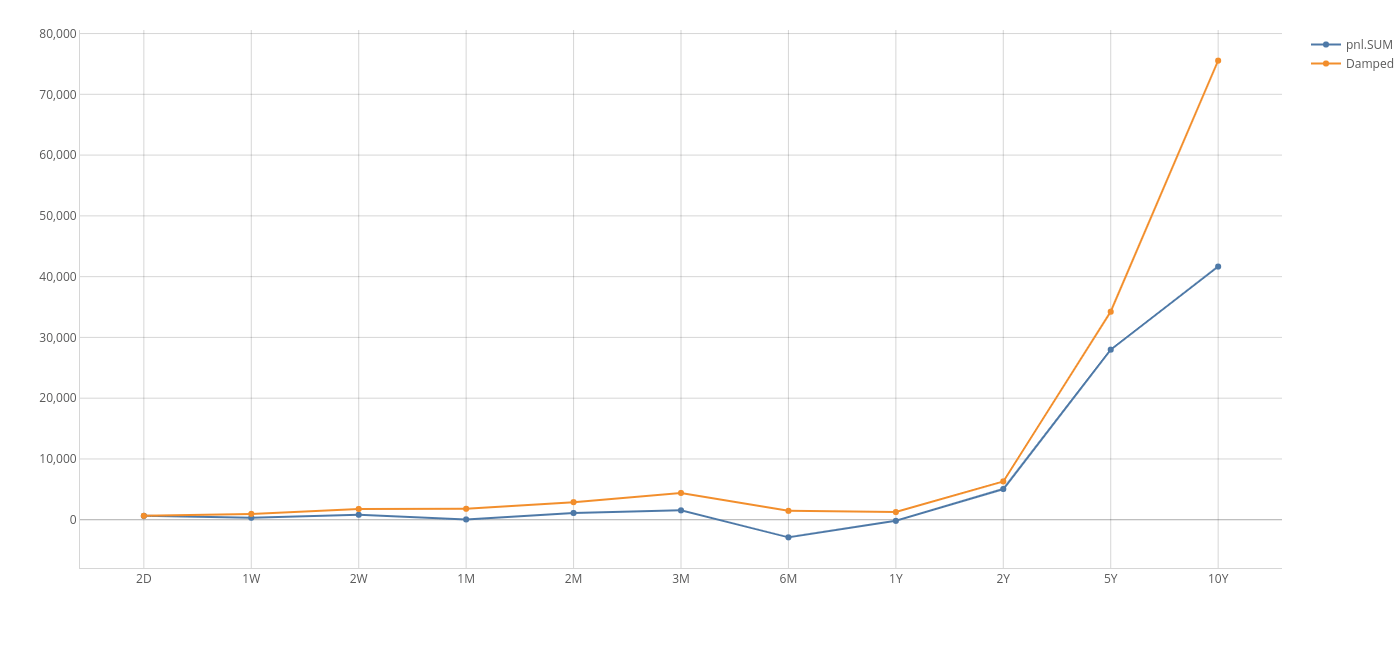
You can apply the following MDX on the sandbox project to perform such a calculation. Here, `pnl.SUM` represents the cumulative measure:
```
WITH
Member [Measures].[Damped] AS IIF(
[Time].[TimeBucket].CurrentMember.PrevMember IS NULL,
[Measures].[pnl.SUM], // this is the base case of the recurrence relation
(
[Time].[TimeBucket].CurrentMember,
[Measures].[pnl.SUM]
) + 0.99 * (
[Time].[TimeBucket].CurrentMember.PrevMember,
[Measures].[Damped]
) // else recurse in the previous member, with a damping factor representing a 1% carrying cost
)
SELECT
NON EMPTY {
[Measures].[contributors.COUNT],
[Measures].[Damped]
} ON COLUMNS,
NON EMPTY DrilldownLevel(
{
[Time].[TimeBucket].[ALL]
}
) ON ROWS
FROM [EquityDerivativesCube]
```
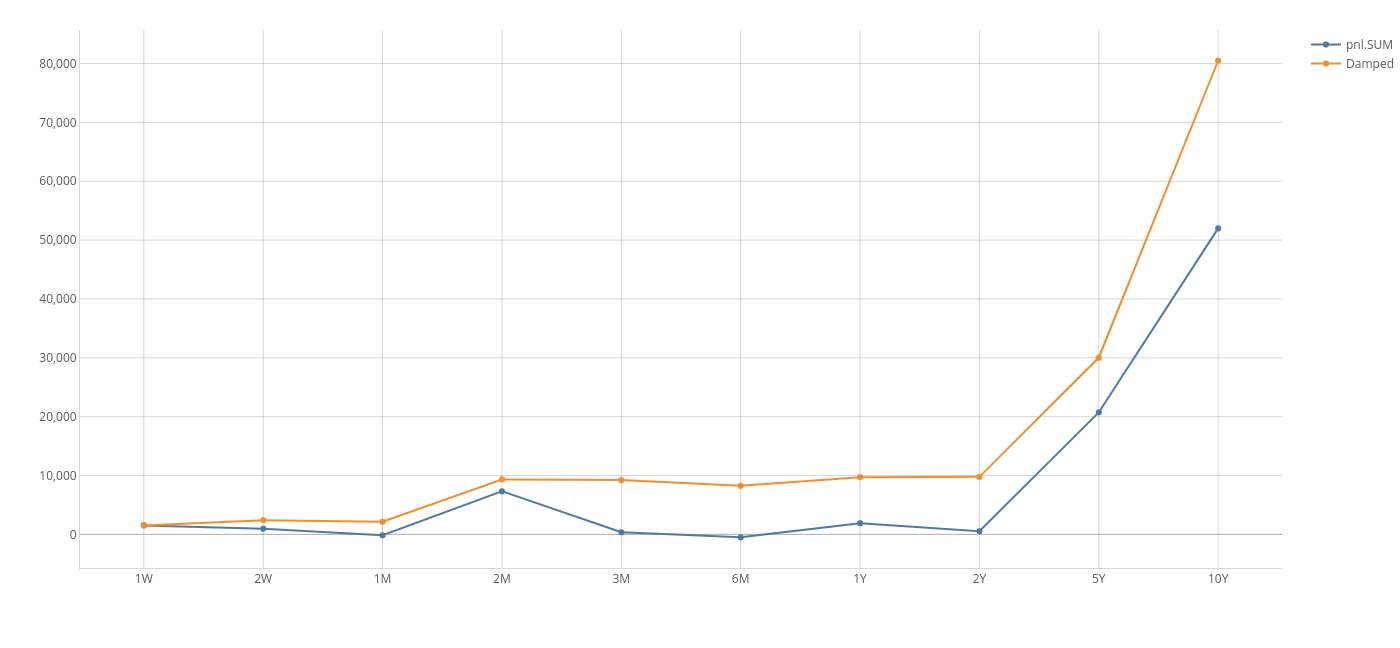
This gives a useful graph on which different assumptions can be tested on the fly, without IT support, such as:
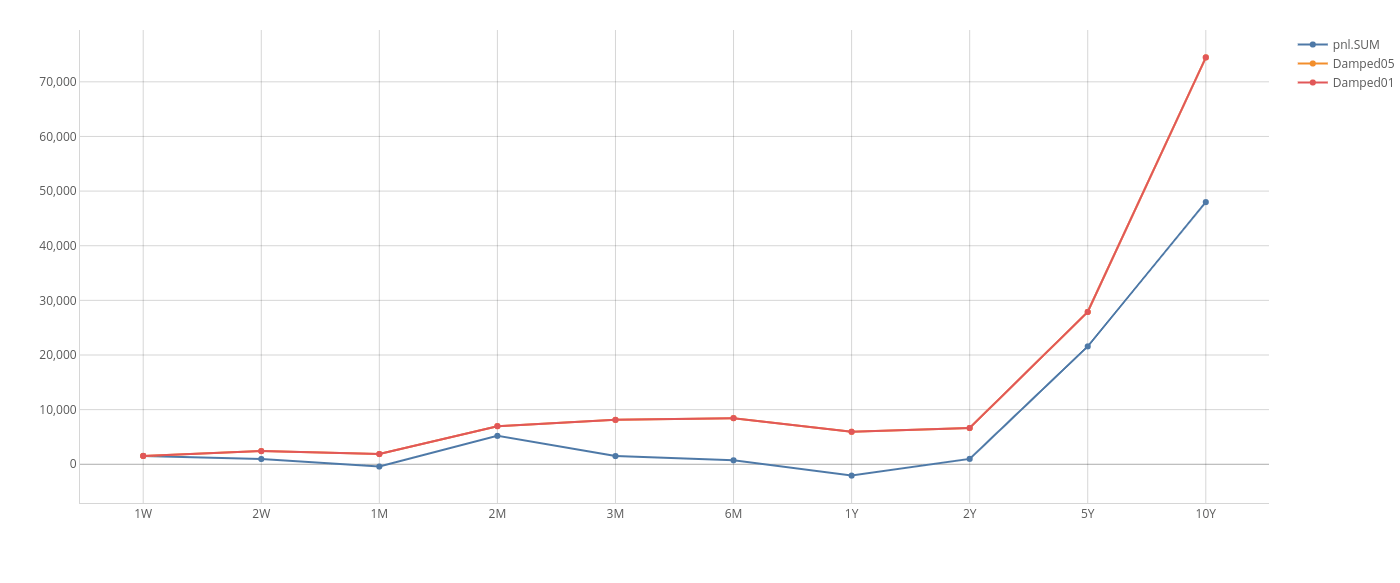
* "What happens to my bottom line if the per-unit cost of storing an unsold tablet rises from 1% per time unit to 5%?"
* "What is the opportunity cost imposed by my excess liquidity buffer if interest rates rise by 1%?
Below is a comparison between accumulation in the presence of costs and with a 1% carrying cost.
Perhaps the cash value of inventory does not just accumulate - it may be associated with an opportunity cost, a fixed storage
or administrative cost x so that the value of an inventory, unless used for some business purpose, decays to zero with some
half-life. Such a scenario could easily model the maintenance of a liquidity buffer or the warehousing cost of unsold electronic
widgets which otherwise have a nominal cash value. To do this we need an MDX recursive measure with a damping factor.
You can apply the following MDX on the sandbox project to perform such a calculation. Here, `pnl.SUM` represents the cumulative measure:
```
WITH
Member [Measures].[Damped] AS IIF(
[Time].[TimeBucket].CurrentMember.PrevMember IS NULL,
[Measures].[pnl.SUM], // this is the base case of the recurrence relation
(
[Time].[TimeBucket].CurrentMember,
[Measures].[pnl.SUM]
) + 0.99 * (
[Time].[TimeBucket].CurrentMember.PrevMember,
[Measures].[Damped]
) // else recurse in the previous member, with a damping factor representing a 1% carrying cost
)
SELECT
NON EMPTY {
[Measures].[contributors.COUNT],
[Measures].[Damped]
} ON COLUMNS,
NON EMPTY DrilldownLevel(
{
[Time].[TimeBucket].[ALL]
}
) ON ROWS
FROM [EquityDerivativesCube]
```
This gives a useful graph on which different assumptions can be tested on the fly, without IT support, such as:
* "What happens to my bottom line if the per-unit cost of storing an unsold tablet rises from 1% per time unit to 5%?"
* "What is the opportunity cost imposed by my excess liquidity buffer if interest rates rise by 1%?
Below is a comparison between accumulation in the presence of costs and with a 1% carrying cost.
 Below is a comparison between a 1% carrying cost and a 5% carrying cost.
 > When using recursion you need to be careful to ensure that your relation terminates and has low computational complexity - otherwise you will invariably produce a stack overflow!
### Only Show VaR for Trades not Present the Previous Day
```
WITH
Member [Measures].[New Trades VaR] AS IIF(
(
[DAY].CurrentMember.NextMember,
[TRADE_ID].CurrentMember,
[Measures].[contributors.COUNT]
) > 0,
NULL,
[Measures].[VaR]
)
SELECT NON EMPTY (
[DAY].[DAY].Members,
[Measures].[New Trades VaR]
) ON COLUMNS,
NON EMPTY
(
[TRADE_ID].[TRADE_ID].Members
)
) ON ROWS
FROM [YOUR_CUBE]
```
> This example works for trade-level VaR. To calculate the VaR for all trades not present the previous day, the
> measure would need to be the sum of the VaR Vector, which could then be fed into a post-processor to calculate the percentile.
### Top 3 Underlyings per Country
You may know the [TopCount](http://msdn.microsoft.com/en-us/library/ms144792.aspx) function, which is helpful when you
want to only keep the members with the highest values.
Now, imagine that in your cube you have the dimensions CounterParty and Geography and you want to retrieve for
each city the three CounterParty with the highest PnL.
You cannot do this solely with [TopCount](http://msdn.microsoft.com/en-us/library/ms144792.aspx), you also have to use
[Generate](http://msdn.microsoft.com/en-us/library/ms145526). This functions acts like a For loop.
Here is the MDX that will do what we want:
```
SELECT
NON EMPTY Generate(
[Geography].[City].[ALL].[AllMember].Children,
TopCount(
{
[Geography].[City].CurrentMember
} * [CounterParty].[CounterParty].[ALL].[AllMember].Children,
3,
[Measures].[pnl.SUM]
)
) ON ROWS,
{
[Measures].[pnl.SUM]
} ON COLUMNS
FROM [EquityDerivativesCube]
```
| City | CounterPartyGroup | pnl.SUM |
| ---------------- | -------------------- | -------- |
| **Berlin** | | |
| | BHP Billiton | 16612.4 |
| | Tyco | 4512.8 |
| | Asahi | -3968.2 |
| **Johannesburg** | | |
| | Cathay | 17893.4 |
| | Reed Elsevier | -4294.8 |
| | China Life Insurance | -5968.8 |
| **London** | | |
| | Mitsubishi | 20222.9 |
| | Vale R Doce | -20424.2 |
| **New York** | | |
| | Sumitomo | 11573.9 |
| | Rockwell | -17787.7 |
| | Mitsubishi | -22128.8 |
| **Paris** | | |
| | Sumitomo | 9619.2 |
| | Total | -3474.0 |
| | Formosa | -9119.2 |
| **Tokyo** | | |
| | Mitsui | 3781.6 |
| | HSBC | 2628.4 |
| | Unilever | -2083.0 |
Here is how we can add the total per region:
```
SELECT
NON EMPTY Generate(
[Geography].[City].[ALL].[AllMember].Children,
{
{
(
[Geography].[City].CurrentMember,
[CounterParty].[CounterParty].[ALL].[AllMember]
)
},
TopCount(
{
[Geography].[City].CurrentMember
} * [CounterParty].[CounterParty].[ALL].[AllMember].Children,
3,
[Measures].[pnl.SUM]
)
}
) ON ROWS,
{
[Measures].[pnl.SUM]
} ON COLUMNS
FROM [EquityDerivativesCube]
```
| City | CounterPartyGroup | pnl.SUM |
| ---------------- | -------------------- | -------- |
| **Berlin** | **Total** | -1847.9 |
| | Unilever | -674.9 |
| | China Life Insurance | -1173.0 |
| **Johannesburg** | **Total** | 15234.7 |
| | Mitsubishi | 15234.7 |
| **London** | **Total** | -4131.5 |
| | Vale R Doce | -807.7 |
| | Tyco | -3323.8 |
| **New York** | **Total** | -3281.1 |
| | HSBC | 22049.8 |
| | Reed Elsevier | 8094.3 |
| | Mitsubishi | 3124.7 |
| **Paris** | **Total** | 16284.0 |
| | Cosco | 22013.2 |
| | BHP Billiton | 11823.1 |
| | Toyota | 874.6 |
| **Tokyo** | **Total** | -17889.6 |
| | Cathay | 2191.8 |
| | Rockwell | 404.4 |
| | Mitsubishi | -1014.3 |
> When using recursion you need to be careful to ensure that your relation terminates and has low computational complexity - otherwise you will invariably produce a stack overflow!
### Only Show VaR for Trades not Present the Previous Day
```
WITH
Member [Measures].[New Trades VaR] AS IIF(
(
[DAY].CurrentMember.NextMember,
[TRADE_ID].CurrentMember,
[Measures].[contributors.COUNT]
) > 0,
NULL,
[Measures].[VaR]
)
SELECT NON EMPTY (
[DAY].[DAY].Members,
[Measures].[New Trades VaR]
) ON COLUMNS,
NON EMPTY
(
[TRADE_ID].[TRADE_ID].Members
)
) ON ROWS
FROM [YOUR_CUBE]
```
> This example works for trade-level VaR. To calculate the VaR for all trades not present the previous day, the
> measure would need to be the sum of the VaR Vector, which could then be fed into a post-processor to calculate the percentile.
### Top 3 Underlyings per Country
You may know the [TopCount](http://msdn.microsoft.com/en-us/library/ms144792.aspx) function, which is helpful when you
want to only keep the members with the highest values.
Now, imagine that in your cube you have the dimensions CounterParty and Geography and you want to retrieve for
each city the three CounterParty with the highest PnL.
You cannot do this solely with [TopCount](http://msdn.microsoft.com/en-us/library/ms144792.aspx), you also have to use
[Generate](http://msdn.microsoft.com/en-us/library/ms145526). This functions acts like a For loop.
Here is the MDX that will do what we want:
```
SELECT
NON EMPTY Generate(
[Geography].[City].[ALL].[AllMember].Children,
TopCount(
{
[Geography].[City].CurrentMember
} * [CounterParty].[CounterParty].[ALL].[AllMember].Children,
3,
[Measures].[pnl.SUM]
)
) ON ROWS,
{
[Measures].[pnl.SUM]
} ON COLUMNS
FROM [EquityDerivativesCube]
```
| City | CounterPartyGroup | pnl.SUM |
| ---------------- | -------------------- | -------- |
| **Berlin** | | |
| | BHP Billiton | 16612.4 |
| | Tyco | 4512.8 |
| | Asahi | -3968.2 |
| **Johannesburg** | | |
| | Cathay | 17893.4 |
| | Reed Elsevier | -4294.8 |
| | China Life Insurance | -5968.8 |
| **London** | | |
| | Mitsubishi | 20222.9 |
| | Vale R Doce | -20424.2 |
| **New York** | | |
| | Sumitomo | 11573.9 |
| | Rockwell | -17787.7 |
| | Mitsubishi | -22128.8 |
| **Paris** | | |
| | Sumitomo | 9619.2 |
| | Total | -3474.0 |
| | Formosa | -9119.2 |
| **Tokyo** | | |
| | Mitsui | 3781.6 |
| | HSBC | 2628.4 |
| | Unilever | -2083.0 |
Here is how we can add the total per region:
```
SELECT
NON EMPTY Generate(
[Geography].[City].[ALL].[AllMember].Children,
{
{
(
[Geography].[City].CurrentMember,
[CounterParty].[CounterParty].[ALL].[AllMember]
)
},
TopCount(
{
[Geography].[City].CurrentMember
} * [CounterParty].[CounterParty].[ALL].[AllMember].Children,
3,
[Measures].[pnl.SUM]
)
}
) ON ROWS,
{
[Measures].[pnl.SUM]
} ON COLUMNS
FROM [EquityDerivativesCube]
```
| City | CounterPartyGroup | pnl.SUM |
| ---------------- | -------------------- | -------- |
| **Berlin** | **Total** | -1847.9 |
| | Unilever | -674.9 |
| | China Life Insurance | -1173.0 |
| **Johannesburg** | **Total** | 15234.7 |
| | Mitsubishi | 15234.7 |
| **London** | **Total** | -4131.5 |
| | Vale R Doce | -807.7 |
| | Tyco | -3323.8 |
| **New York** | **Total** | -3281.1 |
| | HSBC | 22049.8 |
| | Reed Elsevier | 8094.3 |
| | Mitsubishi | 3124.7 |
| **Paris** | **Total** | 16284.0 |
| | Cosco | 22013.2 |
| | BHP Billiton | 11823.1 |
| | Toyota | 874.6 |
| **Tokyo** | **Total** | -17889.6 |
| | Cathay | 2191.8 |
| | Rockwell | 404.4 |
| | Mitsubishi | -1014.3 |