> ## Documentation Index
> Fetch the complete documentation index at: https://docs.activeviam.com/llms.txt
> Use this file to discover all available pages before exploring further.
# Database API
# Database API
An Atoti cube can work on top of a Datastore or an external data warehouse.
Therefore, a common interface is used to represent any component capable of providing versioned data for the cube.
This interface is `com.activeviam.database.api.IDatabase`.
This interface has two kind of implementations:
* `IDatastore` which is the Atoti implementation of an in-memory database.
* `IDirectQueryDatabase` which is an implementation that supports querying an external data warehouse.
An Atoti cube can use any `IDatabase` as a data provider.
## Database Schema
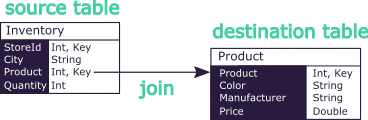
The database schema consists of a set of tables, each containing fields, and that are interlinked with joins.
For those used to the vocabulary historically used in the Datastore, the tables used to be called stores, and the joins
used to be called references.
Naming joins is not something that exists in common databases.
In the context of Atoti where it is mandatory to pre-define a flattened schema, it is convenient to assign names to
those paths. This makes it easier to reason about those fields as integrated to the schema.
 ## Versions
Atoti Databases have the same concept of versions and branches that were previously exposed by the Datastore and Atoti
cubes. As before, they represent single points in time of the Database and alternative scenarios on the dataset.
## Query Runner
This component is accessed from a Version through the method `IDatabaseVersion#getQueryRunner`.
The Query Runner is the entry-point to run queries on a Database.
It can run different types of queries:
* **List**: These queries are made to retrieve a list of records that match some specified conditions.
* **Get-By-Key**: These queries are made to retrieve one or several records (lines of data in a table) given their
unique identifier (i.e. the key).
* **Distinct**: These queries are made to retrieve distinct values of a field or a field combination from a list of
records. The list of records can be optionally filtered with specified conditions.
* **Statistics**: These queries are made to retrieve information about the Database. Details like the size of a table,
or the cardinality of a given field.
## Query Manager
This component is accessed from a Version through the method `IDatabaseVersion#getQueryManager` or from the database
itself.
Completing the Query Runner, the Query Manager makes it possible to prepare queries beforehand.
Using an analogy with JDBC, the Query Runner creates an SQL Statement while the Query Manager creates Prepared
Statements. In the language of the QueryManager, it produces instances of `IPreparedQuery`
## Versions
Atoti Databases have the same concept of versions and branches that were previously exposed by the Datastore and Atoti
cubes. As before, they represent single points in time of the Database and alternative scenarios on the dataset.
## Query Runner
This component is accessed from a Version through the method `IDatabaseVersion#getQueryRunner`.
The Query Runner is the entry-point to run queries on a Database.
It can run different types of queries:
* **List**: These queries are made to retrieve a list of records that match some specified conditions.
* **Get-By-Key**: These queries are made to retrieve one or several records (lines of data in a table) given their
unique identifier (i.e. the key).
* **Distinct**: These queries are made to retrieve distinct values of a field or a field combination from a list of
records. The list of records can be optionally filtered with specified conditions.
* **Statistics**: These queries are made to retrieve information about the Database. Details like the size of a table,
or the cardinality of a given field.
## Query Manager
This component is accessed from a Version through the method `IDatabaseVersion#getQueryManager` or from the database
itself.
Completing the Query Runner, the Query Manager makes it possible to prepare queries beforehand.
Using an analogy with JDBC, the Query Runner creates an SQL Statement while the Query Manager creates Prepared
Statements. In the language of the QueryManager, it produces instances of `IPreparedQuery`
The benefits of Prepared Queries include compiling-once, managing, parametrizing and reusing them.
Once created, those queries must be passed to a given Query Runner to be executed in a given version.
See [Database Queries](./database_queries) for detailed examples of building and running queries.
## Data Streamer
This component is accessed from the database through the method `IDatabase#getDataStreamer`.
The data streamer provides push-based notifications of data changes.
Instead of polling, register a query and a listener: the streamer calls the listener whenever a transaction affects the
query results.
### Registering a stream view
Registering a stream view requires three things:
* An `IPreparedListQuery` defining what data to watch (see [Database Queries](./database_queries) for how to build
list queries)
* An `IStreamListViewListener` that receives change notifications
* `RegistrationOptions` to configure the streaming behavior
```java theme={"languages":{"custom":["/engine/python-sdk/0.9/languages/pycon.tmLanguage.json"]}}
// 1. Prepare the query
final IPreparedListQuery query =
database
.getQueryManager()
.listQuery()
.forTable("trades")
.withCondition(BaseConditions.equal(FieldPath.of("city"), "Paris"))
.withTableFields("tradeId", "trader", "value")
.compile();
// 2. Create the listener
final IStreamListViewListener listener = new TradeStreamListener();
// 3. Register on the data streamer
final IStreamedViewListenerRegistration registration =
database
.getDataStreamer()
.registerListStreamView(query, listener, RegistrationOptions.defaults());
// 4. Wait for the registration to complete (including initial view if enabled)
registration.getAttachmentProcess().toCompletableFuture().get();
// ... the listener is now receiving updates on every commit ...
// 5. Unregister when done
registration.unregister();
```
### The stream view listener
The `IStreamListViewListener` interface defines callbacks for each type of data change.
Some callbacks may be invoked concurrently (e.g. for different partitions), so listener implementations must be
thread-safe.
Within a transaction, callbacks are called in this order:
1. `transactionStarted` signals the beginning of a commit
2. Record change callbacks: `recordsAdded`, `recordsDeleted`, `recordsUpdated`, `partitionDropped`, or `truncate`
3. `transactionCommitted` or `transactionRolledBack` signals the outcome
If any callback throws an exception, it is captured and passed to `onSelfFailure`.
The `IRecordBlock` and `IRecordReader` instances passed to listener callbacks may be backed by reused internal buffers.
To keep the data beyond the callback invocation, it **must** be cloned (e.g. using `IRecordReader#toList()` or
`IRecordReader#copy()`).
```java theme={"languages":{"custom":["/engine/python-sdk/0.9/languages/pycon.tmLanguage.json"]}}
static class TradeStreamListener implements IStreamListViewListener {
// Thread-safe collection: callbacks may be invoked concurrently for different partitions
private final Queue> receivedRecords = new ConcurrentLinkedQueue<>();
@Override
public void transactionStarted(final IEpoch epoch, final ITransactionInformation info) {
// Called at the beginning of a commit
}
@Override
public void transactionCommitted(final IEpoch epoch) {
// Called after the transaction successfully commits
}
@Override
public void transactionRolledBack() {
// Called if the transaction rolls back
}
@Override
public void recordsAdded(
final int partitionId, final IRecordBlock records) {
// Important: record data may be backed by a reused buffer
// Clone the data if you need to keep it beyond this callback
for (final IRecordReader r : records) {
this.receivedRecords.add(r.toList());
}
}
@Override
public void recordsDeleted(
final int partitionId, final IRecordBlock records) {
// Handle deleted records
}
@Override
public void recordsUpdated(
final int partitionId,
final IRecordBlock oldValues,
final IRecordBlock newValues) {
// Handle updated records — both old and new values are provided
}
@Override
public void partitionDropped(
final int partitionId,
final List dropConditionsFields,
final IRecordBlock records) {
// Handle dropped partitions
}
@Override
public void truncate() {
// Handle truncation (all data removed)
this.receivedRecords.clear();
}
@Override
public void onSelfFailure(final Throwable error) {
// Called if any of the above callbacks throws an exception
}
}
```
### Registration options
`RegistrationOptions` is configured with a builder:
| Option | Default | Description |
| ----------------- | ------- | ------------------------------------------------------------------------ |
| `sendInitialView` | `true` | Sends the current data snapshot to the listener before streaming deltas. |
| `branch` | `null` | Branch to listen to. `null` receives updates from all branches. |
| `dictionarized` | `false` | Whether dictionarized field values are streamed in their encoded form. |
```java theme={"languages":{"custom":["/engine/python-sdk/0.9/languages/pycon.tmLanguage.json"]}}
final RegistrationOptions options =
RegistrationOptions.builder()
.sendInitialView(true) // send a snapshot of current data before streaming deltas
.branch(IEpoch.MASTER_BRANCH_NAME) // only listen to changes on the master branch
.dictionarized(false) // receive plain values, not dictionary-encoded
.build();
```
### Prefer single-branch registration on the Datastore
When `sendInitialView` is enabled, the streamer must catch up with the current state of the datastore before streaming
deltas. How this catch-up works depends on the `branch` option:
* **Single-branch** (`branch` set to a specific branch): the catch-up runs **asynchronously**. Transactions on the
datastore are not blocked.
* **Multi-branch** (`branch` set to `null`): the catch-up runs **synchronously** inside a maintenance operation,
**blocking all transactions** until the initial view is fully delivered.
Always prefer setting a specific branch when possible. Even if the application only uses the master branch, explicitly
setting it avoids blocking transactions during the catch-up phase.
This distinction only applies to the Datastore. DirectQuery databases only operate on the master branch.
### Managing the registration
`registerListStreamView` returns an `IStreamedViewListenerRegistration` to manage the lifecycle of the stream:
* `getAttachmentProcess()` returns a `CompletionStage` that completes once the listener is fully registered. If
`sendInitialView` is enabled, it completes after the initial data snapshot has been delivered.
* `unregister()` removes the listener and frees internal resources. If no more listeners remain for the underlying view,
the view itself is deleted.