> ## Documentation Index
> Fetch the complete documentation index at: https://docs.activeviam.com/llms.txt
> Use this file to discover all available pages before exploring further.
# AI-based Optimizer
> The AI-based Optimizer in Atoti Server analyzes query history to recommend partial aggregate provider configurations that balance memory footprint and query execution speed, triggered via the AiOptimizer MBean or REST API and enabled per cube through AggregateProviderRecommendationProperties
## Introduction
Atoti server comes with an AI-based recommendation tool that helps you configure your application.
## Aggregate provider recommendation (Experimental)
The memory footprint and the query execution speed within an Atoti application are significantly affected
by the configuration of the partial aggregate providers. The built-in AI based optimizer can be used to make
recommendations for partial aggregate providers.
From 6.1.1 Atoti stores a query history. This query history is processed by the optimizer to suggest partial
providers. The provided recommendations are therefore tied to queries that have previously run against the cube.
The recommendations are calculated by seeking the best trade-off between the memory footprint of the configured
partial providers and the speed of the query execution.
The aggregate provider recommendation must be enabled by setting the system
property `activeviam.feature.experimental.aggregate_provider_optimizer.enabled` to `true`. It is configured in the
`AggregateProviderDefinition` of each cube and can be triggered and monitored either from the
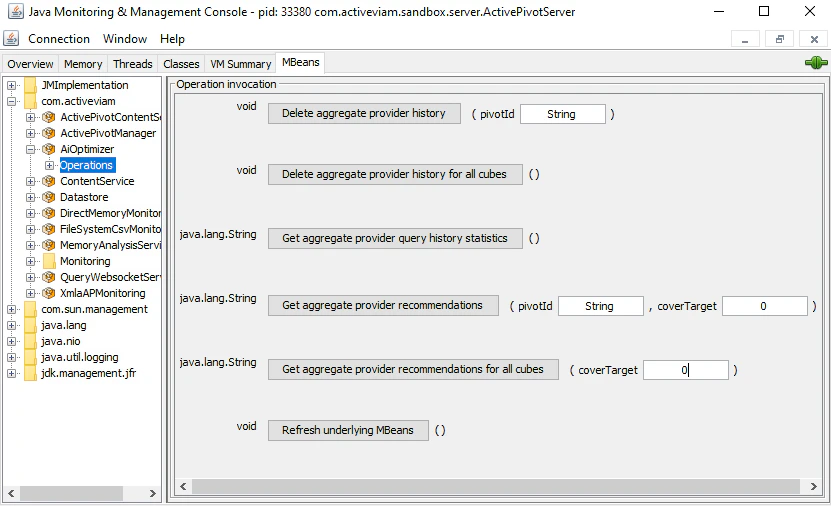
`AiOptimizer` MBean in the folder *com.activeviam* or from the [REST service](https://docs.activeviam.com/engine/rest/6.1.23/ai-optimizer/).
 In order to find a good trade-off between the memory footprint of the recommended partial providers and the
speed of query execution, the optimizer executes MDX queries to estimate the memory footprint of candidate
partial provider configurations.
> **We strongly recommend using this feature in a test environment** because the calculation of the recommendations
> will reduce the responsiveness of the application.
### User Guide
We recommend using the aggregate provider recommendation in a test environment, as this will not impact the
production environment.
Start the application in the test environment, run the queries you want the recommended aggregate providers to
cover, and get the recommendations for the previously run queries. If these recommendations meet your needs, apply
them to your production environment.
#### Step 1: Configuring the aggregate provider recommendation
Three `AggregateProviderDefinition` properties can be configured for each cube:
`AggregateProviderRecommendationProperties#AI_OPTIMIZER_ENABLED`:
This property must be set to `true` to allow the recommendations on a cube. As a reminder, the default value for
this property is `false`.
`AggregateProviderRecommendationProperties#EXCLUDED_LEVELS`:
This property makes it possible to force the optimizer to exclude specific levels from the
recommended partial providers. The expected format of the
property string is the `LevelIdentifier` descriptions of the levels to exclude, separated by commas. The default
value is an empty string: all levels are considered for the recommendations.
It may be relevant to exclude high cardinality levels from the recommendations, as such levels significantly
increase the memory footprint and granularity of the providers that include them. In particular, **it is strongly
recommended to exclude the level based on the key field of the base store**. The downside is that queries
expressing this level will not be covered by the recommended partial providers.
`AggregateProviderRecommendationProperties#QUERY_EXECUTION_TIME_LIMIT`:
This property defines the time limit (in minutes) for executing the MDX queries used to compute
recommendations, with a default value of 10 minutes. The MDX queries are prioritized in a queue, and the
AI-based optimizer runs as many queries as possible within this time limit. Executing more queries improves
the accuracy of the recommendations.
The overall duration of the recommendations calculation may exceed this time limit due to the
additional tasks required to generate the recommendations, but will not exceed twice the defined time limit.
```java theme={"languages":{"custom":["/engine/python-sdk/0.9/languages/pycon.tmLanguage.json"]}}
StartBuilding.cube()
.withName("Cube")
.withSingleLevelDimensions("d1", "d2", "d3", "d4")
.withAggregateProvider()
.withProperty(AggregateProviderRecommendationProperties.AI_OPTIMIZER_ENABLED, "true")
.withProperty(AggregateProviderRecommendationProperties.QUERY_EXECUTION_TIME_LIMIT, "20")
.withProperty(
AggregateProviderRecommendationProperties.EXCLUDED_LEVELS,
LevelIdentifier.simple("d1").toDescription()
+ ","
+ LevelIdentifier.simple("d2").toDescription())
.build();
```
#### Step 2: Executing the queries you want to accelerate
The query history is automatically created by collecting data about executed queries. It is lost when the
application is stopped.
You can clear the history from the following `AiOptimizer` MBean operations:
* `Delete aggregate provider history (String pivotId)`: Delete the query history for the cube
corresponding to the given pivotId (cube name).
* `Delete aggregate provider history for all cubes`: Delete the query history for every cube.
Moreover, you can get statistics about the current state of the query history:
* `Get aggregate provider query history statistics`: Returns the size of the query history for every
cube.
If the query history is empty for a given cube, no partial aggregate provider will be recommended for this cube.
#### Step 3: Getting recommendations
When triggered, the optimizer computes a configuration of partial aggregate providers that covers the current
query history. The recommendations are obtained from the following JMX operations of the `AiOptimizer` MBean:
* `Get aggregate provider recommendations (String pivotId, double coverTarget)`: Computes the recommendations for
the cube corresponding to the given pivotId (cube name).
* `Get aggregate provider recommendations for all cubes (double coverTarget)`: Computes the recommendations for
every cube.
The `coverTarget` argument is a number between 0 and 1
that represents the percentage of the query history to be covered. If it is less than 1, the optimizer
automatically selects which queries to cover by eliminating those that contribute the least to the overall
performance of the recommendations. It must therefore be set to 1 to cover the entire query history. However,
performance benchmarks have shown that a reasonable reduction in this value (around 0.75) can improve the overall
performance of the recommendations, both in terms of memory footprint and query acceleration. No partial
aggregate provider will be recommended if it is set to 0.
The two `Get aggregate provider recommendations` operations return Java code which can be used to configure partial
aggregate providers.
### Are the recommendations deterministic?
As mentioned previously, the best recommendations in terms of memory footprint and query execution
speed are found by executing a series of queries on the cube. The quantity and quality of these queries are
dynamically adjusted based on the available resources and the
`AggregateProviderRecommendationProperties#QUERY_EXECUTION_TIME_LIMIT` property. Consequently, if the available
resources change when recommendations are requested, the resulting recommendations may also change, making
them not entirely deterministic. However, if the available resources remain the same, the recommendations will
be consistent and deterministic for a given query history.
In order to find a good trade-off between the memory footprint of the recommended partial providers and the
speed of query execution, the optimizer executes MDX queries to estimate the memory footprint of candidate
partial provider configurations.
> **We strongly recommend using this feature in a test environment** because the calculation of the recommendations
> will reduce the responsiveness of the application.
### User Guide
We recommend using the aggregate provider recommendation in a test environment, as this will not impact the
production environment.
Start the application in the test environment, run the queries you want the recommended aggregate providers to
cover, and get the recommendations for the previously run queries. If these recommendations meet your needs, apply
them to your production environment.
#### Step 1: Configuring the aggregate provider recommendation
Three `AggregateProviderDefinition` properties can be configured for each cube:
`AggregateProviderRecommendationProperties#AI_OPTIMIZER_ENABLED`:
This property must be set to `true` to allow the recommendations on a cube. As a reminder, the default value for
this property is `false`.
`AggregateProviderRecommendationProperties#EXCLUDED_LEVELS`:
This property makes it possible to force the optimizer to exclude specific levels from the
recommended partial providers. The expected format of the
property string is the `LevelIdentifier` descriptions of the levels to exclude, separated by commas. The default
value is an empty string: all levels are considered for the recommendations.
It may be relevant to exclude high cardinality levels from the recommendations, as such levels significantly
increase the memory footprint and granularity of the providers that include them. In particular, **it is strongly
recommended to exclude the level based on the key field of the base store**. The downside is that queries
expressing this level will not be covered by the recommended partial providers.
`AggregateProviderRecommendationProperties#QUERY_EXECUTION_TIME_LIMIT`:
This property defines the time limit (in minutes) for executing the MDX queries used to compute
recommendations, with a default value of 10 minutes. The MDX queries are prioritized in a queue, and the
AI-based optimizer runs as many queries as possible within this time limit. Executing more queries improves
the accuracy of the recommendations.
The overall duration of the recommendations calculation may exceed this time limit due to the
additional tasks required to generate the recommendations, but will not exceed twice the defined time limit.
```java theme={"languages":{"custom":["/engine/python-sdk/0.9/languages/pycon.tmLanguage.json"]}}
StartBuilding.cube()
.withName("Cube")
.withSingleLevelDimensions("d1", "d2", "d3", "d4")
.withAggregateProvider()
.withProperty(AggregateProviderRecommendationProperties.AI_OPTIMIZER_ENABLED, "true")
.withProperty(AggregateProviderRecommendationProperties.QUERY_EXECUTION_TIME_LIMIT, "20")
.withProperty(
AggregateProviderRecommendationProperties.EXCLUDED_LEVELS,
LevelIdentifier.simple("d1").toDescription()
+ ","
+ LevelIdentifier.simple("d2").toDescription())
.build();
```
#### Step 2: Executing the queries you want to accelerate
The query history is automatically created by collecting data about executed queries. It is lost when the
application is stopped.
You can clear the history from the following `AiOptimizer` MBean operations:
* `Delete aggregate provider history (String pivotId)`: Delete the query history for the cube
corresponding to the given pivotId (cube name).
* `Delete aggregate provider history for all cubes`: Delete the query history for every cube.
Moreover, you can get statistics about the current state of the query history:
* `Get aggregate provider query history statistics`: Returns the size of the query history for every
cube.
If the query history is empty for a given cube, no partial aggregate provider will be recommended for this cube.
#### Step 3: Getting recommendations
When triggered, the optimizer computes a configuration of partial aggregate providers that covers the current
query history. The recommendations are obtained from the following JMX operations of the `AiOptimizer` MBean:
* `Get aggregate provider recommendations (String pivotId, double coverTarget)`: Computes the recommendations for
the cube corresponding to the given pivotId (cube name).
* `Get aggregate provider recommendations for all cubes (double coverTarget)`: Computes the recommendations for
every cube.
The `coverTarget` argument is a number between 0 and 1
that represents the percentage of the query history to be covered. If it is less than 1, the optimizer
automatically selects which queries to cover by eliminating those that contribute the least to the overall
performance of the recommendations. It must therefore be set to 1 to cover the entire query history. However,
performance benchmarks have shown that a reasonable reduction in this value (around 0.75) can improve the overall
performance of the recommendations, both in terms of memory footprint and query acceleration. No partial
aggregate provider will be recommended if it is set to 0.
The two `Get aggregate provider recommendations` operations return Java code which can be used to configure partial
aggregate providers.
### Are the recommendations deterministic?
As mentioned previously, the best recommendations in terms of memory footprint and query execution
speed are found by executing a series of queries on the cube. The quantity and quality of these queries are
dynamically adjusted based on the available resources and the
`AggregateProviderRecommendationProperties#QUERY_EXECUTION_TIME_LIMIT` property. Consequently, if the available
resources change when recommendations are requested, the resulting recommendations may also change, making
them not entirely deterministic. However, if the available resources remain the same, the recommendations will
be consistent and deterministic for a given query history.