> ## Documentation Index
> Fetch the complete documentation index at: https://docs.activeviam.com/llms.txt
> Use this file to discover all available pages before exploring further.
# ETL in Atoti
Atoti's data source API enables developers to populate their Datastore(s) from multiple data
sources. Currently, Atoti supports the following data source types:
* CSV files
* Parquet files
* Java DataBase Connectivity
* Java Objects
In addition to these source types, Atoti provides data fetching capabilities
from the cloud using the Cloud Source API, which natively supports AWS, Azure, and Google Cloud.
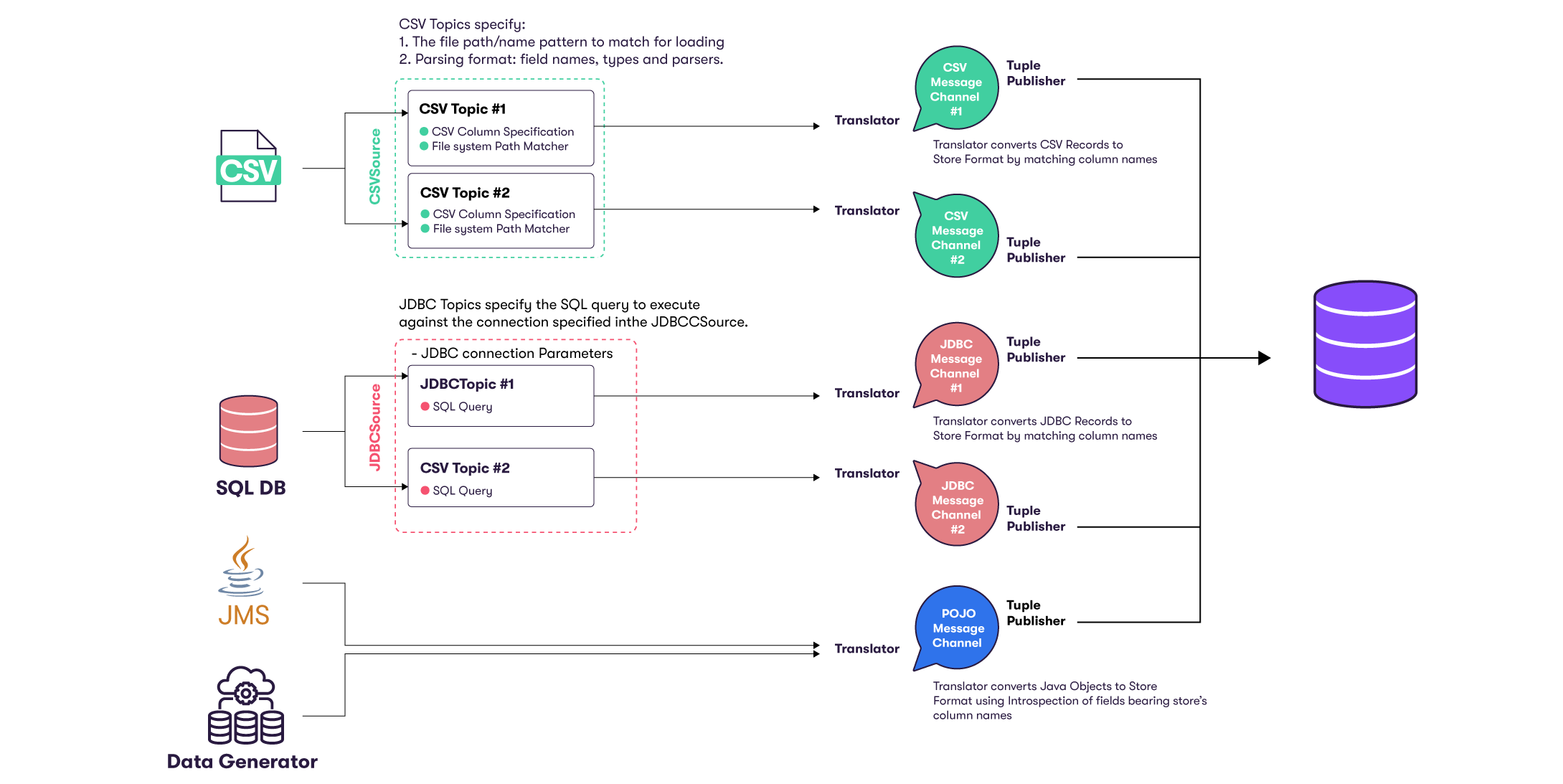
The following schema illustrates the Datastore data loading flow:
 > Implementation details may change depending on the source's type.
## Extraction
First, Atoti's data sources orchestrate and perform the extraction phase that consists of loading the
desired data sources. This step is responsible for creating **Topics** that define the contents of a
data source. A topic usually represents a particular type of data content, for instance a coherent business
entity.
Next, **Message Channels** transform and feed data from a single source to a single store
within the Datastore through transactions. Optionally, various data processing steps can be applied before data is committed into the Datastore.
This includes performing various ETL (Extract, Transform, and Load) operations, using column calculators or custom tuple publishers.
A Channel also encloses two specialized objects:
* a translator that converts source records to the store's format
* a tuple publisher that processes and publishes records into the target store
## Transformation
A message channel can listen to a data source, and fetch from it. An `IMessageChannel` is linked to
a single `ITopic` and fed using `ITranslator`s. This contract simply translates an input object
into an output. Most notably, the `TupleTranslator` translates a line read from a CSV file into a
tuple that can be fed to the `IMessageChannel`, and later directly added to a store.
During the translation step, data can be enhanced: attributes can be added or modified.
A simple example is to store in the file name data that is constant for the entire file, like a
date, and add it as an attribute using the `FileNameCalculator`.
> A message channel appends chunks of data to a message before it is ready to be sent.
> Several message chunks can be created and filled concurrently from several threads, for higher
> performance.
## Loading
Lastly, tuple publishers conclude the data loading.
Atoti provides two implementations of the `ITuplePublisher` contract:
* `TuplePublisher` can be used within a transaction to `publish` the loaded tuples into the
`targetStores`. The `publish` method MUST be called within a started transaction.
* `AutoCommitTuplePublisher` takes care of this step. Its `publish` method starts and stops the
transaction. This is typically used for real-time updates, so that tuples are published as soon as
they are available, to prevent the spawning of a long transaction across multiple messages, which
has to wait for the entire load to be over before committing the transaction.
> Implementation details may change depending on the source's type.
## Extraction
First, Atoti's data sources orchestrate and perform the extraction phase that consists of loading the
desired data sources. This step is responsible for creating **Topics** that define the contents of a
data source. A topic usually represents a particular type of data content, for instance a coherent business
entity.
Next, **Message Channels** transform and feed data from a single source to a single store
within the Datastore through transactions. Optionally, various data processing steps can be applied before data is committed into the Datastore.
This includes performing various ETL (Extract, Transform, and Load) operations, using column calculators or custom tuple publishers.
A Channel also encloses two specialized objects:
* a translator that converts source records to the store's format
* a tuple publisher that processes and publishes records into the target store
## Transformation
A message channel can listen to a data source, and fetch from it. An `IMessageChannel` is linked to
a single `ITopic` and fed using `ITranslator`s. This contract simply translates an input object
into an output. Most notably, the `TupleTranslator` translates a line read from a CSV file into a
tuple that can be fed to the `IMessageChannel`, and later directly added to a store.
During the translation step, data can be enhanced: attributes can be added or modified.
A simple example is to store in the file name data that is constant for the entire file, like a
date, and add it as an attribute using the `FileNameCalculator`.
> A message channel appends chunks of data to a message before it is ready to be sent.
> Several message chunks can be created and filled concurrently from several threads, for higher
> performance.
## Loading
Lastly, tuple publishers conclude the data loading.
Atoti provides two implementations of the `ITuplePublisher` contract:
* `TuplePublisher` can be used within a transaction to `publish` the loaded tuples into the
`targetStores`. The `publish` method MUST be called within a started transaction.
* `AutoCommitTuplePublisher` takes care of this step. Its `publish` method starts and stops the
transaction. This is typically used for real-time updates, so that tuples are published as soon as
they are available, to prevent the spawning of a long transaction across multiple messages, which
has to wait for the entire load to be over before committing the transaction.