> ## Documentation Index
> Fetch the complete documentation index at: https://docs.activeviam.com/llms.txt
> Use this file to discover all available pages before exploring further.
# CSV Source
## Introduction
The CSV Source is one of Atoti's key components. It relies on NIO (Non-blocking I/O) channel,
memory buffers and multithreading to speed-up character decoding and object parsing, providing thus
high speed data analysis through fast data loading.
The CSV Source implementation aims at high performance and detailed configuration. It allows
fetching data from, and listening for changes in CSV files in a multithreaded way in record times,
while keeping the amount of transient memory to a minimum.
Moreover, CSV work is organized internally in workloads that they execute. Nevertheless,
it is also possible for custom code to bypass the CSV Source standard
pipelines, to take control of parsing operations, deciding what files are loaded into what
channel, and when.
## Principle
Multithreaded CSV parsing isn't as straight-forward as splitting the file and assigning each chunk to a single thread.
This example illustrates the difficulties:
Given the following CSV:
```
ID, Name, Price, Comment
0,"nameA",1,"This is a comment, is it not"
1,"nameB",2,"Another comment"
```
If this file is split in half (character wise, since the parser doesn't know about context, line
delimiter, and so on, at that point of the algorithm), the first thread will have the bytes that correspond to
```
0,"nameA",1,"This is a comment
```
while the second thread gets
```
, is it not"
1,"nameB",2,"Another comment"
```
Now the second thread sees a delimiter, the character `,` but as it doesn't know the context, it cannot
know if it is within a comment or not. It could count the `"` character and deduce, after
parsing the entire block, that it was within a comment, but that technique has its own limits.
ActiveViam's multithreaded parser can read over a million entries per second.
This article explains the solution, as well as its parameterization.
### ParserTask
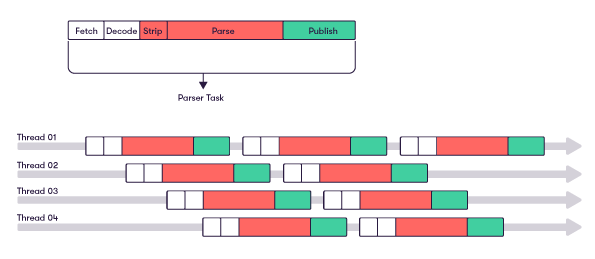
The CSV Source uses a single unified thread pool that runs a single type of task called a
`ParserTask`. A `ParserTask` performs the following tasks:
* Fetch bytes from a byte channel that represents the file,
* Decode the bytes into characters,
* Split these characters into lines,
* Parse the lines into records,
* Publish the records to a source listener.
`ParserTask`s optimize memory access by having all transient data remain in the CPU's
cache for the duration of the computation. Each task works separately without the need for
synchronization with the other tasks in the thread pool.
In a typical usage of the CSV source, the first three sub-tasks of a `ParserTask` are much less
expensive than the following two. Thus, as soon as a `ParserTask` is done with its decoding
sub-task, it spawns the next task, and can give that task context regarding delimiters.
A CSV parsing process can therefore be seen as such:
 ### Integration with CSVSource
The process of reading a CSV starts with the creation of a `ChannelTask` that holds information
regarding the file. When started, it creates the first `ParserTask`.
Around these tasks, ActiveViam has designed a pipeline to help load CSV files into the datastore.
#### Topics
You have to define `ICSVTopic`s, which hold information about the columns from a CSV file (or several files
that have a common structure) and are used to load data.
For CSV files that come from the local file system, we provide two implementations:
* a single CSV file topic, where a single file is watched for updates, or
* a directory topic, where a directory is watched for new or updated files that match a given pattern.
> Configuring these topics can be easily done through a `FileSystemCSVTopicFactory`.
Note that there exist CSV topic implementations for files that do not come from the local file system (Cloud source),
that we do not discuss further in this article. Even though the way to access the file contents is different,
all other aspects of data loading stay the same.
Each `ICSVTopic` holds its own `ICSVParserConfiguration`, which states the delimiter used, the
columns of the files and their position, and other properties. For more details, see
[ICSVParserConfiguration](#icsvparserconfiguration).
#### CSVSource
`ICSVTopic`s are held by the `ICSVSource`, which can create parser configurations and
initialize the workload. An `ICSVSource` is **not** a data source, that is, it does not represent a file.
#### MessageChannels and messages
The `IMessageChannel`s are each linked to a single topic and are used to gather the data, as it is being parsed,
into messages. They are also responsible for sending those messages.
Most messages are `IStoreMessage`s, and gather the data as tuples to add to the datastore.
When asked to `fetch` data for specific `IMessageChannel`s, given as arguments, the `ICSVSource`
polls the corresponding `ICSVTopic`s and generates the corresponding workload.
Note that several channels can correspond to the same topic. For example, if some columns of a file correspond
to a given store and some to another store, there can be one channel for each store: they all depend on the same files
(and the same topic). In that case the channels are automatically grouped into a composite channel,
so that the topic polling and file parsing into lines is only done once but then the lines are dispatched to each
individual channel for specific parsing into records.
## Translators
A default `TupleTranslator` is automatically created within the `MessageChannelFactory`,
and converts parsed lines to tuples that can be inserted into the datastore.
You can directly set additional `IColumnCalculator`s as attributes of the factory.
Data can be enriched in the `ITranslator` using `IColumnCalculator`s. For each tuple
written into an `IMessage`, an `IColumnCalculator` calculates the value to write in the
corresponding added column.
> A `IColumnCalculator` is related to a single topic.
### CSVColumnParser
A `CSVColumnParser` parses the sequence of characters for a given column into the asked type. You can also add formatters, provided they are known to
Atoti. For instance, a "date" column at position 1 in the source can be parsed like so:
`new CSVColumnParser("date", "localDate[yyyy-MM-dd], 1)`
A custom `IParser` could be created, using the annotation `@QuartetPluginValue`.
### ConstantCalculator
A `ConstantCalculator` adds the same predetermined constant value in the given column
position, for every tuple.
### LineIndexCalculator
A `LineIndexCalculator` returns the index, within the current CSV file, of the line that is being
parsed. This is primarily used to add an ID to each element.
### FileNameCalculator
A `FileNameCalculator` returns the name of the current CSV file as a value for the given column.
This is primarily used when the imported files each represent a specific entity.
### FilePathCalculator
A `FilePathCalculator` returns the absolute path to the current CSV file.
### FileLastModifiedCalculator
A `FileLastModifiedCalculator` returns the last modified date of the current CSV file.
### EmptyCalculator
An `EmptyCalculator` adds an empty (null) cell to the tuple. This has two major use cases:
* When the data is not in the source file but is still expected in the destination of the data.
* When it's filled by another multi-value column calculator using the
`IColumnCalculationContext` write-back feature. This allows a column calculator to write in sibling
columns, to use processing resources only once, while filling several columns.
> You can define your own logic in a column calculator by creating a new `ColumnCalculator` and overriding the `compute` method.
## ICSVParserConfiguration
There are several levels of configuration for the `ICSVSource`.
Each defined topic, whether it is a `SingleFileCSVTopic`, a `DirectoryCSVTopic`,
or is created using a `FileSystemCSVTopicFactory`, comes with its `ICSVParserConfiguration`.
Leading and trailing whitespace are automatically trimmed for all kind of values, even for Strings.
### columnCount
Sets the expected number of fields in one line of data.
### acceptOverflowingLines
When set to false, a record that contains more elements than the configured `columnCount` parameter
is automatically rejected.
*Default value:* false. The parser enforces strict compliance rules, unless otherwise
specified.
### acceptIncompleteLines
When set to false, a record that contains fewer elements than the configured `columnCount` parameter
is automatically rejected.
If set to true, null values are inserted into the missing columns.
*Default value:* true.
### Separator
Sets the CSV separator to use with this particular topic. This character is used to separate fields
in the CSV file.
*Default value:* the comma ','.
### processQuotes
Sets the behavior of the parser regarding quotes. When set to true, the parser follows the
official CSV specification, meaning:
* Each field may or may not be enclosed in double quotes. If fields are not enclosed with double
quotes, then double quotes may not appear inside the fields.
* A double-quote appearing inside a field must be escaped by preceding it with another double-quote.
The double-quote character *MUST NOT* be enclosed in a double-quote pair.
* Fields containing line breaks (CRLF), double quotes, and commas *MUST* be enclosed in
double-quotes.
When set to false, all double-quotes within a field are treated as any regular character,
following Microsoft Excel's behavior.
> In this mode, fields shouldn't be enclosed in double-quotes. Line breaks shouldn't be used within a field either.
*Default value:* true.
### CsvParserConfigPolicy
Each parser can be given a reading policy. This policy can be used to:
* Only read a specified amount of lines from a file.
* Only read one-in-n lines from a file, with n being the reading step.
* Only read a specified amount of files.
*Default value:* `NoRestrictionCsvParserPolicyConfig`. All lines of the CSV file(s) are read.
### numberSkippedLines
Sets the amount of lines to skip at the beginning of each file. These are usually header
lines.
### Skipping columns
If the CSV file contains columns that are not useful for a certain topic, they can be totally
skipped by constructing the associated `CSVParserConfiguration` using constructors that take
as arguments either:
* the list of column names. In this case, the user must specify all column names. The ones that do
not correspond to a matching column in the store are skipped.
OR
* the map of column index to column name. In this case, the user can only specify the columns that
are of interest.
*Default value:* 0
## ICSVSourceConfiguration
The CSV Source Configuration is a higher level configuration.
### parserThreads
Sets the number of threads that run the parsing in parallel. This is the number of lines in the
above schema.
*Default value:* half of the available processors, but no more than 8 and not less than 2.
### bufferSize
Sets the size of a byte buffer, in kilobytes.
*Default value:* 64kb
### synchronousMode
In synchronous mode, the processing of a new file can only start when all the activity related to the
previous file has been completed, such as the fetching, parsing, and publishing of the parsed
records. The publishing phase might also include any processing
implemented on the CSV source listener side. So, if the listener implements any asynchronous
processing once it receives the records, the CSV Source processing won't wait before switching
to the following file.
By default, the CSV source works in asynchronous mode for normal CSV files and gzip files.
This means that multiple files can be processed simultaneously, with concurrent publishing of
records, and so on. This mode is the most efficient way of maximizing the multithreading performance of the
source, but make sure that your listener processing(s) are compatible with it.
For example, if you do any "incremental" feeding where the order of records submission is
important, you may not want to use an asynchronous CSV source mode.
Please also note that archives are always processed in synchronous mode in order to keep
the parsers' APIs fully agnostic of the data source's location.
For example, source files may come from the local storage or be lazily fetched from the Internet.
For this reason files are always handled as if they were byte streams,
i.e. bidirectional or random access iteration on the file data is prohibited.
As such it is impossible to find individual entries in ZIP and TAR archives before parsing them.
*Default value:* false
### followSymbolicLinks
When creating a `FileSystemCSVTopicFactory`, which permits the creation of topics associated
with their parser configuration, you can set this property to follow symbolic links when
registering a folder to watch.
*Default value:* false
## CSVSource Parsing Order
The `CSVSource` class can be further configured with `setFileIdentifierComparator` if you need the files from a
topic to be parsed in a specific order (for example, if you have one file per day and want to parse the
files in historical order). If your topic is a local file system directory topic, the provided comparator must be an
`IComparator`.
Note that the comparator will effectively allow to parse the files in the appropriate order only if
[synchronousMode](#synchronousmode) is set to true (otherwise, even if we respect the file order for
beginning the parsing workload, as we don't wait for the first file to be finished parsing before parsing the next one,
the final order for record publishing cannot be guaranteed).
## Monitoring
### Reporting
Optionally, the CSVSource can generate an `ICsvTopicParsingReport` for each fetched topic. This
report will include a `ICsvFileParsingReport` for each parsed file of the former topic, including
all the encountered parsing errors. These reports are returned by the fetch() method of the source,
if the `PARSING_REPORT_ENABLED` property is set to `true`.
Each `ICsvFileParsingReport` includes a wide range of parsing information:
* a list of all encountered errors on the form of `ICsvAnomaly`,
* the number of successfully parsed and loaded lines into the datastore
* aggregated execution times for various steps of the parsing process.
To avoid having an enormous report incurring high memory consumption (for instance while parsing a
large malformed file), only the first errors are taken into account.
The number of stored errors can be specified by the `CSV_PARSING_REPORT_MAX_ANOMALIES` property,
which defaults to `1000`.
### CSVSource MBean
The CSV Source can first be monitored using the associated JMX Bean.
It can be created using:
```
@Bean
@DependsOn(value = "csvSource")
public JMXEnabler JMXCsvSourceEnabler() {
return new JMXEnabler(new CSVMonitoring(csvSource()));
}
```
with `csvSource` being a Bean itself.
The following is a list of available operations and attributes:
* `getTopics`: Retrieves the list of topics defined in the CSV Source, coupled with their actual
state (paused or not, see `pauseListen(topic)` and `resumeListen(topic)`below).
* `getCommittedState(topic)`: Returns the committed state of a given topic: all the files
submitted for processing and their last modification time.
* `pauseListen(topic)`: Allows you to pause the listening of events on a given topic, meaning
that the WatcherService of the CSV Source doesn't process events that concern the given topic,
until the resume method is called. To be able to call this pause method, the topic must extend the
`ACSVTopic` class.
* `resumeListen(topic)`: Resumes the listening of events on a given topic. Additionally, this method
automatically triggers the `differentialReload()` method on the given topic.
* `differentialReload(topic)`: Triggers a differential reload of the topic. it computes the current
state of the topic, compares it to the committed state, and generates an event that only loads
the difference between the two states.
This means that after calling resumeListen() on a topic, the CSV Source processes all the
changes that happened during the pause period of time.
> Warning: This method relies on the **Last Modified Time** property of the files, which in some file
> systems can take up to a second to be updated.
* `fullReload(topic)`: Performs a full reload of the topic: all files linked to this topic
are reloaded.
* `simulateDifferentialReload(topic)`: Simulates a differential reload of the given topic and
returns the changes that the differential reload would have triggered.
### Customized Monitoring
Before reading this section, please refer to
[the monitoring documentation](../monitoring/health_dispatcher).
Several `ICsvHealthEvent` have been added to the CSV Source to ease monitoring.
* `CSVFileParsingProgress` is dispatched to inform the user about the progress of the current
parsing. It contains the full name of the file and the parsing information related to the exact
moment of the dispatch. **associated tags: csv, parsing, source**
* `CSVFileParsingDone` is dispatched when a given file parsing is completed. The `ChannelTask` is closed,
meaning that no new `ParsingTask` can be created. It contains the full name of the file and the parsing information
related to the exact moment of the dispatch. **associated tags: csv, parsing, source**
* `CSVFileParsingFailure` is dispatched in case of a full failure of a CSV file parsing. It contains
the full name of the file, the error message, and the parsing information related to the exact
moment of the failure. **associated tags: csv, parsing, source**
* `CSVLineParsingFailure` is dispatched in case of a failure of a one line parsing in a CSV file. It contains
the full name of the file, the failing line content and line number, and the error message.
**associated tags: csv, parsing, source**
### Integration with CSVSource
The process of reading a CSV starts with the creation of a `ChannelTask` that holds information
regarding the file. When started, it creates the first `ParserTask`.
Around these tasks, ActiveViam has designed a pipeline to help load CSV files into the datastore.
#### Topics
You have to define `ICSVTopic`s, which hold information about the columns from a CSV file (or several files
that have a common structure) and are used to load data.
For CSV files that come from the local file system, we provide two implementations:
* a single CSV file topic, where a single file is watched for updates, or
* a directory topic, where a directory is watched for new or updated files that match a given pattern.
> Configuring these topics can be easily done through a `FileSystemCSVTopicFactory`.
Note that there exist CSV topic implementations for files that do not come from the local file system (Cloud source),
that we do not discuss further in this article. Even though the way to access the file contents is different,
all other aspects of data loading stay the same.
Each `ICSVTopic` holds its own `ICSVParserConfiguration`, which states the delimiter used, the
columns of the files and their position, and other properties. For more details, see
[ICSVParserConfiguration](#icsvparserconfiguration).
#### CSVSource
`ICSVTopic`s are held by the `ICSVSource`, which can create parser configurations and
initialize the workload. An `ICSVSource` is **not** a data source, that is, it does not represent a file.
#### MessageChannels and messages
The `IMessageChannel`s are each linked to a single topic and are used to gather the data, as it is being parsed,
into messages. They are also responsible for sending those messages.
Most messages are `IStoreMessage`s, and gather the data as tuples to add to the datastore.
When asked to `fetch` data for specific `IMessageChannel`s, given as arguments, the `ICSVSource`
polls the corresponding `ICSVTopic`s and generates the corresponding workload.
Note that several channels can correspond to the same topic. For example, if some columns of a file correspond
to a given store and some to another store, there can be one channel for each store: they all depend on the same files
(and the same topic). In that case the channels are automatically grouped into a composite channel,
so that the topic polling and file parsing into lines is only done once but then the lines are dispatched to each
individual channel for specific parsing into records.
## Translators
A default `TupleTranslator` is automatically created within the `MessageChannelFactory`,
and converts parsed lines to tuples that can be inserted into the datastore.
You can directly set additional `IColumnCalculator`s as attributes of the factory.
Data can be enriched in the `ITranslator` using `IColumnCalculator`s. For each tuple
written into an `IMessage`, an `IColumnCalculator` calculates the value to write in the
corresponding added column.
> A `IColumnCalculator` is related to a single topic.
### CSVColumnParser
A `CSVColumnParser` parses the sequence of characters for a given column into the asked type. You can also add formatters, provided they are known to
Atoti. For instance, a "date" column at position 1 in the source can be parsed like so:
`new CSVColumnParser("date", "localDate[yyyy-MM-dd], 1)`
A custom `IParser` could be created, using the annotation `@QuartetPluginValue`.
### ConstantCalculator
A `ConstantCalculator` adds the same predetermined constant value in the given column
position, for every tuple.
### LineIndexCalculator
A `LineIndexCalculator` returns the index, within the current CSV file, of the line that is being
parsed. This is primarily used to add an ID to each element.
### FileNameCalculator
A `FileNameCalculator` returns the name of the current CSV file as a value for the given column.
This is primarily used when the imported files each represent a specific entity.
### FilePathCalculator
A `FilePathCalculator` returns the absolute path to the current CSV file.
### FileLastModifiedCalculator
A `FileLastModifiedCalculator` returns the last modified date of the current CSV file.
### EmptyCalculator
An `EmptyCalculator` adds an empty (null) cell to the tuple. This has two major use cases:
* When the data is not in the source file but is still expected in the destination of the data.
* When it's filled by another multi-value column calculator using the
`IColumnCalculationContext` write-back feature. This allows a column calculator to write in sibling
columns, to use processing resources only once, while filling several columns.
> You can define your own logic in a column calculator by creating a new `ColumnCalculator` and overriding the `compute` method.
## ICSVParserConfiguration
There are several levels of configuration for the `ICSVSource`.
Each defined topic, whether it is a `SingleFileCSVTopic`, a `DirectoryCSVTopic`,
or is created using a `FileSystemCSVTopicFactory`, comes with its `ICSVParserConfiguration`.
Leading and trailing whitespace are automatically trimmed for all kind of values, even for Strings.
### columnCount
Sets the expected number of fields in one line of data.
### acceptOverflowingLines
When set to false, a record that contains more elements than the configured `columnCount` parameter
is automatically rejected.
*Default value:* false. The parser enforces strict compliance rules, unless otherwise
specified.
### acceptIncompleteLines
When set to false, a record that contains fewer elements than the configured `columnCount` parameter
is automatically rejected.
If set to true, null values are inserted into the missing columns.
*Default value:* true.
### Separator
Sets the CSV separator to use with this particular topic. This character is used to separate fields
in the CSV file.
*Default value:* the comma ','.
### processQuotes
Sets the behavior of the parser regarding quotes. When set to true, the parser follows the
official CSV specification, meaning:
* Each field may or may not be enclosed in double quotes. If fields are not enclosed with double
quotes, then double quotes may not appear inside the fields.
* A double-quote appearing inside a field must be escaped by preceding it with another double-quote.
The double-quote character *MUST NOT* be enclosed in a double-quote pair.
* Fields containing line breaks (CRLF), double quotes, and commas *MUST* be enclosed in
double-quotes.
When set to false, all double-quotes within a field are treated as any regular character,
following Microsoft Excel's behavior.
> In this mode, fields shouldn't be enclosed in double-quotes. Line breaks shouldn't be used within a field either.
*Default value:* true.
### CsvParserConfigPolicy
Each parser can be given a reading policy. This policy can be used to:
* Only read a specified amount of lines from a file.
* Only read one-in-n lines from a file, with n being the reading step.
* Only read a specified amount of files.
*Default value:* `NoRestrictionCsvParserPolicyConfig`. All lines of the CSV file(s) are read.
### numberSkippedLines
Sets the amount of lines to skip at the beginning of each file. These are usually header
lines.
### Skipping columns
If the CSV file contains columns that are not useful for a certain topic, they can be totally
skipped by constructing the associated `CSVParserConfiguration` using constructors that take
as arguments either:
* the list of column names. In this case, the user must specify all column names. The ones that do
not correspond to a matching column in the store are skipped.
OR
* the map of column index to column name. In this case, the user can only specify the columns that
are of interest.
*Default value:* 0
## ICSVSourceConfiguration
The CSV Source Configuration is a higher level configuration.
### parserThreads
Sets the number of threads that run the parsing in parallel. This is the number of lines in the
above schema.
*Default value:* half of the available processors, but no more than 8 and not less than 2.
### bufferSize
Sets the size of a byte buffer, in kilobytes.
*Default value:* 64kb
### synchronousMode
In synchronous mode, the processing of a new file can only start when all the activity related to the
previous file has been completed, such as the fetching, parsing, and publishing of the parsed
records. The publishing phase might also include any processing
implemented on the CSV source listener side. So, if the listener implements any asynchronous
processing once it receives the records, the CSV Source processing won't wait before switching
to the following file.
By default, the CSV source works in asynchronous mode for normal CSV files and gzip files.
This means that multiple files can be processed simultaneously, with concurrent publishing of
records, and so on. This mode is the most efficient way of maximizing the multithreading performance of the
source, but make sure that your listener processing(s) are compatible with it.
For example, if you do any "incremental" feeding where the order of records submission is
important, you may not want to use an asynchronous CSV source mode.
Please also note that archives are always processed in synchronous mode in order to keep
the parsers' APIs fully agnostic of the data source's location.
For example, source files may come from the local storage or be lazily fetched from the Internet.
For this reason files are always handled as if they were byte streams,
i.e. bidirectional or random access iteration on the file data is prohibited.
As such it is impossible to find individual entries in ZIP and TAR archives before parsing them.
*Default value:* false
### followSymbolicLinks
When creating a `FileSystemCSVTopicFactory`, which permits the creation of topics associated
with their parser configuration, you can set this property to follow symbolic links when
registering a folder to watch.
*Default value:* false
## CSVSource Parsing Order
The `CSVSource` class can be further configured with `setFileIdentifierComparator` if you need the files from a
topic to be parsed in a specific order (for example, if you have one file per day and want to parse the
files in historical order). If your topic is a local file system directory topic, the provided comparator must be an
`IComparator`.
Note that the comparator will effectively allow to parse the files in the appropriate order only if
[synchronousMode](#synchronousmode) is set to true (otherwise, even if we respect the file order for
beginning the parsing workload, as we don't wait for the first file to be finished parsing before parsing the next one,
the final order for record publishing cannot be guaranteed).
## Monitoring
### Reporting
Optionally, the CSVSource can generate an `ICsvTopicParsingReport` for each fetched topic. This
report will include a `ICsvFileParsingReport` for each parsed file of the former topic, including
all the encountered parsing errors. These reports are returned by the fetch() method of the source,
if the `PARSING_REPORT_ENABLED` property is set to `true`.
Each `ICsvFileParsingReport` includes a wide range of parsing information:
* a list of all encountered errors on the form of `ICsvAnomaly`,
* the number of successfully parsed and loaded lines into the datastore
* aggregated execution times for various steps of the parsing process.
To avoid having an enormous report incurring high memory consumption (for instance while parsing a
large malformed file), only the first errors are taken into account.
The number of stored errors can be specified by the `CSV_PARSING_REPORT_MAX_ANOMALIES` property,
which defaults to `1000`.
### CSVSource MBean
The CSV Source can first be monitored using the associated JMX Bean.
It can be created using:
```
@Bean
@DependsOn(value = "csvSource")
public JMXEnabler JMXCsvSourceEnabler() {
return new JMXEnabler(new CSVMonitoring(csvSource()));
}
```
with `csvSource` being a Bean itself.
The following is a list of available operations and attributes:
* `getTopics`: Retrieves the list of topics defined in the CSV Source, coupled with their actual
state (paused or not, see `pauseListen(topic)` and `resumeListen(topic)`below).
* `getCommittedState(topic)`: Returns the committed state of a given topic: all the files
submitted for processing and their last modification time.
* `pauseListen(topic)`: Allows you to pause the listening of events on a given topic, meaning
that the WatcherService of the CSV Source doesn't process events that concern the given topic,
until the resume method is called. To be able to call this pause method, the topic must extend the
`ACSVTopic` class.
* `resumeListen(topic)`: Resumes the listening of events on a given topic. Additionally, this method
automatically triggers the `differentialReload()` method on the given topic.
* `differentialReload(topic)`: Triggers a differential reload of the topic. it computes the current
state of the topic, compares it to the committed state, and generates an event that only loads
the difference between the two states.
This means that after calling resumeListen() on a topic, the CSV Source processes all the
changes that happened during the pause period of time.
> Warning: This method relies on the **Last Modified Time** property of the files, which in some file
> systems can take up to a second to be updated.
* `fullReload(topic)`: Performs a full reload of the topic: all files linked to this topic
are reloaded.
* `simulateDifferentialReload(topic)`: Simulates a differential reload of the given topic and
returns the changes that the differential reload would have triggered.
### Customized Monitoring
Before reading this section, please refer to
[the monitoring documentation](../monitoring/health_dispatcher).
Several `ICsvHealthEvent` have been added to the CSV Source to ease monitoring.
* `CSVFileParsingProgress` is dispatched to inform the user about the progress of the current
parsing. It contains the full name of the file and the parsing information related to the exact
moment of the dispatch. **associated tags: csv, parsing, source**
* `CSVFileParsingDone` is dispatched when a given file parsing is completed. The `ChannelTask` is closed,
meaning that no new `ParsingTask` can be created. It contains the full name of the file and the parsing information
related to the exact moment of the dispatch. **associated tags: csv, parsing, source**
* `CSVFileParsingFailure` is dispatched in case of a full failure of a CSV file parsing. It contains
the full name of the file, the error message, and the parsing information related to the exact
moment of the failure. **associated tags: csv, parsing, source**
* `CSVLineParsingFailure` is dispatched in case of a failure of a one line parsing in a CSV file. It contains
the full name of the file, the failing line content and line number, and the error message.
**associated tags: csv, parsing, source**