> ## Documentation Index
> Fetch the complete documentation index at: https://docs.activeviam.com/llms.txt
> Use this file to discover all available pages before exploring further.
# How to understand measure dependencies
> How to use the Measure lineage tab in Atoti Admin UI to explore measure dependencies and attributes within a cube, covering measure types, the COPPER API, parent and child relationships, and authorization.
The **Measure lineage** tab in Atoti Admin UI provides a visual and interactive overview of how measures are connected and derived within a cube. It helps users understand dependencies between measures, trace their origins, and inspect their attributes. This is useful for debugging, auditing, and optimizing measure logic.
## How to view a measure
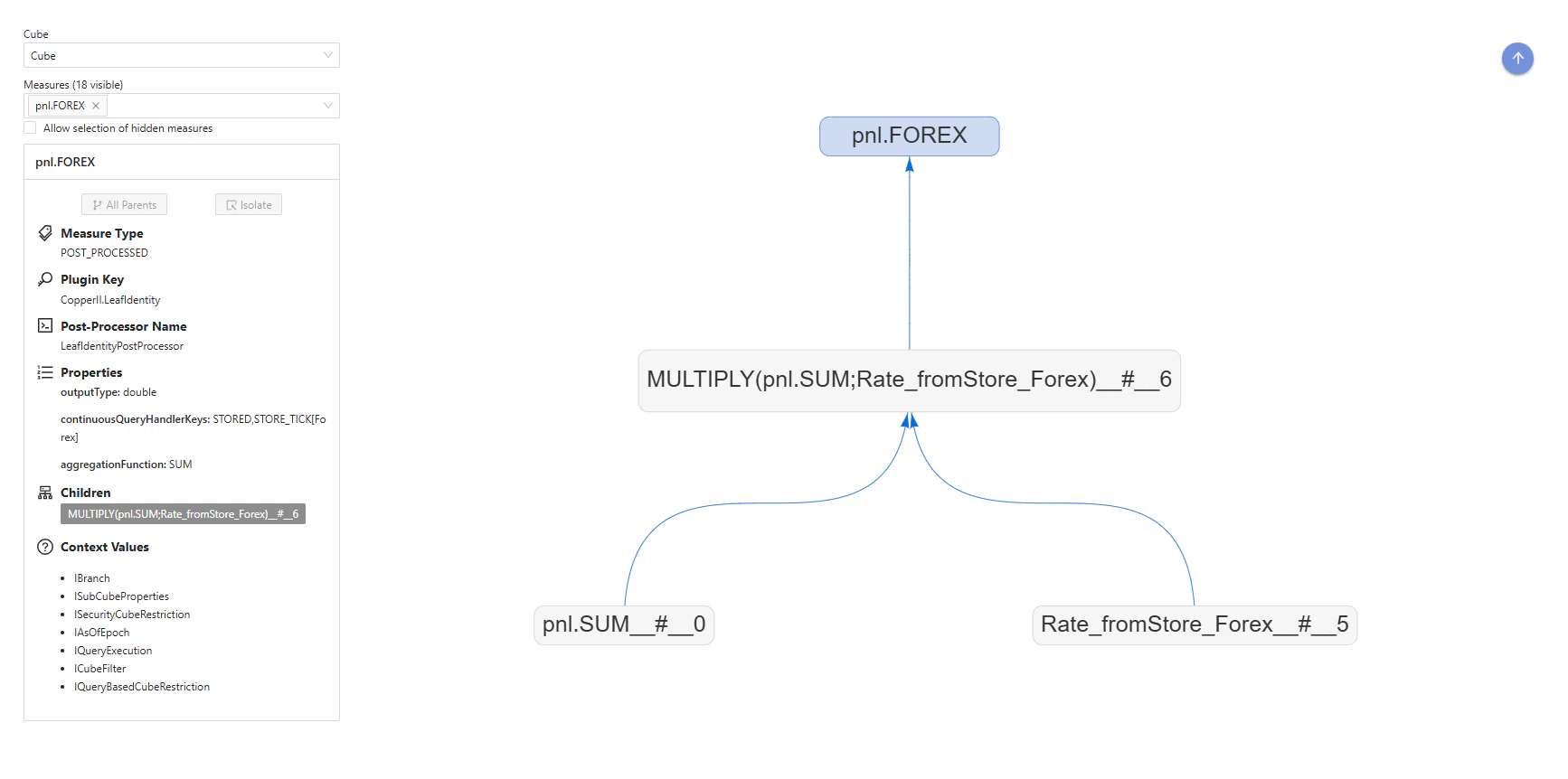
Use the measure selector in the top-left corner to choose a measure.
Once selected:
* The measure is shown in the graph.
* Its attributes are displayed in the panel.
 ## How to interpret measure attributes
The attributes displayed depend on the type of measure selected. There are 4 types of measure:
* **HIDDEN MEASURE**: Used in calculations but not visible in the UI
* **RAW**: An aggregation of the raw data, like `.SUM`
* **NATIVE**: Measures created by the Atoti system, like `update.TIMESTAMP`
* **POST\_PROCESSED**: Measures created from combining any of the above or other post\_processed measures
A measure created using Atoti's COPPER API will display as one of the four types above.
* Attributes for raw measure (created using `Copper.SUM`, etc) indicate the datastore field used for the aggregation.
* Attributes for post-processed measures (created using our legacy Post-processors or with `Copper.newPostProcessor`):
* **Plugin key**: The plugin used to create the measure
* **Post-processor name**: Name of the underlying post-processor class
* **Properties**:
* Output type: Data output format
* Continuous query handler keys: How post-processor measures are chained
* Context values: All external variables that can impact the way the measure is calculated.
## How to explore measure relationships
The child and parent measures are displayed on the screen and listed in the attributes.
* **Child measure**: A measure used in the calculation of the target measure.
* **Parent measure**: A measure calculated using its child measures as inputs.
The measure names are clickable. Click a name in the measure lineage diagram or in the parent or child list to navigate through the measure chain. The measure attributes update when you select a new measure.
Use the buttons at the top of the attributes list:
* **All Parents**: Add all the parents of the target measure
* **Isolate**: Remove all the measures apart from the target measure
## Authorization
Authorization to access the measure lineage tab is managed at the endpoint level.
This tab uses the Atoti Server [Diagnostic endpoint](/engine/java-sdk/6.1/rest-api/diagnostics_rest_api/).
This endpoint is exposed by the [Atoti Server starter](/engine/java-sdk/6.1/starters/atoti_starter/).
## How to interpret measure attributes
The attributes displayed depend on the type of measure selected. There are 4 types of measure:
* **HIDDEN MEASURE**: Used in calculations but not visible in the UI
* **RAW**: An aggregation of the raw data, like `.SUM`
* **NATIVE**: Measures created by the Atoti system, like `update.TIMESTAMP`
* **POST\_PROCESSED**: Measures created from combining any of the above or other post\_processed measures
A measure created using Atoti's COPPER API will display as one of the four types above.
* Attributes for raw measure (created using `Copper.SUM`, etc) indicate the datastore field used for the aggregation.
* Attributes for post-processed measures (created using our legacy Post-processors or with `Copper.newPostProcessor`):
* **Plugin key**: The plugin used to create the measure
* **Post-processor name**: Name of the underlying post-processor class
* **Properties**:
* Output type: Data output format
* Continuous query handler keys: How post-processor measures are chained
* Context values: All external variables that can impact the way the measure is calculated.
## How to explore measure relationships
The child and parent measures are displayed on the screen and listed in the attributes.
* **Child measure**: A measure used in the calculation of the target measure.
* **Parent measure**: A measure calculated using its child measures as inputs.
The measure names are clickable. Click a name in the measure lineage diagram or in the parent or child list to navigate through the measure chain. The measure attributes update when you select a new measure.
Use the buttons at the top of the attributes list:
* **All Parents**: Add all the parents of the target measure
* **Isolate**: Remove all the measures apart from the target measure
## Authorization
Authorization to access the measure lineage tab is managed at the endpoint level.
This tab uses the Atoti Server [Diagnostic endpoint](/engine/java-sdk/6.1/rest-api/diagnostics_rest_api/).
This endpoint is exposed by the [Atoti Server starter](/engine/java-sdk/6.1/starters/atoti_starter/).