> ## Documentation Index
> Fetch the complete documentation index at: https://docs.activeviam.com/llms.txt
> Use this file to discover all available pages before exploring further.
# Task configuration screen
> Overview of the Task Configuration screen in Atoti Sign-Off, showing the available actions, table columns, and filter options for managing task definitions.
The **Task Configuration** screen lists your existing task definitions, and lets you carry out the following actions:
| Action | Description |
| ----------------------------------------------------------------------- | ----------------------------------------------------------------------------------------------------------------------------------------------- |
| [Create Sign-Off Task Definition](./create-task/create-task-ui) | Manually create one task definition at a time. In the default workflow, the tasks definitions are initially saved, not automatically published. |
| [Bulk upload/download multiple tasks](./create-task/create-task-upload) | Prepare and upload a CSV spreadsheet of task definitions based on the provided template, and export task definitions into a CSV file. |
| [Copy task definitions](./create-task/create-task-ui) | Quickly create a new task definition based on an existing one. |
| [View task definition details and history](./view-archive-task) | Display a read-only summary of the task definition parameters, workflow type, and scope. |
| [Modify tasks](./view-archive-task) | Edit task definitions. |
| [Remove tasks](./view-archive-task) | Delete or archive task definitions, depending on their status. |
## Real-time updates
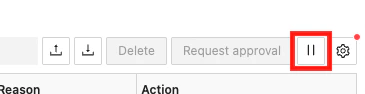
By default, tasks on this screen are updated in **real-time**. You can disable/enable real-time updates by clicking the pause/play button next to the table configuration button:
 To have more than six open connections for real-time updates, you must have HTTP/2 enabled.
This is a limitation of [Server-sent events](https://developer.mozilla.org/en-US/docs/Web/API/Server-sent_events),
which are used to send the updates. You can enable HTTP/2 by setting the `spring.http2.enabled`
property to `true` in the `application.yml` file.
Note that you must be using a secure connection
for this to work. To [secure your application](https://docs.spring.io/spring-boot/reference/features/ssl.), contact your network administrator.
## Table columns
The screen contains a table displaying your task definitions.
To have more than six open connections for real-time updates, you must have HTTP/2 enabled.
This is a limitation of [Server-sent events](https://developer.mozilla.org/en-US/docs/Web/API/Server-sent_events),
which are used to send the updates. You can enable HTTP/2 by setting the `spring.http2.enabled`
property to `true` in the `application.yml` file.
Note that you must be using a secure connection
for this to work. To [secure your application](https://docs.spring.io/spring-boot/reference/features/ssl.), contact your network administrator.
## Table columns
The screen contains a table displaying your task definitions.
 | Field Name | Description | Example |
| ---------------- | ---------------------------------------------------------------------------------------------------------------------------------------------------------------------------------- | ---------------- |
| Name | Name of the task definition | |
| Category | Category of the task definition | |
| Workflow Type | Name of the workflow the sign-off tasks created for this definition will follow. | 4-eyes |
| Server Name | Name of the application server the sign-off tasks created for this definition will apply to. | MR |
| Cube | Name of the cube the sign-off tasks created for this definition will apply to. | Sensitivity Cube |
| Status | Status of the task definition. In the default implementation tasks can only be started on PUBLISHED definitions. | Published |
| Pending Approval | The number of tasks for that definition that are waiting for approval. | 1 |
| Actions | The actions you can carry out on the entry: - Copy: Duplicate an existing task definition to speed up creation. - History: view the audit history of the selected task definition. | |
## Filters
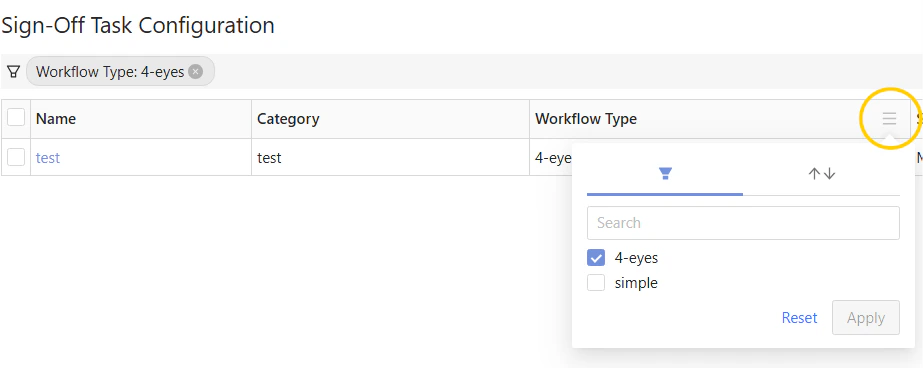
In the column headers you can filter the table values.
| Field Name | Description | Example |
| ---------------- | ---------------------------------------------------------------------------------------------------------------------------------------------------------------------------------- | ---------------- |
| Name | Name of the task definition | |
| Category | Category of the task definition | |
| Workflow Type | Name of the workflow the sign-off tasks created for this definition will follow. | 4-eyes |
| Server Name | Name of the application server the sign-off tasks created for this definition will apply to. | MR |
| Cube | Name of the cube the sign-off tasks created for this definition will apply to. | Sensitivity Cube |
| Status | Status of the task definition. In the default implementation tasks can only be started on PUBLISHED definitions. | Published |
| Pending Approval | The number of tasks for that definition that are waiting for approval. | 1 |
| Actions | The actions you can carry out on the entry: - Copy: Duplicate an existing task definition to speed up creation. - History: view the audit history of the selected task definition. | |
## Filters
In the column headers you can filter the table values.