> ## Documentation Index
> Fetch the complete documentation index at: https://docs.activeviam.com/llms.txt
> Use this file to discover all available pages before exploring further.

# Design limits

> Guidance on key choices when designing a limit, including KPI type, polling frequency, warning threshold, and scope.

This section outlines your available choices when creating limits. In particular, it
focuses on the following fields of the [Limit Structure](./create-limit-ui#create-a-limit-structure) panel:

<table><thead><tr><th>Field Name</th><th>Description</th></tr></thead><tbody><tr><td>Rule</td><td>The supported limit rules are:<br />- <strong>Greater Than</strong>: The limit has a breach status when the measure value is greater than the specified value.<br />- <strong>Less Than</strong>: The limit has a breach status when the measure value is less than the specified value.</td></tr><tr><td>Warning</td><td>Enables or disables warning status when utilization reaches a specified percentage of the limit value. This is useful when you want to monitor when limits have high utilizations, for example, over 80%.</td></tr><tr><td>Warn when utilization reaches % of a limit</td><td>The warning threshold defines how close the value is to the limit before triggering a warning. The KPI status is displayed as an amber triangle in the pivot table when the status is a warning.<br /><br />For example, for a “greater than” limit of 10,000 and a warning set at 90%, a warning is generated when the value reaches 9,000, which means there is 10% of the limit remaining before a breach.<br /><br />For a “less than” limit of 10,000 and a warning set at 90%, a warning is generated when the value reaches 11,000, which means there is 10% of the limit remaining before a breach.</td></tr><tr><td>Value/Absolute Value</td><td>Sets whether the measure value should be interpreted as an absolute value when comparing to limit value. This is useful, for example, when you want to set sensitivity limits, which can be positive or negative numbers, but should be monitored as an absolute value.</td></tr></tbody></table>

In essence, you have the following options available when designing a limit:

* **Rule**: Choose between **Greater Than** and **Less Than**.
* **Warn utilization reaches % of a limit**: Choose between **true** and **false**. If **true**, specify the percentage.
* **Absolute Value**: Choose between **true** and **false**.

This means that there are 8 possible combinations that can be used when designing a limit:

<table><thead><tr><th /><th>Rule</th><th>Warning</th><th>Absolute Value</th></tr></thead><tbody><tr><td><a href="#case-1">1.</a></td><td>GREATER\_THAN</td><td>True (80%)</td><td>True</td></tr><tr><td><a href="#case-2">2.</a></td><td>LESS\_THAN</td><td>True (80%)</td><td>True</td></tr><tr><td><a href="#case-3">3.</a></td><td>GREATER\_THAN</td><td>False</td><td>True</td></tr><tr><td><a href="#case-4">4.</a></td><td>LESS\_THAN</td><td>False</td><td>True</td></tr><tr><td><a href="#case-5">5.</a></td><td>GREATER\_THAN</td><td>True (80%)</td><td>False</td></tr><tr><td><a href="#case-6">6.</a></td><td>LESS\_THAN</td><td>True (80%)</td><td>False</td></tr><tr><td><a href="#case-7">7.</a></td><td>GREATER\_THAN</td><td>False</td><td>False</td></tr><tr><td><a href="#case-8">8.</a></td><td>LESS\_THAN</td><td>False</td><td>False</td></tr></tbody></table>

The following section visualizes what this means for your limits.

## Overview

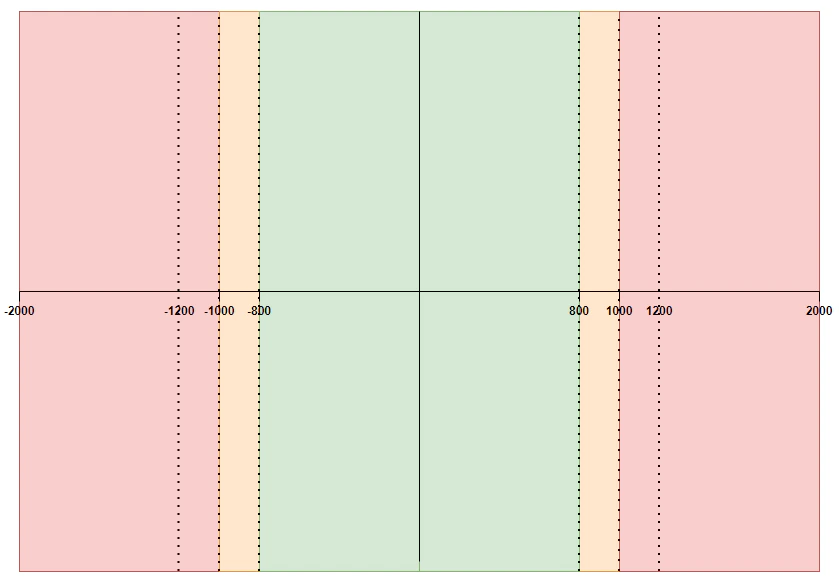
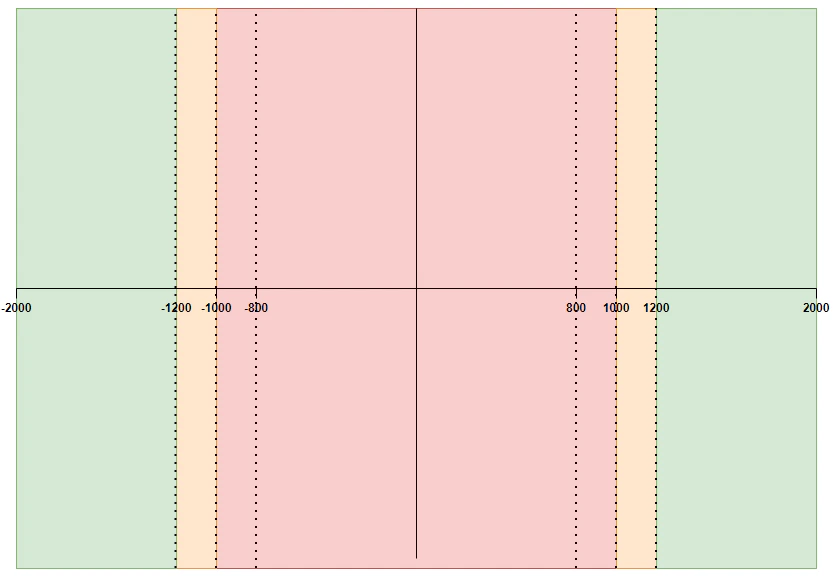
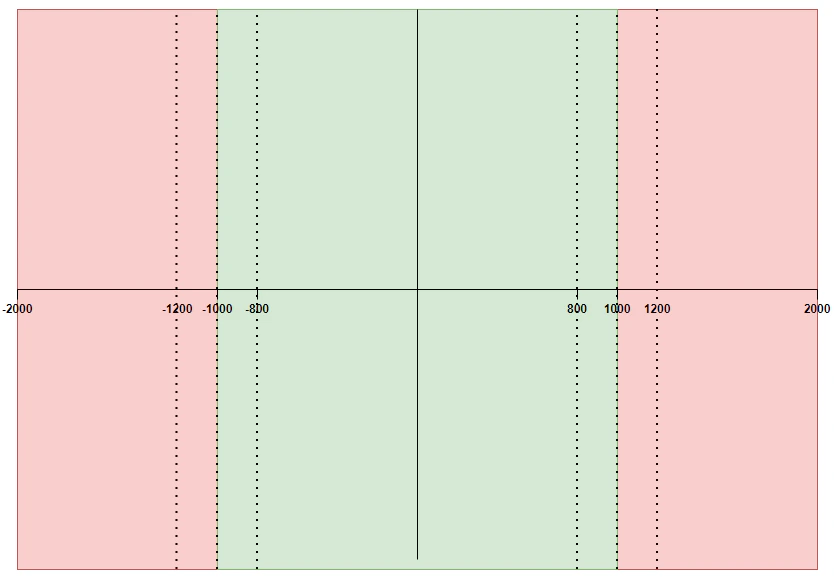
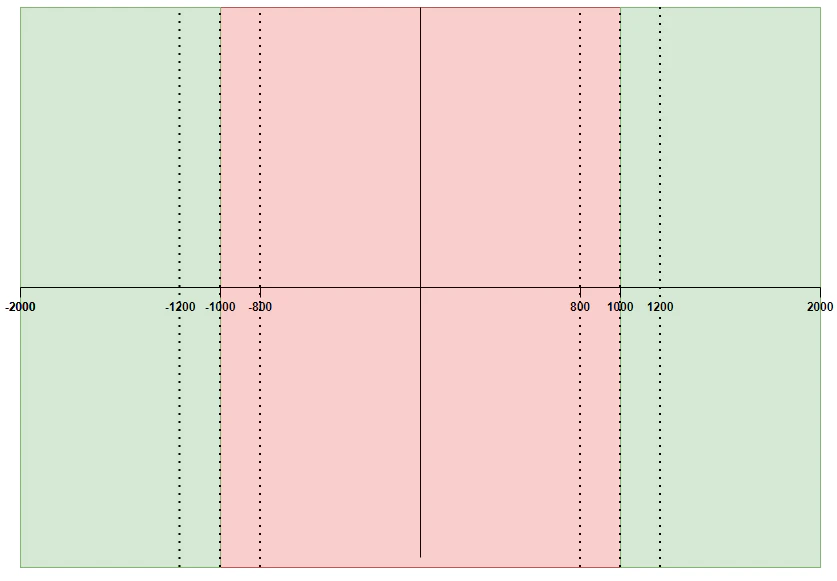
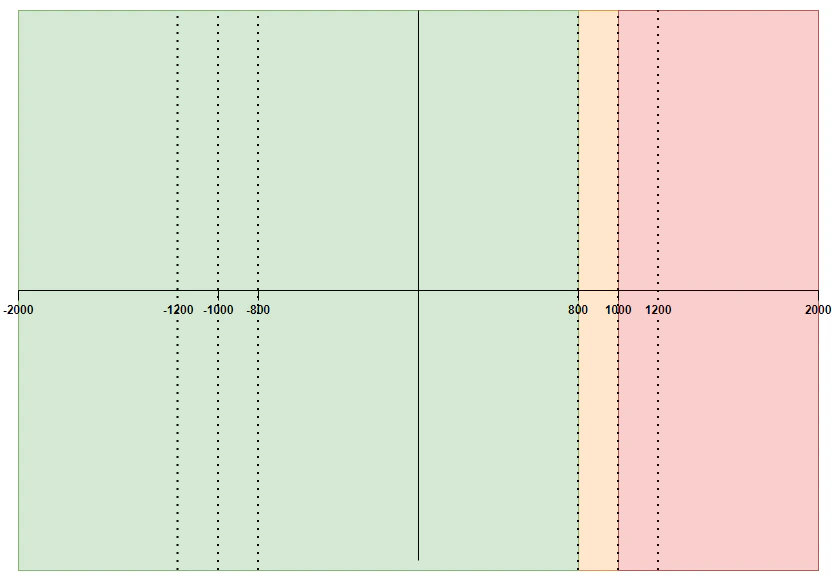
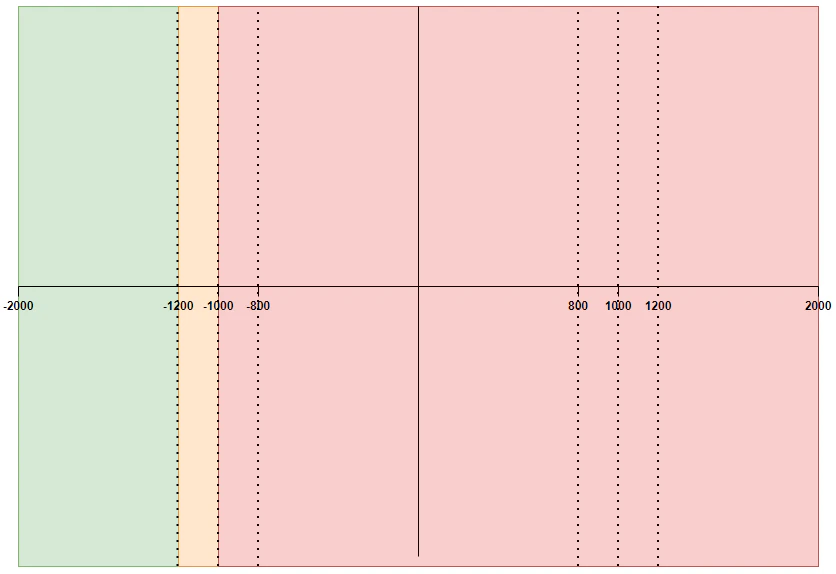
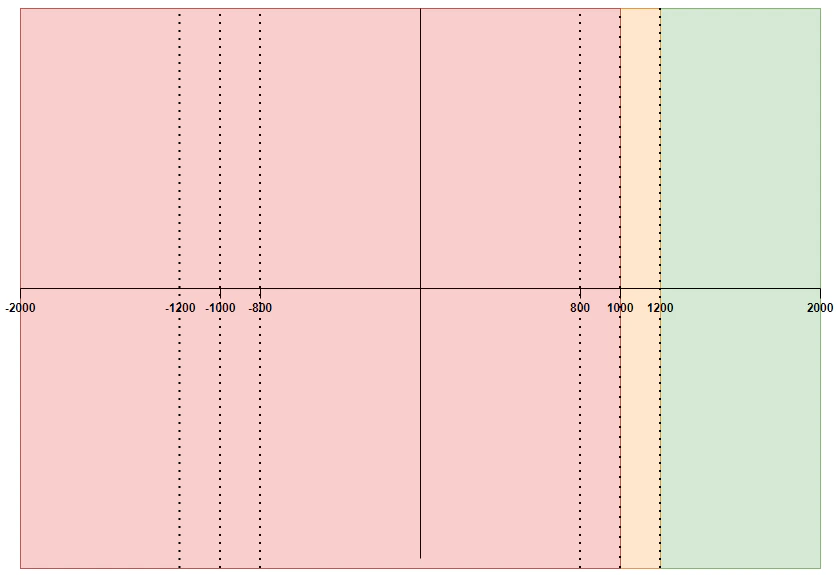
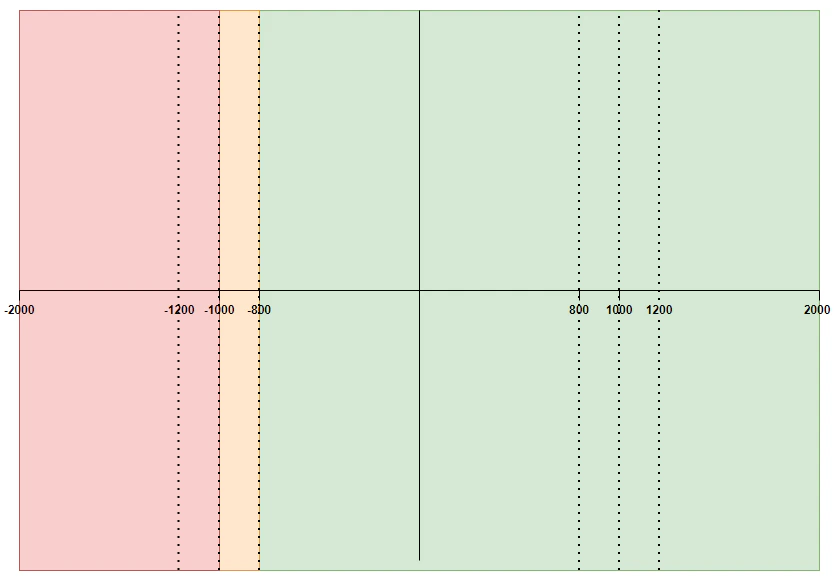
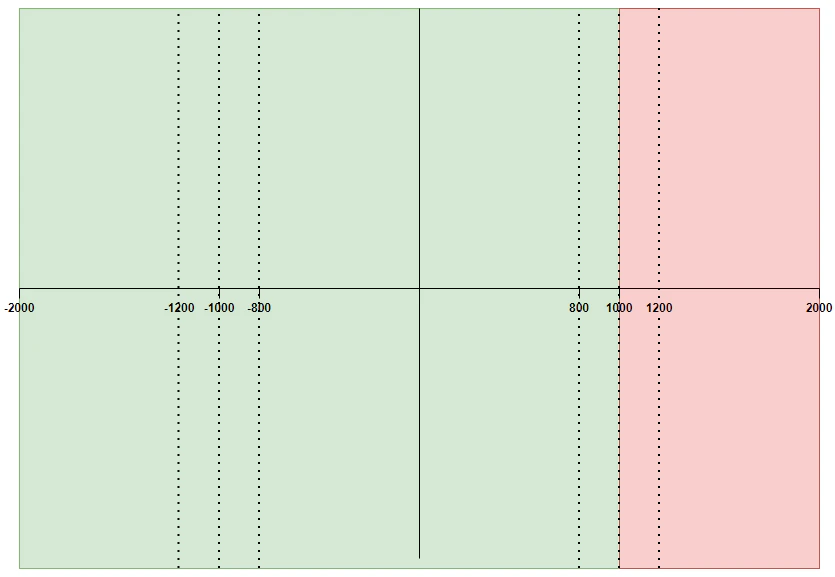
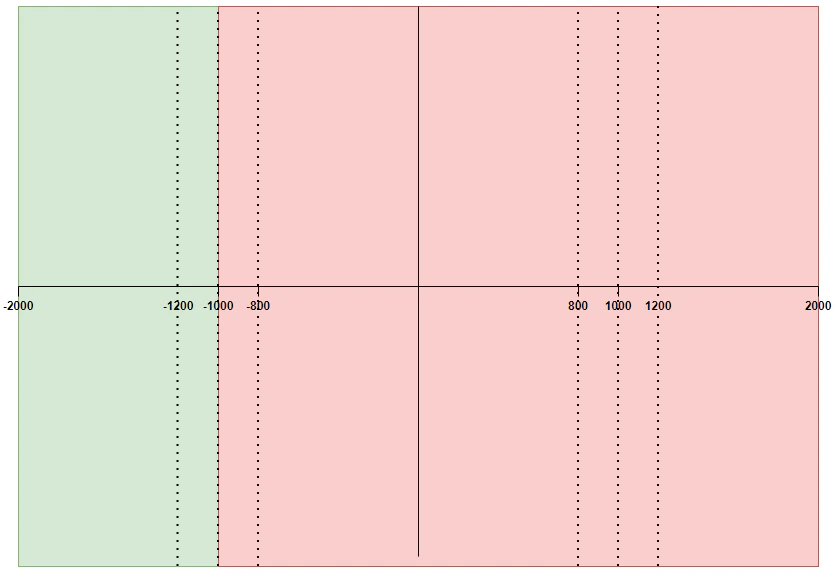
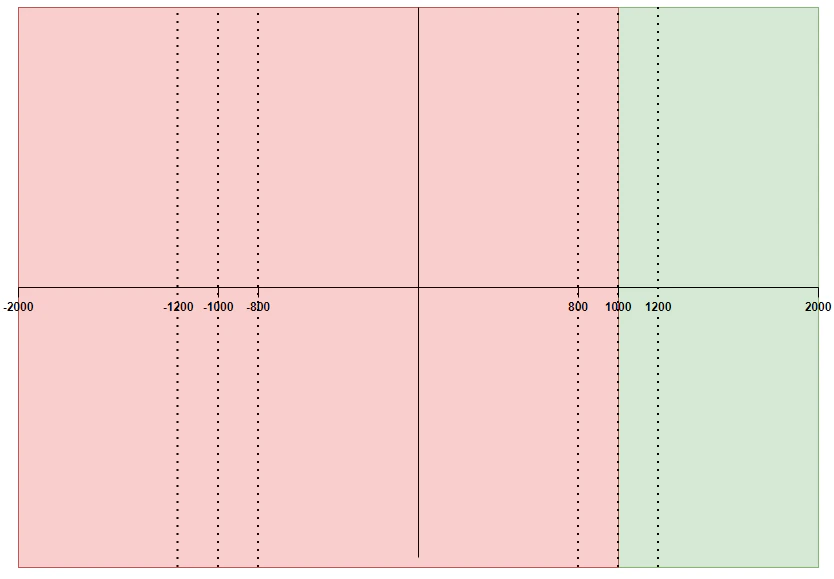
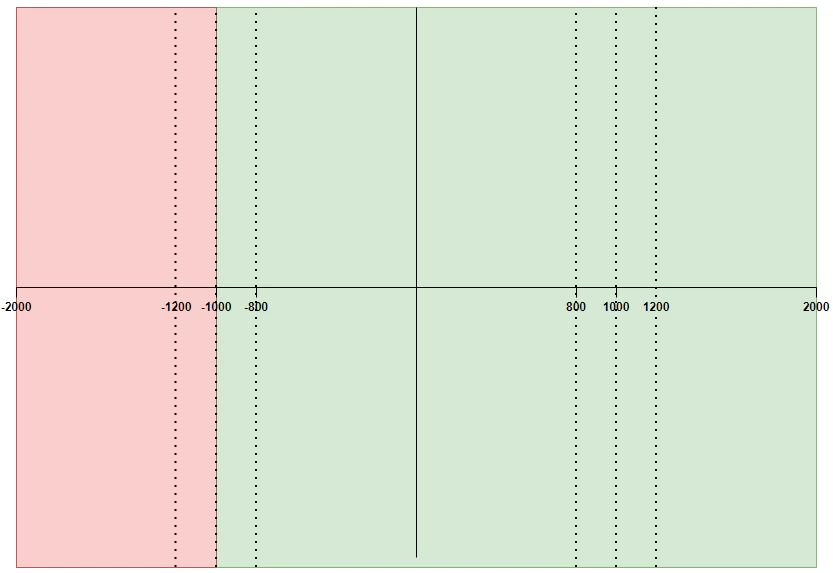
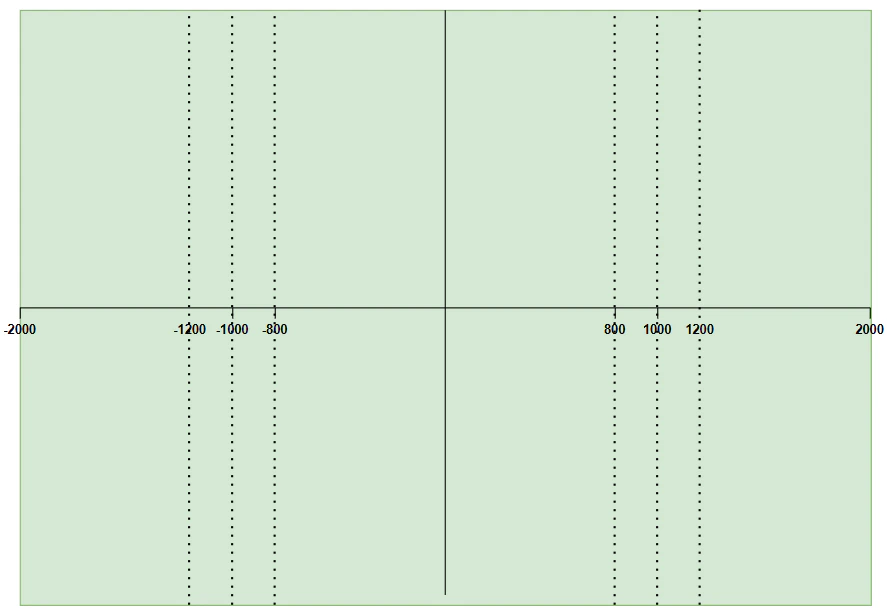
In the following examples we will use similar data to illustrate the different combinations of limit
design. The data is as follows:

* the limit value will be 1,000 or -1,000
* when used, the warning threshold will be 80% of the limit value

In the cases where the limit uses an absolute value, the visualization of both the negative and the
positive limit will be the same, so only one diagram is required.

In the following diagrams, given the scenarios for each case, the colored zones illustrate
numerical regions where the limit will:

* breach, denoted by red zones
* warn, denoted by amber zones
* pass, denoted by green zones

### Case 1

<table><thead><tr><th>Rule</th><th>Warning</th><th>Absolute Value</th></tr></thead><tbody><tr><td>GREATER\_THAN</td><td>True (80%)</td><td>True</td></tr></tbody></table>

<Accordion title="Diagram">
  <Frame>
    <img src="https://mintcdn.com/activeviam/iy5FyCKdXjhHAnDS/atoti-intelligence/workflows/limits/6.1/images/designing-limits/case-1.png?fit=max&auto=format&n=iy5FyCKdXjhHAnDS&q=85&s=6d01710d7850d2419235cc4ec345e983" alt="Case 1" width="839" height="580" data-path="atoti-intelligence/workflows/limits/6.1/images/designing-limits/case-1.png" />
  </Frame>
</Accordion>

### Case 2

<table><thead><tr><th>Rule</th><th>Warning</th><th>Absolute Value</th></tr></thead><tbody><tr><td>LESS\_THAN</td><td>True (80%)</td><td>True</td></tr></tbody></table>

<Accordion title="Diagram">
  <Frame>
    <img src="https://mintcdn.com/activeviam/iy5FyCKdXjhHAnDS/atoti-intelligence/workflows/limits/6.1/images/designing-limits/case-2.png?fit=max&auto=format&n=iy5FyCKdXjhHAnDS&q=85&s=76ae42bbfd8e6927a27b72a1fde0af18" alt="Case 2" width="833" height="578" data-path="atoti-intelligence/workflows/limits/6.1/images/designing-limits/case-2.png" />
  </Frame>
</Accordion>

### Case 3

<table><thead><tr><th>Rule</th><th>Warning</th><th>Absolute Value</th></tr></thead><tbody><tr><td>GREATER\_THAN</td><td>False</td><td>True</td></tr></tbody></table>

<Accordion title="Diagram">
  <Frame>
    <img src="https://mintcdn.com/activeviam/iy5FyCKdXjhHAnDS/atoti-intelligence/workflows/limits/6.1/images/designing-limits/case-3.png?fit=max&auto=format&n=iy5FyCKdXjhHAnDS&q=85&s=c8e0ed5364d498fb11ac2ab6fc95242a" alt="Case 3" width="834" height="578" data-path="atoti-intelligence/workflows/limits/6.1/images/designing-limits/case-3.png" />
  </Frame>
</Accordion>

### Case 4

<table><thead><tr><th>Rule</th><th>Warning</th><th>Absolute Value</th></tr></thead><tbody><tr><td>LESS\_THAN</td><td>False</td><td>True</td></tr></tbody></table>

<Accordion title="Diagram">
  <Frame>
    <img src="https://mintcdn.com/activeviam/iy5FyCKdXjhHAnDS/atoti-intelligence/workflows/limits/6.1/images/designing-limits/case-4.png?fit=max&auto=format&n=iy5FyCKdXjhHAnDS&q=85&s=a132d98b5d4cd0c0974e131b8b02182c" alt="Case 4" width="837" height="581" data-path="atoti-intelligence/workflows/limits/6.1/images/designing-limits/case-4.png" />
  </Frame>
</Accordion>

### Case 5

<table><thead><tr><th>Rule</th><th>Warning</th><th>Absolute Value</th></tr></thead><tbody><tr><td>GREATER\_THAN</td><td>True (80%)</td><td>False</td></tr></tbody></table>

<Accordion title="Diagram">
  #### Positive Limit Value (1,000)

  <Frame>
    <img src="https://mintcdn.com/activeviam/iy5FyCKdXjhHAnDS/atoti-intelligence/workflows/limits/6.1/images/designing-limits/case-5-positive.png?fit=max&auto=format&n=iy5FyCKdXjhHAnDS&q=85&s=bb54733704b04f07f7100a5a00a58eda" alt="Case 5 positive" width="832" height="579" data-path="atoti-intelligence/workflows/limits/6.1/images/designing-limits/case-5-positive.png" />
  </Frame>

  #### Negative Limit Value (-1,000)

  <Frame>
    <img src="https://mintcdn.com/activeviam/iy5FyCKdXjhHAnDS/atoti-intelligence/workflows/limits/6.1/images/designing-limits/case-5-negative.png?fit=max&auto=format&n=iy5FyCKdXjhHAnDS&q=85&s=1330070b1ef9149c5f08821d394404e8" alt="Case 5 negative" width="836" height="574" data-path="atoti-intelligence/workflows/limits/6.1/images/designing-limits/case-5-negative.png" />
  </Frame>
</Accordion>

### Case 6

<table><thead><tr><th>Rule</th><th>Warning</th><th>Absolute Value</th></tr></thead><tbody><tr><td>LESS\_THAN</td><td>True (80%)</td><td>False</td></tr></tbody></table>

<Accordion title="Diagram">
  #### Positive Limit Value (1,000)

  <Frame>
    <img src="https://mintcdn.com/activeviam/iy5FyCKdXjhHAnDS/atoti-intelligence/workflows/limits/6.1/images/designing-limits/case-6-positive.png?fit=max&auto=format&n=iy5FyCKdXjhHAnDS&q=85&s=28a36b4f7c96c5c930852abaefce5897" alt="Case 6 positive" width="837" height="575" data-path="atoti-intelligence/workflows/limits/6.1/images/designing-limits/case-6-positive.png" />
  </Frame>

  #### Negative Limit Value (-1,000)

  <Frame>
    <img src="https://mintcdn.com/activeviam/iy5FyCKdXjhHAnDS/atoti-intelligence/workflows/limits/6.1/images/designing-limits/case-6-negative.png?fit=max&auto=format&n=iy5FyCKdXjhHAnDS&q=85&s=f8e8b2638b3bd53052b37d2ec02374f1" alt="Case 6 negative" width="835" height="582" data-path="atoti-intelligence/workflows/limits/6.1/images/designing-limits/case-6-negative.png" />
  </Frame>
</Accordion>

### Case 7

<table><thead><tr><th>Rule</th><th>Warning</th><th>Absolute Value</th></tr></thead><tbody><tr><td>GREATER\_THAN</td><td>False</td><td>False</td></tr></tbody></table>

<Accordion title="Diagram">
  #### Positive Limit Value (1,000)

  <Frame>
    <img src="https://mintcdn.com/activeviam/iy5FyCKdXjhHAnDS/atoti-intelligence/workflows/limits/6.1/images/designing-limits/case-7-positive.png?fit=max&auto=format&n=iy5FyCKdXjhHAnDS&q=85&s=ec831f69abcf1431c91fe121dc7b247a" alt="Case 7 positive" width="835" height="577" data-path="atoti-intelligence/workflows/limits/6.1/images/designing-limits/case-7-positive.png" />
  </Frame>

  #### Negative Limit Value (-1,000)

  <Frame>
    <img src="https://mintcdn.com/activeviam/iy5FyCKdXjhHAnDS/atoti-intelligence/workflows/limits/6.1/images/designing-limits/case-7-negative.png?fit=max&auto=format&n=iy5FyCKdXjhHAnDS&q=85&s=0a6301dba9584b1c85151c5afc6b8cc1" alt="Case 7 negative" width="836" height="578" data-path="atoti-intelligence/workflows/limits/6.1/images/designing-limits/case-7-negative.png" />
  </Frame>
</Accordion>

### Case 8

<table><thead><tr><th>Rule</th><th>Warning</th><th>Absolute Value</th></tr></thead><tbody><tr><td>LESS\_THAN</td><td>False</td><td>False</td></tr></tbody></table>

<Accordion title="Diagram">
  #### Positive Limit Value (1,000)

  <Frame>
    <img src="https://mintcdn.com/activeviam/iy5FyCKdXjhHAnDS/atoti-intelligence/workflows/limits/6.1/images/designing-limits/case-8-positive.png?fit=max&auto=format&n=iy5FyCKdXjhHAnDS&q=85&s=4ca6448c184f192d59f58ed95c9a99d8" alt="Case 8 positive" width="834" height="579" data-path="atoti-intelligence/workflows/limits/6.1/images/designing-limits/case-8-positive.png" />
  </Frame>

  #### Negative Limit Value (-1,000)

  <Frame>
    <img src="https://mintcdn.com/activeviam/iy5FyCKdXjhHAnDS/atoti-intelligence/workflows/limits/6.1/images/designing-limits/case-8-negative.png?fit=max&auto=format&n=iy5FyCKdXjhHAnDS&q=85&s=754c4cc8ef62b07ba3442737b8235bb7" alt="Case 8 negative" width="833" height="573" data-path="atoti-intelligence/workflows/limits/6.1/images/designing-limits/case-8-negative.png" />
  </Frame>
</Accordion>

## Setting the limit value to 0

We will also consider four special cases where the limit value is 0. When the limit value is 0, it is not possible to
generate a warning. This is because the calculation of the warning range multiplies the warning threshold by the limit
value, which always results in zero in this case. This also means the [utilization](../../cube/utilization)
cannot be calculated due to the zero denominator.

It is also not possible for breaches to occur when the limit value is 0, the rule is set to **LESS\_THAN**, and the
absolute value is set to **True**, as the measure value will always be greater than or equal to 0. This is shown in
[Zero case 4](#zero-case-4) below.

Combinations with a limit value = 0:

<table><thead><tr><th /><th>Rule</th><th>Absolute Value</th></tr></thead><tbody><tr><td><a href="#zero-case-1">Zero Case 1</a></td><td>GREATER\_THAN</td><td>True</td></tr><tr><td><a href="#zero-case-2">Zero Case 2</a></td><td>GREATER\_THAN</td><td>False</td></tr><tr><td><a href="#zero-case-3">Zero Case 3</a></td><td>LESS\_THAN</td><td>False</td></tr><tr><td><a href="#zero-case-4">Zero Case 4</a></td><td>LESS\_THAN</td><td>True</td></tr></tbody></table>

<table><thead><tr><th>Rule</th><th>Absolute Value</th></tr></thead><tbody><tr><td>GREATER\_THAN</td><td>True</td></tr></tbody></table>

\| [Zero Case 2](#zero-case-2) | GREATER\_THAN | False |
\| [Zero Case 3](#zero-case-3) | LESS\_THAN | False |
\| [Zero Case 4](#zero-case-4) | LESS\_THAN | True |

### Zero case 1

<table><thead><tr><th>Rule</th><th>Absolute Value</th></tr></thead><tbody><tr><td>LESS\_THAN</td><td>True</td></tr></tbody></table>

<Accordion title="Diagram">
  <Frame>
    <img src="https://mintcdn.com/activeviam/iy5FyCKdXjhHAnDS/atoti-intelligence/workflows/limits/6.1/images/designing-limits/zero-case-4.png?fit=max&auto=format&n=iy5FyCKdXjhHAnDS&q=85&s=1b0d38a6ea19ed79d308b4edc8bc9ad7" alt="Zero case 4" width="887" height="615" data-path="atoti-intelligence/workflows/limits/6.1/images/designing-limits/zero-case-4.png" />
  </Frame>
</Accordion>