> ## Documentation Index
> Fetch the complete documentation index at: https://docs.activeviam.com/llms.txt
> Use this file to discover all available pages before exploring further.
# Six-eyes approval process
> Reference for the Six-Eyes Approval Process workflow in Atoti Limits, covering the two-stage approval user tasks with Approve and Reject actions, initializing variables, and service tasks at each stage
This section describes the default Six-Eyes Approval Process workflow for managing limits in
Atoti Limits.
## What does the six-eyes approval process look like?
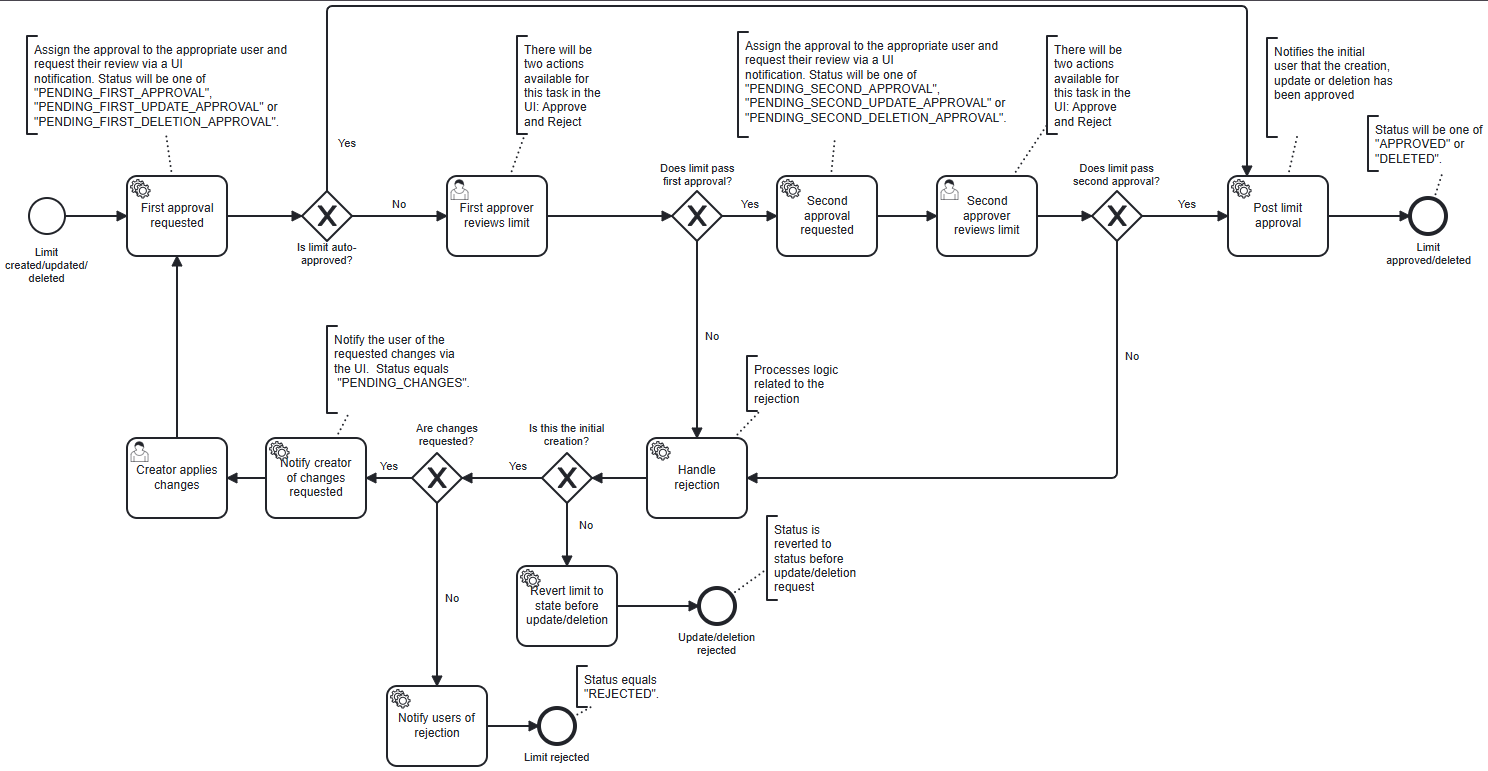 Key features of this workflow include:
* Manages the lifecycle of limit changes that require approval from two separate users.
* Notifies the relevant users at each level of approval and update those notifications as the limit
progresses through the workflow.
* Handles the case where a limit is rejected at either approval stage to either allow the user to
resubmit the limit change or to terminate the workflow.
## What initializing variables are included in the limit-process-six-eyes.bpmn workflow?
The following initializing variables are included in the workflow:
* `Comment` â A text field for adding comments related to the limit.
* `Attachments` â A file upload field for adding attachments related to the limit.
* `First Approvers` â A text field for specifying the user role that will be assigned to the first
approver task. Only users with this role will be able to complete the first approver task.
* `Second Approvers` â A text field for specifying the user role that will be assigned to the second
approver task. Only users with this role will be able to complete the second approver task.
## What user tasks are included in the limit-process-six-eyes.bpmn workflow?
```yaml theme={"languages":{"custom":["/engine/python-sdk/0.9/languages/pycon.tmLanguage.json"]}}
actions:
- task-name: First approver reviews limit
name: Approve
action-input-fields:
- label: Does limit pass first approval?
task-variable: firstApprovalPassed
input-type: CHECKBOX
required: true
default-value: true
enabled: false
hidden: true
- &attachments
label: Attachments
task-variable: attachments
input-type: ATTACHMENTS
required: false
- task-name: First approver reviews limit
name: Reject
action-input-fields:
- label: Does limit pass first approval?
task-variable: firstApprovalPassed
input-type: CHECKBOX
required: true
default-value: false
enabled: false
hidden: true
- label: Should the creator make changes?
task-variable: changesRequested
input-type: CHECKBOX
- label: Attachments
task-variable: attachments
input-type: ATTACHMENTS
required: false
- task-name: Second approver reviews limit
name: Approve
action-input-fields:
- label: Does limit pass second approval?
task-variable: secondApprovalPassed
input-type: CHECKBOX
required: true
default-value: true
enabled: false
hidden: true
- *attachments
- task-name: Second approver reviews limit
name: Reject
action-input-fields:
- label: Does limit pass second approval?
task-variable: secondApprovalPassed
input-type: CHECKBOX
required: true
default-value: false
enabled: false
hidden: true
- label: Should the creator make changes?
task-variable: changesRequested
input-type: CHECKBOX
- *attachments
```
The workflow includes two user tasks:
* `First approver reviews limit`
* `Second approver reviews limit`
Each of these tasks includes two possible actions: `Approve` and `Reject`.
### What input fields are included in the actions for the approval tasks?
The `Approve` action for both approval tasks includes the following input fields:
* **Does limit pass first/second approval?** â A hidden checkbox field that is automatically set to
`true` when the user selects the `Approve` action. This field is used to move the workflow to the
next approval step.
* **Attachments** â A file upload field for adding attachments related to the approval.
The `Reject` action for both approval tasks includes the following input fields:
* **Does limit pass first/second approval?** â A hidden checkbox field that is automatically set to
`false` when the user selects the `Reject` action. This field is used to move the workflow to the
next step which is dependent upon the value of the `Should the creator make changes?` field.
* **Should the creator make changes?** â A checkbox field that allows the approver to indicate
if the limit creator should be allowed to make changes and resubmit the limit. If this field is
checked, the limit creator will be notified to make changes and resubmit the limit. If it is not
checked, the workflow will terminate with status: `REJECTED`.
* **Attachments** â A file upload field for adding attachments related to the rejection.
## What service tasks are included in the limit-process-six-eyes.bpmn workflow?
The workflow includes several service tasks that are executed at various points in the workflow to
handle notifying relevant users, updating notification statuses, and managing workflow state.
### `First approval requested` service task
This example serves as a skeleton implementation not the default implementation. You may customize
this service task to meet your specific requirements. For more information see the section
on [customizing service tasks](../../dev-extensions/custom-workflow-service/customizing-default-workflows#how-to-modify-what-happens-when-a-service-task-executes).
```java theme={"languages":{"custom":["/engine/python-sdk/0.9/languages/pycon.tmLanguage.json"]}}
@Bean
@ConditionalOnMissingBean(name = "sixEyesLimitFirstApproval")
public Connector sixEyesLimitFirstApproval() {
return integrationContext -> {
log.info("Requesting first approval.");
// code executed when first approval is requested
return integrationContext;
};
}
```
**When is this service task executed?**
When a new limit is created or an existing limit is updated/deleted.
**What does this service task do?**
Sets the workflow status to indicate that the first approval is pending, updates the candidate
user roles for the first approver task, and sends a notification to the relevant users to inform
them that their approval is required.
### `Second approval requested` service task
This example serves as a skeleton implementation not the default implementation. You may customize
this service task to meet your specific requirements. For more information see the section
on [customizing service tasks](../../dev-extensions/custom-workflow-service/customizing-default-workflows#how-to-modify-what-happens-when-a-service-task-executes).
```java theme={"languages":{"custom":["/engine/python-sdk/0.9/languages/pycon.tmLanguage.json"]}}
@Bean
@ConditionalOnMissingBean(name = "sixEyesLimitSecondApproval")
public Connector sixEyesLimitSecondApproval() {
return integrationContext -> {
log.info("Requesting second approval.");
// code executed when second approval is requested
return integrationContext;
};
}
```
**When is this service task executed?**
After the first approver approves the limit.
**What does this service task do?**
Sets the workflow status to indicate that the second approval is pending, updates the candidate user
roles for the second approver task, marks the first approval notification as obsolete, and sends a
notification to the relevant users to inform them that their approval is required.
### `Post limit approval` service task
This example serves as a skeleton implementation not the default implementation. You may customize
this service task to meet your specific requirements. For more information see the section
on [customizing service tasks](../../dev-extensions/custom-workflow-service/customizing-default-workflows#how-to-modify-what-happens-when-a-service-task-executes).
```java theme={"languages":{"custom":["/engine/python-sdk/0.9/languages/pycon.tmLanguage.json"]}}
@Bean
@ConditionalOnMissingBean(name = "postSixEyesLimitApproval")
public Connector postSixEyesLimitApproval() {
return integrationContext -> {
log.info("Notifying users of six-eyes approval.");
// code executed after second approval
return integrationContext;
};
}
```
**When is this service task executed?**
After the second approver approves the limit.
**What does this service task do?**
Sets the workflow status to indicate that the limit creation, update, or deletion has been approved,
applies the draft limit if change was an update or deletion, marks the second approval notification
as obsolete, and sends a notification to the limit creator to inform them that the limit has been
approved.
### `Handle rejection` service task
This example serves as a skeleton implementation not the default implementation. You may customize
this service task to meet your specific requirements. For more information see the section
on [customizing service tasks](../../dev-extensions/custom-workflow-service/customizing-default-workflows#how-to-modify-what-happens-when-a-service-task-executes).
```java theme={"languages":{"custom":["/engine/python-sdk/0.9/languages/pycon.tmLanguage.json"]}}
@Bean
@ConditionalOnMissingBean(name = "handleSixEyesRejection")
public Connector handleSixEyesRejection() {
return integrationContext -> {
// code executed when a limit is rejected
return integrationContext;
};
}
```
**When is this service task executed?**
When a limit is rejected at either approval step.
**What does this service task do?**
Sets a variable to indicate whether the limit was being created for the first time or if it was an
update/deletion. This variable is used to determine the next step in the workflow.
### `Revert limit to state before update/deletion` service task
This example serves as a skeleton implementation not the default implementation. You may customize
this service task to meet your specific requirements. For more information see the section
on [customizing service tasks](../../dev-extensions/custom-workflow-service/customizing-default-workflows#how-to-modify-what-happens-when-a-service-task-executes).
```java theme={"languages":{"custom":["/engine/python-sdk/0.9/languages/pycon.tmLanguage.json"]}}
@Bean
@ConditionalOnMissingBean(name = "revertSixEyesLimitUpdateOrDeletion")
public Connector revertSixEyesLimitUpdateOrDeletion() {
return integrationContext -> {
// code executed when limit update or deletion is rejected
return integrationContext;
};
}
```
**When is this service task executed?**
When a limit update or deletion is rejected.
**What does this service task do?**
Reverts the limit status to the state it was in before the update or deletion was requested.
### `Notify creator of changes requested` service task
This example serves as a skeleton implementation not the default implementation. You may customize
this service task to meet your specific requirements. For more information see the section
on [customizing service tasks](../../dev-extensions/custom-workflow-service/customizing-default-workflows#how-to-modify-what-happens-when-a-service-task-executes).
```java theme={"languages":{"custom":["/engine/python-sdk/0.9/languages/pycon.tmLanguage.json"]}}
@Bean
@ConditionalOnMissingBean(name = "sixEyesLimitRequestChanges")
public Connector sixEyesLimitRequestChanges() {
return integrationContext -> {
log.info("Requesting user changes.");
// code executed when changes are requested for a rejected limit
return integrationContext;
};
}
```
**When is this service task executed?**
When an approver rejects a limit creation and requests changes.
**What does this service task do?**
Sets the workflow status to indicate that changes are requested, marks the approval notification as
obsolete, and sends a notification to the limit creator to inform them that changes are required
before resubmitting the limit.
### `Notify users of rejection` service task
This example serves as a skeleton implementation not the default implementation. You may customize
this service task to meet your specific requirements. For more information see the section
on [customizing service tasks](../../dev-extensions/custom-workflow-service/customizing-default-workflows#how-to-modify-what-happens-when-a-service-task-executes).
```java theme={"languages":{"custom":["/engine/python-sdk/0.9/languages/pycon.tmLanguage.json"]}}
@Bean
@ConditionalOnMissingBean(name = "notifyUsersOfSixEyesRejection")
public Connector notifyUsersOfSixEyesRejection() {
return integrationContext -> {
log.info("Notifying users of six-eyes rejection.");
// code executed when a limit is rejected without changes requested
return integrationContext;
};
}
```
**When is this service task executed?**
When a limit creation is rejected and changes are not requested.
**What does this service task do?**
Sets the workflow status to indicate that the limit has been rejected, marks the approval
notification as obsolete, and sends a notification to the limit creator to inform them that the
limit has been rejected.
Key features of this workflow include:
* Manages the lifecycle of limit changes that require approval from two separate users.
* Notifies the relevant users at each level of approval and update those notifications as the limit
progresses through the workflow.
* Handles the case where a limit is rejected at either approval stage to either allow the user to
resubmit the limit change or to terminate the workflow.
## What initializing variables are included in the limit-process-six-eyes.bpmn workflow?
The following initializing variables are included in the workflow:
* `Comment` â A text field for adding comments related to the limit.
* `Attachments` â A file upload field for adding attachments related to the limit.
* `First Approvers` â A text field for specifying the user role that will be assigned to the first
approver task. Only users with this role will be able to complete the first approver task.
* `Second Approvers` â A text field for specifying the user role that will be assigned to the second
approver task. Only users with this role will be able to complete the second approver task.
## What user tasks are included in the limit-process-six-eyes.bpmn workflow?
```yaml theme={"languages":{"custom":["/engine/python-sdk/0.9/languages/pycon.tmLanguage.json"]}}
actions:
- task-name: First approver reviews limit
name: Approve
action-input-fields:
- label: Does limit pass first approval?
task-variable: firstApprovalPassed
input-type: CHECKBOX
required: true
default-value: true
enabled: false
hidden: true
- &attachments
label: Attachments
task-variable: attachments
input-type: ATTACHMENTS
required: false
- task-name: First approver reviews limit
name: Reject
action-input-fields:
- label: Does limit pass first approval?
task-variable: firstApprovalPassed
input-type: CHECKBOX
required: true
default-value: false
enabled: false
hidden: true
- label: Should the creator make changes?
task-variable: changesRequested
input-type: CHECKBOX
- label: Attachments
task-variable: attachments
input-type: ATTACHMENTS
required: false
- task-name: Second approver reviews limit
name: Approve
action-input-fields:
- label: Does limit pass second approval?
task-variable: secondApprovalPassed
input-type: CHECKBOX
required: true
default-value: true
enabled: false
hidden: true
- *attachments
- task-name: Second approver reviews limit
name: Reject
action-input-fields:
- label: Does limit pass second approval?
task-variable: secondApprovalPassed
input-type: CHECKBOX
required: true
default-value: false
enabled: false
hidden: true
- label: Should the creator make changes?
task-variable: changesRequested
input-type: CHECKBOX
- *attachments
```
The workflow includes two user tasks:
* `First approver reviews limit`
* `Second approver reviews limit`
Each of these tasks includes two possible actions: `Approve` and `Reject`.
### What input fields are included in the actions for the approval tasks?
The `Approve` action for both approval tasks includes the following input fields:
* **Does limit pass first/second approval?** â A hidden checkbox field that is automatically set to
`true` when the user selects the `Approve` action. This field is used to move the workflow to the
next approval step.
* **Attachments** â A file upload field for adding attachments related to the approval.
The `Reject` action for both approval tasks includes the following input fields:
* **Does limit pass first/second approval?** â A hidden checkbox field that is automatically set to
`false` when the user selects the `Reject` action. This field is used to move the workflow to the
next step which is dependent upon the value of the `Should the creator make changes?` field.
* **Should the creator make changes?** â A checkbox field that allows the approver to indicate
if the limit creator should be allowed to make changes and resubmit the limit. If this field is
checked, the limit creator will be notified to make changes and resubmit the limit. If it is not
checked, the workflow will terminate with status: `REJECTED`.
* **Attachments** â A file upload field for adding attachments related to the rejection.
## What service tasks are included in the limit-process-six-eyes.bpmn workflow?
The workflow includes several service tasks that are executed at various points in the workflow to
handle notifying relevant users, updating notification statuses, and managing workflow state.
### `First approval requested` service task
This example serves as a skeleton implementation not the default implementation. You may customize
this service task to meet your specific requirements. For more information see the section
on [customizing service tasks](../../dev-extensions/custom-workflow-service/customizing-default-workflows#how-to-modify-what-happens-when-a-service-task-executes).
```java theme={"languages":{"custom":["/engine/python-sdk/0.9/languages/pycon.tmLanguage.json"]}}
@Bean
@ConditionalOnMissingBean(name = "sixEyesLimitFirstApproval")
public Connector sixEyesLimitFirstApproval() {
return integrationContext -> {
log.info("Requesting first approval.");
// code executed when first approval is requested
return integrationContext;
};
}
```
**When is this service task executed?**
When a new limit is created or an existing limit is updated/deleted.
**What does this service task do?**
Sets the workflow status to indicate that the first approval is pending, updates the candidate
user roles for the first approver task, and sends a notification to the relevant users to inform
them that their approval is required.
### `Second approval requested` service task
This example serves as a skeleton implementation not the default implementation. You may customize
this service task to meet your specific requirements. For more information see the section
on [customizing service tasks](../../dev-extensions/custom-workflow-service/customizing-default-workflows#how-to-modify-what-happens-when-a-service-task-executes).
```java theme={"languages":{"custom":["/engine/python-sdk/0.9/languages/pycon.tmLanguage.json"]}}
@Bean
@ConditionalOnMissingBean(name = "sixEyesLimitSecondApproval")
public Connector sixEyesLimitSecondApproval() {
return integrationContext -> {
log.info("Requesting second approval.");
// code executed when second approval is requested
return integrationContext;
};
}
```
**When is this service task executed?**
After the first approver approves the limit.
**What does this service task do?**
Sets the workflow status to indicate that the second approval is pending, updates the candidate user
roles for the second approver task, marks the first approval notification as obsolete, and sends a
notification to the relevant users to inform them that their approval is required.
### `Post limit approval` service task
This example serves as a skeleton implementation not the default implementation. You may customize
this service task to meet your specific requirements. For more information see the section
on [customizing service tasks](../../dev-extensions/custom-workflow-service/customizing-default-workflows#how-to-modify-what-happens-when-a-service-task-executes).
```java theme={"languages":{"custom":["/engine/python-sdk/0.9/languages/pycon.tmLanguage.json"]}}
@Bean
@ConditionalOnMissingBean(name = "postSixEyesLimitApproval")
public Connector postSixEyesLimitApproval() {
return integrationContext -> {
log.info("Notifying users of six-eyes approval.");
// code executed after second approval
return integrationContext;
};
}
```
**When is this service task executed?**
After the second approver approves the limit.
**What does this service task do?**
Sets the workflow status to indicate that the limit creation, update, or deletion has been approved,
applies the draft limit if change was an update or deletion, marks the second approval notification
as obsolete, and sends a notification to the limit creator to inform them that the limit has been
approved.
### `Handle rejection` service task
This example serves as a skeleton implementation not the default implementation. You may customize
this service task to meet your specific requirements. For more information see the section
on [customizing service tasks](../../dev-extensions/custom-workflow-service/customizing-default-workflows#how-to-modify-what-happens-when-a-service-task-executes).
```java theme={"languages":{"custom":["/engine/python-sdk/0.9/languages/pycon.tmLanguage.json"]}}
@Bean
@ConditionalOnMissingBean(name = "handleSixEyesRejection")
public Connector handleSixEyesRejection() {
return integrationContext -> {
// code executed when a limit is rejected
return integrationContext;
};
}
```
**When is this service task executed?**
When a limit is rejected at either approval step.
**What does this service task do?**
Sets a variable to indicate whether the limit was being created for the first time or if it was an
update/deletion. This variable is used to determine the next step in the workflow.
### `Revert limit to state before update/deletion` service task
This example serves as a skeleton implementation not the default implementation. You may customize
this service task to meet your specific requirements. For more information see the section
on [customizing service tasks](../../dev-extensions/custom-workflow-service/customizing-default-workflows#how-to-modify-what-happens-when-a-service-task-executes).
```java theme={"languages":{"custom":["/engine/python-sdk/0.9/languages/pycon.tmLanguage.json"]}}
@Bean
@ConditionalOnMissingBean(name = "revertSixEyesLimitUpdateOrDeletion")
public Connector revertSixEyesLimitUpdateOrDeletion() {
return integrationContext -> {
// code executed when limit update or deletion is rejected
return integrationContext;
};
}
```
**When is this service task executed?**
When a limit update or deletion is rejected.
**What does this service task do?**
Reverts the limit status to the state it was in before the update or deletion was requested.
### `Notify creator of changes requested` service task
This example serves as a skeleton implementation not the default implementation. You may customize
this service task to meet your specific requirements. For more information see the section
on [customizing service tasks](../../dev-extensions/custom-workflow-service/customizing-default-workflows#how-to-modify-what-happens-when-a-service-task-executes).
```java theme={"languages":{"custom":["/engine/python-sdk/0.9/languages/pycon.tmLanguage.json"]}}
@Bean
@ConditionalOnMissingBean(name = "sixEyesLimitRequestChanges")
public Connector sixEyesLimitRequestChanges() {
return integrationContext -> {
log.info("Requesting user changes.");
// code executed when changes are requested for a rejected limit
return integrationContext;
};
}
```
**When is this service task executed?**
When an approver rejects a limit creation and requests changes.
**What does this service task do?**
Sets the workflow status to indicate that changes are requested, marks the approval notification as
obsolete, and sends a notification to the limit creator to inform them that changes are required
before resubmitting the limit.
### `Notify users of rejection` service task
This example serves as a skeleton implementation not the default implementation. You may customize
this service task to meet your specific requirements. For more information see the section
on [customizing service tasks](../../dev-extensions/custom-workflow-service/customizing-default-workflows#how-to-modify-what-happens-when-a-service-task-executes).
```java theme={"languages":{"custom":["/engine/python-sdk/0.9/languages/pycon.tmLanguage.json"]}}
@Bean
@ConditionalOnMissingBean(name = "notifyUsersOfSixEyesRejection")
public Connector notifyUsersOfSixEyesRejection() {
return integrationContext -> {
log.info("Notifying users of six-eyes rejection.");
// code executed when a limit is rejected without changes requested
return integrationContext;
};
}
```
**When is this service task executed?**
When a limit creation is rejected and changes are not requested.
**What does this service task do?**
Sets the workflow status to indicate that the limit has been rejected, marks the approval
notification as obsolete, and sends a notification to the limit creator to inform them that the
limit has been rejected.