> ## Documentation Index
> Fetch the complete documentation index at: https://docs.activeviam.com/llms.txt
> Use this file to discover all available pages before exploring further.

# Legacy workflows

> Reference for the deprecated legacy workflows in Atoti Limits, covering the four-eyes, straight-through, and exception processes, state transition tables, breach email configuration, and upload behavior for in-progress limits

<Warning>
  These legacy workflows still exist for backward compatibility and to simplify migration efforts but
  will be removed in a future release. Please use the newer workflows in your product. This page exists
  only for helping users migrate and will be removed in a future release.
</Warning>

Atoti Limits provides a few workflows out of the box with Activiti. The complete tutorial of Activiti can be found on the [Activiti website](https://www.activiti.org/userguide/).

This section shows you how to use the out-of-box workflows.

You can find the Business Process Modeling Notation (BPMN) files in the **limits-starter/src/main/resources/processes** folder.
bpmn files are in the XML format, however, we recommend that you install the Activiti Diagram Editor plugin in your IDE, such as Intellij or Eclipse, to edit and read the bpmn files in a nice UI workflow representation.

The events that trigger a workflow are:

* Limit change: a new limit is created or amended through the UI.
* An exception (breach or warning) occurs after the limit evaluation.

You can set up workflows for each of these events.

## limit-process-four-eyes.bpmn

This workflow requires one approval. By default, one user creates the limit, and another approves it. Alternatively, if the `limits.workflow-rules.can-approver-be-same-as-creator` property in [application.yml](../../../user-ref/properties/property-files/application-yml) is enabled, the creator of the limit can also approve it.

<Note>
  See [Section:limit workflow](../../../user-ref/properties/property-files/application-yml#section-limit-workflow) in the application.yml configuration file on configuring the workflow. The workflow names must match the process ID in the bpmn:

  **application.yml**:

  ```
  limits:
    limitWorkflows:
      FourEyes:
        key: limit-process-instance.four-eyes
  ```

  **limit-process-four-eyes.bpmn**:

  ```
  <process id="limit-process-instance.four-eyes ...>"
  ```
</Note>

All serviceTasks need to have the associated Bean defined in the LimitsProcessInstanceWorkflowService.java or a delegate service:

Location: limits-activeviam/src/main/java/com/activeviam/limits/workflow/instance
File name: DeleteDelegateService.java

<Frame>
  <img src="https://mintcdn.com/activeviam/iy5FyCKdXjhHAnDS/atoti-intelligence/workflows/limits/6.1/images/4-eyes-workflow.png?fit=max&auto=format&n=iy5FyCKdXjhHAnDS&q=85&s=298e84b8d03a7e22cb997999c9e7dbac" alt="FourEyes Workflow Diagram" width="1006" height="724" data-path="atoti-intelligence/workflows/limits/6.1/images/4-eyes-workflow.png" />
</Frame>

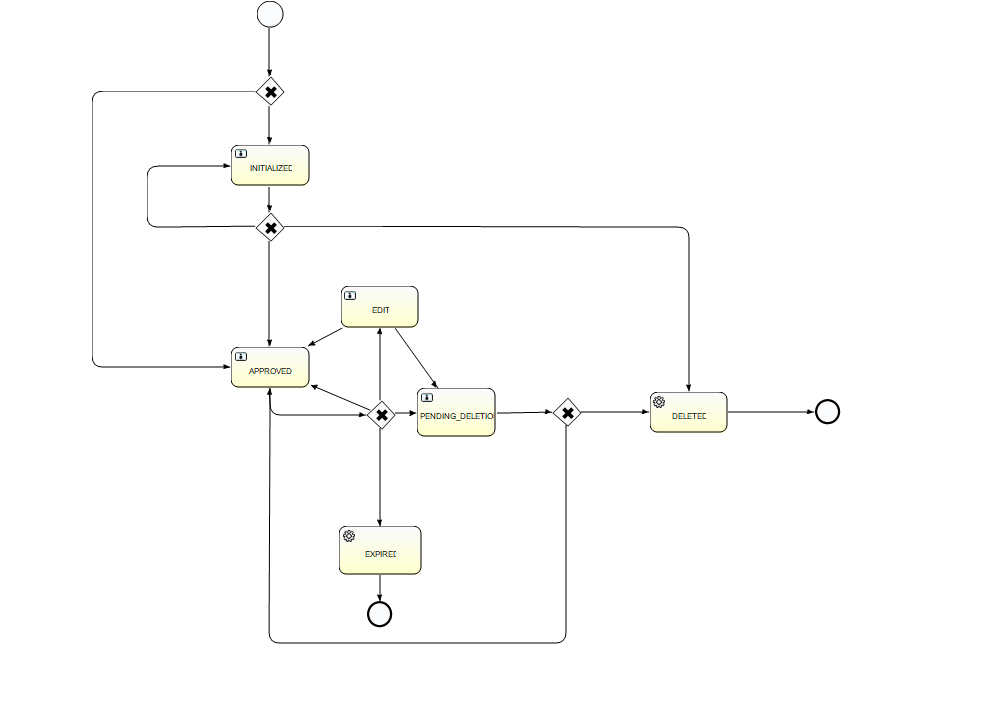
The possible actions in each of the actionable states are:

<table><thead><tr><th>Start state</th><th>Action</th><th>End state</th></tr></thead><tbody><tr><td>-</td><td>Create</td><td>Initialized</td></tr><tr><td>Initialized</td><td>Approve</td><td>Approved</td></tr><tr><td>Initialized</td><td>Reject</td><td>Initialized</td></tr><tr><td>Approved</td><td>Edit</td><td>Edit</td></tr><tr><td>Approved</td><td>Delete</td><td>Pending Deletion</td></tr><tr><td>Approved</td><td>Expire</td><td>Expired</td></tr><tr><td>Edit</td><td>Approve</td><td>Approved</td></tr><tr><td>Edit</td><td>Delete</td><td>Pending Deletion</td></tr><tr><td>Edit</td><td>Expire</td><td>Expired</td></tr><tr><td>Edit</td><td>Reject</td><td>Edit</td></tr><tr><td>Pending Deletion</td><td>Approve</td><td>Deleted</td></tr><tr><td>Pending Deletion</td><td>Reject</td><td>Approved</td></tr><tr><td>Deleted</td><td>System</td><td>End</td></tr><tr><td>Expired</td><td>System</td><td>End</td></tr></tbody></table>

## limit-process-straight-through.bpmn

This workflow doesn’t require an approval. The limit is created in approved state.

<Note>
  See [Section:limit](../../../user-ref/properties/property-files/application-yml#section-limit) in the application.yml configuration file on configuring the workflow. The workflow names must match the process ID in the bpmn:

  **application.yml**:

  ```
  limits:
    limitWorkflows:
      StraightThrough:
        key: limit-process-instance.straight-through
  ```

  **limit-process-straight-through.bpmn**:

  ```
  <process id="limit-process-instance.straight-through ...>"
  ```
</Note>

## limit-process-exception.bpmn

This workflow handles breaches and warnings.

<Note>
  See [Section: Limit Workflow](../../../user-ref/properties/property-files/application-yml#section-limit-workflow) in the application.yml configuration file on configuring the workflow. The workflow names must match the process ID in the bpmn:

  **application.yml**:

  ```
  limits:
    exceptionWorkflows:
      Exception:
        key: limit-process-instance.exception
  ```

  **limit-process-exception.bpmn**:

  ```
  <process id="limit-process-instance.exception ...>"
  ```
</Note>

All serviceTasks need to have the associated Bean defined in the java file:
Location: limits-activeviam/src/main/java/com/activeviam/limits/workflow/instance
File name: LimitsProcessInstanceWorkflowService.java

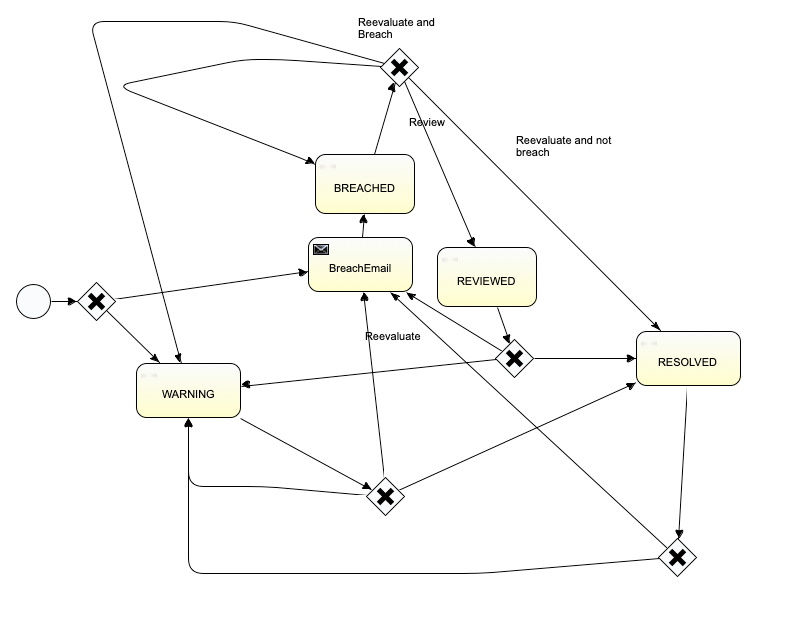
The following diagram represents the various possible states and actions in the Exception workflow:

<Frame>
  <img src="https://mintcdn.com/activeviam/iy5FyCKdXjhHAnDS/atoti-intelligence/workflows/limits/6.1/images/exception-workflow.png?fit=max&auto=format&n=iy5FyCKdXjhHAnDS&q=85&s=7862ce66392608881e78dce12a773e0c" alt="Exception Workflow Diagram" width="803" height="629" data-path="atoti-intelligence/workflows/limits/6.1/images/exception-workflow.png" />
</Frame>

<table><thead><tr><th>Start state</th><th>Action</th><th>End state</th></tr></thead><tbody><tr><td>None</td><td>System Eval</td><td>Warning<br />Breached Email</td></tr><tr><td>Breached Email</td><td>System Eval</td><td>Breached</td></tr><tr><td>Breached</td><td>User Review</td><td>Reviewed</td></tr><tr><td>Breached</td><td>System Eval</td><td>Breached<br />Resolved<br />Warning</td></tr><tr><td>Reviewed</td><td>System Eval</td><td>Breached Email<br />Warning<br />Resolved</td></tr><tr><td>Resolved</td><td>System Eval</td><td>Warning<br />Breached Email<br />Resolved</td></tr><tr><td>Warning</td><td>System Eval</td><td>Breached Email<br />Warning<br />Resolved</td></tr></tbody></table>

## incident-review-process.bpmn

This workflow handles breaches and warnings.

<Note>
  See [Section: Limit Workflow](../../../user-ref/properties/property-files/application-yml#section-limit-workflow) in the application.yml configuration file on configuring the workflow. The workflow
  names must match the process ID in the bpmn:

  **application.yml**:

  ```
  activeviam:
    apps:
      workflow-service:
        workflows:
          - process-id: incident-review-process
  ```

  **limit-process-exception.bpmn**:

  ```
  <process id="incident-review-process" ...>"
  ```
</Note>

The user tasks are defined via configuration properties. You can customize the user tasks by overriding the
`activeviam.apps.workflow-service.workflows.actions.*` properties for the workflow with
`process-id: incident-review-process`. The default configuration is:

<Accordion title="Default actions for incident-review-process.bpmn">
  ```yaml theme={"languages":{"custom":["/engine/python-sdk/0.9/languages/pycon.tmLanguage.json"]}}
  actions:
    - task-name: User reviews incident
      name: Review breach
      action-input-fields:
        - label: Is the incident valid?
          task-variable: incidentIsValid
          input-type: CHECKBOX
          required: true
        - label: Classification
          task-variable: classification
          input-type: SELECT
          options:
            - Unclassified
            - Technical Issue
            - True Breach
            - New Trade
            - Late Trade
            - Market Moved
          required: true
        - label: Resolution
          task-variable: resolution
          input-type: SELECT
          options:
            - No action
            - Hedge exposure
            - Reduce position
            - Keep position
            - Keep, request increase
          default-value: No action
          required: true
        - label: Comment
          task-variable: comment
          input-type: TEXT
          required: false
        - label: Attachments
          task-variable: attachments
          input-type: ATTACHMENTS
          required: false
        - label: Attachment link
          task-variable: attachmentLink
          input-type: LINK
          required: false
    - task-name: User reviews incident
      name: Review warning
      action-input-fields:
        - label: Comment
          task-variable: comment
          input-type: TEXT
          required: false
        - label: Attachments
          task-variable: attachments
          input-type: ATTACHMENTS
          required: false
        - label: Attachment link
          task-variable: attachmentLink
          input-type: LINK
          required: false
  ```
</Accordion>

The service tasks are defined via Spring beans. You can customize the service tasks by defining your own bean with
type `org.activiti.api.process.runtime.connector.Connector` and name matching the `implementation` property of the
service task in the BPMN file. The default service task beans are defined in `IncidentReviewConfig.java`:

<Accordion title="Default service tasks for incident-review-process.bpmn">
  ```java theme={"languages":{"custom":["/engine/python-sdk/0.9/languages/pycon.tmLanguage.json"]}}
  @Bean
  @ConditionalOnMissingBean(name = "notifyUsersOfNewIncident")
  public Connector notifyUsersOfNewIncident() {
    return integrationContext -> {
      log.info("A new incident has been created, notifying relevant users.");
      notificationService.publishNotification(
              Notification.notificationWithDefaultActionsBuilder()
                      .title("New Incident Created")
                      .description("A new incident has been created and requires your review.")
                      .severity(MEDIUM)
                      .classifiers(List.of("incident"))
                      .userRoles(List.of("ROLE_MANAGERS"))
                      .sourceId(integrationContext.getInBoundVariable(OBJECT_ID_VARIABLE_NAME))
                      .build());
      return integrationContext;
    };
  }

  @Bean
  @ConditionalOnMissingBean(name = "notifyUsersOfIncidentResolution")
  public Connector notifyUsersOfIncidentResolution() {
    return integrationContext -> {
      log.info("An incident has been resolved, notifying relevant users.");
      integrationContext.addOutBoundVariable(STATUS_VARIABLE_NAME, REVIEWED.toString());
      List<Notification> notifications =
              notificationService.getNotificationsBySourceId(
                      integrationContext.getInBoundVariable(OBJECT_ID_VARIABLE_NAME));
      notifications.forEach(
              notification ->
                      notificationService.updateNotificationStatus(
                              notification.getId(), "The incident has been reviewed.", OBSOLETE));
      return integrationContext;
    };
  }
  ```
</Accordion>

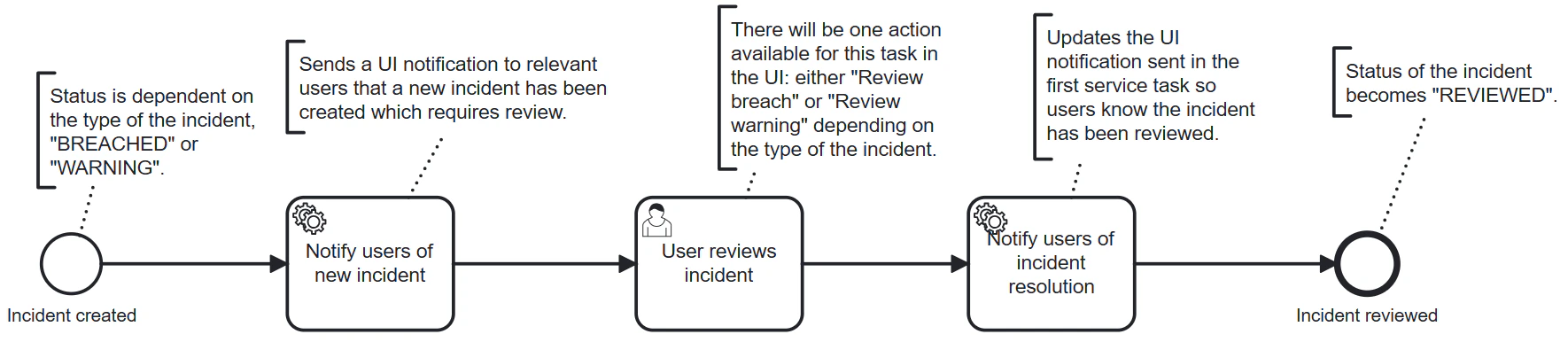
The following diagram represents the various possible states and actions in the Incident Review Process workflow:

<Frame>
  <img src="https://mintcdn.com/activeviam/iy5FyCKdXjhHAnDS/atoti-intelligence/workflows/limits/6.1/images/incident-review-process-bpmn.png?fit=max&auto=format&n=iy5FyCKdXjhHAnDS&q=85&s=5da6ce6b8eccdecba2d3f80a44f53c25" alt="Exception Workflow Diagram" width="1770" height="386" data-path="atoti-intelligence/workflows/limits/6.1/images/incident-review-process-bpmn.png" />
</Frame>

## Configure breach email notifications

When a limit is breached, Atoti Limits notifies the specified users by email. Here’s how to configure the email:

In the limit-process-exception.bpmn, you can find the following BreachEmail section and configure the “to”, “from”, and “subject” fields, and the email body.

<Note>
  By default this implementation will not send emails. See [Extending the Mail provider](#extending-the-mail-provider) section below.
</Note>

```xml theme={"languages":{"custom":["/engine/python-sdk/0.9/languages/pycon.tmLanguage.json"]}}
 <serviceTask id="mailtask1" name="BreachEmail" activiti:class="com.activeviam.limits.workflow.service.instance.activity.impl.TestMailActivityBehavior">
      <extensionElements>
        <activiti:field name="to">
          <activiti:string><![CDATA[bas.email.demo.test@gmail.com]]></activiti:string>
        </activiti:field>
        <activiti:field name="from">
          <activiti:string><![CDATA[breach@activeviam.com]]></activiti:string>
        </activiti:field>
        <activiti:field name="subject">
          <activiti:expression><![CDATA[Breach Notification - ${limitsName}]]></activiti:expression>
        </activiti:field>
        <activiti:field name="html">
          <activiti:expression><![CDATA[<html>
<head>
<style>
h3 {text-align: center;background-color:DodgerBlue;color:FloralWhite}
</style>
</head>
<body>

<h3>Breach Notification</h3>
<p>Dear Limit Controller, </p>

<p>Limit, ${limitsName}, with limit value, ${limitsValue}, is breached. Please investigate below:
<a href=${url}>Limits Inventory</a>
</p>

<p>
Thank you.
</p>

</body>
</html>]]></activiti:expression>
        </activiti:field>
      </extensionElements>
    </serviceTask>
```

<Note>
  Breach emails use out-of-the-box functionality from Activiti, which causes a performance decrease in the workflow. To avoid this, disable the breach email by removing the “BreachEmail” element from the bpmn file.
  Make sure that the paths to the “Breach Email” go to the “BREACHED” node after the change.
</Note>

### Extend the mail provider

If you’d like to use the default Activiti mail provider, replace the `activiti:class="package.to.CustomClass"` in the `<serviceTask>` description
with `activiti:type="mail"`

Note in the service task description the element `activiti:class="com.activeviam.limits.workflow.service.instance.activity.impl.TestMailActivityBehavior"`. This is a way of providing a custom Java delegator to override the default `MailActivityBehavior`.

This is an Activiti feature that can be used to provide extra functionality to your project. For example, to avoid sending emails in a test environment, you can do the following:

```java theme={"languages":{"custom":["/engine/python-sdk/0.9/languages/pycon.tmLanguage.json"]}}
public class TestMailActivityBehavior extends MailActivityBehavior {

    protected static final Logger LOGGER = LoggerFactory.getLogger(TestMailActivityBehavior.class.getSimpleName());

    @Override
    public void execute(DelegateExecution execution) {
        LOGGER.info("Sending test email for execution: " + execution);
        leave(execution);
    }
}
```

## Upload a limit already in a workflow state

When uploading limits in bulk, some limits may already be present in the module and in progress in one of the workflows. Here’s how the state of the affected limit changes when this happens:

##### FourEyes Workflow:

* “Pending Approval” becomes “Approved”.
* “Pending Deletion” becomes “Deleted”.

##### Straight-through:

A limit in the “Approved” state stays “Approved”.