> ## Documentation Index
> Fetch the complete documentation index at: https://docs.activeviam.com/llms.txt
> Use this file to discover all available pages before exploring further.
# Incident review process
> Reference for the Incident Review Process workflow in Atoti Limits, covering the workflow diagram, user tasks and input fields for reviewing breaches and warnings, and pre- and post-review service tasks
This section describes the default Incident Review Process workflow for managing incidents in
Atoti Limits.
## What does the incident review process look like?
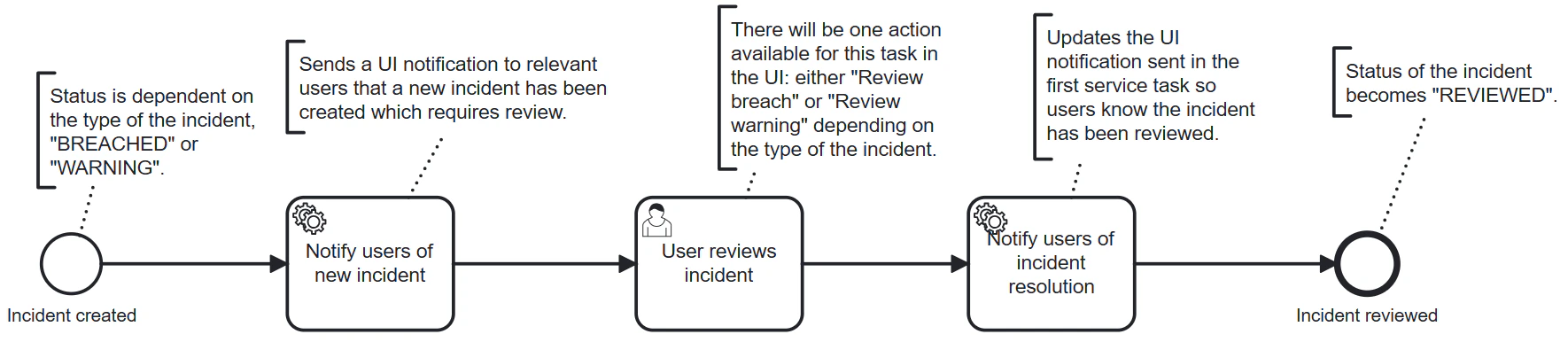 Key features of this workflow include:
* Manages the lifecycle of incident breaches and warnings.
* Allows incidents to be reviewed by users to classify them and determine the appropriate resolution.
* Notifies relevant users when a new incident is created and update those notifications when
the incident has been reviewed.
## What user tasks are included in the incident-review-process.bpmn workflow?
```yaml theme={"languages":{"custom":["/engine/python-sdk/0.9/languages/pycon.tmLanguage.json"]}}
actions:
- task-name: User reviews incident
name: Review breach
action-input-fields:
- label: Classification
task-variable: classification
input-type: SELECT
options:
- Unclassified
- Technical Issue
- True Breach
- New Trade
- Late Trade
- Market Moved
required: true
- label: Resolution
task-variable: resolution
input-type: SELECT
options:
- No action
- Hedge exposure
- Reduce position
- Keep position
- Keep, request increase
default-value: No action
required: true
- label: Comment
task-variable: comment
input-type: TEXT
required: false
- label: Attachments
task-variable: attachments
input-type: ATTACHMENTS
required: false
- label: Attachment link
task-variable: attachmentLink
input-type: LINK
required: false
- task-name: User reviews incident
name: Review warning
action-input-fields:
- label: Comment
task-variable: comment
input-type: TEXT
required: false
- label: Attachments
task-variable: attachments
input-type: ATTACHMENTS
required: false
- label: Attachment link
task-variable: attachmentLink
input-type: LINK
required: false
```
The workflow includes a single user task, `User reviews incident`, which includes two possible
actions: `Review breach` and `Review warning`. Only one of these actions will be enabled and visible
to the user per incident depending on whether the incident is a breach or a warning.
### What input fields are included in the actions for the `User reviews incident` task?
The `Review breach` action includes the following input fields:
* **Classification** â A dropdown selection field for classifying the incident. Options:
`Unclassified`, `Technical Issue`, `True Breach`, `New Trade`, `Late Trade`, `Market Moved`.
* **Resolution** â A dropdown selection field for selecting the resolution action. Options:
`No action`, `Hedge exposure`, `Reduce position`, `Keep position`, `Keep, request increase`.
* **Comment** â A text input field for adding additional information about the incident.
* **Attachments** â A file upload field for adding attachments related to the incident.
* **Attachment link** â A field for adding a link to an external attachment or resource.
The `Review warning` action includes the following input fields:
* **Comment** â A text input field for adding information about the warning.
* **Attachments** â A file upload field for adding attachments related to the warning.
* **Attachment link** â A field for adding a link to an external attachment or resource.
## What service tasks are included in the incident-review-process.bpmn workflow?
The workflow includes two service tasks, one that is executed when a new incident is created prior
to the user review, and another that is executed after the user has reviewed the incident.
### Pre-review service task
```java theme={"languages":{"custom":["/engine/python-sdk/0.9/languages/pycon.tmLanguage.json"]}}
@Bean
@ConditionalOnMissingBean(name = "notifyUsersOfNewIncident")
public Connector notifyUsersOfNewIncident() {
return integrationContext -> {
log.info("A new incident has been created, notifying relevant users.");
// code executed when a new incident is created
return integrationContext;
};
}
```
**When is this service task executed?**
When a new incident is created.
**What does this service task do?**
Sends a notification to relevant users to inform them that a new incident has been created and
requires their review.
### Post-review service task
```java theme={"languages":{"custom":["/engine/python-sdk/0.9/languages/pycon.tmLanguage.json"]}}
@Bean
@ConditionalOnMissingBean(name = "notifyUsersOfIncidentResolution")
public Connector notifyUsersOfIncidentResolution() {
return integrationContext -> {
// code executed after the incident has been reviewed
return integrationContext;
};
}
```
**When is this service task executed?**
After the incident has been reviewed.
**What does this service task do?**
Updates the notification status to indicate that the incident has been reviewed. It also updates the
workflow status to `Reviewed`, which will be reflected in the incident status.
Key features of this workflow include:
* Manages the lifecycle of incident breaches and warnings.
* Allows incidents to be reviewed by users to classify them and determine the appropriate resolution.
* Notifies relevant users when a new incident is created and update those notifications when
the incident has been reviewed.
## What user tasks are included in the incident-review-process.bpmn workflow?
```yaml theme={"languages":{"custom":["/engine/python-sdk/0.9/languages/pycon.tmLanguage.json"]}}
actions:
- task-name: User reviews incident
name: Review breach
action-input-fields:
- label: Classification
task-variable: classification
input-type: SELECT
options:
- Unclassified
- Technical Issue
- True Breach
- New Trade
- Late Trade
- Market Moved
required: true
- label: Resolution
task-variable: resolution
input-type: SELECT
options:
- No action
- Hedge exposure
- Reduce position
- Keep position
- Keep, request increase
default-value: No action
required: true
- label: Comment
task-variable: comment
input-type: TEXT
required: false
- label: Attachments
task-variable: attachments
input-type: ATTACHMENTS
required: false
- label: Attachment link
task-variable: attachmentLink
input-type: LINK
required: false
- task-name: User reviews incident
name: Review warning
action-input-fields:
- label: Comment
task-variable: comment
input-type: TEXT
required: false
- label: Attachments
task-variable: attachments
input-type: ATTACHMENTS
required: false
- label: Attachment link
task-variable: attachmentLink
input-type: LINK
required: false
```
The workflow includes a single user task, `User reviews incident`, which includes two possible
actions: `Review breach` and `Review warning`. Only one of these actions will be enabled and visible
to the user per incident depending on whether the incident is a breach or a warning.
### What input fields are included in the actions for the `User reviews incident` task?
The `Review breach` action includes the following input fields:
* **Classification** â A dropdown selection field for classifying the incident. Options:
`Unclassified`, `Technical Issue`, `True Breach`, `New Trade`, `Late Trade`, `Market Moved`.
* **Resolution** â A dropdown selection field for selecting the resolution action. Options:
`No action`, `Hedge exposure`, `Reduce position`, `Keep position`, `Keep, request increase`.
* **Comment** â A text input field for adding additional information about the incident.
* **Attachments** â A file upload field for adding attachments related to the incident.
* **Attachment link** â A field for adding a link to an external attachment or resource.
The `Review warning` action includes the following input fields:
* **Comment** â A text input field for adding information about the warning.
* **Attachments** â A file upload field for adding attachments related to the warning.
* **Attachment link** â A field for adding a link to an external attachment or resource.
## What service tasks are included in the incident-review-process.bpmn workflow?
The workflow includes two service tasks, one that is executed when a new incident is created prior
to the user review, and another that is executed after the user has reviewed the incident.
### Pre-review service task
```java theme={"languages":{"custom":["/engine/python-sdk/0.9/languages/pycon.tmLanguage.json"]}}
@Bean
@ConditionalOnMissingBean(name = "notifyUsersOfNewIncident")
public Connector notifyUsersOfNewIncident() {
return integrationContext -> {
log.info("A new incident has been created, notifying relevant users.");
// code executed when a new incident is created
return integrationContext;
};
}
```
**When is this service task executed?**
When a new incident is created.
**What does this service task do?**
Sends a notification to relevant users to inform them that a new incident has been created and
requires their review.
### Post-review service task
```java theme={"languages":{"custom":["/engine/python-sdk/0.9/languages/pycon.tmLanguage.json"]}}
@Bean
@ConditionalOnMissingBean(name = "notifyUsersOfIncidentResolution")
public Connector notifyUsersOfIncidentResolution() {
return integrationContext -> {
// code executed after the incident has been reviewed
return integrationContext;
};
}
```
**When is this service task executed?**
After the incident has been reviewed.
**What does this service task do?**
Updates the notification status to indicate that the incident has been reviewed. It also updates the
workflow status to `Reviewed`, which will be reflected in the incident status.