> ## Documentation Index
> Fetch the complete documentation index at: https://docs.activeviam.com/llms.txt
> Use this file to discover all available pages before exploring further.
# Override default managed objects
> How to override the default JPA entity classes in Atoti Limits to customize column lengths, add fields, change attribute converters, or add Hibernate filters, using the same class and package names as the defaults
# Overview
Atoti Limits provides [several objects out-of-the-box](../../persistence/configuring-persistence#managed-objects)
that are managed by the default `EntityManager`. Each of these objects is defined as a JPA entity using the `@Entity`
and `@Table` annotations. The default entity classes are:
In some scenarios you may want to override the default managed objects, for example:
* to change the length of a database [column](https://jakarta.ee/specifications/persistence/3.2/apidocs/jakarta.persistence/jakarta/persistence/column)
* to add new fields
* to change a field’s [attribute converter](https://jakarta.ee/specifications/persistence/2.2/apidocs/javax/persistence/attributeconverter)
* to mark a field as nullable/not nullable
* to add an [attribute override](https://jakarta.ee/specifications/persistence/3.2/apidocs/jakarta.persistence/jakarta/persistence/attributeoverride)
* to add dynamic [filters](https://thorben-janssen.com/hibernate-filter/) to entities at runtime
To customize these entities, you’ll need to override the default entity classes. The following steps outline how to
correctly configure your custom entity classes:
## 1. Copy the existing entity class to your project with the same class and package names
It is critical that the class and package names remain the same so that the `EntityManager` recognizes your custom
entity class as an override of the default entity class and doesn’t treat it as a new entity. For example, to customize
the `LimitEntity` class, you need to create a `LimitEntity.java` file at the following path in your project:
```
.//com/activeviam/limits/model/jpa/LimitEntity.java
```
Where `` is the path from the root of your project to the directory containing your `.java` files, typically `src/main/java`.
## 2. Modify the entity class as needed
Removing or renaming existing fields may break Atoti Limits.
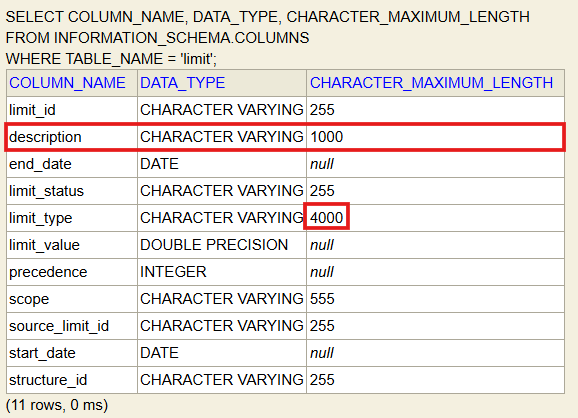
You can now modify the entity class as needed. The following example increases the length of the `limit_type` field from
the default of 255 characters to 4000 and adds a new `description` field with a length of 1000 characters, all other
fields and methods remain unchanged:
```java theme={"languages":{"custom":["/engine/python-sdk/0.9/languages/pycon.tmLanguage.json"]}}
@Entity
@Table(name = TABLE_LIMIT)
@Getter
@Setter
@EqualsAndHashCode
public class LimitEntity implements ILimitsApplicationEntity, ILimit {
@Id
@Column(name = COL_LIMIT_ID)
protected String limitId;
@Column(name = COL_LIMIT_STRUCT_ID)
protected String structureId;
@Column(name = COL_START_DATE)
protected LocalDate startDate;
@Column(name = COL_END_DATE)
protected LocalDate endDate;
@Column(name = COL_LIMIT_TYPE, length = 4000) // Increased length from default (255) to 4000
protected String limitType;
@Column(name = COL_SCOPE, length = 555)
protected String scope;
@Column(name = COL_LIMIT_STATUS)
protected String limitStatus;
@Column(name = COL_SOURCE_LIMIT_ID)
protected String sourceLimitId;
@Column(name = COL_LIMIT_VALUE)
protected double limitValue;
@Column(name = COL_PRECEDENCE)
protected int precedence;
@Column(name = "description", length = 1000) // New field added
protected String description;
@Override
public String getId() {
return limitId;
}
@Override
public boolean isNew() {
return limitId == null;
}
public Limit toLimit() {
Limit limit =
Limit.builder()
.limitId(limitId)
.structureId(structureId)
.startDate(startDate)
.endDate(endDate)
.limitType(LimitType.valueOf(limitType))
.scope(Scope.fromScopeString(scope))
.limitStatus(limitStatus)
.draftLimit(null)
.draftLimitStatus(limitStatus)
.sourceLimitId(sourceLimitId)
.limitValue(limitValue)
.precedence(precedence)
.build();
if (List.of(EXPIRED.toString(), DELETED.toString()).contains(limitStatus)) {
limit.setAlive(false);
}
return limit;
}
public static LimitEntity fromLimit(Limit limit) {
LimitEntity limitEntity = new LimitEntity();
limitEntity.setLimitId(limit.getLimitId());
limitEntity.setLimitType(limit.getLimitType().toString());
limitEntity.setStructureId(limit.getStructureId());
limitEntity.setStartDate(limit.getStartDate());
limitEntity.setEndDate(limit.getEndDate());
limitEntity.setScope(limit.getScope().toScopeString());
limitEntity.setLimitStatus(limit.getLimitStatus());
limitEntity.setSourceLimitId(limit.getSourceLimitId());
limitEntity.setLimitValue(limit.getLimitValue());
limitEntity.setPrecedence(limit.getPrecedence());
return limitEntity;
}
@Override
public void setID(String id) {
setLimitId(id);
}
}
```
If you have an existing database and you modify the physical structure of the data in your schema, you may need to
[migrate the schema](../../persistence/limits-database-migration) in order for your changes to take effect.
The next time you start Atoti Limits, it will use your custom entity class for the `Limit` managed object. You
can verify the change is applied by checking the schema for the `limits` table in your database to verify that the
`limit_type` column has a length of 4000 and that the new `description` column exists: