> ## Documentation Index
> Fetch the complete documentation index at: https://docs.activeviam.com/llms.txt
> Use this file to discover all available pages before exploring further.
# Set up a custom disclaimer in Java
> How to customize the Atoti Intelligence AI disclaimer in an Atoti Java project through the `atoti.ai.disclaimer` application property, and the default disclaimer shown when none is defined.
### Atoti Intelligence Essentials
This is part of the Atoti Intelligence Essentials offer.
This guide explains how to configure an AI disclaimer for use with Atoti Intelligence in an Atoti Java project.
## Why configure an AI disclaimer?
LLMs can make mistakes. Depending on an organization's compliance requirements, an AI disclaimer may be necessary to inform users when an LLM is involved in a response.
## Configuration approach
Set the disclaimer in the application configuration file.
Add the following to `application.yaml`:
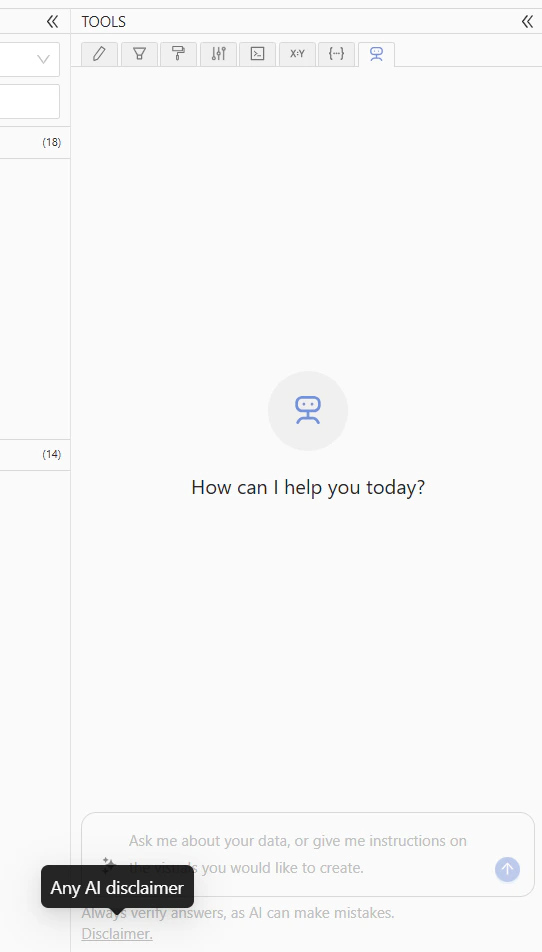
Any disclaimer set will be displayed in the UI. If none is defined, the disclaimer defaults to:
This is what the disclaimer will look like in the UI:
 ## Related reading
* [Set up an LLM](../configure-and-start/set-up-an-llm)
* [Set up a custom disclaimer in Python](./setup-python)
## Related reading
* [Set up an LLM](../configure-and-start/set-up-an-llm)
* [Set up a custom disclaimer in Python](./setup-python)